1
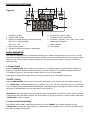
(8) SET CLOCK TIME
The clock time can be set only after the radio is turned off. Press “SN/TIME” key, the minute numbers (8)
Figure III starts jumping, then press “DOWN” or “UP” to adjust the minute numbers. Press “SN/TIME” key
again to set the hour numbers analogously, the clock time will be memorized automatically 3 seconds later.
If you want to know what time it is while listening to the radio, just press “SN/TIME” key, the clock time will
show at the position (3) Figure III on LCD display, and shift to show signal-strength information automatically 3
seconds later.
MP3 OPERATION
1. Insert a USB disk into the USB port.
2. Press “RADIO/MP3” key to select MP3 playing if the radio is on Radio mode, now the song number of
“000” will show on LCD play.
3. Press “MEM” key to start playing, press it again to pause.
4. Press “M+” or “M-” key to skip to the next or previous song.
5. Press “M-SCAN” key to stop playing.
Attention:
If unit don´t play the songs on USB-stick, than it is a reason that batteries are low. Please replace the batteries
with new one. (We suggest to use Alkaline-batteries)
SPECIFICATIONS
Mains:
Batteries:
Frequency coverage:
AC 230V~50Hz
4x UM-2 / C 1.5V batteries
FM: 87.5-108MHz
AM: 522-1620KHz
Copyrights by Woerlein GmbH, D-90556 Cadolzburg, Germany
Technical changes without any further announcement