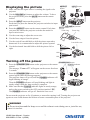
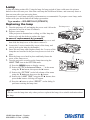
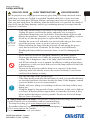
1
Remote control (continued)
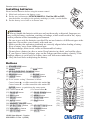
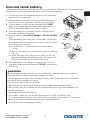
Installing batteries
Please load the batteries before using the remote control.
1. Slide back and remove the battery cover.
2. Put the two AA batteries (HITACHI MAXELL, Part No.LR6 or R6P)
into the holder, according to the polarity markings (+) and (-) on the holder.
3. Put the battery cover back to its former state.
WARNING
►Always handle the batteries with care and use them only as directed. Improper use
may result in battery explosion, cracking or leakage, which could result in fire, injury
and/or pollution of the surrounding environment.
• Be sure to use only the batteries specified. Do not use batteries of different types at the
same time. Do not mix a new battery with used one.
• Make sure the plus and minus terminals are correctly aligned when loading a battery.
• Keep a battery away from children and pets.
• Do not recharge, short circuit, solder or disassemble a battery.
• Do not place a battery in a fire or water. Keep batteries in a dark, cool and dry place.
• If you observe battery leakage, wipe out the leakage and then replace a battery. If the
leakage adheres to your body or clothes, rinse well with water immediately.
• Obey the local laws on disposing the battery.
Buttons
(1) STANDBY/ON button
(2) VIDEO button
(3) RGB button
(4) MY SOURCE/DOC.CAMERA button
(5) SEARCH button
(6) BLANK button
(7) LASER button
(8) ASPECT button
(9) Lever switch : acting 3 functions as below.
Cursor button ▲ : to slide toward the side marked ▲.
Cursor button ▼ : to slide toward the side marked ▼.
ENTER button : to push down the center point.
(10) Cursor button ◄
(11) Cursor button ►
(12) PAGE UP button
(13) PAGE DOWN button
(14) ESC button
(15) MENU button
(16) RESET button
(17) POSITION button
(18) AUTO button
(19) PbyP button
(20) MAGNIFY ON
ON/OFF
OFF button
(21) MY BUTTON 1 button (22) MY BUTTON 2 button
(23) VOLUME +/(24) FREEZE button
+ - button
(25) KEYSTONE button
(26) MUTE button
LW400 User Manual - Concise
020-000051-01 Rev.1 (05/08)
6
LASER
INDICATOR
(1)
(2)
STANDBY/ON
VIDEO
RGB
MY SOURCE/
DOC.CAMERA
SEARCH
(6)
(8)
(10)
(12)
(14)
(17)
(18)
(20)
(22)
(24)
BLANK
LASER
ASPECT
PUSH ENTER
PAGE DOWN
PAGE UP
ESC
MENU
RESET
POSITION
AUTO
PbyP
MAGNIFY
MY BUTTON
VOLUME
+
ON
1
OFF
2
-
FREEZE
KEYSTONE
MUTE
(3)
(4)
(5)
(7)
(9)
(11)
(13)
(15)
(16)
(19)
(21)
(23)
(25)
(26)