1
Appendix B - Touch Panel Runtime Errors
Introduction
1
B
3
4
5
6
7
8
9
10
11
12
13
14
A
B
C
D
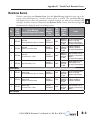
The C-more touch panels have diagnostics built-in to the operating system that monitor
various runtime functions that will display an error message on the panel’s display indicating
that a particular error has occurred and what the error represents. The Error Message(s) is
displayed in the upper left area of the display screen. The Runtime Errors are also logged into
the panel’s Error log under the Information tab in the panel’s System Setup Screens. The
Error Log Code, for example RTE-004, identifies the error on the System Screen - Error tab
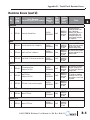
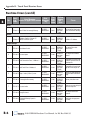
and in the error log. See Chapter 5: System Setup Screens for additional details. The tables
that follow show the possible Runtime Errors.
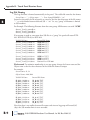
The user can include in their touch panel project the use of this diagnostic information by
using the system tag name SYS ERR ERRORCODE to control displayed screens, operator
messages, etc., and also communicate error information to the PLC or controlling device. If
a runtime error occurs, the SYS ERR ERRORCODE system tag will contain the numeric
value shown under the Tag Code Error Value. For example, For example, if the panel project
is configured to log to USB and no USB flash drive is installed in the panel, the panel will
display “RTE-004 Log buffer memory is full” and the SYS ERR ERRORCODE system tag
will contain the value 2004. The value of the last runtime error detected will remain in the
SYS ERR ERRORCODE.
If you have difficulty determining the cause of the error, refer to Chapter 8: Troubleshooting
for additional help or contact our technical support group at 770-844-4200
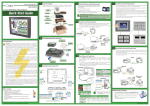
Stride™
Ethernet Switch
10/100 Base-T
(such as SE-SW5U)
C-more
Touch Panel
H0-ECOM/H0-ECOM100
Ethernet Module
Ethernet CAT5
Cable
DL06 PLC
B-2
RTE-004 Log buffer
memory is full
Error Message
®
Auto MDI / MDI-X
Ethernet Port
EA9-USER-M Hardware User Manual, 1st Ed. Rev. B 01/15