1
13
Part Four
Income
Managing Income
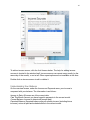
Your income appears in the Income and Payments section, underneath the Month at a
Glance. The income area is circled in the photo below.
To Edit Your Income Sources Click the pencil icon on the Income and Payments
screen. A new window will pop up (pictured on the next page).
To Disable Income Tracking Go to Chronicle’s preferences, and uncheck Enable
Income Management on the General tab.