1
3
Part One
The Chronicle Interface
The Overview Screen
1
2
4
5
3
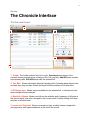
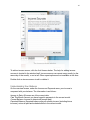
1. Toolbar The toolbar buttons from left to right: Overview button returns to the
overview screen pictured above, showing a list of all your bills. Add Bill button creates
new repeating bills. Edit Bill button edits the selected bill.
2. Your Bills Shows information about all upcoming bills, including when they are due
and how often they are due. Double clicking a bill here switches to bill detail view.
3. Bill Action Area Shows actions available for the selected bill, or total amount due
when multiple bills are selected.
4. Month At a Glance Shows your bills on the calendar, and a summary of bills due in
the current month, due soon, and paid in the current month. Double clicking a bill here
switches to bill detail view.
5. Income and Payments Shows a summary of your monthly income compared to
your payments, and expected balance at the end of the month.