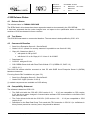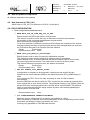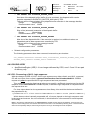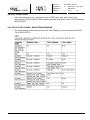
1
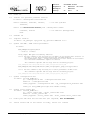
12.
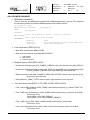
mount CD
13.
install all optional products from CD
in shell: /<mountpoint>/installer.sh
Select Continue, Continue, Install,
Previous,
Dok. Nr./No:
CGS-RIBRE-TN-0001
Ausgabe/Issue:
21
Datum/Date:
Überarbtg./rev:
-
Datum/Date:
Seite/Page:
22
von/of:
09.11.2007
26
-- for CGS optional
Select for Installation Source path /<mountpoint>/addon
Continue, Install
Exit
-- for add-ons (unsupported)
14.
unmount CD
15.
register version
in shell: vit_manager -upd_item cgs_optional VERSION 6.4.0
16.
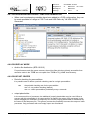
update the MDB / MDB stored procedures
in shell:
$CGS_HOME/patches/patch_mdb.sh
-- needs ca. 5 minutes
verify output: MDB patch successfully installed
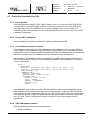
REMARK: The next command is only necessary for an update of the internal data structure of
the MDB (e.g. new data structure delivery for extended databases
(user defined data types)). During initialization all user entries in the flexible
tool invocation and flexible reports are deleted.
This command is optional and the usage shall be decided by projects.
$CGS_HOME/gsaf/mda/config/mdb/install/admin_scripts/initialize_mdb
$CGS_HOME/gsaf/mda/config/mdb/install/admin_scripts/update_plsql_stored_procedures
REMARK: The next command is only necessary for a better performance of MDB access.
This command is optional and the usage shall be decided by projects.
$CGS_HOME/gsaf/mda/config/mdb/install/admin_scripts/gather_mdb_stats
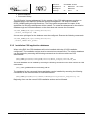
17.
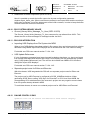
update configuration.xml
in shell: cd $CGS_HOME/etc/
cp ./configuration.xml ./configuration.xml.save
chmod +w ./configuration.xml
config upgrade ./configuration.xml cgs_configuration_defaults.xml
config is $CGS_HOME/gsaf/cgsi/bin/linuxi/config
18.
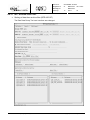
update start_center.xml
in shell: cd $CGS_HOME/etc/
cp ./start_center.xml ./start_center.xml.save
chmod +w ./start_center.xml
config upgrade ./start_center.xml start_center/start_center.xml
19.
build your SAS with the new CGS API (not required, but recommended)
20.
reboot server and if the server is ready, reboot all clients
FORM 0019.1M.0
CGS_6.4.0_SW_Release_Notes.doc
Copyright by Astrium - All Rights Reserved