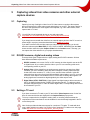
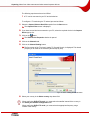
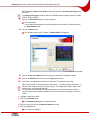
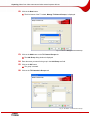
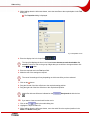
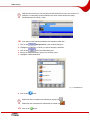
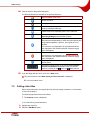
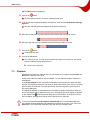
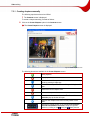
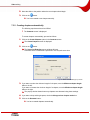
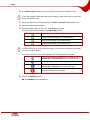
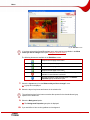
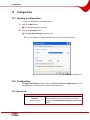
1
Nero Vision Manual Nero AG Copyright and Trademark Information The Nero Vision Manual and all its contents are protected by copyright and are the property of Nero AG. All rights reserved. This manual contains materials which are protected by internationally recognized copyright laws. This manual may not - in whole or in part - be copied, transmitted, or otherwise reproduced without the express written permission of Nero AG. Nero AG rejects any claims that transcend the clauses of the guarantee rights. Nero AG does not accept any liability for the correctness of the content of the Nero Vision manual. The contents of the supplied software, as well as of the Nero Vision manual, may be changed without prior notice. All trade names and trademarks are the property of their respective owners. The trademarks mentioned here are named for information purposes only. Copyright © 2007 Nero AG and its licensors. All rights reserved. REV 7.0 – 4.9.0.18 Contents Contents 1 General information 6 1.1 About the manual 6 1.2 About Nero Vision 6 1.3 Versions of Nero Vision 7 2 Technical information 8 2.1 System requirements 8 2.2 2.2.1 2.2.2 2.2.3 2.2.4 Terminology Video/chapter/movie/project Disc/disc format Encoding/transcoding/recoding/decoding DVD discs 9 9 9 9 10 2.3 2.3.1 2.3.2 2.3.3 2.3.4 2.3.5 2.3.6 2.3.7 2.3.8 Disc formats supported DVD Video DVD-VR/-VFR (video mode)/+VR Video CD (VCD) Super Video CD (SVCD) miniDVD HD-BURN Editable Blu-ray™ disc AVCHD 10 10 10 11 11 11 11 11 12 2.4 Overview of compatibility between disc formats and discs 12 2.5 Overview of compatibility between DVD discs and editable disc formats 13 3 Launching the program 14 3.1 Launching Nero Vision via Nero StartSmart 14 3.2 Launching Nero Vision directly 14 4 User interface 15 4.1 General information 15 4.2 4.2.1 4.2.2 Main screen Buttons Extended dialog box 17 18 19 5 Capturing videos from video cameras and other external capture devices 21 5.1 Capturing 21 5.2 DV/HDV cameras, digital and analog videos 21 Page 3 Contents 5.3 Setting a TV card 21 5.4 Capturing video on the hard drive 25 6 Creating a disc project 30 7 Video editing 34 7.1 Making a movie 34 7.2 Cutting video titles 40 7.3 7.3.1 7.3.2 7.3.3 Chapters Creating chapters manually Creating chapters automatically Editing chapters 41 42 43 44 7.4 Exporting the movie 45 8 Slide show 47 8.1 Creating a slide show 47 9 Menu 54 9.1 Editing the menu 54 9.2 Editing the Smart3D menu 60 10 Showing a preview 63 11 Burning a disc 65 12 Project management 68 12.1 Saving a project 68 12.2 Opening a project 68 12.3 Opening a disc image 68 13 Editable DVDs 70 13.1 DVD-VR/DVD-VFR (video mode)/+VR 70 13.2 Creating an editable DVD with videos 70 13.3 Creating an editable DVD directly via a capture device 71 14 Advanced operations 72 14.1 Erasing a rewritable disc 72 14.2 Displaying disc info 72 14.3 Finalizing a DVD 73 14.4 Creating covers and labels 74 15 Configuration 75 15.1 Opening a configuration 75 15.2 15.2.1 Configuration General tab 75 75 Page 4 Contents 15.2.2 15.2.3 Folders tab Messages tab 76 77 15.3 Displaying video options 77 15.4 15.4.1 15.4.2 15.4.3 Video options General tab <Disc Format> tab Nero Digital™ Encoder Configuration 77 78 78 80 16 List of figures 82 17 Glossary 83 18 Index 88 19 Contact Information 91 Page 5 General information 1 General information 1.1 About the manual This manual is intended for all users who wish to learn how to use Nero Vision. It is processbased and explains how to reach a particular objective on a step-by-basis. To make the best use of this manual, please note the following conventions:: Symbol Meaning Indicates warnings or instructions that have to be followed strictly. Indicates additional information or advice. 1. Start … Æ Indicates an intermediate result. Î Indicates a result. OK Indicates text passages or buttons that appear in the program interface of Nero Vision. They are shown in bold face. Chapter Indicates references to other chapters. They are executed as links and are shown in red and underlined. […] 1.2 A number at the beginning of a line indicates a request for action. Carry out these actions in the order specified. Indicates keyboard shortcuts for entering commands. About Nero Vision Nero Vision software has an extremely user-friendly interface and allows you to record, edit and burn movies and slide shows. You can use Nero Vision to play back your videos on your PC from DV video cameras or other external video devices and to burn them as DVD-Video, DVD-VR/-VFR (video mode)/+VR, Video CD (VCD), Super Video CD (SVCD), miniDVD, BDAV (editable Blu-ray™ disc), AVCHD or HD-BURN or save them in a folder on the hard drive. With the many features offered in this powerful multimedia software, you will have numerous options for creating and collecting your memories. Even users who are new to the world of videos will find it easy to use Nero Vision. With Nero Vision you can … shorten videos quickly and easily and add effects, create chapters using automatic scene cut detection and set chapter marks manually, create your own menus from predefined menu templates with animated buttons, add your own background pictures and texts, use the preview screen with the handy virtual remote control to view your project, ... and much more! Page 6 General information Using your DV video camera, a FireWire® card, and the appropriate hardware, you can import your own videos from your camera. If you have a DirectShow® compatible video capture card, you can use Nero Vision to record videos directly from the video capture card. If you do not have any video hardware at all, you can still work with video files that are on your PC or that you downloaded from the Internet. 1.3 Versions of Nero Vision Nero Vision is available in versions with different functionalities. In addition to the full Nero Vision version there are other versions with restricted functionality. The following functions are not available in Nero Vision Essentials: The number of Smart3D menu templates is limited The following functions are not available in Nero Vision Essentials SE: Make New Movie... Make Blu-ray™ Discs / Make Editable Blu-ray™ Discs Edit Movie Export Movie to File Export Movie to DV Video Camera Record Directly to DVD-VR Record Directly to Blu-ray™ Discs Make Editable DVD (DVD-VR/DVD-VFR (video mode)/+VR) Smart3D Menus To make a disc in DVD-Video, SVCD, miniDVD or HD-BURN disc format, the video source files must be encoded in MPEG-2 video format. The discs can then be played back on compatible DVD players. If the original data is not available in compatible format, you will need the DVD-Video plugin to create it; this is not included in the Nero Vision Essentials or Nero Vision Essentials SE versions. You can obtain it from www.nero.com. Page 7 Technical information 2 Technical information 2.1 System requirements In addition to the general system requirements for the Nero program package, the following individual system requirements apply to Nero Vision: Microsoft® DirectX® 9.0c or later Optional: FireWire® (IEEE 1394) Controller for DV capturing USB capture device (webcam) Analog or digital TV card (analog, DVB-T, DVB-S, DVB-C, and ATSC) to the BDA driver standard DirectShow® compatible video capture card Blu-ray™-capable recorder and Blu-ray™ disc Installation of the latest WHQL-certified device drivers is recommended. WHQL stands for Windows Hardware Quality Labs and means that the device driver certified by Microsoft® is compatible with Microsoft® Windows® and the relevant hardware. To make a disc in DVD-Video, SVCD, miniDVD or HD-BURN disc format, the video source files must be encoded in MPEG-2 video format. The discs can then be played back on compatible DVD players. If the original data is not available in compatible format, you will need the DVD-Video plugin to create it; the DVD-Video plug-in is already included in the full version of Nero Vision. Even if you do not have a recorder capable of burning DVDs or CDs, you can still use the image recorder to burn a disc image and save it for future use.on your hard drive. Once you have connected the appropriate recorder to the system, you can burn disc images on real discs at any time using Nero Vision, Nero Burning ROM or Nero Express. Page 8 Technical information 2.2 Terminology 2.2.1 Video/chapter/movie/project Video denotes a single video file that is stored on the hard drive, such as your vacation video. It makes no difference if you have created the video yourself or imported it. As soon as you open a video file in Nero Vision and work on it, it becomes a video title. Editing includes the creation of transitions, cutting or the generation of a sound track. Chapter denotes a section of a video title, the beginning of which is defined by a chapter mark.The more marks the video title has, the more chapters it contains. The more marks the video title has, the more chapters it contains. Each video title consists of at least one chapter. The advantage of chapters is that you can jump directly to specific chapters when playing the video without having to fast forward or rewind. Movie refers to a complete compilation of one or more video titles which are mostly edited. An example of a movie is an assortment of clips from videos of your last vacation. Project refers to the process from when the videos are opened through to the finished, exported movie. A project can be saved with all changes to a project file and can be opened again at a later date; the project file has the extension *.nvc (Nero Vision Compilation). In summary: the goal of a project is a finished movie which consists of several video titles, each of which is subdivided into chapters. 2.2.2 Disc/disc format Disc is a data medium to which information is saved. CD-R, DVD-R, and DVD+R are examples of write-once discs that are written to by a recorder and read by a player. Discs of the same type with different storage capacities are available, e.g. for DVD-R with 4.38 GB or as DVD-R DL (Dual Layer, with two data layers) with 7.95 GB. Disc format refers to the format in which the data is organized on a disc. For example, the DVD-VR disc format is only supported by the DVD-RW and DVD-RAM discs and can only be used with these. Conversely, the following applies: the disc formats Video CD (VCD), Super Video CD (SVCD), miniDVD, and HD-BURN can be created on the disc types CD-R and CD-RW. The disc format determines the technical options that are available, such as subtitling or multiple sound tracks. 2.2.3 Encoding/transcoding/recoding/decoding Encoding is the generation of a video in a specific video format, e.g. MPEG-2 or Nero Digital™ (MPEG-4). An appropriate encoder is required for each video format. Transcoding is the conversion of an existing video from one video format to another, e.g. from Xvid to MPEG-2. Recoding is the conversion of an existing video with specific properties (e.g. bit rate 2500 kb/s) to the same video format with different properties (e.g. bit rate 1990 kb/s). Decoding is the opening or playing of a video that was encoded in a specific video format. Page 9 Technical information 2.2.4 DVD discs Writable DVD discs are categorized as follows: Data medium DVD Digital Versatile Disc – Identifies an optical data medium. Specification - Refers to discs that conform to the specification of the DVD Forum. + Refers to discs that conform to the specification of the DVD+RW Alliance. Rewritability R Recordable. Refers to write-once discs. RW ReWritable. Refers to rewritable discs. RAM Random Access Memory. Refers to rewritable discs with special data security. Data layers DL Dual Layer (in - discs) and Double Layer (in + discs). Refers to discs with two data layers on each side. A DVD-R DL is therefore a write-once disc with two data layers; it has a capacity of 7.95 GB. 2.3 Disc formats supported Nero Vision supports different disc formats. This section tells you about the advantages and disadvantages of the individual formats. For details on which disc format is available on which discs, refer to Overview of compatibility between disc formats and discs. 2.3.1 DVD Video Using the video codec MPEG-2 to compress video files, a DVD-Video can hold up to 135 minutes of video on a 4.38 GB DVD-R/-RW/+R/+RW in a quality far superior to VHS video or Video CD. You can play the disc on most DVD players which means very high quality storage for all of your home videos. You can also play DVDs on your PC if you have the appropriate software and DVD-ROM drive. A DVD-DL disc doubles the storage capacity of the disc and in turn the space for a DVDVideo. 2.3.2 DVD-VR/-VFR (video mode)/+VR DVD-VR/-VFR (video mode)/+VR are special types of DVD-Video that provide three options which DVD-Video alone cannot provide: Direct recording of videos onto disc in real-time is possible (option: Record Directly to Disc). The data on the disc can later be edited and altered. More video titles can be added if space is still available on the disc. This means that a DVD-VR/DVD-VFR (video mode)/+VR is similar to a video cassette, but of a far superior quality. However, there are differences between the individual disc formats: Page 10 Technical information The DVD-VR is specifically designed for recording directly to disc. Although a graphics menu is not supported, playlists are created instead. Furthermore, the sound track cannot be changed, i.e. it is not possible to edit or add to the existing track. DVD-VR is not compatible with DVD-Video and can only be played on special DVD players. DVD-VFR (video mode) – just like DVD-Video – allows you to create menus but not to create chapter menus or playlists. Once the disc has been finalized, a DVD-VFR is essentially compatible with DVD-Video and can be played in most DVD players. Once the disc has been finalized, the DVD+VFR format is essentially compatible with DVD-Video and can be played in most DVD players. The storage capacity doubles for burning to a DVD+R DL disc as does the space for the DVD+VR. 2.3.3 Video CD (VCD) Using the video codec MPEG-1 to compress video files, a VCD generates a quality roughly similar to VHS video and can hold up to 74 or 80 minutes of full-motion video along with stereo sound on 650 and 700 MB CDs respectively. VCDs can be played on most DVD players and on your PC if you have the appropriate software and a drive that can read CDR/CD-RW discs. 2.3.4 Super Video CD (SVCD) This format uses the video codec MPEG-2 to store video files in a quality roughly similar to S-VHS and can hold around 30 or 40 minutes of full-motion video along with stereo sound on 650 MB and 700 MB CDs respectively. SVCDs can be played on a growing number of DVD players and on the PC if you have the appropriate software and a drive that can read CD-R/RW discs. 2.3.5 miniDVD In principle, a miniDVD is nothing other than a CD-R or CD-RW, upon which a DVD structure has been written in UDF format. It offers the same technical benefits and qualities as a DVD, whether this be the ability to create chapters or menus, support for subtitles or a number of audio tracks (even in real digital multichannel sound). miniDVDs can easily be played by a PC, while reproduction is not guaranteed with all types of DVD players. 2.3.6 HD-BURN The creation of an HD-BURN CD is only supported by specific recorders. In principle, an HDBURN CD is nothing other than a CD-R or CD-RW, for which a special procedure is used to double the storage capacity of a CD and which has a DVD structure written on it in UDF format. It offers the same technical options and qualities as a DVD-Video, i.e. the possibility to create chapters or menus and support for subtitles and multiple sound tracks (including real digital multichannel sound). 2.3.7 Editable Blu-ray™ disc The creation of a Blu-ray™ disc is only supported by specific recorders. Blu-ray™ discs are written with a blue laser. The shorter wave length (405 nm) of this laser makes it possible to adjust the laser beam with greater precision. Data can be packed more tightly and takes up less space on the disc. Page 11 Technical information An editable Blu-ray™ disc (BD-AV) is a special variant of the Blu-ray™ disc that allows you to record videos that are encoded in DV or MPEG-2 format. The data on the disc can be edited, altered or expanded with additional video titles at a later point. 2.3.8 AVCHD AVCHD (Advanced Video Codec High Definition) is a new format for HD recordings on DVD, storage card or hard drive. This high-resolution format is used mainly by new camera models. The video material is compressed with the MPEG-4 AVC/H.264 codec. Audio data is stored in Dolby® Digital (AC3) or, in the case of NTSC and PAL standard formats, in linear PCM format. 2.4 Overview of compatibility between disc formats and discs Disc format Discs supported DVD-R, DVD-R DL DVD-RW DVD-Video DVD-RAM DVD+R, DVD+R DL DVD+RW DVD-VR DVD-RW DVD-RAM DVD-R DVD-VFR (video mode) DVD-RW DVD-RAM DVD+VR DVD+R, DVD+R DL DVD+RW Video CD (VCD) CD-R Super Video CD (SVCD) CD-R miniDVD HD-BURN Editable Blu-ray™ disc CD-RW CD-RW CD-R CD-RW CD-R CD-RW BD-R BD-RE DVD-R, DVD-R DL DVD-RW AVCHD DVD-RAM DVD+R, DVD+R DL DVD+RW Storage card, hard drive Page 12 Technical information To burn a DVD-Video or DVD-VR/DVD-VFR (video mode)/+VR disc, a supported DVD recorder must be connected to the PC. To burn VCD/SVCD/miniDVD/HD-BURN discs, you need to have a supported CD and/or DVD recorder connected to your system. Please visit www.nero.com for the list of currently supported recorders. Even if you do not have a recorder capable of burning DVDs and/or VCDs/SVCDs/miniDVDs/HD-BURNs, you can still burn a disc image and save it for future use on your hard drive. Once you have connected an appropriate recorder to the PC, you can use Nero Vision, Nero Burning ROM or Nero Express at any time to burn disc images on real discs. 2.5 Overview of compatibility between DVD discs and editable disc formats Disc DVD-R Supported disc formats for "editable DVDs" DVD-VFR (video mode) DVD-RW DVD-VR, DVD-VFR (video mode) DVD-RAM DVD-VR, DVD-VFR (video mode) DVD+R DVD+VR DVD+R DL DVD+VR DVD+RW DVD+VR Page 13 Launching the program 3 Launching the program 3.1 Launching Nero Vision via Nero StartSmart To launch Nero Vision via Nero StartSmart, proceed as follows: 1. Click on the Nero StartSmart icon. Æ The Nero StartSmart window is opened. 2. Click on the arrow button in the left margin of the window. Æ The extended dialog box will open. Fig. 1: Nero StartSmart 3. Select the Nero Vision entry from the Applications selection list. Æ The Nero Vision window opens. Î You have launched Nero Vision via Nero StartSmart. 3.2 Launching Nero Vision directly To launch Nero Vision directly, proceed as follows: 1. If you are using the Windows XP Start menu, click Start > Programs > Nero 7 (Premium) > Photo and Video > Nero Vision. If you are using the classic Start menu, click Start > Programs > Nero 7 (Premium) > Photo and Video > Nero Vision. Æ The Nero Vision window opens. Î You have launched Nero Vision. Page 14 User interface 4 User interface 4.1 General information Basically, the user interface consists of the selection of a task from the Start screen.You then complete the task by navigating through the different steps, with a separate window being displayed for each individual step. A project consists essentially of four steps: 1. Picking a task. Select what you would like to do by moving the cursor over the menu item. As you move your cursor over an item, an explanatory text will pop up next to it. Left-click on the item for the task to be started. Fig. 2: Launch screen This manual contains a chapter for each task that describes all of the steps required for its completion. 2. Completing a task. Depending on the task, you will have to go through various steps until you reach the end. Each individual step consists of a new screen. To help you know where you are and what you need to do, each screen comes with a name and a brief description. To move to the next screen or to go back to the previous screen, use the Next or Back buttons on the navigation bar. Page 15 User interface Fig. 3: Contents screen Some screens include a menu. When the cursor is on an option, an explanatory text will pop up underneath. Fig. 4: Content screen – What do you want to do? menu The two buttons Cancel and Refresh are available in screens where you can perform various actions. These let you easily cancel out an action or restore the last actions undone. This lets you try out a large number of Nero Vision features without having to discard the entire project if you are not satisfied. Each screen contains tooltips, detailed information, and explanations for the various buttons, icons, and menus. Hold your cursor for a few seconds over an item to learn more about it. Page 16 User interface 3. Burning. Burning marks the end of a project. For this you should define the burning parameters and click on the Burn button. Depending on the type of project you are working on and the recorder connected to the system, a number of different entries are available for selection. Fig. 5: Burn Options screen 4. Following the burning process. Once you have finished burning you can decide what you would like to do next: launch Nero ShowTime and view your project or create covers and labels for the disc using Nero CoverDesigner. Of course, you can also save the project or start a new one. 4.2 Main screen Only the buttons and controls that are required are displayed on the Nero Vision user interface – depending on which screen you are in. This makes the interface easy to use. When you click on the More button, an additional, extended dialog box is opened (see Extended dialog box). Page 17 User interface 4.2.1 Buttons Help for Nero Vision: opens online help. Enter new serial number: allows you to enter a new serial number. The Welcome to Nero window is opened. Nero Vision on the Web: opens the Nero Vision Web page. Tips: opens the Tips window. You can configure Nero Vision in such a way that useful tips are displayed when you open each screen. Key Definitions: displays assigned key combinations and their functions. The Key Definitions window is opened. Info: displays the version and registration data. The About Nero Vision window is opened. More Displays the extended dialog box. Exports the movie to a file. Export process The Export Movie screen is displayed. In this screen you can specify the export settings and then export the project (see Exporting the movie). The button is only available if you have inserted at least one video in a project. Saves the project with all changes made. The Save As pop-up window will open. Save The project is saved to an administration file with the extension .nvc (NeroVision Compilation). This function is useful for times when you are not able to finish your project and would like to continue at a later time (see Saving a project). This undoes the last action. With Nero Vision you can undo many actions so that you can restore the desired condition even after having made a large number of changes. Restores the last action that you have undone. With Nero Vision you can restore many actions that have been undone so that you can restore the desired condition even after having made a large number of changes. Returns to the previous screen. Go Back Next Burn If necessary, you will be prompted to save the project, as the changes you have made will otherwise be lost. Displays the next screen. Starts the burn process. The button is only displayed in the Burn screen. Page 18 User interface 4.2.2 Extended dialog box Only the buttons and controls that are required are displayed on the Nero Vision user interface – depending on which screen you are in. This makes the interface easy to use. When you click on the More button, an additional extended area is opened. The extended dialog box is closed again in normal mode when you switch to the next screen. In so-called 'sticky mode', the extended dialog box will be displayed until it is closed once more by clicking on the More button again. The icon in the extended dialog box displays its current mode. Click on this icon to change the mode. The extended dialog box is in normal mode. The extended dialog box is in sticky mode. 4.2.2.1 Check boxes Never use black thumbnails Black thumbnails are not used in menus. Instead, the first non-black thumbnail is found and displayed. This function can slow down the application. Create menu on disc Automatically creates a menu. The individual video titles can easily be selected using the menu. Create chapters automatically Creates chapters automatically that can be selected individually later when playing the movie. Snap timeline items to each other Connects the elements in the Timeline tab to one another as with a magnet. Consequently, text, audio, and effects begin at the same time. Use time-code based chapter detection for DV files This automatically identifies individual scenes in DV (Digital Video) files using the time stamp and incorporates them. Enable capture device audio playback Enables playback on the recorder. This setting does not affect playback of captured video files. Detect scenes while capturing (DV) Automatically searches for scene changes when capturing from a DV capture device. ® ® Display Microsoft(R) 'Video Displays Microsoft Video for Windows devices in the list for Windows'(R) devices of recorders. 4.2.2.2 Root menu Move next objects: when inserting an effect moves the next effect to the back. Adding effects to timeline Fit to available space: when inserting a new effect adjusts the effect so that it only takes up the available space up to the beginning of the next effect. Start playback with Menu: displays the menu after the disc has been inserted in the player. <Video title>: plays the selected video title after the disc has been inserted in the player. Page 19 User interface When finished playing a title Play next title: plays the next video title after one video title has been played. Switch to menu: displays the menu after a video title has been played. Loop Title: repeats the video title in an endless loop. 4.2.2.3 Radio buttons Font height calculation mode Automatic: automatically calculates the font height of the button texts so that the full text can be displayed. Custom: deactivates automatic font height calculation. You can define the font height yourself in the Edit Menu screen. 4.2.2.4 Buttons Configure Opens the configuration of Nero Vision (see Configuration). Edits the default options when creating a video. The Default Video Options window is opened (see Displaying video options). Default Video Options As long as you have not selected any kind of disc, the video options for all the supported formats will be shown. After you have selected a disc format, only the General tab and the tab for the current disc format are displayed. The Nero Digital™ Encoder Configuration window appears for Nero Digital™ format. Erase Disc Disc Info Erases rewritable discs. The Erase Rewritable Disc popup window opens (see Erasing a rewritable disc). Before a disc can be erased, the recorder must contain a rewritable disc. The erase method can be set. Displays the information on the disc inserted, such as the disc type, available storage capacity, number of sessions, and tracks. The Disc Info pop-up window will open (see Displaying disc info). Insert the disc that you want to know more about and select the drive where it is located. Finalize Disc Make covers und labels Finalizes DVD-VR/-VFR (video mode)/+VR/+R/+RW discs (see also Finalizing a DVD). The Finalize Disc pop-up window will open. Starts Nero CoverDesigner (see Creating covers and labels). Nero CoverDesigner is an application in the Nero 7 program suite and is automatically installed while Nero 7 is being installed. Using Nero Cover Designer, you can create and print labels and booklets for CDs/DVDs that have been burned. Please see the separate Nero CoverDesigner user manual for full instructions on how to make professional looking covers and labels. Page 20 Capturing videos from video cameras and other external capture devices 5 Capturing videos from video cameras and other external capture devices 5.1 Capturing Capturing is a way of taking the video from a DV video camera or another video capture device connected to the video capture card and placing it on your PC. The capture device is the device that transmits the video signals to be captured, e.g. a DV video camera, video capture card or TV card. You will find a list of supported devices on our web page under: http://www.nero.com/nero7/eng/all_capture_devices.php?ascd=nvision4 If you simply want to transfer the video from an external capture device to the PC to use it at a later stage in a project, proceed as described under Setting a TV card. If you want to create a disc and also capture a video for this special project, you should select the relevant option Make DVD (or VCD, SVCD, miniDVD, HD-BURN) from the Start screen and then select the option Capture Video from the Content screen. That way, you can capture the video and work on your project simultaneously. 5.2 DV/HDV cameras, digital and analog videos There are three types of capture device: digital, analog and DV-/HDV cameras. All three have different hardware requirements. 5.3 DV/HDV cameras: In the case of a DV or HDV camera, the video signal is sent to the PC in digital format. All you need to transfer video to your PC is a connecting cable and a corresponding socket on your PC. Analog Video: Video signals from an analog source need to be converted to a digital format for your PC to be able to work with them. Examples of analog capture devices include VHS video recorders, TV, VHS-C, 8 mm, and Hi-8 video cameras. Unlike DV capture devices where the device itself delivers digital video signals to your PC, you need to have a video capture card installed in the PC in the case of analog video signals. The analog signals are converted into digital signals by the video capture card. Digital Video (ATSC, DVB-T/S/C): Video signals from digital capture devices are sent to the PC in digital format and exist in MPEG-2 format after transfer. TV cards are typical examples of digital devices. In order to transfer digital video, a corresponding device must be connected to your PC. Setting a TV card If you have connected a TV card to your PC and call the Video Capture screen for the first time, all connected devices are displayed in the Capture Device pop-up menu. To set up a capture device for digital or analog video, a recording card that meets the requirements of the manufacturer must be installed or must be already integrated in the PC on the factory side. Nero Vision provides simultaneous support for a number of TV cards, TV cards with dual tuner, and/or hybrid tuner cards. You will find a list of supported TV cards on our web page under:http://www.nero.com/nero7/eng/capture_devices_nh.php. Page 21 Capturing videos from video cameras and other external capture devices The following requirement has to be fulfilled: A TV card is connected to your PC and switched on. To configure a TV card using the TV wizard, proceed as follows: 1. Select the Capture Video to Hard Drive option from the Start screen. Æ The Capture Video screen is displayed. 2. If you have several devices connected to your PC, select the required device in the Capture Device pop-up list. 3. Click on the button. Æ The Video Device Properties window is opened. 4. Click on the Channels tab. 5. Click on the Channel Setting button. Æ The first screen of the TV wizard, Analog TV Channel Search, is displayed. This wizard prompts you to make all the necessary entries step by step. Fig. 6: TV wizard – Analog TV Channel Search 6. Select your country in the Select country drop-down field. When configuring DVB-S TV cards, you must select the satellite instead of the country in the Select your satellite configuration field. When configuring DVB-C TV cards, you must select the appropriate frequency range instead of the country. Page 22 Capturing videos from video cameras and other external capture devices Choose between Antenna and Cable as the signal source in the Select source type dropdown field. The Select source type drop-down field is not available when configuring digital TV cards (DVB-T, DVB-S, DVB-C). 7. Click on the Start Search button to start the search. Æ The search starts. You are kept informed about the search progress and the number of channels found in the Search Status area.. 8. Click on the Next button. Æ The second screen of the TV wizard, TV Channel Edit, is displayed. Fig. 7: TV wizard – TV Channel Edit 9. Click on the Up and/or Down buttons to change the order of the available channels. 10. Click on the Remove button to remove the highlighted channels. 11. If you want to coordinate the channels of a number of TV cards with each other: Nero Vision regards TV channels with the same name – so-called "physical" channels – on different tuner cards as the same "logical" channel. This means that a logical channel can contain one or more physical channels. The channels are automatically coordinated with each other during the channel search. Only the logical channels will be displayed in Nero Vision following configuration in the TV wizard. 1. Highlight a channel you want. 2. Click on the Rename button. Æ The Rename Channel pop-up window will open. 3. Enter the name you want in the Rename Channel text field. 4. Click on the OK button. Æ The channel is renamed. Page 23 Capturing videos from video cameras and other external capture devices 12. Click on the Next button. Æ The third screen of the TV wizard, Manage TV Channel Groups, is displayed. Fig. 8: TV wizard – Manage TV Channel Groups 13. Click on the Add button on the TV Channel Groups tab. Æ The Add Group dialog window is displayed. 14. Enter the name you want for the group in the Add Group text field. 15. Click on the OK button. Æ The group is created. 16. Click on the TV Channels in Groups tab. Fig. 9:: TV wizard – TV Channels in Groups Page 24 Capturing videos from video cameras and other external capture devices 17. Select the group you want to edit in the Modify groups drop-down menu. 18. Highlight the channels you want to assign to this group in the Available Channels area. 19. Click on the >> button. Æ The highlighted channels are shown in the Modify groups/Name area. 20. Click on the Up and/or Down buttons to change the order of the channels within the group. 21. Click on the Finish button. Æ The TV wizard is closed and the Video Capture screen is displayed. Î You have configured the TV card. 5.4 Capturing video on the hard drive The following requirements have to be fulfilled: No applications are running that place a high demand on the processor. There are no applications running in full-screen mode. The workstation is not blocked during the entire capture process. There is sufficient space on your hard drive. To capture a video on the hard drive, proceed as follows: 1. Connect the digital or analog capture device to the PC using the corresponding cables and switch it on. To set up a capture device for digital or analog video, a recording card that meets the requirements of the manufacturer must be installed or must be already integrated in the PC on the factory side. 2. Select the Capture Video to Hard Drive option from the Start screen. Æ The Capture Video screen is displayed. Page 25 Capturing videos from video cameras and other external capture devices Fig. 10: Capture Video screen The following buttons are available in the Video Capture screen: Starts playback. Stops playback. Starts capture. Rewinds the video. Fast forwards the video. Switches to full-screen mode. You can return to window mode by pressing the Esc key. Sets the capture timer which allows you to define the start time, end time, and capture time for capturing a video. Switches to the next channel. Switches to the previous channel. Displays the played position in the format hours:minutes:seconds.hundredths of a second. Jumps to a specific position by (next) and (back) buttons. clicking on the 3. Select the capture device in the Capture Device pop-up menu. The capture device may be in camera mode or in VCR mode. In camera mode, the video signals are continuously transferred from the capture device to the PC, and you can view the current video signal in the preview dialog box. In the case of a DV video camera, everything in the picture area frame of the video camera is displayed in the preview dialog box. A TV card is always in camera mode as there is a constant video signal coming in and Page 26 Capturing videos from video cameras and other external capture devices there is no way of pausing, rewinding/fast forwarding or restarting the video signal. In VCR mode, the video already exists on tape (or another medium). To capture this video you need to insert the tape into your video device and play it back. You can also rewind/fast forward through the whole tape to play back specific scenes. Digital video cameras can be set to either "camera" mode or "VCR" mode. Please check the manufacturer's instructions on how to do this. Analog video cameras are automatically in VCR mode. Depending on whether the capture device is in "camera" or "VCR" mode, some buttons are not available. Æ If the capture device is in camera mode, the current video signal is displayed in the preview dialog box. 4. If you are using an analog capture device, start playback on the capture device. If you are using a digital capture device and it is in VCR mode, control the tape using the buttons. Æ You will see the current scene in the preview dialog box. 5. Check playback from the capture device in the preview dialog box. 6. If you want to change the video settings: 1. Click on the button. Æ The Video Device Properties window is opened. If a digital capture device was selected in the Capture Device selection list, only the Channels tab is available in the Video Devices Properties window. 2. Perform the required settings and click on the button. Fig. 11: Video Device Properties window The following tabs are available in the Video Devices Properties window: Format General Sets the frame rate, color compression process and output format to correspond to the way the video is to be burned onto the disc. In the case of analog capture devices, clicking on the Configure button starts the device test. You can select the video source here (video, composite or S-video) Sets values such as brightness, sharpness or contrast using the sliders. Page 27 Capturing videos from video cameras and other external capture devices All available channels of the selected device are displayed. You can select the required channel for your recording here. Channels Clicking on the Manage TV Channel Groups button displays the last screen of the TV wizard again, and you can edit, add or remove groups and assigned channels. The TV wizard screen displays the available channels and groups of all installed capture devices. If you click on the Channel Setting button, you can once again configure a TV card on a step-by-step basis using the TV wizard (see Setting a TV card). 7. If you want to select an external audio source for capture: 1. Click on the button. Æ The Audio Device Properties window is opened. Fig. 12: Audio Device Properties window 2. Select the audio device from the Audio Source selection menu. icon and select the audio inputs required from the pop-up context menu (e.g. 3. Click on the CD player, line, microphone). button. 4. Click on the 8. Select the required capture template in the Capture Template pop-down menu.. When data is captured directly on disc, the Capture Template selection menu is not displayed 9. If you would like to perform other detailed settings for the capture: 1. Click on the Configure button. Æ The Video Options window is opened (see Video options). 2. Perform detailed settings for video mode, transcoding quality, etc. Page 28 Capturing videos from video cameras and other external capture devices 3. Click on the OK button. 10. If you would like to save the video file to a folder other than My Documents/NeroVision/CapturedVideo: 1. Click on the More button. Æ The extended dialog box will open. 2. Enter the path and the file name in the Capture to File input field. Capturing video requires a lot of drive space. Please make sure that you have enough drive space to capture all your video. Capturing video from a capture card requires about 330 MB of hard drive space per second depending on the resolution and the data format of your video. A DV capture via a FireWire® card (IEEE 1394) uses up to 3.6 MB of hard drive space per second. 11. Click on the button. Æ Capturing starts and the picture currently captured in Nero Vision is displayed. 12. If you would like to exit capturing, click on the button. Æ The captured file appears in the Captured selection list, which contains captured files that have not yet been assigned to a project. 13. If you would like to view the captured video: 1. Select the relevant video from the Captured selection list. 2. Click on the button. Æ The captured video is displayed in the preview dialog box. 14. If you would like to capture other videos from the same source, repeat steps 11 and 12. 15. Click on the Next button. Æ The screen with the menu What would you like to do next? is displayed. Î You have captured a video to the hard drive. Page 29 Creating a disc project 6 Creating a disc project To create a disc project, proceed as follows: 1. In the Start screen, select the Create DVD > DVD Video or Create CD selection entry and the required disc type (Video-CD / Super Video CD / miniDVD / HD-BURN / AVCHD). Æ The Contents screen is displayed. Fig. 13: Contents screen – Add Video Files option The following options are available for selection in the Contents screen: Captures a video. Capture Video Add Video Files Make Movie Make Slide Show Import Disc Import AVCHD Edit Movie Generate Chapters The Video Capture screen is displayed (see Setting a TV card). Adds video files to the project. The Open pop-up window opens. Makes a movie. The Movie screen is displayed (see Making a movie). Makes a slide show. The Slide Show screen is displayed (see Creating a slide show). Imports elements from an existing disc. Imports videos that are saved in an AVCHD project (on DVD, storage card or hard drive). Edits a selected video title. The Movie screen is displayed (see Video editing). Generates chapters in the selected video title. The Generate Chapters screen is displayed (see Creating chapters manually). Page 30 Creating a disc project The following buttons are available in the Contents screen: Moves selected media titles up. Moves selected media titles down. Deletes selected media titles. Combines several video titles to form a single title. Changes the name of the selected media title. The Rename Title pop-up window will open. 2. To capture a video for your project: 1. Select Capture Video. Æ The Video Capture window open 2. Repeat the steps described under Setting a TV card. 3. If you have already captured the video or would like to add a video stored on the hard drive: 1. Select the Add Video Files option. Æ The Open pop-up window will open. Fig. 14: Open pop-up window 2. Select the required files and click on the Open button. Æ The required files are added to the project.. Page 31 Creating a disc project 4. If you want to add videos that are stored on a disc: 1. Insert the disc in a drive. 2. Select the Import Disc option. 3. If more than one drive has been installed, select the drive in which the disc is inserted from the pop-up menu. Æ The Import Title from Disc pop-up window opens. 4. Mark the required videos and click on the OK button. Æ The video files are added. A small thumbnail of the relevant video title is displayed for each video. Next to the thumbnail, you will also see the length of the video and the number of chapters. 5. If the disc you are using is not a DVD with 4.38 GB storage capacity, but a DVD-1 or DVD-9 (with 7.95 GB capacity), select the disc type from the selection menu in the bottom righthand section of the screen. If the disc you are using is a CD, select from the menu whether the CD has a capacity of 74 or 80 minutes. Æ The capacity bar at the lower edge of the screen, which displays the space available, is automatically adjusted. The total storage capacity available will be determined by the project that you are working on. 6. If you want to move a media title: 1. Highlight the media title. 2. Click on the or button. Æ The media title is moved to the required position. 7. If you want to rename a media title: 1. Highlight the media title. button. 2. Click on the 3. The Rename Title pop-up window will open. 4. Enter the new title in the input field and click on the OK button Æ The media title is renamed. 8. If you want to remove a media title from a project: 1. Highlight the media title. 2. Click on the button. Æ The media title is removed from the project. 9. If you want to combine several video titles to form a single title, proceed as follows: 1. Highlight the video titles. 2. Click on the button. Æ A dialog box will open. 3. Click on the Yes button. Æ The selected video titles are combined to form a single new title. Page 32 Creating a disc project 10. If you want to edit the video titles individually: 1. Highlight the video title. 2. Select the Edit Movie option. Æ The Movie screen is displayed (see Video editing). 11. Click on the Next button. Æ The Select Menu screen is displayed (see Editing the menu). Î You have created a disc project and can now create a menu for your project. Page 33 Video editing 7 Video editing 7.1 Making a movie You cannot edit videos or make your own movies in Nero Vision Essentials SE. To make a movie, proceed as follows: 1. In the Start screen, select the Make Movie option. Æ The Movie screen is displayed. This screen consists of three dialog boxes: the Preview, Media, and Contents dialog boxes. Fig. 15: Movie screen Æ If media files are already available, they are displayed in the upper right dialog box, the media dialog box. The following tabs are available in the media dialog box: Displays the media files. Displays video effects. Displays text effects. Displays transitions. Page 34 Video editing The following buttons are available in the media dialog box: Browse: searches for media files and adds them to your own media files. The Open pop-up window is displayed. Browse and Add to Project: searches for media files, adds them to your own media files and to the movie. The Open pop-up window is opened. Starts video capture. The Video Capture screen is displayed (see Setting a TV card). Import: imports media files from a TWAIN-compatible device such as a scanner. A window is opened. Select source: selects a source for the TWAIN import. The Select source pop-up window will open. Removes the selected element from the group. Removes all elements from a group. A pop-up window will open. Starts automatic scene cut detection. The Scene Cut Detection window will open. Opens the marked media file with an associated program. This element is only displayed if an executable action has been assigned to the marked media file. Otherwise a gray button is displayed. Adds selected elements to the movie. 2. If you want to select a different group, select from the media dialog box in the selection menu. The entry displayed in the default setting is My Media Files. 3. If you want to create a new group: 1. Select the <Create New Group> option in the media dialog box in the selection menu. Æ The Create Element Group pop-up window will open. 2. Enter the required name in the input field and click on the OK button Æ The new group is displayed in the selection menu and opens automatically. 4. If you want to add media files that are stored on your PC to the movie, click on the > Browse button. Æ The Open pop-up window will open. 5. Select the required media files and click on the Open button. 6. Highlight the files that you want to add to your movie. 7. Click on the button. Page 35 Video editing Æ Media files are inserted in the contents dialog box on the Storyboard tab and are displayed with a thumbnail.. You can add video and image files to your movie. Storyboard and Timeline Images are indicated on the icon in the top left corner. tabs with the Fig. 16: Storyboard tab In addition to the Storyboard tab, the Timeline tab is also available in the contents dialog box. The Timeline tab opens automatically when you add an audio file, a video or a text effect to your movie, or if you click on the relevant tab. 8. Click in the contents dialog box on the Timeline tab. Fig. 17: Timeline tab The Timeline tab consists of the following dialog boxes: Text Effects Video Track Contains the text effects. Contains the video effects. Contains the video titles. Audio 1 Contains the audio files on the first track. Audio 2 Contains the audio files on the second track. The following buttons are available on the Timeline tab: Zooms out of the Timeline tab so that the entire movie is displayed. Zooms into the Timeline tab. Zooms out of the Timeline tab. Page 36 Video editing 9. To add an effect to a media file : 1. Click on the tab in the media dialog box. Fig. 18: Video Effects tab 2. Select the required effect. 3. While holding down the left mouse button, move the effect to the required place in the Effects dialog box. 4. Drag the left end of the blue effect bar to the required starting position. 5. Drag the right end of the blue effect bar to the required end position. Media files with video effects are indicated on the . Storyboard tab with the icon 10. To add a text effect to a media file: 1. Click on the tab in the media dialog box. Fig. 19: Text Effects tab 2. Highlight the required text effect. Page 37 Video editing 3. While holding down the left mouse button, move the text effect to the required place in the Text dialog box. Æ The Properties dialog is displayed. Fig. 20: Properties window 4. Enter the display time in the input field . The input field displays the time in the format hours:minutes:seconds.hundredths of a second. To do this, click on the group of digits that you would like to change and then click or button. on the 5. Enter the required text in the Text input field. 6. Make the rest of the settings as required. The rest of the settings will vary depending on which text effect you have selected. button. 7. Click on the 8. Drag the left end of the blue effect bar to the required starting position. 9. Drag the right end of the blue effect bar to the required end position. Media files with text effects are indicated on the . Storyboard tab with the icon 11. If you want to insert a sound track into the movie: tab in the media dialog box. 1. Click on the 2. Highlight the required audio file. 3. While holding down the left mouse button, move the audio file to the required position in the Audio 1 or Audio 2 dialog box. Page 38 Video editing With two sound tracks you can also place several audio files on top of one another. For example, a commentary can be provided on the Audio 2 track whilst music plays simultaneously on the Audio 1 track. 12. If you want to insert transitions between the individual media files :: Storyboard tab in the contents dialog box. 1. Click on the 2. Highlight the media area. to which you want to assign the transition. 3. Click on the tab in the media dialog box. 4. Select your desired transition group in the selection menu. 5. Highlight the desired transition. Fig. 21: Transitions tab 6. Click on the button. Media files with no transition are indicated by a gray icon Media files with a transition are indicated by a colored icon 13. Click on the . . button. Page 39 Video editing 14. View the movie in the preview dialog box. The following buttons are available in the preview dialog box: Begins playback of the movie. Pauses the movie. Stops playback. Switches to the full-screen mode. You can return to window mode by pressing the Esc key. Creates a still of the displayed position in the video title. Records an audio commentary for the video title. The Audio Recording Settings pop-up window will open. Splits the video title at the selected position. Both titles exist independently of each other after splitting and can be added separately. However, the original file is not modified. This element is only displayed if an executable action has been assigned to the marked media file. Otherwise a gray button is displayed. Cuts scenes from the video title (see Cutting video titles). This element is only displayed if an executable action has been assigned to the marked media file. Otherwise a gray button is displayed. Edits the properties of the selected elements. The Properties window opens. Displays the played position in the format hours:minutes:seconds.hundredths of a second. Jumps to a specific (next) and (back) buttons. position by clicking on the 15. If you are happy with the movie, click on the Next button. Æ The screen with the menu What would you like to do next? is displayed. Î You have made a movie. 7.2 Cutting video titles When cutting video titles, the original video file does not change; instead the cut information is stored in the project. The following requirement has to be fulfilled: The Contents screen is displayed. To cut video titles, proceed as follows: 1. Highlight the video title. 2. Select the Edit Movie option. Page 40 Video editing Æ The Movie screen is displayed. 3. Click on the button. Æ The first time the function is invoked, a dialog box will open. 4. If you do not want to display the dialog box anymore, check the Do not show this message again box. Æ The start and end marks are displayed in the preview dialog box. 5. Move the left start mark up to the beginning of the section that you want to remove. 6. Move the right end mark up to the end of the section that you want to remove. 7. Click on the button. Æ A dialog box will open. 8. Click on the Yes button. Æ The video title is split. The first section contains the range in front of the cut, the second section contains the range behind the cut. Î You have cut a video title. 7.3 Chapters Chapters are sections in a video title that you can access on your player using the Back and Next buttons without have to wind. Initially, each video title contains only one chapter. You can add new chapters manually or automatically. In the Create Chapter screen, the slider bar below the preview dialog box shows the video title from the beginning to the end. The thumb or slider button allows you to move to a certain position within the video title. The video picture that exists at that position will be shown in the preview dialog box. The individual chapters are separated from one another by chapter marks which define the end of one chapter and the beginning of the next. The beginning of each chapter is indicated by the chapter mark below the preview dialog box on the scrollbar; an exception to this is the first chapter, the beginning of which is the beginning of the video title. If you have checked the Create chapters automatically box in the extended dialog box, the chapters will be automatically generated during the burning process. If you click on the More button, you will be able to use this check box when you compile a disc. Page 41 Video editing 7.3.1 Creating chapters manually The following requirement has to be fulfilled: The Contents screen is displayed. To create a chapter manually, proceed as follows: 1. Click on the Create Chapters option in the Contents screen. Æ The Create Chapters screen is displayed. Fig. 22: Create Chapters screen The following buttons are available in the Create Chapters screen: Starts playback. Stops playback. Switches to the full-screen mode. You can return to window mode by pressing the Esc key. Renames the chapter. The Rename Chapter dialog box will open. Deletes the current chapter mark. Deletes all chapter marks. Starts automatic scene cut detection. The Scene Cut Detection pop-up window will open. Inserts a new chapter mark at the current position of the slider. Displays the played position in the format hours:minutes:seconds.hundredths of a second. Jumps to a specific (next) and (back) buttons position by clicking on the Page 42 Video editing 2. Move the slider to the position where the new chapter should begin. 3. Click on the button. Î You have created a new chapter manually. 7.3.2 Creating chapters automatically The following requirement has to be fulfilled: The Contents screen is displayed. To create chapters automatically, proceed as follows: 1. Click on the Create Chapters option in the Contents screen. Æ The Create Chapters screen is displayed. 2. Click on the button. Æ The Scene Cut Detection pop-up window will open. Automatic scene cut detection is performed. This may take some time. Fig. 23: Scene Cut Detection pop-up window 3. If you want to reduce the minimum length of a chapter, move the Minimum chapter length slider to the left. If you want to increase the minimum length of a chapter, move the Minimum chapter length slider to the right. Æ The pop-up window shows how many chapters were detected using these settings. 4. If you want to keep existing chapters, check the Keep previous chapter marks box. 5. Click on the Generate button. Î You have created chapters automatically. Page 43 Video editing 7.3.3 Editing chapters The following requirement has to be fulfilled: The Contents screen is displayed. To edit a chapter, proceed as follows: 1. Click on the Create Chapters option in the Contents screen. Æ The Create Chapters screen is displayed. 2. If you want to move the chapter marks, move the slider in the scrollbar. You can move the position of the individual chapter marks within the start and end positions of the video title, but not beyond the next chapter mark if there are more than two chapters in the scrollbar. 3. Highlight the chapter that you want to change. 4. If you want to change the title of the chapter: 1. Click on the button. Æ The Rename Chapter dialog box will open. 2. Enter the new chapter name in the input field and click on the OK button Æ The title is changed. 3. If you want to delete the chapter, click on the button. Æ The chapter is deleted. 5. If you want to delete all chapters: 1. Click on the button. Æ A dialog box will open. 2. Click on the OK button. Æ All chapter marks are deleted. 6. Click on the Next button. Æ The Contents screen is displayed. Î You have edited the chapters. Page 44 Video editing 7.4 Exporting the movie When the movie has been created, it can be exported as well as burnt to disc. To export a movie, proceed as follows: 1. Click on the Export button in the screen or click on the Export Movie option in the menu What would you like to do next? Æ The Export Video screen is displayed. Fig. 24: Export Video screen 2. Select the required export template in the Export Template drop-down list. Æ The selection menus for output formats and profiles will be displayed. The template selected will primarily determine the type of output and the quality of reproduction. In addition, the aspect ratio, further quality settings, and the encoding mode can be specified. Depending on the export template chosen, the following will change: output format, video mode (PAL/NTSC), aspect ratio, quality settings, bit rate, resolution, encoding mode and/or audio quality. 3. If you have selected DVD, SVCD, VCD or e-mail as an export template, and would like to make changes to the export settings: 1. Click on the Configure button. Æ The Video Options pop-up window will open (see Video options). 4. If you want to save the video to a different folder and under a different name to the one shown in the Output file display field: 1. Click on the button .... Æ A dialog box will open. Page 45 Video editing 2. Select the desired folder in the Location selection menu. 3. Enter the desired file name in the File Name input field and click on the Save button.. 5. Click on the Export button. Æ Export starts. The export progress is displayed in the same window. As soon as the export is complete, a pop-up window will open. 6. Click on the OK button. Æ The screen with the menu What would you like to do next? is displayed. Î You have exported a movie. Page 46 Slide show 8 Slide show 8.1 Creating a slide show Please note that when creating a slide show, the picture files (e.g. *.jpg, *.bmp, *.gif) are not saved in the original format. If you want to save the picture in the original picture format as well, proceed as described at the end of this section. The following requirements have to be fulfilled: For slide shows on DVD-Video, Super Video CD, miniDVD, AVCHD and HD-BURN: the DVD-Video plug-in with which MPEG-2 is encoded. The plug-in is already available in the full version. The Contents screen is displayed. To create a slide show, proceed as follows: 1. Select the Make Slide Show... option. Æ The Slide Show screen is displayed. This screen consists of three dialog boxes: Preview, Media, and Contents dialog boxes. Fig. 25: Slide Show screen Æ If media files are already available, they are displayed in the media dialog box. 2. If you want to select a different group, select from the media dialog box in the selection menu. Page 47 Slide show The entry displayed in the default setting is My Media Files. 3. If you want to create a new group: 1. Select the <Create New Group> entry from the media dialog box in the selection menu. Æ The Create Element Group dialog box will open. 2. Enter the required name in the input field and click on the OK button Æ The new group is displayed in the selection menu and opens automatically. The following buttons are available on the tab: Browse: searches for media files and adds them to your own media files. The Open pop-up window will open. Browse and Add to Project: searches for media files, adds them to your own media files and the slide show. The Open pop-up window will open. Import: imports media files from a TWAIN-compatible device such as a scanner. A window is opened. Select source: selects a source for the TWAIN import. The Select source pop-up window will open. Removes the selected element from the group. Removes all elements from the group. A dialog box will open. Opens the marked media file with an associated program. This element is only displayed if an executable action has been assigned to the marked media file. Otherwise a gray button is displayed. Adds marked elements to the slide show. 4. If you want to add media files (images or audio files) that are stored on your PC to the slide show, click on the > Browse button. Æ The Open pop-up window will open. 5. Select the required media files and click on the Open button. 6. Select the files that you want to add to your slide show. 7. Click on the button. Up to 2000 images can be added to a slide show. Æ The images are inserted in the contents dialog box on the tab. Page 48 Slide show The following buttons are available on the tab: Removes the highlighted element from the slide show. Removes all elements from the slide show. A dialog box will open. Removes an audio commentary that has been assigned to an individual image. The context menu also contains the Delete All Commentary function, which removes all audio commentary from the slide show. The audio files on the background) are not affected by this. tab (audio files in Cuts the highlighted picture to the desired size. The Cut Graphic pop-up window opens. Assigns effects to the highlighted graphic. A context menu with the available effects will open. These effects are not stored in the original file, but only for the slide show. Rotates the highlighted pictures 90 degrees to the left. Rotates the highlighted pictures 90 degrees to the right. Saves the highlighted picture with all the effects. A dialog box will open. Records an audio file that can be assigned to an image. The Audio Recording Settings pop-up window will open. This enables you to assign a separate audio commentary to every image. If a picture is highlighted in the content dialog box, the audio file is directly assigned to the picture, otherwise the recording is added to the media dialog box. Defines the picture display time and the transition periods. The Default Duration Values pop-up window will open. Processes the properties of the marked elements, such as display duration, header and footer, as well as playback duration for stored audio files (audio commentaries). The Properties window is displayed. Æ If you have added audio files to your slide show, they will be inserted in the content dialog box on the tab. Page 49 Slide show The following buttons are available on the tab: Removes the highlighted element from the slide show. Removes all elements from the slide show. A dialog box will open. Records an audio file that is added to the background of the slide show. The Audio Recording Settings pop-up window will open. Edits the properties of the highlighted elements such as display time and header and footer. The Properties dialog will open. The context menu also contains the Delete All Audio Elements function, which removes all audio files on the tab. The audio files on the affected by this (Audio Commentary) tab are not 8. If you have added audio files to the slide show (Background Music) and if you would like the length of the slide show to be adjusted to the playback time for the audio file: 1. Click on the More button. Æ The extended dialog box will open. 2. Check the Fit slide show duration to audio duration box. Æ The overall duration of the slide show will be adapted to the overall length of the inserted audio files. If the Fit slide show duration to audio duration check box has been enabled, the display time for the images cannot be changed. 9. If you wish to add individual images to the slide show audio files (audio commentary): 1. Use Drag & Drop to move the required audio file from the media area to the required image in the content area. Æ In the content area the image underlaid with the audio file is identified by an additional icon and the title of the audio file is displayed. 10. If you would like to insert smooth transitions between pictures: tab. 1. Click on the 2. If you want to assign the same transition to all pictures, click on the film strip until it is highlighted in blue. If you would like to insert different transitions in the pictures, highlight the picture to which you would like to assign the transition effect. tab in the media dialog box. 3. Click on the 4. Select your desired transition group in the selection menu. 5. Highlight the desired transition. 6. Click on the 11. Click on the button. button. Page 50 Slide show Æ The Default Duration Values pop-up window will open. 12. Enter the desired time in seconds for which a picture should be displayed in the Picture visibility time input field. 13. Check the Apply to existing picture box. 14. If you have inserted transitions: 1. Enter the desired time for a transition in the Duration of transitions input field. 2. Check the Apply to existing transitions box. 15. Click on the OK button. 16. If you want to change the settings for an individual picture: 1. Highlight the picture. 2. Click on the button. Æ The Properties window is opened and displays the Image Properties area and the Images and Comments tabs. The Comments tab is only available if an audio file has been assigned to the selected image (audio commentary). 3. Enter the display time in the Image Properties area in the input field. The input field displays the time in the format hours:minutes:seconds.hundredths of a second. To do this, click on the group of digits that you would like to change and then click or button. on the If you have assigned an audio file to the image (audio commentary) and if you want the duration of the display to reflect the length of the audio file, enable the Adjust Display Duration to Commentary check box. The check box is only available if an audio file (audio commentary) has been assigned to the image. 4. If you would like to display text at the top of the picture, enter the desired text in the Header text input field. 5. If you would like to display text at the bottom of the picture, enter the desired text in the Footer text input field. 6. If you have not entered any text, skip sub-steps 7 to 11. 7. Select your desired font type from the large selection menu. 8. Select the required font style in the upper small selection menu and the font size in the lower small selection menu. 9. In the Color dialog box, click in the color circle to define the color and color saturation for the text. 10. Move the slider to adjust the color intensity. 11. If you have assigned an audio file to the image, click on the Comments tab. If you have not assigned an audio file to the image, skip sub-steps 12 to 14. 12. Enter the length of time for which the image is to be displayed before the audio file starts to play in the Commentary begins with delay input field. Page 51 Slide show 13. If you have enabled the Fit display duration to commentary duration in the Image Properties dialog box, enter the length of time for which the image is to be displayed after the audio file has been played in the Commentary ends with delay input field. The input field displays the time in the format hours:minutes:seconds.hundredths of a second. Click on the group of digits that you would like to change and then click on the button. or 14. Move the slider to adjust the volume. icon. If you would like to change the settings for several pictures at once, click on the The Properties window then remains open and displays the settings for a picture when that picture is highlighted. Æ The settings are applied. 17. Click on the button. 18. View the slide show in the preview dialog box. Fig. 26: Slide show screen – finished The following buttons are available in the preview dialog box: Starts the slide show. Pauses the slide show. Ends the slide show. Switches to the full-screen mode. You can return to window mode by pressing the Esc key. Page 52 Slide show Displays the played position in the format hours:minutes:seconds.hundredths of a second. Jumps to a specific (next) and (back) buttons. position by clicking on the 19. If you are happy with your slide show, click on the Next button. Æ The Contents screen is displayed (see Creating a disc project). Depending on the disc type, a different number of chapters can be created for a slide show. No chapters are created in DVD-VR projects. VCD/SVCD – up to 98 chapters DVD-Video/MiniDVD, HD-BURN, DVD-VFR – up to 99 chapters DVD-VR – up to 64 chapters BD AV – up to 200 chapters 20. If you would like to store your slide show pictures on the disc in a PC-readable format, select the relevant entry from the Add selection menu. The following entries are available in this selection menu: Nothing Original pictures Only saves the pictures in the slide show. Saves the pictures in the original format as well. HTML browser gallery Additionally creates a HTML version of the slide show on the disc; this can be displayed on any PC using a browser. PC slide show Additionally creates an executable file on the disc; this can be opened on any Windows PC. Original pictures are saved on the disc in the ORIGPICS folder. You can display the HTML browser gallery by opening the INDEX.HTM file on the disc. The executable file for the PC slide show is called slideshw.exe. 21. Click on the Next button. Æ The Select Menu screen is displayed (see Editing the menu). Î You have created a slide show and can now create a menu for your project. Page 53 Menu 9 Menu You can use up to two levels in the menu layout. The main menu consists of all the video titles in the project. Each video title is represented by a button consisting of a thumbnail and a button text. If a video title has more than one chapter, a video title submenu is generated. If you make changes, you can adjust all menu hierarchies independently of one another. Main Menu Video Title 2 Video Title 1 Chapter 1 Chapter 2 Chapter 1 Chapter 2 You can select the layout of each menu from existing menu templates. Menu templates are subdivided into menu template groups. 9.1 Editing the menu The following requirement has to be fulfilled: The Select Menu screen is displayed. Fig. 27: Select Menu screen To edit the menu, proceed as follows: 1. In the Menu to be used selection menu, choose whether your disc should contain title and chapter menus, title menus only or no menu at all. Page 54 Menu 2. In the Select a menu selection menu, choose the menu that you would like to edit. If your disc consists of video titles with several chapters, repeat these steps for each menu that you would like to edit. 3. Select your desired menu template group in the Menu Template Group selection menu. 4. Select the required menu template. 5. Enter the desired header for your menu in the Header input field. The following buttons are available in the Select Menu screen: Jumps to the first page of the selected menu. Jumps to the previous page of the selected menu. Jumps to the next page of the selected menu. Jumps to the last page of the selected menu. If the buttons do not all fit on a single menu page, you can switch from page to page using the menu navigation buttons. If you have created your own menu templates, the following buttons are available: Changes the name of the selected menu template group. The Rename Menu Template Group pop-up window will open. Deletes the selected menu template group. Changes the name of the selected menu template. The Rename Menu Template pop-up window will open. Deletes the selected menu template. 6. Click on the Edit Menu button. Æ The Edit Menu screen is displayed. Page 55 Menu Fig. 28: Edit Menu screen If you have selected the Smart3D template group, other entries are available in the What would you like to change? menu (see Editing the Smart3D menu). The following buttons are available in the Edit Menu screen: Jumps to the first page of the menu. Jumps to the previous page of the menu. Jumps to the next page of the menu. Jumps to the last page of the menu. Deletes the selected text element. This button is only available if a text element is selected. Edits the properties of the selected button. The Button Properties pop-up window will open. 7. Select the Layout entry from the What would you like to change? menu. Æ A group box is displayed. 8. Select the layout for pictures and buttons in the selection list. The outlined preview for the buttons contains blue spaces for the thumbnails and gray spaces for the button text. 9. Select the Background option. Æ The Background Properties group box is displayed. 10. If you would like to have a color gradient as a background: Page 56 Menu 1. Click on the button. 2. In the Color dialog box, click in the color circle to define the color and color saturation. 3. Move the slider to adjust the color intensity. 11. If you want to have a picture as a background: button. 1. Click on the 2. Select the desired picture from the Custom picture option. 12. If you would like to have a video as a background: button. 1. Click on the 2. Select the desired video from the Video file option. The video playback takes 10 seconds. If the video file is longer than that, it will be interrupted after 10 seconds and replayed from the start in a loop. 13. Select the desired audio file that is to be played in the background from the Audio file selection list. The audio playback takes 20 seconds. If the audio is longer than that, it will be interrupted after 20 seconds and replayed in a loop from the start. Silence is added to shorter audio files. If the pop-down list does not contain the required image, video or audio file, click on the button to open the Open dialog window. Mark the required file and click on the Open button. 14. Select the Buttons option. Æ The Button Settings group box is displayed. 15. If you would like to animate a button thumbnail, check the Animate Buttons box. 16. Select the desired frame for the individual buttons from the Button Frame selection list. If you prefer not to display a frame around your buttons, please select the entry Use No Frame. 17. In the Text and numbering dialog box in the selection menu, select whether the button text should also be numbered. 18. If the button text contains numbers, select the type of digits from the Numeral type selection menu. 19. In the Template selection menu, select which text should be displayed in addition to number and/or text. 20. If the button text contains numbers and if you want the numbers on each menu page to begin at 1, check the Restart numbering on each menu page box. 21. Select the Font option. Æ A group box is displayed. 22. Select the font type for the button text from the large selection menu. Page 57 Menu 23. Select the desired font style from the small selection menu. 24. If you have selected the Custom radio button from the Font height calculation mode extended dialog box, select the desired font size from the lowest selection menu. 25. In the Color dialog box, click in the color circle to define the color and color saturation. 26. Move the slider to adjust the color intensity. 27. Select the Header and Footer Text option. Æ The Menu texts group box is displayed. 28. Enter the header text in the relevant input field. 29. Enter the footer text in the relevant input field. 30. Select the Shadows option. Æ A group box is displayed. 31. If you want to display a shadow behind the button text: 1. 2. 3. 4. Check the Display shadow box. Move the top slider for the color in the desired direction. Move the bottom slider for the color intensity in the desired direction. Turn the Light Source dial to define the desired angle of the virtual light source in relation to the object. 5. Move the Opacity slider to define the desired shadow transparency. 6. Move the Distance slider to define the desired distance between the object and the shadow. 32. Select the Automation option. Æ A group box is displayed. 33. If you have selected a video as a background or animated buttons, enter the number of seconds that should be shown by the video before the animation starts from the beginning in the Playtime input field in the Animation dialog box. 34. If you want to define that an action in the manner of a screen saver be executed for the menu after a certain period of inactivity: 1. Select which menu element should be executed from the Action selection menu in the Auto Play dialog box. 2. In the Delay input field, enter the number of seconds after which the menu element should be executed. No action is executed in the default setting, i.e. the menu appears after the disc has been inserted until such time as something has been selected. 35. Select the Interaction Colors option. Æ A group box is displayed. 36. Click on the Highlight tab. 37. Click in the color circle to define the color and color intensity of the buttons when highlighted. 38. Move the slider to adjust the color intensity. 39. Move the Opacity slider to define the transparency of the color. Page 58 Menu 40. Click on the Activation tab. 41. Click in the color circle to define the color and color intensity of the buttons when activated, i.e. shortly before playback. 42. Move the slider to adjust the color intensity. 43. Move the Opacity slider to define the transparency of the color. 44. If you would like to change the thumbnail or the text of an individual button: 45. Select the button. 46. Click on the button. Æ The Button Properties pop-up window will open. Fig. 29: Button Properties pop-up window 47. If you would like to use a thumbnail from the video title or the slide show: button. 1. Click on the 2. Move the slider in the Chapter or Title dialog box until the desired thumbnail is displayed. 48. If you would like to use a different picture: button. 1. Click on the 2. In the Custom Picture dialog box, click on the desired picture file in the selection list. 3. If the selection list does not contain the desired picture file, click on the button. Æ The Open pop-up window will open. 4. Mark the required file and click on the Open button. 49. Enter the button text in the Text input field and click on the OK button 50. Repeat steps 48 to 53 for each button that you would like to adjust. 51. If you are happy with your menu, click on the Next button. Æ The Select Menu screen is displayed. Page 59 Menu 52. If you would like to save the adjusted menu as a menu template: 1. Click on the Save As Template button. Æ The Save Menu Template dialog box will open. 2. Enter a name in the Template Name input field. 3. Select the <Create New Group> entry from the Add to Group selection menu. 4. Enter the name for the new menu template group in the New group name input field and click on the OK button. Æ The adapted menu is saved as a menu template. 53. If you would like to change the behavior after the end of a video title: 1. Click on the More button. Æ The extended dialog box will open. 2. Select the desired entry from the When finished playing a title selection menu. 54. Click on the Next button. Æ The Preview screen is displayed (see Showing a preview). Î You have edited the menu. 9.2 Editing the Smart3D menu With the Smart3D menu template group from Nero Vision, you can very easily set up an initial animation and 3D menus for your videos. The following requirements have to be fulfilled: A graphics card with 3D acceleration is connected to the PC. A Smart3D menu is selected as a menu template. The Edit Menu screen is displayed. To edit Smart3D menus, proceed as follows: Should problems occur when editing Smart3D menus, make sure that you have installed the most recent version of the graphics card driver. 1. Repeat steps 1 to 6 under Editing the menu; select a Smart3D menu as menu template. Æ The Edit Menu screen is displayed. 2. Select the Background option. Æ The Background Properties group box is displayed. In the default setting each Smart3D menu has an audio file specially composed for this template. The No Audio entry appears in the Audio File selection list. 3. If you want to replace the predefined audio file played in the background of the template with another audio file, select the required file in the Audio File selection list. Page 60 Menu If the pop-down list does not contain the required audio file, click on the the Open dialog window. button to open Mark the required file and click on the Open button. The audio playback takes 20 seconds. If the audio is longer than that, it will be interrupted after 20 seconds and replayed in a loop from the start. Silence is added to shorter audio files. 4. Select the Buttons option. Æ The Button Settings group box is displayed. 5. If you would like to use an animated thumbnail as a button, check the Animate Buttons box. 6. In the Text and numbering dialog box in the selection menu, select whether the button text should also be numbered. 7. If the button text contains numbers, select the type of digits from the Numeral type selection menu. 8. In the Template selection menu, select which text should be displayed in addition to the number and/or text. 9. Select the Header and Footer Text option. Æ The Menu texts group box is displayed. 10. Enter the header text in the relevant input field. 11. Enter the footer text in the relevant input field. 12. Select the Interaction Colors option. Æ A group box is displayed. 13. Click on the Highlight tab. 14. Click in the color circle to define the color and color intensity of the buttons when highlighted. 15. Move the slider to adjust the color intensity. 16. Move the Opacity slider to define the transparency of the color. 17. Click on the Activation tab. 18. Click in the color circle to define the color and color intensity of the buttons when activated, i.e. shortly before playback. 19. Move the slider to adjust the color intensity. 20. Move the Opacity slider to define the transparency of the color. 21. Select the Menu Transitions option. Æ The Allow Animated Menu Transitions group box is displayed. 22. Enable or disable the check boxes as required: The following check boxes are available: When entering the menu for Plays an animation when the DVD is started before the the first time (menu intro) menu is opened for the first time. Page 61 Menu Plays an animation when jumping from the main menu When jumping from the title to the chapter menu of a video. menu to a chapter menu This transition only appears if chapter marks have been defined for a video. When jumping from a chapter menu to the title menu When jumping through the pages of the menu When jumping from the menu to a title Plays an animation when jumping from the chapter menu to the main menu. Plays an animation when jumping to a different page of the menu. Plays an animation as a transition between a menu and the start of the actual video. When returning to the menu Plays an animation as a transition when the menu is re-opened after a title has been played back. after playback of a title 23. Click on the Next button. Æ The Preview screen is displayed (see Showing a preview). Î You have edited a Smart3D menu. Page 62 Showing a preview 10 Showing a preview In the Preview screen, you can play back a disc to test it before actually burning it. Using the cursor or the remote control, you can test how the disc behaves when played back on a compatible player. In the menu, all of the buttons can be used quite normally so that you can view your finished work. Fig. 30: Preview screen The following requirement has to be fulfilled: The Preview screen is displayed. To display the preview for a project, proceed as follows: 1. Click on the buttons for the desired actions in the virtual remote control. The following buttons are available in the Preview screen: Moves the mark up. Moves the mark to the right. Moves the mark down. Moves the mark to the left. Confirms the mark and starts the marked element. Page 63 Showing a preview Displays the title menu. Displays the last menu used. Displays the current media title. Stops playback. Switches to the previous chapter. Switches to the next chapter. Æ If the menu contains animated elements, the Preview Menu Animation button is displayed. 1. Click on the Preview Menu Animation button. Æ The Preview Menu Animation window opens. While the menu animation is being calculated, the current status is displayed in the progress bar. 2. Click on the Close button. 2. If you are happy with the preview, click on the Next button. Æ The Burn Options screen is displayed (see Burning a disc). Î You have displayed the preview. Page 64 Burning a disc 11 Burning a disc Depending on the type of project that you have been working on and the recorder connected to the system, the Set the parameters for burning menu will contain different options. A project file (*.nvc) saves the project data – information about file paths and layout – after you have started work on your project. This means that you can interrupt your work at any time and resume the project at a later point or burn it on disc. The contents of a project file can only be opened with Nero Vision. The file size of a saved compilation is significantly smaller than a disc image. A disc image (image file) is the precise image of the project data to be burned. You can burn the finished image as often as you like at a later stage, but it requires just as much space on the hard drive as the compilation to be burned. As well as being burned on disc, some projects can also be recorded in hard disk folders, provided there is enough space. You can open files in the hard drive folder using Nero ShowTime and play them back like a real disc. The following requirement has to be fulfilled: The Burn Options screen is displayed. Fig. 31: Burn Options screen To burn a project or record it on the hard disc as a disc image or folder, proceed as follows: 1. If you would like to burn the project to a disc: 1. Insert a writable disc in the desired recorder. 2. Select the Burn To... option and the desired recorder. 2. If you would like to burn the project as a disc image, select the Burn To > Image Recorder option. 3. If you would like to write the project to a folder on the hard drive: Page 65 Burning a disc 1. Select the Write to Hard Disk Folder option. Æ A dialog box will open. 2. In the directory tree, click on the folder where the files are to be saved and then click on the OK button. 4. Select the Volume Name option. Æ A group box is displayed. 5. Enter the desired name for the disc in the input field. Characters that are not permitted in the disc name are automatically converted to underscores (_). 6. If you are burning to a disc: 1. Select the Recording Settings option. Æ The Settings for recording group box is displayed. 2. In the Speed selection menu, select the speed that the recorder should use to write to the disc. 3. If you would like to perform a speed test, check the Determine maximum speed box. Î Before burning, the program will verify whether the recorder is capable of burning the session with the selected writing speed. In addition, it will also verify if all files selected for burning are actually available. 4. If you still want to burn the disc on positive verification, check the Write box. The book type of a DVD helps DVD players to identify the inserted disc and determines the DVD’s level of compatibility. With some DVD recorders, Nero can change the book type setting if a DVD is burned. The selection menu is only displayed for supported recorders. 5. If you would like to change the book type of a DVD, select the desired entry from the Book Type selection menu. The following entries are available in the selection menu: Automatic Automatically defines the most compatible book type for this disc. DVD-ROM Sets the book type to DVD-ROM. Physical disc type Current recorder setting Leaves the book type unchanged as specified on the DVD disc. Applies the book type setting from the recorder. 6. If you would like to burn the project directly to the disc without temporarily storing the disc structure on the hard drive first, check the Use Burn-at-once box. 7. If you want to burn a disc or disc image, click on the Burn button. If you want to write a folder on the hard disk, click on the Write button. Æ If you have selected the Burn To... > Image Recorder option, a dialog box will open. 1. Select the desired folder from the Location selection menu. Page 66 Burning a disc 2. Enter the desired file name in the File Name input field and click on the Save button.. Æ The Burn screen is displayed. Your project files will be converted to the appropriate format and then burned to disc, or written as a disc image or as a folder to the hard drive, depending on what you chose. 8. If you would like to change the priority of the recording process, select the relevant entry from the Priority selection menu. The priority determines how much computing power is assigned to the process. Normally, you should not change this setting. 9. If you would like your PC to shut down automatically after successfully burning a disc, check the Shut down computer when finished box. Æ As soon as the burning process has finished, a dialog box will open. 10. If you do not want to save a log file for the burning process, click on the No button. If you would like to save a log file: 1. Click on the Yes button. Æ A dialog box will open. 2. Select the desired folder from the Location selection menu. 3. Enter the desired file name in the File Name input field and click on the Save button.. Æ The screen with the menu What would you like to do next? is displayed. You can burn the project again, save the project, start a new project, make covers and labels or start Nero ShowTime. Î You have burned a disc or written a disc image or hard disc folder. Page 67 Project management 12 Project management 12.1 Saving a project Once you have started working with your project and created your layout, occasionally you may want to interrupt your work, resume it at a later date, or burn it. A project file (*.nvc) saves the project data – information about file paths and layout – after you have started work on your project. This means that you can interrupt your work at any time and resume the project at a later point or burn it on disc. The contents of a project file can only be opened with Nero Vision. The file size of a saved compilation is significantly smaller than a disc image. A disc image (image file) is the precise image of the project data to be burned. You can burn the finished image as often as you like at a later stage, but it requires just as much space on the hard drive as the compilation to be burned. As well as being burned on disc, some projects can also be recorded in hard drive folders, provided there is enough space. You can open files in the hard drive folder using Nero ShowTime and play them back like a real disc. To save a project, proceed as follows: 1. Click on the Save button. Æ The Save As dialog box will open. 2. Enter the desired file name in the File Name input field and click on the Save button.. Î You have saved the project and can open it again later to continue working on it or burn it. 12.2 Opening a project The following requirement has to be fulfilled: The Start screen is displayed. To open a project, proceed as follows: 1. In the Start screen, select the Open Saved Project or Disc Image option. Æ The Open pop-up window will open. 2. In the File Type selection menu, select the Nero Vision Projects (*.nvc) option. 3. Highlight the project file of the required video project and click on the Open button. Æ The Contents screen is displayed (see Creating a disc project). Î You have opened an existing project and can now continue to edit it or burn it. 12.3 Opening a disc image The following requirement has to be fulfilled: The Start screen is displayed. Page 68 Project management To open a disc image, proceed as follows: 1. In the Start screen, select the Open Saved Project or Disc Image option. Æ The Open pop-up window will open. 2. In the File Type selection menu, select the Nero Image Files (*.nrg) option. 3. Highlight the disc image and click on the Open button. Æ The Burn Options screen is displayed (see Burning a disc). Î You have opened a disc image and can now burn it. Page 69 Editable DVDs 13 Editable DVDs 13.1 DVD-VR/DVD-VFR (video mode)/+VR Nero Vision Essentials SE does not support the editable disc formats DVD-VR/DVD-VFR (video mode)/+VR. If you have installed a DVD-RW/+RW recorder and have inserted a DVD-RW or DVD+RW disc, you can use Nero Vision to create editable DVD disc formats: DVD-VR, DVD-VFR (video mode), and DVD+VR. In comparison to DVD-Video, the advantage of these disc formats is that the content can be changed later on. This means that you can edit the films, insert new passages, delete scenes that you do not want to see, or overwrite the disc. The disc formats DVD-VFR (video mode) and DVD+VR are compatible with DVD-Video after they have been finalized and can be played back on almost all commercially available DVD players. Although the disc format DVD-VR, which is available for DVD-RW and DVD-RAM discs, can only be played on appropriate VR-compatible recorders, it has the advantage that it is specially designed for direct recording on disc. An overview of which disc format is supported by which disc can be found in Overview of compatibility between disc formats and discs. 13.2 Creating an editable DVD with videos The following requirement has to be fulfilled: The recorder supports the burning of an editable disc format. To create an editable DVD with videos, proceed as follows: 1. In the Start screen select the option Make DVD... > Editable DVD. Æ The Contents screen is displayed. 2. Repeat the steps described under Creating a disc project. Due to the differences in the specifications for DVD-VR, DVD-VFR (video mode), and DVD+VR, there may be differences in editing the title and the movie. In principle, however, the remainder of the procedure is identical to the procedures described under Creating a disc project. Î You have created an editable DVD with video. Page 70 Editable DVDs 13.3 Creating an editable DVD directly via a capture device If you create an editable DVD by means of a capture device, you can transfer the required data (e.g. camera recordings) directly to disc, i.e. without buffering. The following requirements have to be fulfilled: A capture device is installed and connected to the PC. No applications are running that place a high demand on the processor. There are no applications running in full-screen mode. The workstation is not blocked during the entire capture process. To create an editable DVD directly via a capture device, proceed as follows: 1. Insert a rewritable disc in the DVD recorder. 2. Connect the digital or analog capture device to the PC with the corresponding cables and switch it on. To install a capture device for digital or analog video, a recording card that meets the requirements of the manufacturer must be installed or must be already integrated in the PC on the factory side. 3. Start Nero Vision (see Launching the program). 4. In the Start screen, select the Record Directly to Disc option. If several recorders are installed on your PC, select the recorder in which you have inserted the rewritable disc from the selection menu. Æ The Video Capture screen is displayed. 5. Repeat the steps described under Setting a TV card. Î You have created an editable DVD directly via a capture device. Page 71 Advanced operations 14 Advanced operations 14.1 Erasing a rewritable disc To erase a rewritable disc, proceed as follows: 1. Select Disc Tools > Erase Disc in the Start screen. Æ The Erase Rewritable Disc pop-up window will open. Fig. 32: Erase Rewritable Disc pop-up window 2. In the top selection menu, select the recorder in which the disc has been inserted. 3. If you would like to erase the disc quickly, select the Erase Rewritable disc quickly from the bottom selection menu. If you would like to physically erase all data from the disc, select the Full-erase rewritable disc from the bottom selection menu. The fast erasing procedure does not physically remove the data from the disc, it only makes it inaccessible. Please note that the data can be restored. Sometimes it can take quite a long time to erase a rewritable disc completely. 4. Click on the Erase button. Î You have erased a rewritable disc. 14.2 Displaying disc info To display information about a disc that has been inserted, proceed as follows: 1. Select Disc Tools > Disc Info in the Start screen. Æ The Disc Info pop-up window will open. Page 72 Advanced operations Fig. 33: Disc Info pop-up window 2. Select the recorder in which the disc has been inserted from the selection menu. Î You have displayed information on the disc that is inserted. 14.3 Finalizing a DVD To finalize a DVD-VR/-VFR (video mode)/+VR/+R or DVD+RW disc with videos, proceed as follows: 1. Select Disc Tools > Finalize Disc in the Start screen. Æ The Finalize Disc pop-up window will open. 2. Insert the disc you want to finalize and select the drive where the disc is located in the Select Recorder menu. Click on the Update button to display information about the disc you have inserted. 3. Use the Create Menus for This Disc selection menu to decide whether to create a new menu on your disc, to retain an existing menu or not to create a menu. 4. Click on the Start button. Î You have now finalized a DVD. Page 73 Advanced operations 14.4 Creating covers and labels To create covers and labels, proceed as follows: 1. Click on the More button. Æ The extended dialog box will open. 2. Click on the Make covers and labels button. Î Nero CoverDesigner will open. Nero CoverDesigner is an application in the Nero 7 program suite and is automatically installed while Nero 7 is being installed. Using Nero Cover Designer, you can create and print labels and booklets for CDs/DVDs that have been burned. Please see the separate Nero CoverDesigner user manual for full instructions on how to make professional looking covers and labels. Page 74 Configuration 15 Configuration 15.1 Opening a configuration To open the configuration, proceed as follows: 1. Click on the More button. Æ The extended dialog box will open. 2. Click on the Configure button. Æ The Application Settings window will open. Î You have called the configuration and can now make the required settings. Fig. 34: Application Settings window 15.2 Configuration The Application Settings window contains the General, Folders and Messages tabs. You can adapt Nero Vision to your own personal requirements here. 15.2.1 General tab Format of saved media files dialog box Graphics selection menu Defines the graphics format in which Nero Vision saves media files from external devices and video snapshots. Portable Network Graphics is selected by default. Page 75 Configuration Options Area Verbose: when you move the pointer over a control element, this displays its function and provides a detailed explanation. This option is selected by default. Display tooltips pop-up menu Brief: when you move the pointer over a control element, this displays its function. None: does not show anything when the mouse pointer is moved over a control element. Never show black thumbnails for assets check box Enable all supported recorder formats for the Image Recorder check box Does not show any black thumbnails in the contents dialog box. Instead, the first non-black thumbnail is found and displayed. This function can slow down the application. The box is checked by default. Activates all supported recorder formats for the Image Recorder. Some disc formats require a specific recorder. With this setting, the Image Recorder enables the creation of all disc formats and not only those supported by the installed recorder. This box is checked by default. 15.2.2 Folders tab Directories dialog box Defines the folder in which temporary files are stored. Temporary files input field Saved picture files input field Imported video files input field Button … The folder should be located on a drive with plenty of drive space. The temp folder of the user who is logged on is used by default. Defines the folder in which imported image files and video snapshots are stored. The My Pictures folder of the user who is logged on is used by default. Defines the folder in which imported video files are stored. The NeroVision subfolder of My Documents of the user who is logged on is used by default. Opens a dialog box in which the folder can be selected for the respective files. Page 76 Configuration 15.2.3 Messages tab Defines whether a message should be displayed for the selected action. Selection list When you right-click on an entry in the selection list, a context menu opens in which the following entries are available: Continue: continues with the action without prompting. Prompt: inquires as to whether or not the action should be performed. No: cancels the action without inquiring. Disable Info Messages button Set default values button Sets all info messages to Continue. Messages about alternative options continue to be displayed. Resets the settings for all messages to the default values. 15.3 Displaying video options To call up the video options, proceed as follows: 1. Click on the More button. Æ The extended dialog box will open. 2. If the Start screen is displayed, click on the Default Video Options button. If a different screen is displayed, click on the Video Options button. Æ The Default Video Options window is opened. Î You have called the video options and can now make the required settings. 15.4 Video options Once you have selected a disc format, only the General tab and that of the disc format will be displayed. You can adapt the video options to your requirements here. If you have not yet selected a disc format, the tabs for all supported formats will appear. The Nero Digital™ Encoder Configuration window appears for Nero Digital™ format. Page 77 Configuration 15.4.1 General tab Video mode dialog box Defines the video mode, more precisely the color transmission system. This guarantees that videos can be displayed on the existing playback devices. PAL: selects the video mode PAL (Phase Alternating Line), which is used in Europe, but also in Australia, South America and many African and Asian countries. Root menu NTSC: selects the video mode NTSC (National Television System Committee), which is used in extensive parts of America and some East Asian countries. If you are unsure about the video mode that is used in your country, select your country from the country list. Nero Vision then sets the correct video mode automatically. Nero SmartEncoding dialog box Deactivate: deactivates SmartEncoding. Video and audio material which is already compatible with the target format is still re-encoded. Root menu Automatic: determines automatically whether video and audio material is re-encoded. Nero Vision checks, among other things, how much space is available for the project and then determines which compatible segments are re-encoded. This entry is selected by default. Activate: activates SmartEncoding. Video and audio material which is compatible with the target format is not re-encoded. This saves a lot of time for large-scale projects, so that you will achieve your goal much faster. 15.4.2 <Disc Format> tab Aspect ratio dialog box 4:3 radio button Defines the aspect ratio as 4 to 3. 16:9 radio button Defines the aspect ratio as 16 to 9. Automatic radio button Defines the aspect ratio for each title automatically on the basis of the original material. This radio button is selected by default. Page 78 Configuration Transcoding quality dialog box Automatic (fit to disc): uses the best possible encoding quality in relation to the available storage capacity. Other settings for bit rate and resolution are not available. This entry is selected by default. Quality settings selection menu High Quality, Standard Play, Standard Play Plus, Long Play, Extended Play, Super Long Play: sets the respective preset quality profile with defined bit rate and resolution. Custom: enables user-defined settings. Manual setting of the bit rate and resolution is only available for this entry. Please note that only experienced users should change this setting. Progressive: uses the progressive or full-screen procedure in which actual full pictures are used for building the picture. Sample format selection menu Interlaced (top field first): uses the interlaced procedure in which a picture is made up of two separate fields, and transmits the top field first. Interlaced (bottom field first): uses the interlaced procedure in which a picture is made up of two separate fields, and transmits the bottom field first. Automatic: encodes the file in the sample format in which the original exists. This entry is selected by default. Bit rate input field Resolution selection menu Defines the bit rate. The bit rate affects the quality of the video. The input field is only activated if the Custom entry has been selected in the Quality settings selection menu. Selects the resolution from a list of resolutions possible for the disc type. The selection menu is only activated if the Custom entry has been selected from the Quality settings selection menu. Fast encoding (1-pass): encodes the video very quickly. Encoding is faster, but the quality is inferior. Encoding mode selection menu High Quality (2-pass VBR): encodes the video with variable data rate. Encoding takes longer, but the quality is better. VBR stands for Variable Bit Rate and means that individual periods in a video are encoded using different, suitable data rates: scenes with a lot of movement are encoded with a higher bit rate than scenes with less movement. Page 79 Configuration Formats dialog box Video format display field Displays the video format used. Defines the audio format. The selection menu is deactivated for the Super Video CD disc format. Automatic: automatically detects the best audio format. Audio format selection menu Dolby Digital (AC-3) 5.1: encodes audio data in the Dolby Digital audio format with 6 channel surround sound. (5.1 means: 5 channels with the full frequency range and one bass channel.) Dolby Digital (AC-3) 2.0: encodes audio data in the Dolby Digital audio format in stereo. Stereo: encodes audio in MPEG-1 (layer 2). This entry is only available in PAL video mode. LPCM: encodes audio data in LPCM. This entry is only available in NTSC video mode. 15.4.3 Nero Digital™ Encoder Configuration Defines the profile category. Profile category pop-up menu Once you have selected a category and profile, only the corresponding entries in the selection menus are displayed. Creates the profile. Profile drop-down menu Aspect ratio pop-up menu Picture Refresh Rate pop-up menu Target Size pop-up menu Resolution pop-up menu Once you have selected a category and profile, only the corresponding entries in the selection menu are displayed. Defines the aspect ratio. Defines the maximum number of pictures per second. Defines the size of the target file.. If the user-defined parameter is selected, the required value can be entered in the text field beneath this. Selects the resolution from a list of the resolutions available for Nero Digital™. Defines the audio format. Stereo: encodes audio in MPEG-1 (layer 2). Nero Digital Audio area 5.1 Channel Surround: encodes audio data in Dolby Digital audio format in 6-channel-Surround. (5.1 means: 5 channels with the full frequency range and one bass channel.) Page 80 Configuration Fast encoding (1-pass): encodes the video very quickly. Encoding is faster, but the quality is inferior. Coding Method pop-up menu. High Quality (2-pass VBR): encodes the video in two passes with variable data rate. Encoding takes longer, but the quality is better. VBR stands for Variable Bit Rate and means that individual periods in a video are encoded using different, suitable data rates: scenes with a lot of movement are encoded with a higher bit rate than scenes with less movement. Page 81 List of figures 16 List of figures Fig. 1: Nero StartSmart.....................................................................................................................................14 Fig. 2: Launch screen ......................................................................................................................................15 Fig. 3: Contents screen ...................................................................................................................................16 Fig. 4: Content screen – What do you want to do? menu ............................................................................16 Fig. 5: Burn Options screen............................................................................................................................17 Fig. 6: TV wizard – Analog TV Channel Search ............................................................................................22 Fig. 7: TV wizard – TV Channel Edit ...............................................................................................................23 Fig. 8: TV wizard – Manage TV Channel Groups ..........................................................................................24 Fig. 9:: TV wizard – TV Channels in Groups ....................................................................................................24 Fig. 10: Capture Video screen ........................................................................................................................26 Fig. 11: Video Device Properties window ......................................................................................................27 Fig. 12: Audio Device Properties window......................................................................................................28 Fig. 13: Contents screen – Add Video Files option .......................................................................................30 Fig. 14: Open pop-up window ..........................................................................................................................31 Fig. 15: Movie screen.......................................................................................................................................34 Fig. 16: Storyboard tab...................................................................................................................................36 Fig. 17: Timeline tab ........................................................................................................................................36 Fig. 18: Video Effects tab................................................................................................................................37 Fig. 19: Text Effects tab ..................................................................................................................................37 Fig. 20: Properties window..............................................................................................................................38 Fig. 21: Transitions tab ...................................................................................................................................39 Fig. 22: Create Chapters screen.....................................................................................................................42 Fig. 23: Scene Cut Detection pop-up window ................................................................................................43 Fig. 24: Export Video screen ..........................................................................................................................45 Fig. 25: Slide Show screen..............................................................................................................................47 Fig. 26: Slide show screen – finished .............................................................................................................52 Fig. 27: Select Menu screen............................................................................................................................54 Fig. 28: Edit Menu screen................................................................................................................................56 Fig. 29: Button Properties pop-up window.....................................................................................................59 Fig. 30: Preview screen ...................................................................................................................................63 Fig. 31: Burn Options screen..........................................................................................................................65 Fig. 32: Erase Rewritable Disc pop-up window .............................................................................................72 Fig. 33: Disc Info pop-up window ....................................................................................................................73 Fig. 34: Application Settings window.............................................................................................................75 Page 82 Glossary 17 Glossary Capture card This is a card that fits inside your PC and connects to your DV/analog capture device via a cable. It captures video from your device, through the card, and onto your hard drive. Capturing This is a procedure for transferring a video from a DV video camera or a DV/analog capture device to your PC. AVI An acronym for Audio Video Interleave. A Microsoft® standard container format. Bit rate The amount of data, calculated in bits over time. Buffer underrun Buffer underruns are caused when there is an interruption in the flow of data to the internal buffer of the recorder. This can be the fault of the software or the hardware itself. When recording, data is fed continuously to the recorder’s buffer in order to keep a steady flow of data which is required when recording. When something interrupts that steady flow, it can cause a buffer underrun and your disc is no longer useable. CD-R Compact Disc – Recordable. Write-once disc. CD-RW Compact Disc - ReWritable. A disc that can be written to more than once. Codec Compressor/decompressor. A codec is a method in which data is digitally encoded for recording or saving to disc then decoded for playback. Container format A container format is a file format in which other file formats are saved in multiple data streams for video and audio. For example, an MP4 container, i.e. a file with the extension .mp4, can consist of video streams in the video format MPEG-4 AVC encoded using Nero Digital™ and audio streams in the audio format MEPG-4 HE-AAC encoded using Nero Digital™. This and other container formats can also contain additional data such as subtitles, menus or additional sound tracks. Disc-at-once Method in which the laser in your recorder burns straight through in one session without turning off and on between each track. This method is best when recording audio CDs you want to play in your home or car stereo. Page 83 Glossary Disc image An individual file on the hard drive that contains an image of a complete disc. A disc image can be used if problems occur during the burning process or if there is no recorder connected to your PC. You will need free space on your hard drive to create a disc image. DV An acronym for Digital Video. This is an umbrella term for formats for backing up and saving video and audio data intended for DV products such as video cameras for instance. Also stands for a video that was recorded by a digital camera, often via FireWire®. DVD Acronym for Digital Versatile Disc. The DVD is an optical disc and is the successor of the CD. Just like a CD, a DVD is a round plastic disc measuring 12 cm in diameter, but it can store more data. A DVD can be written to on each side in two layers. The standard size is the DVD-5 with 4.38 GB of actual disk space; up to 18 GB can be stored on double-sided and double-layered DVDs. The terms disc and disc format are often combined under the umbrella term DVD. The disc is the physical volume such as a DVD+RW for example, i.e. a rewritable DVD. It stores multimedia content in a specific disc format, such as DVD+VR for instance, which also determines the features that are available such as subtitles. The video codec used is MPEG2. DVD-R The DVD was originally designed for the movie and games market. But now you can burn data and your own home videos to a DVD-R, which can be played back on all DVD-ROM drives. You have the advantage of storing much more data on this disc than on a regular CD-R/-RW. You can write to a DVD-R once, and this disc is compatible with most DVD-ROM drives and DVD players. DVD-RW An acronym for DVD ReWriteable. A rewritable disc developed by the DVD Forum. The DVD-RW is rewritable and performs the same function as a DVD-R. But it can only be read by a few DVD-ROM and DVD players. Check with the manufacturer for compatibility issues. DVD+RW An acronym for DVD ReWriteable. Rewritable disc developed by the DVD+RW Alliance. The DVD+RW enables full, non-cartridge compatibility with existing DVD-Video players and DVD-ROM drives for both real-time video recording and random data recording for many PC and entertainment software applications. Finalizing Finalizing writes additional data to a disc and so completes it; it is not possible to write anymore to a finalized disc. An exception to this are finalized rewritable discs that can be erased. Some disc formats such as DVD-VFR and DVD+VR can only be played with normal DVD players after they have been finalized. Firmware The firmware in recorders functions as the operating system of the drive and contains instructions that determine how the drive reacts to commands from the PC. Generally the firmware in modern recorders can be updated, which improves the support for discs from other manufacturers, for instance. Page 84 Glossary Frame A single still picture in a sequence of pictures, which give the impression of movement when played fast enough. Frames per second The number of pictures per second in a video title. Table of contents The table of contents (TOC) is stored in the lead-in. This is where the content of every session is managed. Interlaced Video This method involves displaying a video in two parts: each part contains a line in every second row and displays it (first field). The second part fills in the other rows up until the screen is fully displayed (second field). This method is faster than progressive scan (or noninterlaced scanning) in which all rows are displayed simultaneously. JPEG An acronym for Joint Photographic Experts Group. This is an international group which approved a standard for the compression of pictures. Chapter marks These are marks set in the video title that identify a scene change or position. A video title can be subdivided into several chapters that are separated from one another by chapter marks. Lead-in The initial area of every session is known as the lead-in. This is where the table of contents for your disc and additional information concerning the CD is stored. Lead-out The final area in a session. This area is located at the end of the disc. If the disc has not yet been finalized, the reference to the next session is stored here. MiniDV This is a type of cassette that a DV video camera uses. It is known to have finer quality. MPEG Acronym for Moving Picture Experts Group that approves industry standards for audio and video codecs. MPEG-1 This format is part of the MPEG compression family. MPEG-2 There is very little difference between MPEG-1 and MPEG-2, with the exception that MPEG2 works better with televisions that are interlaced and is the broadcast standard. MPEG-2 is used as a video format on DVDs. Page 85 Glossary MPEG-4 MPEG-4 is the most recent MPEG standard for video and audio, which was adopted in 1999. MPEG-4 combines many functions from MPEG-1, MPEG-2, and other standards. Nero Digital™ video and Nero Digital™ audio are based on this industry standard. Nero Digital™ Nero Digital™ is a suite of MPEG-4 compatible video and audio codecs. The codecs are fully compatible with the MPEG-4 standard and have been further developed by Nero to achieve a considerably higher quality and to make available additional functions, such as subtitles. NTSC An acronym for National Television System Committee and the standard for video and television in extensive parts of America and in some East Asian countries. Other parts of the world use different standards. NTSC has more frames per second than PAL, but fewer horizontal lines. PAL PAL stands for Phase Alternating Line and is the video and television standard in use in many parts of Europe, but also in South America and Australia. PAL has more horizontal lines than NTSC, however fewer frames per second. Session Discs such as CDs and DVDs are divided into tracks and sessions. A session is a selfcontained data area that is burned using a single process, and consists of a lead-in, one or more tracks, and a lead-out. In principle, a session is comparable to the partition on a hard drive. A multisession disc can contain multiple sessions. Simulated recording Simulation of the burn process in order to test whether there is a constant writing. The procedure is the same as that for writing to a disc, the only difference being that the laser writer is switched off. SVCD Super Video CD (SVCD) is very similar to a video CD, but this format uses a MPEG-2 to store audio data. SVCDs can be played back on DVD players or on PCs with a DVD-ROMor CD-ROM drive using software. Track Data unit that joins successive sectors on a disc. On an audio CD, a track corresponds to a piece of music. Several tracks together with the lead-in and lead-out constitute a session. Track-at-once Method in which the laser in the recorder turns off and on between each track. UDF Acronym for Universal Disk Format. File system used for DVDs, Blu-ray™ discs and HDDVDs. Page 86 Glossary VBR Acronym which stands for Variable Bit Rate. In contrast to normal storage of audio or video data with a constant bit rate (CBR), individual periods are encoded with different bit rates that have been adjusted accordingly. Scenes with lots of movement are stored with a higher bit rate than stills; they therefore require more storage capacity, which is not required for scenes with less movement. The quality of the video is better overall. VCD An acronym for Video Compact Disc, it stores movies and audio/video using MPEG-1. A video disc can be played back by most CD-ROM, DVD players, and DVD-ROM drives. VHS The old cassette/tape format that was generally used to play back videos. Page 87 Index 18 Index Displaying Info .............................................................. 20, 72 A Erasing................................................................................ 20 Audio track Finalizing............................................................................. 20 Writing to Hard Drive Folder ............................................... 65 Inserting...............................................................................38 Disc format..................................................................10 B Burning ..................................................... 17, 64, 65, 69 Buttons Edit Menu Screen................................................................56 Compatibility overview ............................................ 10, 12, 70 Disc Format ..................................................................9 Disc image ............................................................65, 68 Disc Image General................................................................................18 Opening .............................................................................. 68 Main Screen ........................................................................18 Disc Info......................................................................20 Movie Screen ......................................................................35 Disk Image Preview Screen ...................................................................63 Burning ............................................................................... 65 Select Menu Screen ............................................................55 DVD+VR ...............................................................10, 70 Slide Show Screen ..............................................................49 DVD-VFR..............................................................10, 70 Video Capture Screen .........................................................26 DVD-Video..................................................................10 DVD-Video Plug-in....................................................7, 8 C DVD-VR ................................................................10, 70 Capture device ........................................................... 21 Capturing .................................................................... 21 E Chapter......................................................................... 9 Editable Disc Format ..................................................13 Deleting ...............................................................................44 Editable DVD ..............................................................70 Rename...............................................................................44 Creating .............................................................................. 70 Chapters ..................................................................... 41 Creating Directly via Capture Device.................................. 71 Creating Automatically ........................................................43 Encoding.......................................................................9 Creating Manually .........................................................30, 42 Export ...................................................................18, 45 Editing .................................................................................44 Extended Dialog Box ..................................................19 Compatibility overview.................................... 10, 12, 70 Configuration .............................................................. 75 Opening...............................................................................75 H HD-BURN ...................................................................11 Contact information .................................................... 91 Conventions.................................................................. 6 Covers and Labels Creating.........................................................................20, 74 D M Main screen ................................................................17 Menu Editing............................................................... 33, 53, 54, 60 Menu hierarchies ........................................................54 Decoding ...................................................................... 9 DirectX.......................................................................... 8 Disc ............................................................ 9, 10, 12, 70 Menu Template.....................................................54, 55 Menu template group Smart3D........................................................................ 56, 60 Burning ....................................................................64, 65, 69 Page 88 Index Menu Template Group.......................................... 54, 55 miniDVD ..................................................................... 11 S Movie............................................................................ 9 Scope of functions ........................................................7 Exporting .......................................................................18, 45 Screen Inserting an audio track .......................................................38 Burn Options....................................................................... 17 Inserting transitions .............................................................39 Capture Video..................................................................... 22 Making...........................................................................30, 34 Contents ....................................................................... 16, 30 Create Chapters ................................................................. 42 N Edit Menu...................................................................... 55, 60 Nero CoverDesigner............................................. 20, 74 Export Video ....................................................................... 45 Nero Digital(TM) encoder configuration...................... 80 Launching ........................................................................... 15 Nero Scout.................................................................. 28 Movie .................................................................................. 34 Preview ............................................................................... 63 Nero Vision Select Menu........................................................................ 54 About .....................................................................................6 Slide Show.......................................................................... 47 Essentials ..............................................................................7 Essentials SE ........................................................................7 Slide show Adding audio commentary .................................................. 50 Launching Directly...............................................................14 Background music .............................................................. 50 Launching via Nero StartSmart ...........................................14 Chapters ............................................................................. 53 Versions ................................................................................7 Inserting a transition ........................................................... 50 Original pictures.................................................................. 53 O Overview of Compatibility ........................................... 13 Slide Show Creating ........................................................................ 30, 47 Smart3D Menu P Editing........................................................................... 56, 60 Preview Showing...................................................................60, 62, 63 Program Launching......................................................................14, 71 Project .......................................................................... 9 Opening...............................................................................68 Steps ..........................................................................15 Super Video CD..........................................................11 SVCD..........................................Siehe Super Video CD Symbols ........................................................................6 System requirements Capture devices.................................................................. 21 Saving ...........................................................................18, 68 DirectX .................................................................................. 8 Soundcard ............................................................................ 8 Q QuickInfos .................................................................. 76 System Requirements ..................................................8 System requirementsn Capture devices.................................................................. 21 R Recoding ...................................................................... 9 Requirements ............................................................... 8 Rewritable Disc Erasing ..........................................................................20, 72 T Tab <Disc Format> .................................................................... 78 Folders................................................................................ 76 General ......................................................................... 75, 78 Page 89 Index Messages ............................................................................77 Versions........................................................................7 Storyboard...........................................................................36 Video ............................................................................9 Timeline...............................................................................36 Analog................................................................................. 21 Target group ................................................................. 6 Digital.................................................................................. 21 Tasks.......................................................................... 15 Recording on hard drive ..................................................... 25 Terminology.................................................................. 9 Video caoture..............................................................21 Text effect Video capture card......................................................21 Adding .................................................................................37 Tooltips ....................................................................... 16 Transcoding.................................................................. 9 Transition Inserting...............................................................................50 Transitions Inserting...............................................................................39 Video Editing...................................................30, 33, 34 Video effect Adding................................................................................. 37 Video Options Displaying ..................................................................... 20, 77 Video recording...........................................................25 Video title TV Card ...................................................................... 26 Adding a text effect ............................................................. 37 TV cards Adding a video effect .......................................................... 37 Editing TV channels ............................................................23 TV channel search ..............................................................22 TV Cards Video Title Cutting ................................................................................ 40 Video titles Manage TV groups..............................................................24 Inserting transitions............................................................. 39 Select source type...............................................................23 Video-CD ....................................................................11 Videokamera...............................................................26 U User Interface ............................................................. 15 W WHQL-certified driver ...................................................8 V VCD...................................................... Siehe Video-CD Page 90 Contact Information 19 Contact Information Nero Vision is a product from Nero AG. Nero AG Im Stöckmädle 13-15 76307 Karlsbad Germany Web: www.nero.com Help: http://support.nero.com E-mail: [email protected] Fax: +49 7248 928 499 Copyright © 2007 Nero AG and its licensors. All rights reserved. Page 91