1
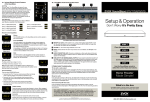
Connect the SoundBase ESB214 to your TV system
Step1 : Place the system
A.
Move your TV aside and turn it so you
can see the connection panel.
B. Place the SoundBase ESB214 where you
had your TV.
Placement guidance:
ESB214 is designed
designed to
The SoundBase
SoundBse ESB214
tofitfit
under TVs that weigh no more than 40 lb
(18 kg) and have bases no wider than 20"
(508 mm) and no deeper than 10¼" (260
mm). Many 42" and most 32" TVs and
smaller meet these requirements.
Step 2: Connect the SoundBase system to the Power
Connect the Power adaptor to the SoundBase and the power source, Then turn on
the Power,The LED display will be light up.
The LED display will be light up
Step 3: connect the SoundBase to the TV system
Step 4: Check your TV settings
To enjoy the full benefit of hearing TV audio through the SoundBse speaker
system, the internal speakers in your TV should be turned off. Also, you need
to make sure that some audio settings do not inhibit the audio output signal.