1
Note: Check the user manual for your TV for help on using the TV menus and
changing any TV settings. Manufacturers usually make user manuals available
on their web sites.
A. Turn on your TV.
B. Go to the TV menu and select Audio, Sound, or Speaker Settings.
C. Look for the menu item that allows you to turn off the TV speakers. This menu
item may be called Speakers On/Offor something closely related.If there is no setting
for turning the TV speakers off, adjust the TV volume to its lowest setting.
D. If you decided to use either an optical or coaxial digital audio output, look for a
menu item in the Audio Settings that may affect digital audio output. You may have to
select the digital output you want to use.
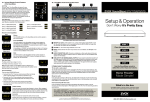
Step 5 Choose the correct Correct signal input
Press Power Button either on the SounBase or the remote to open it.
Then press MODE button to choose the correct Audio source form TV, DVD play, ect.
Connect the SoundBase to other device
Other Function instruction