1
System Board
User’s Manual
Copyright
This publication contains information that is protected by copyright.
No part of it may be reproduced in any form or by any means or
used to make any transformation/adaptation without the prior written permission from the copyright holders.
This publication is provided for informational purposes only. The
manufacturer makes no representations or warranties with respect to
the contents or use of this manual and specifically disclaims any express or implied warranties of merchantability or fitness for any particular purpose. The user will assume the entire risk of the use or the
results of the use of this document. Further, the manufacturer reserves the right to revise this publication and make changes to its
contents at any time, without obligation to notify any person or entity of such revisions or changes.
© 2008. All Rights Reserved.
Trademarks
Windows® 98, Windows® 98 SE, Windows® ME, Windows® 2000,
Windows NT® 4.0 and Windows® XP are registered trademarks of
Microsoft Corporation. VIA is a registered trademark of VIA Technologies, Inc. Award is a registered trademark of Award Software,
Inc. Other trademarks and registered trademarks of products appearing in this manual are the properties of their respective holders.
FCC and DOC Statement on Class B
This equipment has been tested and found to comply with the limits
for a Class B digital device, pursuant to Part 15 of the FCC rules.
These limits are designed to provide reasonable protection against
harmful interference when the equipment is operated in a residential
installation. This equipment generates, uses and can radiate radio frequency energy and, if not installed and used in accordance with the
instruction manual, may cause harmful interference to radio communications. However, there is no guarantee that interference will not
occur in a particular installation. If this equipment does cause harmful
interference to radio or television reception, which can be determined
by turning the equipment off and on, the user is encouraged to try
to correct the interference by one or more of the following measures:
• Reorient or relocate the receiving antenna.
• Increase the separation between the equipment and the receiver.
• Connect the equipment into an outlet on a circuit different from
that to which the receiver is connected.
• Consult the dealer or an experienced radio TV technician for
help.
Notice:
1. The changes or modifications not expressly approved by the
party responsible for compliance could void the user's authority
to operate the equipment.
2. Shielded interface cables must be used in order to comply with
the emission limits.
Table of Contents
Warranty.................................................................................................
Static Electricity Precaution................................................................
Safety Measures.....................................................................................
About the Package...............................................................................
Before Using the System Board.........................................................
5
6
6
7
7
Chapter 1 - Introduction.................................................................... 8
Specifications................................................................................................................................... 8
Features.............................................................................................................................................. 10
Chapter 2 - Hardware Installation....................................................
System Board Layout ..........................................................................................................
System Memory..........................................................................................................................
CPU.......................................................................................................................................................
Flame-Freezer Heat Sink....................................................................................................
Jumper Settings............................................................................................................................
Rear Panel I/O Ports.............................................................................................................
Bernstein Audio Module......................................................................................................
Internal I/O Connectors.....................................................................................................
16
16
17
23
28
34
41
43
45
Chapter 3 - BIOS Setup...................................................................... 56
Award BIOS Setup Utility................................................................................................. 56
RAID BIOS..................................................................................................................................... 99
Updating the BIOS..................................................................................................................100
Chapter 4 - Supported Software....................................................... 102
Chapter 5 - RAID................................................................................. 120
Chapter 6 - ATI CrossFire Technology............................................. 127
Appendix A - System Error Message............................................... 136
Appendix B - Troubleshooting.......................................................... 138
Warranty
1. Warranty does not cover damages or failures that arised from
misuse of the product, inability to use the product, unauthorized
replacement or alteration of components and product specifications.
2. The warranty is void if the product has been subjected to physical abuse, improper installation, modification, accidents or unauthorized repair of the product.
3. Unless otherwise instructed in this user’s manual, the user may
not, under any circumstances, attempt to perform service, adjustments or repairs on the product, whether in or out of warranty.
It must be returned to the purchase point, factory or authorized
service agency for all such work.
4. We will not be liable for any indirect, special, incidental or
consequencial damages to the product that has been modified
or altered.
1
Introduction
Static Electricity Precautions
It is quite easy to inadvertently damage your PC, system board,
components or devices even before installing them in your system
unit. Static electrical discharge can damage computer components
without causing any signs of physical damage. You must take extra
care in handling them to ensure against electrostatic build-up.
1. To prevent electrostatic build-up, leave the system board in its
anti-static bag until you are ready to install it.
2. Wear an antistatic wrist strap.
3. Do all preparation work on a static-free surface.
4. Hold the device only by its edges. Be careful not to touch any of
the components, contacts or connections.
5. Avoid touching the pins or contacts on all modules and connectors. Hold modules or connectors by their ends.
Important:
Electrostatic discharge (ESD) can damage your processor, disk
drive and other components. Perform the upgrade instruction
procedures described at an ESD workstation only. If such a
station is not available, you can provide some ESD protection
by wearing an antistatic wrist strap and attaching it to a metal
part of the system chassis. If a wrist strap is unavailable, establish and maintain contact with the system chassis throughout
any procedures requiring ESD protection.
Safety Measures
To avoid damage to the system:
• Use the correct AC input voltage range..
To reduce the risk of electric shock:
• Unplug the power cord before removing the system chassis
cover for installation or servicing. After installation or servicing,
cover the system chassis before plugging the power cord.
Battery:
• Danger of explosion if battery incorrectly replaced.
• Replace only with the same or equivalent type recommend by
the manufacturer.
• Dispose of used batteries according to local ordinance.
6
Introduction
1
About the Package
The system board package contains the following items. If any of
these items are missing or damaged, please contact your dealer or
sales representative for assistance.
;
;
;
;
;
;
;
;
;
;
;
One system board
One Bernstein audio module with cable
One Flame-Freezer heat sink kit
One IDE round cable
One floppy round cable
Four Serial ATA data cables
Four Serial ATA power cables
One I/O shield
One RAID driver diskette
One “Mainboard Utility” CD
One user’s manual
The system board and accessories in the package may not come
similar to the information listed above. This may differ in accordance
to the sales region or models in which it was sold. For more information about the standard package in your region, please contact
your dealer or sales representative.
Before Using the System Board
Before using the system board, prepare basic system components.
If you are installing the system board in a new system, you will need
at least the following internal components.
•
•
•
A CPU
Memory module
Storage devices such as hard disk drive, CD-ROM, etc.
You will also need external system peripherals you intend to use
which will normally include at least a keyboard, a mouse and a video
display monitor.
7
1
Introduction
Chapter 1 - Introduction
Specifications
8
Processor
• LGA 775 socket for:
- Intel® CoreTM2 Quad and Intel® CoreTM2 Duo
• Supports Intel Enhanced Memory 64 Technology (EMT64T)
• Supports Enhanced Intel SpeedStep Technology (EIST)
• Supports Intel Hyper-Threading Technology
• Supports 1600/1333/1066/800MHz FSB
Chipset
• Intel® chipset
- Northbridge:
Intel® X48 Express chipset
Intel® Fast Memory Access technology
- Southbridge: Intel® ICH9R
System Memory
• Four 240-pin DDR2 DIMM sockets
• Supports DDR2 667/800 MHz
• Delivers up to 12.8Gb/s bandwidth
• Supports dual channel (128-bit wide) memory interface
• Supports up to 8GB system memory
• Supports unbuffered x8 and x16 DIMMs
Expansion Slots
• 2 PCI Express (Gen 2) x16 slots (PCIE 1 and PCIE 3)
- 2-way CrossFire at x16/x16 bandwidth
- 2-way CrossFire + Physics at x16/x16/x4 bandwidth
• 1 PCI Express x1 slot (PCIE 2)
• 1 PCI Express x4 slot (PCIE 4)
• 3 PCI slots
BIOS
• Award BIOS
• 8Mbit flash memory
• CMOS Reloaded
Audio
• Bernstein audio module
- Realtek ALC885 8-channel High Definition Audio CODEC
- Center/subwoofer, rear R/L and side R/L jacks
- Line-in, line-out (front R/L) and mic-in jacks
- 2 coaxial RCA S/PDIF-in/out jacks
- 1 optical S/PDIF connector
- 1 CD-in connector
- 1 front audio connector
• DAC SNR/ADC SNR of 106dB/101dB
• Full-rate lossless content protection technology
LAN
• Mar vell 88E8052 and Mar vell 88E8053 PCIE Gigabit LAN
controllers
• Fully compliant to IEEE 802.3 (10BASE-T), 802.3u (100BASETX) and 802.3ab (1000BASE-T) standards
Introduction
Storage
• Intel ICH9R chip
- Intel Matrix Storage technology
- Supports up to 6 SATA devices
- SATA speed up to 3Gb/s
- RAID 0, RAID 1, RAID 0+1 and RAID 5
• JMicron JMB363 PCI Express to SATA and PATA host controller
- Supports up to 2 UltraDMA 100Mbps IDE devices
- Supports 2 SATA devices
- SATA speed up to 3Gb/s
- RAID 0 and RAID 1
IEEE 1394
• VIA VT6307
• Supports two 100/200/400 Mb/sec ports
Rear Panel I/O
• Mini-DIN-6 PS/2 mouse port and PS/2 keyboard port
• 1 IEEE 1394 port
• 6 USB 2.0/1.1 ports
• 2 RJ45 LAN ports
Internal I/O
• 3 connectors for 6 additional external USB 2.0 ports
• 1 connector for an external COM port
• 1 connector for an IEEE 1394 port
• 1 connector for the Bernstein audio module
• 1 front audio connector (on the Bernstein audio module)
• 1 CD-in connector (on the Bernstein audio module)
• 1 S/PDIF connector (on the Bernstein audio module)
• 1 IrDA connector
• 1 CIR connector
• 8 Serial ATA connectors
• 1 40-pin IDE connector
• 1 floppy connector
• 1 24-pin ATX power connector
• 1 8-pin 12V power connector
• 2 4-pin 5V/12V power connectors (FDD type)
• 1 front panel connector
• 6 fan connectors
• 1 diagnostic LED
• EZ touch switches (power switch and reset switch)
1
Power Management • ACPI and OS Directed Power Management
• ACPI STR (Suspend to RAM) function
• Wake-On-PS/2 / Wake-On-USB Keyboard/Mouse
• Wake-On-LAN and Wake-On-Ring
• RTC timer to power-on the system
• AC power failure recovery
Hardware Monitor
• Monitors CPU/system/Northbridge temperature and overheat alarm
• Monitors Vcore/Vdimm/Vnb/VCC5/12V/V5sb/Vbat voltages
• Monitors the speed of the cooling fans
• CPU Overheat Protection function monitors CPU temperature
and fan during system boot-up - automatic shutdown upon system overheat
PCB
• 6 layers, ATX form factor
• 24.5cm (9.64") x 30.5cm (12")
9
1
Introduction
Features
The data transfer rate of the high performance DDR2
technology delivers bandwidth of 12.8 Gb/s and beyond.
That is twice the speed of the conventional DDR without increasing its power consumption. DDR2 SDRAM
modules work at 1.8V supply compared to 2.6V memory voltage
for DDR modules. DDR2 also incorporates new innovations such as
the On-Die Termination (ODT) as well as larger 4-bit pre-fetch
against DDR which fetches 2 bits per clock cycle.
ATI’s CrossFireTM technology drives your
PC to a new peak of performance by
combining multiple GPUs in a single system. By connecting a Radeon CrossFire Edition graphics card and a
standard PCI Express graphics card, the power of the dual GPUs
(Graphics Processing Units) within the system will accelerate your
gaming performance and improve image quality.
Aside from dual GPU for 3D rendering, CrossFire’s new feature asymmetric processing technology, allows adding another dedicated
GPU for physics processing. The 3 GPUs simultaneously handle Data
Parallel Processing (DPP) computing tasks such as game rendering
and physics in a single system. This provides more realistic cutting
edge 3D graphics to run at high resolutions.
The Realtek ALC885 on the Bernstein audio module
supports 6 audio jacks that provide 8-channel audio
output for advanced 7.1-channel super surround sound
audio system. It is also equipped with a CD-in connector,
front audio connector and S/PDIF output allowing digital connections
with DVD systems or other audio/video multimedia.
10
Introduction
1
S/PDIF is a standard audio file transfer format that
transfers digital audio signals to a device without having
to be converted first to an analog format. This prevents
the quality of the audio signal from degrading whenever
it is converted to analog. S/PDIF is usually found oyn digital audio
equipment such as a DAT machine or audio processing device. The
S/PDIF interface on the system board sends surround sound and
3D audio signal outputs to amplifiers and speakers and to digital
recording devices like CD recorders.
JMB363 The JMicron JMB363 controller supports up to two
UltraDMA 100Mbps IDE devices and two Serial
ATA devices.
Serial ATA is a storage interface that is compliant with SATA 1.0 specification. Intel ICH9R
and JMicron JMB363 both support speed of up to 3Gb/s. Serial
ATA improves hard drive performance faster than the standard parallel ATA whose data transfer rate is 100MB/s.
The Intel ICH9R chip allows configuring RAID on Serial ATA
devices. It supports RAID 0, RAID 1, RAID 0+1 and RAID
5.
The JMicron JMB363 chip allows configuring RAID on another 2 Serial ATA devices. It supports RAID 0 and RAID
1.
The Marvell 88E8052 and Marvell 88E8053 PCI Express
Gigabit LAN controllers support up to 1Gbps data rate.
11
1
Introduction
IEEE 1394 is fully compliant with the 1394 OHCI (Open
Host Controller Interface) 1.1 specification. It supports up
to 63 devices that can run simultaneously on a system.
1394 is a fast external bus standard that supports data
transfer rates of up to 400Mbps. In addition to its high speed, it
also supports isochronous data transfer which is ideal for video devices that need to transfer high levels of data in real-time. 1394
supports both Plug-and-Play and hot plugging.
CMOS Reloaded is a technology that allows storing
multiple user-defined BIOS settings by using the
BIOS utility to save, load and name the settings. This
is especially useful to overclockers who require saving a variety of overclocked settings and being able
to conveniently switch between these settings simultaneously.
The system board supports Intel proceshyper-threading
sors with Hyper-Threading Technology. Enatechnology
bling the functionality of Hyper-Threading
Technology for your computer system requires ALL of the following
platforms.
Components:
•
•
•
•
CPU - an Intel® Pentium® 4 Processor with HT Technology
Chipset - an Intel® chipset that supports HT Technology
BIOS - a BIOS that supports HT Technology and has it enabled
OS - an operating system that includes optimizations for HT
Technology
For more information on Hyper-Threading Technology, go to:
www.intel.com/info/hyperthreading.
PCI Express is a high bandwidth I/O infrastructure
that possesses the ability to scale speeds by forming
multiple lanes. The system board currently supports
the physical layer of x1 and x16 lane widths. The x1 PCI Express
lane supports transfer rate of 2.5 Gigabytes (250MBbps) per second. The PCI Express architecture also provides a high performance
graphics infrastructure by enhancing the capability of a x16 PCI Express lane to provide 4 Gigabytes per second transfer rate.
12
Introduction
1
CPU Overheat Protection has the capability of monitoring the CPU’s temperature during system boot up.
Once the CPU’s temperature exceeded the temperature limit pre-defined by the CPU, the system will automatically shutdown. This preventive measure has been added to protect the CPU
from damage and insure a safe computing environment.
CPU
Overheat
Protection
The system board is equipped with an IrDA connector
for wireless connectivity between your computer and
peripheral devices. The IRDA (Infrared Data Association) specification
supports data transfers of 115K baud at a distance of 1 meter.
IrDA
The system board supports USB 2.0 and USB 1.1
por ts. USB 1.1 suppor ts 12Mb/second bandwidth
while USB 2.0 supports 480Mb/second bandwidth
providing a marked improvement in device transfer
speeds between your computer and a wide range of simultaneously
accessible external Plug and Play peripherals.
This feature allows the system that is in the
Suspend mode or Soft Power Off mode to
wake-up/power-on to respond to calls coming from an external modem or respond to calls from a modem PCI card that uses the PCI
PME (Power Management Event) signal to remotely wake up the
PC.
Wake-On-Ring
Important:
If you are using a modem add-in card, the 5VSB power source
of your power supply must support a minimum of ≥720mA.
This feature allows the network to remotely
wake up a Soft Power Down (Soft-Off) PC.
It is supported via the onboard LAN port or via a PCI LAN card
that uses the PCI PME (Power Management Event) signal. However,
if your system is in the Suspend mode, you can power-on the system
only through an IRQ or DMA interrupt.
Wake-On-LAN
Important:
The 5VSB power source of your power supply must support
≥720mA.
13
1
Introduction
Wake-On-PS/2
This function allows you to use the PS/2
keyboard or PS/2 mouse to power-on the
system.
Important:
The 5VSB power source of your power supply must support
≥720mA.
This function allows you to use a USB
keyboard or USB mouse to wake up a
system from the S3 (STR - Suspend To RAM) state.
Wake-On-USB
Important:
If you are using the Wake-On-USB Keyboard/Mouse function for
2 USB ports, the 5VSB power source of your power supply
must support ≥1.5A. For 3 or more USB ports, the 5VSB
power source of your power supply must support ≥2A.
rtc
The RTC installed on the system board allows your
system to automatically power-on on the set date and
time.
The system board is designed to meet the ACPI (Advanced Configuration and Power Interface) specification.
ACPI has energy saving features that enables PCs to implement
Power Management and Plug-and-Play with operating systems that
support OS Direct Power Management. ACPI when enabled in the
Power Management Setup will allow you to use the Suspend to
RAM function.
str
With the Suspend to RAM function enabled, you can power-off the
system at once by pressing the power button or selecting “Standby”
when you shut down the system without having to go through the
sometimes tiresome process of closing files, applications and operating system. This is because the system is capable of storing all programs and data files during the entire operating session into RAM
(Random Access Memory) when it powers-off. The operating session
will resume exactly where you left off the next time you power-on
the system.
14
Introduction
1
Important:
The 5VSB power source of your power supply must support
≥1A.
Power failure
recovery
When power returns after an AC power failure, you may choose to either power-on the
system manually or let the system power-on
automatically.
15
2
Hardware Installation
Chapter 2 - Hardware Installation
System Board Layout
Mouse
KB
PS/2 power
select (JP7)
1
1
1
DIMM 2
DIMM 1
CPU
fan
DIMM 4
DIMM 3
12V power
C217
ATX
power
Socket 775
1394-0
USB 10
11
12 24
1
1
USB 6-11 power
select (JP5)
LAN 1
USB 89
DRAM
Power
LED
NB fan
1
13
Intel
X48
JP15
JP14
1
LAN 2
USB 67
3rd fan
JP13
CPU FSB select
1
1
JMicron
JMB363
5V/12V
1
PCIE 1
IDE
PCIE 2
Marvell
88E8053
Marvell
88E8052
SATA 7
SATA 8
PCI 1
Intel
ICH9R
1394-1
1
5V/12V
power
1
VIA
VT6307
SATA 3
SATA 4
PCI 2
Battery
1
1
PCI 3
BIOS
CIR
ITE
IT8718F
1
1
System
fan
USB 4-5
1
USB 2-3
1
1
USB 0-5 power
select (JP6)
Standby Power LED
COM
FDD
1
2nd fan Reset Power
SATA 5
SATA 6
Secondary RTC
reset (JP12)
Clear
CMOS (JP2)
USB 0-1
1
PCIE 4
1
16
1st fan
1
Bernstein audio
IrDA
1
1
SATA 1
SATA 2
PCIE 3
1
Safe boot
(JP1)
Speaker on/off
(JP8)
1
Front panel
1
1
Hardware Installation
.
.
. . .
.
.
.
2
Warning:
Electrostatic discharge (ESD) can damage your system board, processor, disk drives, add-in boards, and other components. Perform the
upgrade instruction procedures described at an ESD workstation only.
If such a station is not available, you can provide some ESD protection by wearing an antistatic wrist strap and attaching it to a metal
part of the system chassis. If a wrist strap is unavailable, establish
and maintain contact with the system chassis throughout any procedures requiring ESD protection.
System Memory
.
.
. . .
.
.
.
Warning:
When the DRAM Power LED lit red, it indicates that power is
present on the DIMM sockets. Power-off the PC then unplug the
power cord prior to installing any memory modules. Failure to do so
will cause severe damage to the motherboard and components.
Channel A
DIMM 1
DIMM 2
Channel B
DIMM 3
DIMM 4
DRAM
Power LED
The four DIMM sockets on the system board are divided into 2
channels:
Channel A - DIMM 1 and DIMM 2
Channel B - DIMM 3 and DIMM 4
17
2
Hardware Installation
The system board supports the following memory interface.
Single Channel (SC)
Data will be accessed in chunks of 64 bits (8B) from the memory
channels.
Virtual Single Channel (VSC)
If both channels are populated with different memory configurations,
the MCH defaults to Virtual Single Channel.
Dual Channel (DC)
Dual channel provides better system performance because it doubles
the data transfer rate.
Dynamic Mode Addressing
This mode minimizes the overhead of opening/closing pages in
memory banks allowing for row switching to be done less often.
Single Channel
DIMMs are on the same channel.
DIMMs in a channel can be identical or completely different.
Not all slots need to be populated.
Virtual Single
Channel
DIMMs of different memory configurations
are on different channels.
Odd number of slots can be populated.
Dual Channel
DIMMs of the same memory configuration
are on different channels.
Dynamic Mode
Addressing
In single channel, requires even number or
rows (side of the DIMM) populated. This
mode can be enabled with 1 SS, 2 SS or
2 DS.
In VSC mode, both channels must have
identical row structure.
BIOS Setting
Configure the system memory in the Genie BIOS Setting submenu
of the BIOS. Refer to chapter 3 for more information.
18
Hardware Installation
2
The table below lists the various optimal operating modes that should
be configured for the memory channel operation.
DIMM 1
DIMM 2
DIMM 3
DIMM 4
No memory
E
E
E
E
Single channel A
P
E
E
E
Single channel A
P
P
E
E
Single channel A
E
P
E
E
Single channel B
E
E
P
E
Single channel B
E
E
P
P
Single channel B
E
E
E
P
Virtual single channel
E
P(**)
E
P(**)
Virtual single channel
E
P
P
E
Virtual single channel
E
P(**)
P
P(**)
Virtual single channel
P
E
E
P
Virtual single channel
P(**)
E
P(**)
E
Virtual single channel
p(**)
E
P(**)
P
Virtual single channel
P
P(**)
E
P(**)
Virtual single channel
P(**)
P
P(**)
E
Virtual single channel
P(**)
P(**)
P(**)
P(**)
Dual channel
E
P(*)(2,4)
E
P(*)(2,4)
Dual channel
P(*)(1,3)
E
P(*)(1,3)
E
Dual channel
P(*)(1,3)
P(*)(2,4)
P(*)(1,3)
P(*)(2,4)
Config
Continued on the next page...
19
2
Hardware Installation
DIMM 1
DIMM 2
DIMM 3
DIMM 4
Dynamic Mode Addressing
E
P(*)(2,4)
DS
E
P(*)(2,4)
DS
Dynamic Mode Addressing
P(*)(1,3)
DS
E
P(*)(1,3)
DS
E
Dynamic Mode Addressing
P(*)(1,3)
DS
P(*)(2,4)
DS
P(*)(1,3)
DS
P(*)(2,4)
DS
Dynamic Mode Addressing
E
P(*)(2,4)
SS
E
P(*)(2,4)
SS
Dynamic Mode Addressing
P(*)(1,3)
SS
E
P(*)(1,3)
SS
E
Dynamic Mode Addressing
P(*)(1,3)
SS
P(*)(2,4)
SS
P(*)(1,3)
SS
P(*)(2,4)
SS
Config
P - denotes populated
E - denotes empty
* - denotes DIMMs are identical
** - denotes DIMMs are not identical
SS - denotes Single Sided DIMM
DS - denotes Double Sided DIMM
1, 2, 3 or 4 - denotes the DDR DIMM slot
20
Hardware Installation
2
Installing the Memory Module
Note:
The system board used in the following illustrations may not
resemble the actual board. These illustrations are for reference
only.
1. Make sure the PC and all other peripheral devices connected to
it has been powered down.
2. Disconnect all power cords and cables.
3. Locate the DIMM socket on the system board.
4. Push the “ejector tabs” which are at the ends of the socket to
the side.
Ejector
tab
Ejector
tab
DIMM sockets
5. Note how the module is keyed to the socket.
Notch
Key
21
2
Hardware Installation
6. Grasping the module by its edges, position the module above
the socket with the “notch” in the module aligned with the “key”
on the socket. The keying mechanism ensures the module can be
plugged into the socket in only one way.
7. Seat the module vertically, pressing it down firmly until it is completely seated in the socket.
8. The ejector tabs at the ends of the socket will automatically
snap into the locked position to hold the module in place.
22
Hardware Installation
2
CPU
Overview
The system board is equipped with a surface mount LGA 775 socket. This
socket is exclusively designed for installing a LGA 775 packaged Intel
CPU.
Important:
1. Before you proceed, make sure (1) the LGA775 socket
comes with a protective cap, (2) the cap is not damaged and (3) the socket’s contact pins are not bent. If
the cap is missing or the cap and/or contact pins are
damaged, contact your dealer immediately
immediately..
2. Make sure to keep the protective cap. RMA requests
will be accepted and processed only if the LGA775
socket comes with the protective cap.
Installing the CPU
1. Make sure the PC and all other peripheral devices connected to it has
been powered down.
2. Disconnect all power cords and cables.
3. Locate the LGA 775
CPU socket on the
system board.
Important:
The CPU socket must
not come in contact with
anything other than the
CPU. Avoid unnecessary
exposure. Remove the
protective cap only when
you are about to install
the CPU.
23
2
Hardware Installation
4. The CPU socket comes Cover
with a cover that is
attached with a removable protective cap. The
cap is used to protect
the CPU socket against
dust and harmful particles. Remove the protective cap only when you
are about to install the
CPU.
5. Lift the protective cap
from the location
pointed below to detach
the cap from the cover.
Lever
Lift this part up
6. Unlock the socket by
pushing the lever down,
moving it away from the
side tab of the socket,
then lifting it up.
Lever
lifted
Tab
7. Now lift the cover.
Cover
24
Protective cap
Hardware Installation
2
8. Position the CPU above
the socket. The gold
mark on the CPU must
align with pin 1 of the
CPU socket.
Important:
Handle the CPU by its
edges and avoid touching the pins.
Pin 1 of
the socket
Gold mark
9. Insert the CPU into the
socket until it is seated
in place. The CPU will fit
in only one orientation
and can easily be inserted without exerting
any force.
Important:
Do not force the CPU
into the socket. Forcing
the CPU into the socket
may bend the pins and
damage the CPU.
25
2
Hardware Installation
10. Once the CPU is in
place, move the cover
down.
11. Push the lever down to
lock the socket. The
lever should hook onto
the side tab to indicate
that the CPU is completely secured in the
socket.
Cover
Lever
Installing the Fan and Heat Sink
The CPU must be kept cool by using a CPU fan with heat sink.
Without sufficient air circulation across the CPU and heat sink, the
CPU will overheat damaging both the CPU and system board.
Note:
• Use only certified fan and heat sink.
• The fan and heat sink package usually contains the fan and
heat sink assembly, and an installation guide. If the installation procedure in the installation guide differs from the one
in this section, please follow the installation guide in the
package.
1. Before you install the fan / heat sink, you must apply a thermal
paste onto the top of the CPU. The thermal paste is usually
supplied when you purchase the CPU or fan heat sink assembly.
Do not spread the paste all over the surface. When you later
place the heat sink on top of the CPU, the compound will disperse evenly.
Do not apply the paste if the fan / heat sink already has a patch
of thermal paste on its underside. Peel the strip that covers the
paste before you place the fan / heat sink on top of the CPU.
26
Hardware Installation
2. Place the heat sink on
top of the CPU. The 4
studs around the heat
sink which are used to
secure the heat sink
onto the system board
must match the 4
mounting holes around
the socket.
Position each stud so
that the groove faces
the heat sink then push
it down firmly until it
clicks into place.
Groove
2
Mounting hole
Mounting hole
Fan
Heat sink
Stud
Note:
You will not be able to secure the fan and heat sink assembly in place
if the groove is not facing the heat sink.
3. Connect the CPU fan’s cable connector to the CPU fan connector on
the system board.
Note:
LP UT series provides the option of using the Transpiper heat sink.
However, instead of using the push-pin type of CPU heat sink / fan
assembly, opt for an assembly that uses mounting screws. Refer to
the Transpiper Heat Sink section for details.
27
2
Hardware Installation
Flame-Freezer Heat Sink
The heat dissipating effect of a heat sink mounted directly at the place
where the heat is produced, such as that of a northbridge, is usually limited. To overcome this problem, the system board uses the heat pipe
technology which is an extremely high thermal conductor that can dissipate
heat effectively. The Flame-Freezer heat sink when installed at the rear of
the chassis provides additional cooling to the entire system.
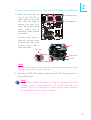
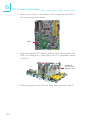
1. The right photo shows the heat
pipe assembly on the system
board.
Heat pipe
assembly
28
Hardware Installation
2
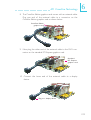
2. Before you proceed, make sure
you have already installed the
provided I/O shield and system
board into the chassis.
I/O shield
Internal view of the chassis
(rear I/O area)
29
2
Hardware Installation
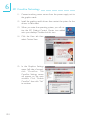
3. Remove the screws that hold the
metal-plate-covering of the I/O
shield.
Metal-plate-covering
of the I/O shield
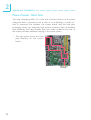
4. The base of the heat sink which
is used to stabilize the FlameFreezer heat sink is now
accessible.
X
Heat sink base
Enlarged view of the
heat sink base
30
Hardware Installation
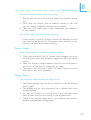
5. With the raised bump of the
mounting clip facing upward,
position the mounting clip on the
heat sink as shown on the right.
2
Mounting screws
Mounting clip
Heat sink
Mounting
clip
6. With the mounting clip still in
place (as shown above), inser t
the heat sink from a 45o angle.
You need to exert some force
to be able to push it all the way
in. You will notice that the
mounting clip will hold the heat
sink securely once it is in place.
31
2
Hardware Installation
7. With the clip already in place,
secure the heat sink by mounting
the 2 provided screws.
Internal view of the
chassis (rear I/O area)
X
Mounting
holes
32
Hardware Installation
2
8. The photos on the right show
the properly installed heat sink.
Rear view
Internal view
9. Replace the metal plate
previously removed in step 3.
Note:
The heat sink on the Northbridge is removable allowing you to install
a heat sink of your choice. Make sure to use a heat sink that will
provide sufficient heat dissipation.
33
2
Hardware Installation
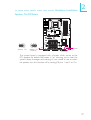
Jumper Settings
Clear CMOS Data
Clearing CMOS Data using JP2
JP2
X
1
2 3
1
2 3
1-2 On: Normal
2-3 On:
(default)
Clear CMOS Data
If you encounter the following,
a) CMOS data becomes corrupted.
b) You forgot the supervisor or user password.
c) The overclocked settings in the BIOS resulted to the system’s instability or caused system boot up problems.
you can reconfigure the system with the default values stored in the
ROM BIOS.
To load the default values stored in the ROM BIOS, please follow
the steps below.
1. Power-off the system then unplug the power cord.
2. Set JP2 pins 2 and 3 to On. Wait for a few seconds and set JP2
back to its default setting, pins 1 and 2 On.
3. Now plug the power cord then power-on the system.
34
Hardware Installation
2
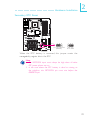
Clearing CMOS Data using the EZ Clear® Function
EZ Clear® bypasses the manual process of using a jumper to clear
the CMOS by simply using the reset and power buttons.
Important:
EZ Clear® is supported only if standby power is present in the
system.
To use EZ Clear®:
1. Make sure the standby power is present.
2. Using the EZ touch switches on the system board, first press the
Reset button then the Power button simultaneously for approximately 4 seconds.
X
Reset
Power
If the system board is already enclosed in a chassis, apply the
same method using the Reset button and Power button located
at the front panel of the chassis.
3. After 4 seconds, release the power button first then the Reset
button.
4. The CMOS will restore the clock settings back to their default
values.
35
2
Hardware Installation
PS/2 Power Select
JP7
3
X
2 1
3
1-2 On: 5V
(default)
2 1
2-3 On:
5VSB
Important:
The 5VSB power source of your
power supply must suppor t
≥720mA.
Selecting 5VSB will allow you to use the PS/2 keyboard or PS/2
mouse to wake up the system.
USB Power Select
USB 6-11
(JP5)
3
X
2
3
2
1
1
1-2 On: 5V
(default)
1
USB 0-5
(JP6)
2 3
1-2 On: 5V
X (default)
2-3 On:
5VSB
1
2 3
2-3 On:
5VSB
Selecting 5VSB will allow you to use the USB keyboard or USB
mouse to wake up the system..
36
Important:
If you are using the Wake-On-USB Keyboard/Mouse function for 2 USB ports,
the 5VSB power source of your power supply must support ≥1.5A. For 3 or
more USB por ts, the 5VSB power source of your power supply must support
≥2A.
Hardware Installation
2
Speaker On/Off Select
2 3
1-2 On:
Speaker Off
1
2 3
2-3 On:
Speaker On
(default)
X
1
JP8
Buzzer
The system board is equipped with a buzzer which serves as the
PC’s speaker. By default the buzzer is “on” allowing you to hear the
system’s beep messages and warnings. If you intend to use an external speaker, turn this function off by setting JP8 pins 1 and 2 to On.
37
2
Hardware Installation
Safe Boot
JP1
X
1
2 3
1-2 On:
Default
1
2 3
2-3 On:
Safe boot
This jumper is used to safely reboot the system whenever the system hangs and you are unable to restart the system.
1. Power-off the system then unplug the power cord.
2. Set pins 2 and 3 to On. Wait for a few seconds then set the
jumper back to its default setting, pins 1 and 2 On.
3. Plug the power cord then power-on the system. The system will
reboot normally without losing all data stored in the CMOS.
38
Hardware Installation
2
Secondary RTC Reset
JP12
X
1
2 3
1-2 On: Normal
(default)
1
2 3
2-3 On:
RTC reset
When the RTC batter y is removed, this jumper resets the
manageability register bits in the RTC.
Note:
1. The SRTCRST# input must always be high when all other
RTC power planes are on.
2. In the case where the RTC battery is dead or missing on
the platform, the SRTCRST# pin must rise before the
RSMRST# pin.
39
2
Hardware Installation
CPU FSB Select
4
3
X
2
1
JP14
JP15
JP13
By default, JP13 to JP15 are set to pins 1 and 2 On. This setting will
allow the system to automatically run according to the CPU’s FSB. If
you want to change the setting, please refer to the table below.
40
By CPU
FSB 800
FSB 1066 FSB 1333
JP14
1-2 On
3-4 On
2-3 On
2-3 On
JP13
1-2 On
2-3 On
2-3 On
2-3 On
JP15
1-2 On
2-3 On
2-3 On
3-4 On
Hardware Installation
2
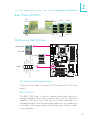
Rear Panel I/O Ports
PS/2
Mouse
1394-0
LAN 1 LAN 2
USB 10-11
USB 6-7
USB 8-9
PS/2
K/B
PS/2 Ports and IEEE 1394 Ports
PS/2 Mouse
W
PS/2 KB
TPAGround
TPB+12V (fused)
Ground
1394-0
10
9
W
TPA+
Ground
TPB+
+12V (fused)
Key
1394-1 2
1
W
PS/2 Mouse and PS/2 Keyboard Ports
These ports are used to connect a PS/2 mouse and a PS/2 keyboard.
IEEE 1394 Ports
The IEEE 1394-0 port is used to connect audio/video devices or
storage peripherals. The 10-pin connector allows you to connect an
additional 1394 por t. Your 1394 port may come mounted on a
card-edge bracket. Install the card-edge bracket to an available slot
at the rear of the system chassis then connect the 1394 port cable
to this connector.
41
2
Hardware Installation
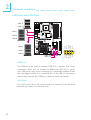
USB Ports and LAN Ports
USB 11
USB 10
W
LAN 1
W
USB 9
VCC
-Data
+Data
GND
N. C.
W
USB 8
USB 7
2
1
USB 6
USB 4-5
USB 2-3
USB 0-1
10
9
VCC
-Data
+Data
GND
Key
LAN 2
USB Ports
The USB ports are used to connect USB 2.0/1.1 devices. The 10-pin
connectors allow you to connect 6 additional USB 2.0/1.1 ports.
Your USB ports may come mounted on a card-edge bracket. Install
the card-edge bracket to an available slot at the rear of the system
chassis then connect the USB port cables to these connectors.
LAN Ports
The LAN ports allow the system board to connect to a local area
network by means of a network hub.
42
Hardware Installation
2
Bernstein Audio Module
1
Left audio channel
Ground
Ground
Right audio channel
Line-in
Line-out
Mic-in
Center/
Subwoofer
Rear R/L
4
CD-in
Side R/L
10 9
Line out Jet Detect
N. C.
Mic Jet Detect
Vcc
GND
S/PDIF-out
S/PDIF-in
21
Front audio
Side view
Bernstein audio
module connector
Line out_Left
Sense
Line out_Right
Mic_Right
Mic_Left
SPDIF in
GND
SPDIF out
Key
+5V
5
Optical S/PDIF
1
Line-in Jack (Light Blue)
This jack is used to connect any audio devices such as Hi-fi set, CD
player, tape player, AM/FM radio tuner, synthesizer, etc.
Line-out Jack (Lime)
This jack is used to connect to the front right and front left speakers
of the audio system.
Mic-in Jack (Pink)
This jack is used to connect an external microphone.
Center/Subwoofer Jack (Orange)
This jack is used to connect to the center and subwoofer speakers
of the audio system.
Rear Right/Left Jack (Black)
This jack is used to connect to the rear right and rear left speakers
of the audio system.
Side Right/Left Jack (Gray)
This jack is used to connect to the side left and side right speakers
of the audio system.
43
2
Hardware Installation
Coaxial RCA S/PDIF-in and SPDIF-out Jacks
These jacks are used to connect external audio output devices using
coaxial S/PDIF cables.
CD-in Connector
The CD-in connector is used to receive audio from a CD-ROM
drive, TV tuner or MPEG card.
Front Audio Connector
The front audio connector is used to connect to the line-out and
mic-in jacks that are at the front panel of your system.
Optical S/PDIF Connector
The optical S/PDIF connector is used to connect an external audio
output device using an optical S/PDIF cable.
Important:
DO NOT use optical S/PDIF and coaxial RCA S/PDIF at the
same time.
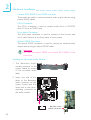
Installing the Bernstein Audio Module
1. The Bernstein
module connects
system board by
of the provided
cable.
audio
to the
means
audio
2. Insert one end of the
cable to the Bernstein
audio connector on the
system board and the
other end to the corresponding connector on
the audio module.
X
11
1
Bernstein audio
module connector
12
44
2
Hardware Installation
2
3. The length of the audio cable
provides the option and flexibility of installing the module on
any available expansion bracket
slot at the rear of the system
chassis. Remove the screw of
the bracket where you want the
audio module installed then remove the bracket. Place the
Audio cable
Bernstein audio module on the
expansion bracket slot then secure the module by replacing the
bracket screw you removed earlier.
I/O Connectors
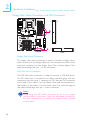
Serial ATA Connectors
SATA
SATA
SATA
SATA
7-8
1-2
3-4
5-6
The Serial ATA (SATA) connectors are used to connect Serial ATA
drives. Connect one end of the Serial ATA cable to a Serial ATA
connector and the other end to your Serial ATA device.
ICH9R supports SATA 1 to SATA 6.
JMB363 supports SATA 7 and SATA 8.
Configuring RAID
Refer to the RAID chapter in this manual for more information
about creating RAID on Serial ATA drives.
45
2
Hardware Installation
Floppy Disk Drive Connector and IDE Connector
39
40
X
2
1
IDE
1
2
X 33 43
FDD
Floppy Disk Drive Connector
The floppy disk drive connector is used to connect a floppy drive.
Insert one end of the floppy cable into this connector and the other
end-most connector to the floppy drive. The colored edge of the
cable should align with pin 1 of this connector.
IDE Disk Drive Connector
The IDE disk drive connector is used to connect 2 IDE disk drives.
An IDE cable have 3 connectors on them, one that plugs into this
connector and the other 2 connects to IDE devices. The connector
at the end of the cable is for the Master drive and the connector in
the middle of the cable is for the Slave drive. The colored edge of
the cable should align with pin 1 of this connector.
Note:
When using two IDE drives, one must be set as the master
and the other as the slave. Follow the instructions provided by
the drive manufacturer for setting the jumpers and/or switches
on the drives.
46
Hardware Installation
2
IrDA, CIR and Serial (COM) Connectors
IRRX
Ground N. C.
VCC
IRTX
IrDA 5
1
CIR 5
1
CIRTX
5VSB
Ground N. C.
CIRRX
RD
DTR
DSR
CTS
W
X
COM 12
CD
TD
GND
RTS
RI
9
IrDA and CIR Connectors
These connectors are used to connect an IrDA module and/or CIR
module.
Note:
The sequence of the pin functions on some IrDA/CIR cable
may be reversed from the pin function defined on the system
board. Make sure to connect the cable connector to the IrDA/
CIR connector according to their pin functions.
You may need to install the proper drivers in your operating system
to use the IrDA/CIR function. Refer to your operating system’s
manual or documentation for more information.
Serial (COM) Connector
The serial (COM) connector is used to connect modems, serial printers, remote display terminals, or other serial devices. Your COM port
may come mounted on a card-edge bracket. Install the card-edge
bracket to an available slot at the rear of the system chassis then
connect the serial port cable to this connector. The colored edge of
the cable should align with pin 1 of this connector.
47
2
Hardware Installation
Cooling Fan Connectors
3
1
X
X
N. C.
Power
Ground
1
NB fan
Power
Ground N. C.
3
Power
Ground N. C.
X
1
X1
3rd fan
Power
Ground N. C.
X1
3
3
System fan
X
2nd fan
3
1st fan
Power
Ground N. C.
1
Ground
Power
Sense
Speed
4
CPU fan Control
These fan connectors are used to connect cooling fans. Cooling fans
will provide adequate airflow throughout the chassis to prevent overheating the CPU and system board components.
EZ Touch Switches
Reset
Power
X
48
The presence of the power switch and reset switch on the system
board are user-friendly especially to DIY users. They provide convenience in powering on and/or resetting the system while fine tuning
the system board before it is installed into the system chassis.
Hardware Installation
2
LEDs
DRAM
Power LED
Standby
Power LED
Diagnostic
LED
DRAM Power LED
This LED will light when the system’s power is on.
Standby Power LED
This LED will light when the system is in the standby mode.
Diagnostic LED
The Diagnostic LED displays POST codes. POST (Power-On Self
Tests) which is controlled by the BIOS is performed whenever you
power-on the system. POST will detect the status of the system and
its components. Each code displayed on the LED corresponds to a
certain system status.
.
.
. . .
.
.
.
Warning:
When the DRAM Power LED and/or Standby Power LED lit red,
it indicates that power is present on the DIMM sockets and/or
PCI slots. Power-off the PC then unplug the power cord prior to
installing any memory modules or add-in cards. Failure to do so
will cause severe damage to the motherboard and components.
49
2
Hardware Installation
Power Connectors
Use a power supply that complies with the ATX12V Power Supply
Design Guide Version 1.1. An ATX12V power supply unit has a
standard 24-pin ATX main power connector that must be inserted
into this connector.
12 24
COM
+5VDC
+5VDC
+5VDC
NC
COM
COM
COM
PS_ON#
COM
-12VDC
+3.3VDC
+3.3VDC
+12VDC
X +12VDC
+5VSB
PWR_OK
COM
+5VDC
COM
+5VDC
COM
+3.3VDC
+3.3VDC
1 13
Your power supply unit may come with an 8-pin or 4-pin +12V
power connector. The +12V power enables the delivery of more
+12VDC current to the processor’s Voltage Regulator Module
(VRM). If available, it is preferable to use the 8-pin power; otherwise
connect a 4-pin power to this connector.
X
+12V
5
1
8
4
Ground
50
Hardware Installation
2
The power connectors from the power supply unit are designed to
fit the 24-pin and 8-pin connectors in only one orientation. Make
sure to find the proper orientation before plugging the connectors.
The FDD-type power connectors are additional power connector.s If
you are using more than one graphics cards, we recommend that
you plug power cables from your power supply unit to the 5V/12V
power connectors. This will provide more stability to the entire system. The system board will still work even if the additional power
connector is not connected.
1
4
+5V
+12V
Ground
Ground
The system board requires a minimum of 300 Watt power supply
to operate. Your system configuration (CPU power, amount of
memory, add-in cards, peripherals, etc.) may exceed the minimum
power requirement. To ensure that adequate power is provided, we
strongly recommend that you use a minimum of 400 Watt (or
greater) power supply.
Important:
Insufficient power supplied to the system may result in instability or the add-in boards and peripherals not functioning properly. Calculating the system’s approximate power usage is important to ensure that the power supply meets the system’s
consumption requirements.
51
2
Hardware Installation
Restarting the PC
Normally, you can power-off the PC by:
1. Pressing the power button at the front panel of the chassis.
or
2. Pressing the power switch that is on the system board (note: not
all system boards come with this switch).
If for some reasons you need to totally cut off the power supplied
to the PC, switch off the power supply or unplug the power cord.
Take note though that if you intend to restart it at once, please
strictly follow the steps below.
1. The time where power is totally discharged varies among power
supplies. It's discharge time is highly dependent on the system's
configuration such as the wattage of the power supply, the sequence of the supplied power as well as the number of peripheral devices connected to the system. Due to this reason, we
strongly recommend that you wait for the Standby Power LED
(refer to the “LEDs” section in this chapter for the location of the
Standby Power LED) to lit off.
2. After the Standby Power LED has lit off, wait for 6 seconds
before powering on the PC.
If the system board is already enclosed in a chassis which apparently will not make the Standby Power LED visible, wait for 15
seconds before you restore power connections. 15 seconds is
approximately the time that will take the LED to lit off and the
time needed before restoring power.
The above will ensure protection and prevent damage to the
motherboard and components.
52
Hardware Installation
2
Front Panel Connectors
SPEAKER
RESET
HD-LED
1
2
X 12 90
PWR-LED
ATX-SW
HD-LED: Primary/Secondary IDE LED
This LED will light when the hard drive is being accessed.
RESET: Reset Switch
This switch allows you to reboot without having to power off the
system thus prolonging the life of the power supply or system.
SPEAKER: Speaker Connector
This connects to the speaker installed in the system chassis.
ATX-SW: ATX Power Switch
Depending on the setting in the BIOS setup, this switch is a “dual
function power button” that will allow your system to enter the SoftOff or Suspend mode.
53
2
Hardware Installation
PWR-LED: Power/Standby LED
When the system’s power is on, this LED will light. When the system
is in the S1 (POS - Power On Suspend) or S3 (STR - Suspend To
RAM) state, it will blink every second.
Note:
If a system did not boot-up and the Power/Standby LED did
not light after it was powered-on, it may indicate that the CPU
or memory module was not installed properly. Please make
sure they are properly inserted into their corresponding socket.
Pin
54
Pin Assignment
HD-LED
(Primary/Secondary IDE LED)
3
5
HDD LED Power
HDD
Reserved
14
16
N. C.
N. C.
ATX-SW
(ATX power switch)
8
10
PWRBT+
PWRBT-
Reserved
18
20
N. C.
N. C.
RESET
(Reset switch)
7
9
Ground
H/W Reset
SPEAKER
(Speaker connector)
13
15
17
19
Speaker Data
N. C.
Ground
Speaker Power
PWR-LED
(Power/Standby LED)
2
4
6
LED Power (+)
LED Power (+)
LED Power (-) or Standby Signal
Hardware Installation
2
PCI Express Slots
PCI Express x16 (PCIE 1)
PCI Express x1
PCI Express x16 (PCIE 3)
PCI Express x16 (PCIE 4)
PCI Express x16
Install PCI Express x16 graphics card, that comply to the PCI Express specifications, into the PCI Express x16 slot. To install a graphics card into the x16 slot, align the graphics card above the slot then
press it down firmly until it is completely seated in the slot. The
retaining clip of the slot will automatically hold the graphics card in
place.
PCI Express Slots Configuration
Bandwidth
Graphics Mode
PCIE 1
PCIE 3
PCIE 4
2-way CrossFire
x16
x16
N.C.
2-way CrossFire + Physics
x16
x16
x4
PCI Express x1
Install PCI Express cards such as network cards or other cards that
comply to the PCI Express specifications into the PCI Express x1
slot.
55
3
BIOS Setup
Chapter 3 - BIOS Setup
Award BIOS Setup Utility
The Basic Input/Output System (BIOS) is a program that takes care
of the basic level of communication between the processor and peripherals. In addition, the BIOS also contains codes for various advanced features found in this system board. This chapter explains the
Setup Utility for the Award BIOS.
After you power up the system, the BIOS message appears on the
screen and the memory count begins. After the memory test, the
following message will appear on the screen:
Press DEL to enter setup
If the message disappears before you respond, restart the system or
press the “Reset” button. You may also restart the system by pressing the <Ctrl> <Alt> and <Del> keys simultaneously.
When you press <Del>, the main menu screen will appear.
Phoenix - AwardBIOS CMOS Setup Utility
X
Standard CMOS Features
X
Genie BIOS Setting
X
Advanced BIOS Features
X
CMOS Reloaded
X
Advanced Chipset Features
Load Optimized Defaults
X
Integrated Peripherals
Set Supervisor Password
X
Power Management Setup
Set User Password
X
PnP/PCI Configurations
Save & Exit Setup
X
PC Health Status
Exit Without Saving
Esc : Quit
F10 : Save & Exit Setup
↑ ↓ → ←
Time, Date, Hard Disk Type...
56
: Select Item
BIOS Setup
3
Standard CMOS Features
Use the arrow keys to highlight “Standard CMOS Features” then
press <Enter>. A screen similar to the one below will appear.
X
X
X
X
X
X
X
X
X
X
Date <mm:dd:yy>
Time <hh:mm:ss>
Tue, Oct 30 2007
20 : 20 : 30
IDE
IDE
IDE
IDE
IDE
IDE
IDE
IDE
IDE
IDE
None
None
None
None
None
None
None
None
None
None
Channel 0 Master
Channel 0 Slave
Channel 1 Master
Channel 1 Slave
Channel 2 Master
Channel 3 Master
Channel 4 Master
Channel 4 Slave
Channel 5 Master
Channel 5 Slave
1.44M, 3.5in.
All, But Keyboard
Base Memory
Extended Memory
Total Memory
640K
1046528K
1047552K
↑↓→← :
Move
Enter: Select
F5: Previous Values
Item Help
Menu Level
X
Change the day, month,
year and century
X
Drive A
Halt On
X
Phoenix - AwardBIOS CMOS Setup Utility
Standard CMOS Features
+/-/PU/PD: Value
F10: Save
F6: Fail-Safe Defaults
ESC: Exit
F1: General Help
F7: Optimized Defaults
The screen above list all the fields available in the Standard CMOS Features
submenu, for ease of reference in this manual. In the actual CMOS setup, you have
to use the scroll bar to view the fields. The settings on the screen are for
reference only. Your version may not be identical to this one.
Date
The date format is <day>, <month>, <date>, <year>. Day displays
a day, from Sunday to Saturday. Month displays the month, from
January to December. Date displays the date, from 1 to 31. Year
displays the year, from 1994 to 2079.
Time
The time format is <hour>, <minute>, <second>. The time is based
on the 24-hour military-time clock. For example, 1 p.m. is 13:00:00.
Hour displays hours from 00 to 23. Minute displays minutes from
00 to 59. Second displays seconds from 00 to 59.
57
3
BIOS Setup
IDE Channel 0 Master to IDE Channel 5 Slave
To configure the IDE drives, move the cursor to a field then press
<Enter>. The following screen will appear.
Phoenix - AwardBIOS CMOS Setup Utility
IDE Channel 0 Master
IDE HDD Auto-Detection
Press Enter
IDE Channel 0 Master
Access Mode
Auto
Auto
Menu Level
Capacity
0MB
Cylinder
Head
Precomp
Landing Zone
Sector
0
0
0
0
0
↑↓→← :
Move
Enter: Select
F5: Previous Values
Item Help
+/-/PU/PD: Value
F10: Save
F6: Fail-Safe Defaults
XX
To auto-detect the
HDD’s size, head... on
this channel
ESC: Exit
F1: General Help
F7: Optimized Defaults
The settings on the screen are for reference only. Your version may not be
identical to this one.
IDE HDD Auto-Detection
Detects the parameters of the drive. The parameters will automatically be shown on the screen.
IDE Channel 0 Master to IDE Channel 5 Slave
The drive type information should be included in the documentation
from your hard disk vendor. If you select ”Auto”, the BIOS will autodetect the HDD & CD-ROM drive at the POST stage and show
the IDE for the HDD & CD-ROM drive. If a hard disk has not
been installed, select “None”.
Access Mode
For hard drives larger than 528MB, you would typically select the
LBA type. Certain operating systems require that you select CHS or
Large. Please check your operating system’s manual or Help desk on
which one to select.
58
BIOS Setup
3
Capacity
Displays the approximate capacity of the disk drive. Usually the size
is slightly greater than the size of a formatted disk given by a disk
checking program.
Cylinder
This field displays the number of cylinders.
Head
This field displays the number of read/write heads.
Precomp
This field displays the number of cylinders at which to change the
write timing.
Landing Zone
This field displays the number of cylinders specified as the landing
zone for the read/write heads.
Sector
This field displays the number sectors per track.
Drive A
This field identifies the type of floppy disk drive installed.
None
360K, 5.25 in.
1.2M, 5.25 in.
720K, 3.5 in.
1.44M, 3.5 in.
2.88M, 3.5 in.
No floppy drive is installed
5-1/4 in. standard drive; 360KB capacity
5-1/4 in. AT-type high-density drive; 1.2MB capacity
3-1/2 in. double-sided drive; 720KB capacity
3-1/2 in. double-sided drive; 1.44MB capacity
3-1/2 in. double-sided drive; 2.88MB capacity
59
3
BIOS Setup
Halt On
This field determines whether the system will stop if an error is
detected during power up. The default setting is All Errors.
No Errors The system boot will not stop for any errors detected.
All Errors The system boot will stop whenever the BIOS detects
a non-fatal error.
All, But Keyboard The system boot will not stop for a keyboard
error; it will stop for all other errors.
All, But Diskette The system boot will not stop for a disk error;
it will stop for all other errors.
All, But Disk/Key The system boot will not stop for a disk or
keyboard error; it will stop for all other errors.
Base Memory
Displays the amount of base (or conventional) memory installed in
the system. The value of the base memory is typically 512K for
systems with 512K memory installed on the motherboard or 640K
for systems with 640K or more memor y installed on the
motherboard.
Extended Memory
Displays the amount of extended memory detected during boot-up.
Total Memory
Displays the total memory available in the system.
60
BIOS Setup
3
Advanced BIOS Features
The Advanced BIOS Features allows you to configure your system
for basic operation. Some entries are defaults required by the system
board, while others, if enabled, will improve the performance of your
system or let you set some features according to your preference.
Phoenix - AwardBIOS CMOS Setup Utility
Advanced BIOS Features
X
Hard Disk Boot Priority
Quick Power On Self Test
First Boot Device
Second Boot Device
Third Boot Device
Boot Other Device
Boot Up Floppy Seek
Boot Up Numlock Status
Security Option
MPS Version Control For OS
HDD S.M.A.R.T Capability
Full Screen LOGO Show
↑↓→← :
Move
Enter: Select
F5: Previous Values
Press Enter
Enabled
Hard Disk
CDROM
CDROM
Enabled
Disabled
On
Setup
1.4
Disabled
Enabled
+/-/PU/PD: Value
F10: Save
F6: Fail-Safe Defaults
Item Help
Menu Level
X
Select Hard Disk Boot
Device Priority
ESC: Exit
F1: General Help
F7: Optimized Defaults
The settings on the screen are for reference only. Your version may not be
identical to this one.
61
3
BIOS Setup
Hard Disk Boot Priority
This field is used to select the boot sequence of the hard drives.
Move the cursor to this field then press <Enter>. Use the Up or
Down arrow keys to select a device then press <+> to move it up
or <-> to move it down the list.
Phoenix - AwardBIOS CMOS Setup Utility
Hard Disk Boot Priority
1. Bootable Add-in Cards
Item Help
Menu Level
XX
Use <↑ > or <↓> to
select a device, then
press <+> to move it up,
or <-> to move it down
the list. Press <ESC> to
exit this menu.
↑↓ :
Move
PU/PD/+/-: Change Priority
F10: Save
ESC: Exit
F5: Previous Values
F6: Fail-Safe Defaults
F7: Optimized Defaults
The settings on the screen are for reference only. Your version may not be
identical to this one.
Quick Power On Self Test
This field speeds up Power On Self Test (POST) whenever the system is powered on. The BIOS will shorten or skip some check items
during POST. To attain the shortest POST time, select “Fast”.
First Boot Device, Second Boot Device, Third Boot Device and Boot
Other Device
Select the drive to boot first, second and third in the “First Boot
Device” “Second Boot Device” and “Third Boot Device” fields respectively. The BIOS will boot the operating system according to the
sequence of the drive selected. Set “Boot Other Device” to Enabled
if you wish to boot from another device.
62
BIOS Setup
3
Boot Up Floppy Seek
When enabled, the BIOS will check whether the floppy disk drive
installed is 40 or 80 tracks. Note that the BIOS cannot distinguish
between 720K, 1.2M, 1.44M and 2.88M drive types as they are all
80 tracks. When disabled, the BIOS will not search for the type of
floppy disk drive by track number. Note that there will not be any
warning message if the drive installed is 360KB.
Boot Up NumLock Status
This allows you to determine the default state of the numeric
keypad. By default, the system boots up with NumLock on wherein
the function of the numeric keypad is the number keys. When set to
Off, the function of the numeric keypad is the arrow keys.
Security Option
This field determines when the system will prompt for the passwordeverytime the system boots or only when you enter the BIOS setup.
Set the password in the Set Supervisor/User Password submenu.
System
The system will not boot and access to Setup will be
denied unless the correct password is entered at the
prompt.
Setup
The system will boot, but access to Setup will be denied
unless the correct password is entered at the prompt.
MPS Version Control for OS
This field is used to select the MPS version that the system board is
using.
HDD S.M.A.R.T. Capability
The system board supports SMART (Self-Monitoring, Analysis and
Reporting Technology) hard drives. SMART is a reliability prediction
technology for ATA/IDE and SCSI drives. The drive will provide sufficient notice to the system or user to backup data prior to the
drive’s failure. The default is Disabled. If you are using hard drives
that support S.M.A.R.T., set this field to Enabled. SMART is suppor ted in ATA/33 or later hard drives.
63
3
BIOS Setup
Full Screen Logo Show
This field is applicable only if you want a particular logo to appear
during system boot-up.
Enabled
The logo will appear in full screen during system bootup.
Disabled The logo will not appear during system boot-up.
64
BIOS Setup
3
Advanced Chipset Features
Phoenix - AwardBIOS CMOS Setup Utility
Advanced Chipset Features
PCI-E Compliancy Mode
PEG Force X1
Init Display First
↑↓→← :
Move
Enter: Select
F5: Previous Values
v1.0a
Disabled
PCI Slot
+/-/PU/PD: Value
F10: Save
F6: Fail-Safe Defaults
Item Help
Menu Level
X
ESC: Exit
F1: General Help
F7: Optimized Defaults
The settings on the screen are for reference only. Your version may not be
identical to this one.
This section gives you functions to configure the system based on
the specific features of the chipset. The chipset manages bus speeds
and access to system memory resources. These items should not
be altered unless necessary. The default settings have been chosen
because they provide the best operating conditions for your system.
The only time you might consider making any changes would be if
you discovered some incompatibility or that data was being lost
while using your system.
PCI-E Compliancy Mode
This field is used to select the mode for the PCI Express add-in
card.
PEG Force x1
The options are Enabled and Disabled.
Init Display First
PCI Express Slot
PCI Slot
When the system boots, it will first initialize the
PCI Express Master graphics card.
When the system boots, it will first initialize
PCI.
65
3
BIOS Setup
Integrated Peripherals
Phoenix - AwardBIOS CMOS Setup Utility
Integrated Peripherals
X
X
X
X
OnChip IDE Device
Onboard PCI Device
Super IO Device
USB Device Setting
Press
Press
Press
Press
↑↓→← :
Move
Enter: Select
F5: Previous Values
Item Help
Enter
Enter
Enter
Enter
Menu Level
+/-/PU/PD: Value
F10: Save
F6: Fail-Safe Defaults
X
ESC: Exit
F1: General Help
F7: Optimized Defaults
The settings on the screen are for reference only. Your version may not be
identical to this one.
OnChip IDE Device
Phoenix - AwardBIOS CMOS Setup Utility
OnChip IDE Device
SATA Mode
- Legacy Mode Support
Onboard JMB363 Controller
- Controller Mode
↑↓→← :
Move
Enter: Select
F5: Previous Values
IDE
Disabled
Enabled
Native IDE
+/-/PU/PD: Value
F10: Save
F6: Fail-Safe Defaults
Item Help
Menu Level
X
ESC: Exit
F1: General Help
F7: Optimized Defaults
The settings on the screen are for reference only. Your version may not be
identical to this one.
66
BIOS Setup
3
SATA Mode
This field is used to configure the SATA devices supported by the
Intel ICH9R.
IDE
This option configures the Serial ATA drives as Parallel
ATA storage devices.
RAID This option allows you to create RAID or Intel Matrix
Storage configuration on Serial ATA devices.
AHCI This option allows the Serial ATA devices to use AHCI
(Advanced Host Controller Interface).
Legacy Mode Support
The options are Enabled and Disabled.
Onboard JMB363 Controller
This field is used to enable or disable the onboard JMicron JMB363
controller.
Controller Mode
This field is used to configure the SATA devices supported by the
JMicron JMB363. The options are AHCI+IDE, RAID+IDE and Native
IDE.
67
3
BIOS Setup
Onboard PCI Device
Phoenix - AwardBIOS CMOS Setup Utility
Onboard PCI Device
Onboard Lan1 Controller
Onboard Lan2 Controller
IEEE 1394 Controller
Onboard HD Audio
↑↓→← :
Move
Enter: Select
F5: Previous Values
Enabled
Enabled
Enabled
Enabled
+/-/PU/PD: Value
F10: Save
F6: Fail-Safe Defaults
Item Help
Menu Level
X
ESC: Exit
F1: General Help
F7: Optimized Defaults
The settings on the screen are for reference only. Your version may not be
identical to this one.
Onboard Lan1 Controller
This field is used to enable or disable the onboard LAN 1 controller.
Onboard Lan2 Controller
This field is used to enable or disable the onboard LAN 2 controller.
IEEE 1394 Controller
This field is used to enable or disable the onboard IEEE 1394.
Onboard HD Audio
This field is used to enable or disable the onboard HD audio.
68
BIOS Setup
3
Super IO Device
Phoenix - AwardBIOS CMOS Setup Utility
Super IO Device
x
x
x
x
x
x
x
Disabled
Button Only
Enabled
Enter
Ctrl-F1
Enabled
3F8/IRQ4
Disabled
IrDA
Half
Off
Disabled
11
Power On By Mouse
Power On By Keyboard
Power On By Button
KB Power On Password
Hot Key Power On
Onboard FDC Controller
Onboard Serial Port
Onboard IRDA Select
IR Mode Select
UR2 Duplex Mode
PWRON After PWR-Fail
CIR Port Access
CIR Port IRQ
↑↓→← :
Move
Enter: Select
F5: Previous Values
+/-/PU/PD: Value
F10: Save
F6: Fail-Safe Defaults
Item Help
Menu Level
XX
ESC: Exit
F1: General Help
F7: Optimized Defaults
The settings on the screen are for reference only. Your version may not be
identical to this one.
Power On By Mouse
Disabled
Mouse Move
Mouse Click
Disables the mouse power-on function.
Move the mouse to power on the system.
Click the mouse to power on the system.
Power On By Keyboard
This field allows you to use the keyboard to power-on the system.
Button only
Password
Hot Key
Any Key
Keyboard 98
Default setting. Uses the power button to power
on the system.
When this option is selected, set the password
you would like to use to power-on the system in
the “KB Power On Password” field.
When this option is selected, select the function
key you would like to use to power-on the system in the “Hot Key Power On” field.
Press any key to power-on the system.
When this option is selected, press the “wake
up” key of the Windowsâ 98 compatible keyboard to power-on the system.
69
3
BIOS Setup
Power On By Button
To use the power button to power on the system, set this field to
Enabled.
KB Power On Password
Move the cursor to this field and press <Enter>. Enter your password. You can enter up to 5 characters. Type in exactly the same
password to confirm, then press <Enter>.
The power button will not function once a keyboard password has
been set in this field. You must type the correct password to poweron the system. If you forgot the password, power-off the system and
remove the battery. Wait for a few seconds and install it back before powering-on the system.
Hot Key Power On
This field is used to select a function key that you would like to use
to power-on the system.
Onboard FDC Controller
Enabled
Disabled
Enables the onboard floppy disk controller.
Disables the onboard floppy disk controller.
Onboard Serial Port
Auto
The system will automatically select an I/O address for the onboard serial port.
3F8/IRQ4, 2F8/IRQ3, 3E8/IRQ4, 2E8/IRQ3
Allows you to
manually select an I/O address for the onboard
serial port.
Disabled
Disables the onboard serial port.
Onboard IRDA Select
3F8/IRQ4, 2F8/IRQ3, 3E8/IRQ4, 2E8/IRQ3
Allows you to
manually select an I/O address for the onboard
IrDA.
Disabled
Disables the onboard IrDA.
70
BIOS Setup
3
IR Mode Select
This field is used to select the type of IrDA standard supported by
your IrDA device. For better transmission of data, your IrDA peripheral device must be within a 30o angle and within a distance of 1
meter.
UR2 Duplex Mode
Half
Full
Data is completely transmitted before receiving
data.
Transmits and receives data simultaneously.
PWRON After PWR-Fail
Off
On
Former-Sts
When power returns after an AC power failure,
the system’s power is off. You must press the
Power button to power-on the system.
When power returns after an AC power failure,
the system will automatically power-on.
When power returns after an AC power failure,
the system will return to the state where you left
off before power failure occurs. If the system’s
power is off when AC power failure occurs, it will
remain off when power returns. If the system’s
power is on when AC power failure occurs, the
system will power-on when power returns.
CIR Port Address
This field is used to select an I/O address for the CIR device.
CIR Port IRQ
This field is used to select an IRQ for the CIR device.
71
3
BIOS Setup
USB Device Setting
Phoenix - AwardBIOS CMOS Setup Utility
USB Device Setting
USB 1.0 Controller
USB 2.0 Controller
USB Operation Mode
USB Keyboard Function
USB Mouse Function
USB Storage Function
Enabled
Enabled
High Speed
Enabled
Enabled
Enalbed
*** USB Mass Storage Device Boot Setting ***
↑↓→← :
Move
Enter: Select
F5: Previous Values
+/-/PU/PD: Value
F10: Save
F6: Fail-Safe Defaults
Item Help
Menu Level
XX
[Enable] or [Disable]
Universal Host
Controller
Interfacefor Universal
Serial Bus USB
Operation Mode
ESC: Exit
F1: General Help
F7: Optimized Defaults
The settings on the screen are for reference only. Your version may not be
identical to this one.
USB 1.0 Controller
This field is used to enable or disable the Universal Host Controller
Interface (USB 1.0).
USB 2.0 Controller
This field is used to enable or disable the Enhanced Host Controller
Interface (USB 2.0).
USB Operation Mode
This field is used to select the USB’s operation mode. The options
are Full/Low Speed and High Speed.
USB Keyboard Function
Due to the limited space of the BIOS ROM, the support for legacy
USB keyboard (in DOS mode) is by default set to Disabled. With
more BIOS ROM space available, it will be able to support more
advanced features as well as provide compatibility to a wide variety
of peripheral devices.
If a PS/2 keyboard is not available and you need to use a USB
keyboard to install Windows (installation is performed in DOS
mode) or run any program under DOS, set this field to Enabled.
72
BIOS Setup
3
USB Mouse Function
Due to the limited space of the BIOS ROM, the support for legacy USB
mouse (in DOS mode) is by default set to Disabled. With more BIOS
ROM space available, it will be able to support more advanced features
as well as provide compatibility to a wide variety of peripheral devices.
If a PS/2 mouse is not available and you need to use a USB mouse to
install Windows (installation is performed in DOS mode) or run any
program under DOS, set this field to Enabled.
USB Storage Function
This field is used to enable or disable the support for legacy USB
mass storage.
73
3
BIOS Setup
Power Management Setup
The Power Management Setup allows you to configure your system
to most effectively save energy.
Phoenix - AwardBIOS CMOS Setup Utility
Power Management Setup
x
x
x
x
x
ACPI Suspend Type
USB KB WakeUp From S3(S4)
Soft-Off By PWR-BTTN
PCI Express PME
Run VGABIOS if S3 Resume
Wake-Up by PCI Card
Resume by Alarm
Date(Of Month) Alarm
Time(hh:mm:ss) Alarm
HPET Support
HPET Mode
WDRT Support
WDRT Run/Stop
WDRT Count
↑↓→← :
Move
Enter: Select
F5: Previous Values
S3(STR)
Disabled
Instant-Off
Enabled
Auto
Enabled
Disabled
0
0:0:0
Disabled
32-bit Mode
Disabled
Stop
1023
+/-/PU/PD: Value
F10: Save
F6: Fail-Safe Defaults
Item Help
Menu Level
X
ESC: Exit
F1: General Help
F7: Optimized Defaults
The settings on the screen are for reference only. Your version may not be
identical to this one.
ACPI Suspend Type
This field is used to select the type of Suspend mode.
S1(POS)
S3(STR)
Enables the Power On Suspend function.
Enables the Suspend to RAM function.
USB KB Wakeup From S3(S4)
This field, when enabled, allows you to use a USB keyboard to wake
up a system that is in the S3 (STR - Suspend To RAM) state. This
can be configured only if the “ACPI Suspend Type” field is set to
“S3(STR)”.
74
BIOS Setup
3
Soft-Off by PWR-BTTN
This field allows you to select the method of powering off your
system.
Delay 4 Sec. Regardless of whether the Power Management function is enabled or disabled, if the power button is
pushed and released in less than 4 sec, the system
enters the Suspend mode. The purpose of this function is to prevent the system from powering off in
case you accidentally “hit” or pushed the power button. Push and release again in less than 4 sec to
restore. Pushing the power button for more than 4
seconds will power off the system.
Instant-Off
Pressing and then releasing the power button at
once will immediately power off your system.
PCI Express PME
This field is used to configure the PCI Express PME.
Run VGABIOS if S3 Resume
When this field is set to Auto, the system will initialize the VGA BIOS
when it wakes up from the S3 state. This can be configured only if
the “ACPI Suspend Type” field is set to “S3(STR)”. When this feature
is disabled, the system resume time is shortened but system will
need an AGP driver to initialize the VGA card. Therefore, if the AGP
driver of the card does not support the initialization feature, the
display may work abnormally or not function after resuming from S3.
Wake-Up by PCI Card
Enabled
Disabled
This field should be set to Enabled only if your PCI
card such as LAN card or modem card uses the
PCI PME (Power Management Event) signal to remotely wake up the system. Access to the LAN card
or PCI card will cause the system to wake up. Refer
to the card’s documentation for more information.
The system will not wake up despite access to the
PCI card.
75
3
BIOS Setup
Resume By Alarm
Enabled
Disabled
When Enabled, you can set the time you would like
the Soft Power Down (Soft-Off) PC to power-on in
the “Time (dd:hh:mm) of Alarm” field. However, if the
system is being accessed by incoming calls or the
network prior to the time set in the field, the system
will give priority to the incoming calls or network.
Disables the automatic power-on function. (default).
Day (of Month) Alarm
0
1-31
The system will power-on everyday according to the
time set in the “Time (hh:mm:ss) Alarm” field.
Select a date you would like the system to poweron. The system will power-on on the set date, and
time set in the “Time (hh:mm:ss) Alarm” field.
Time (hh:mm:ss) of Alarm
This is used to set the time you would like the system to power-on.
HPET Support
This field is used to enable or disable HPET.
HPET Mode
This field is used to select the HPET mode.
WDRT Support
This field is used to enable or disable WDRT.
WDRT Run/Stop and WDRT Count
These fields are used to configure WDRT.
76
BIOS Setup
3
PnP/PCI Configurations
This section describes configuring the PCI bus system. It covers
some very technical items and it is strongly recommended that only
experienced users should make any changes to the default settings.
Phoenix - AwardBIOS CMOS Setup Utility
PnP/PCI Configurations
Resources Controlled By
x IRQ Resources
Auto(ESCD)
Press Enter
PCI/VGA Palette Snoop
PCI Latency Timer (Per 8CLK)
INT Pin 1 Assignment
INT Pin 2 Assignment
INT Pin 3 Assignment
INT Pin 4 Assignment
INT Pin 5 Assignment
INT Pin 6 Assignment
INT Pin 7 Assignment
INT Pin 8 Assignment
↑↓→← :
Move
Enter: Select
F5: Previous Values
Item Help
Menu Level
X
Disabled
8
Auto
Auto
Auto
Auto
Auto
Auto
Auto
Auto
+/-/PU/PD: Value
F10: Save
F6: Fail-Safe Defaults
ESC: Exit
F1: General Help
F7: Optimized Defaults
The settings on the screen are for reference only. Your version may not be
identical to this one.
Resources Controlled By
The Award Plug and Play BIOS has the capability to automatically
configure all of the boot and Plug and Play compatible devices.
Auto(ESCD) The system will automatically detect the settings for
you.
Manual
Choose the specific IRQ in the “IRQ Resources”
field.
77
3
BIOS Setup
IRQ Resources
Move the cursor to this field and press <Enter>. This field is used to
set each system interrupt to either Reserved or PCI Device.
Phoenix - AwardBIOS CMOS Setup Utility
IRQ Resources
IRQ-3
IRQ-4
IRQ-5
IRQ-7
IRQ-9
IRQ-10
IRQ-11
IRQ-12
IRQ-14
IRQ-15
PCI
PCI
PCI
PCI
PCI
PCI
PCI
PCI
PCI
PCI
assigned to
assigned to
assigned to
assigned to
assigned to
assigned to
assigned to
assigned to
assigned to
assigned to
↑↓→← :
Move
Enter: Select
F5: Previous Values
Device
Device
Device
Device
Device
Device
Device
Device
Device
Device
+/-/PU/PD: Value
F10: Save
F6: Fail-Safe Defaults
Item Help
Menu Level
XX
Legacy ISA for devices
compliant with the
original PC AT bus
specification. PCI/ISA
PnP for devices
compliant with the Plug
and Play standard
whether designed for
PCI or ISA bus
architecture.
ESC: Exit
F1: General Help
F7: Optimized Defaults
The settings on the screen are for reference only. Your version may not be
identical to this one.
PCI/VGA Palette Snoop
This field determines whether the MPEG ISA/VESA VGA cards can
work with PCI/VGA or not.
Enabled
Disabled
MPEG ISA/VESA VGA cards work with PCI/VGA.
MPEG ISA/VESA VGA cards does not work with PCI/
VGA.
PCI Latency Timer (Per 8CLK)
This feature is used to select the length of time each PCI device will
control the bus before another takes over. The larger the value, the
longer the PCI device can retain control of the bus. Since each access to the bus comes with an initial delay before any transaction
can be made, low values for the PCI Latency Timer will reduce the
effectiveness of the PCI bandwidth while higher values will improve it.
INT Pin 1 Assignment to INT Pin 8 Assignment
By default, a device is automatically assigned to each INT. You can
also manually assign an INT for each device.
78
BIOS Setup
3
PC Health Status
85oC/185oF
>50oC
<25oC
>35oC
<25oC
>55oC
<25oC
CPU Core Voltage
DRAM Voltage
NB Core Voltage
CPU VTT Voltage
ATX +3.3V Voltage
ATX +12V Voltage
5V Standby Voltage
Battery Voltage
CPU CORE Temperature
PWM AREA Temperature
CHIPSET Temperature
CPU FAN Fan Speed
CHS Fan Speed
CHIPSET Fan Speed
1.31V
1.96V
1.32V
1.21V
3.13V
11.84V
4.78V
3.29V
43oC
40oC
40oC
3308 RPM
0RPM
0RPM
↑↓→← :
Move
Enter: Select
F5: Previous Values
Item Help
Menu Level
X
X
Shutdown Temperature
CPUFan Fully On If CPUTemp
CPUFan Turn OFF if CPUTemp
CHSFan Fully On If CHSTemp
CHSFan Turn OFF if CHSTemp
NB Fan Fully On If NB Temp
NB Fan Turn OFF if NB Temp
X
Phoenix - AwardBIOS CMOS Setup Utility
PC Health Status
+/-/PU/PD: Value
F10: Save
F6: Fail-Safe Defaults
ESC: Exit
F1: General Help
F7: Optimized Defaults
The screen above list all the fields available in the PC Health Status submenu, for
ease of reference in this manual. In the actual CMOS setup, you have to use the
scroll bar to view the fields. The settings on the screen are for reference only. Your
version may not be identical to this one.
Shutdown Temperature
You can prevent the system from overheating by selecting a temperature at which the system will shutdown. If the system detected
that its temperature exceeded the one set in this field, it will automatically shutdown.
CPUFan Fully On If CPUTemp
This field is used to select the CPU’s temperature at which the CPU
fan will rotate at full speed.
CPUFan Turn Off If CPUTemp
This field is used to select the CPU’s temperature at which the CPU
fan will rotate at a start speed which is the slowest speed.
Note:
1. If the CPU temperature runs between the highest (set in
the “CPUFan Fully On If CPUTemp” field) and lowest (set in
the “CPUFan Turn Off If CPUTemp” field) temperature, the
system will automatically adjust the CPU fan’s speed according to the temperature.
79
3
BIOS Setup
2. If you want to reduce the CPU fan’s noise or prevent CPU
overheat, select a lower temperature in the “CPUFan Fully
On If CPUTemp” field to allow the CPU fan to rotate full
speed at the selected lower temperature.
CHSFan Fully On If CHSTemp
This field is used to select the system’s temperature at which the
chassis fan will rotate at full speed.
CHSFan Turn Off If CHSTemp
This field is used to select the system’s temperature at which the
chassis fan will rotate at a start speed which is the slowest speed.
Note:
If the system’s temperature runs between the highest (set in
the “CHSFan Fully On If CHSTemp” field) and lowest (set in the
”CHSFan Turn Off If CHSTemp” field) temperature, the system
will automatically adjust the chassis fan’s speed according to
the temperature.
NB Fan Fully On If NB Temp
This field is used to select the Northbridge chip’s temperature at
which the chip’s fan will rotate at full speed.
NB Fan Turn Off If NB Temp
This field is used to select the Northbridge chip’s temperature at
which the chip’s fan will rotate at a start speed which is the slowest
speed.
Note:
If the Northbridge chip’s temperature runs between the highest
(set in the “NB Fan Fully On If NB Temp” field) and lowest (set
in the “NB Fan Turn Off If NB Temp” field) temperature, the
system will automatically adjust the fan speed of the
Northbridge chip according to the temperature.
CPU Core Voltage to CHIPSET Fan Speed
These fields will show the output voltage, temperature and fan
speed of the monitored devices or components.
80
BIOS Setup
3
Genie BIOS Setting
Phoenix - AwardBIOS CMOS Setup Utility
Genie BIOS Setting
X
X
CPU Feature
DRAM Timing
Exit Setup Shutdown
Clock VCO Divider
CPU Clock Ratio
Target CPU Clock
CPU Clock
Boot Up Clock
DRAM Speed
Target DRAM Speed
PCIE Clock
Press Enter
Press Enter
Mode 2
Auto
7X
1862 MHz
266 MHz
Auto
Auto
DDR2 800
100 MHz
X
Voltage Setting
PCIE Slot Config
CPU Spread Spectrum
PCIE Spread Spectrum
SATA Spread Spectrum
Press Enter
1x 1x
Disabled
Disabled
Disabled
↑↓→← :
Move
Enter: Select
F5: Previous Values
+/-/PU/PD: Value
F10: Save
F6: Fail-Safe Defaults
Item Help
Menu Level
X
ESC: Exit
F1: General Help
F7: Optimized Defaults
The settings on the screen are for reference only. Your version may not be
identical to this one.
CPU Feature
DRAM Timing
Refer to the following pages for more information on
these submenus.
Exit Setup Shutdown
The options are Mode 1 and Mode 2.
Clock VCO Divider
The options are Auto, 2, 3 and 4.
CPU Clock Ratio
This field is used to select the CPU’s frequency ratio.
Target CPU Clock
This field will show the targeted CPU clock.
CPU Clock
This field provides several options for selecting the external system
bus clock of the processor. The available options allow you to adjust
the processor’s bus clock by 1MHz increment.
81
3
BIOS Setup
Important:
Selecting an external bus clock other than the default setting
may result to the processor’s or system’s instability and are not
guaranteed to provide better system performance.
Boot Up Clock
This field is used to select the boot up clock.
DRAM Speed
This field is used to select the clock speed of the DIMM.
Target DRAM Speed
This field will show the targeted DRAM speed.
PCIE Clock
This field is used to select the bus clock of the PCI Express.
Voltage Setting
Refer to the following pages for more information on this submenu.
PCIE Slot Config
This field is used to configure PCI Express.
CPU Spread Spectrum
The options are Disabled, -0.5%, +-0.25%, -1.0% and +-0.5%.
PCIE Spread Spectrum
The options are Disabled, -0.5%, and -1.0%.
SATA Spread Spectrum
The options are Enabled and Disabled.
82
BIOS Setup
3
CPU Feature
Move the cursor to this field and press <Enter>, the following
screen will appear:
Phoenix - AwardBIOS CMOS Setup Utility
CPU Feature
Thermal Management Control
Limit CPUID MaxVal
C1E Function
Execute Disable Bit
Virtualization Technology
Enabled
Disabled
Auto
Enabled
Enabled
Item Help
Menu Level
X
↑↓:
Move
PU/PD/+/-: Change Priority
F10: Save
ESC: Exit
F5: Previous Values
F6: Fail-Safe Defaults
F7: Optimized Defaults
The settings on the screen are for reference only. Your version may not be
identical to this one.
Thermal Management Control
This field is used to enable or disable thermal management.
Limit CPUID MaxVal
The CPUID instruction of some newer CPUs will return a value
greater than 3. Problems will occur only in certain operating systems.
The default is Disabled because this problem does not exist in the
Windows series operating systems. If you are using an operating
system other than Windows, this problem may occur. To avoid tihs
problem, enable this field to limit the return value to 3 or lesser than
3.
C1E Function
The options are Auto and Disabled.
Execute Disable Bit
When this field is set to Disabled, it will force the XD feature flag to
always return to 0.
83
3
BIOS Setup
Virtualization Technology
When this field is set to Enabled, the VMM can utilize the additional
hardware capabilities provided by Vanderpool Technology.
84
BIOS Setup
3
DRAM Timing
Move the cursor to this field and press <Enter>. The following
screen will appear.
Phoenix - AwardBIOS CMOS Setup Utility
DRAM Timing
Auto
Auto
Auto
Auto
Auto
Auto
Auto
Auto
Auto
Current[ 2]
Current[10]
Current[ 0]
Current[14]
Auto
Auto
CAS Latency Time (tCL)
Precharge Delay (tRAS)
RAS# Precharge (tRP)
RAS# to CAS# Delay (tRCD)
Write to PRE Delay (tWR)
REF to ACT Delay (tRFC)
Rank Write to Read (tWTR)
ACT to ACT Delay (tRRD)
Read CAS# Precharge (tRTP)
DIMM 1 CLK Fine Delay
DIMM 2 CLK Fine Delay
DIMM 3 CLK Fine Delay
DIMM 4 CLK Fine Delay
All Precharge to Act
All PRE to Refresh
↑↓→← :
Move
Enter: Select
F5: Previous Values
+/-/PU/PD: Value
F10: Save
F6: Fail-Safe Defaults
Item Help
Menu Level
XX
ESC: Exit
F1: General Help
F7: Optimized Defaults
The settings on the screen are for reference only. Your version may not be
identical to this one.
CAS Latency Time (tCL)
This field is used to select the clock cycle of the CAS latency time.
The option selected specifies the timing delay before SDRAM starts
a read command after receiving it.
Precharge Delay (tRAS)
The options are Auto, and 9 to15.
RAS# Precharge (tRP)
This field is used to select the idle clocks after issuing a precharge
command to the DRAM.
RAS# to CAS# Delay (tRCD)
This field is used to select the RAS# to CAS# delay time when
reading and writing to the same bank.
85
3
BIOS Setup
Write to PRE Delay (tWR)
The options are Auto, and 6 to 18.
REF to ACT Delay (tRFC)
The options are Auto, and 16 to 33.
Rank Write to Read (tWTR)
The options are Auto, and 6 to 18.
ACT to ACT Delay (tRRD)
The options are Auto, and 1 to 15.
Read CAS# Precharge (tRTP)
The options are Auto, and 1 to 15.
DIMM 1/2/3/4 CLK Fine Delay
The options are Current, 0 to 15.
ALL Precharge to Act
The options are Auto, and 2 to 9.
ALL PRE to Refresh
The options are Auto, and 1 to 15.
86
BIOS Setup
3
Voltage Setting
Move the cursor to this field and press <Enter>. The following
screen will appear.
Phoenix - AwardBIOS CMOS Setup Utility
Voltage Setting
CPU VID Control
CPU VID Special Add
DRAM Voltage Control
SB 1.05V Voltage
SB Core/CPU PLL Voltage
NB Core Voltage
CPU VTT Voltage
Vcore Droop Control
Clockgen Voltage Control
GTL+ Buffers Strength
Host Slew Rate
GTL REF Voltage Control
x CPU GTL 1/3 REF Volt
x CPU GTL 0/2 REF Volt
x North Bridge GTL REF Volt
CPU Core Voltage
DRAM Voltage
NB Core Voltage
CPU VTT Voltage
↑↓→← :
Move
Enter: Select
F5: Previous Values
Auto
Auto
1.972V
1.070V
1.55V
1.33V
1.20V
Enabled
3.45V
Strong
Weak
Disabled
110
110
110
Item Help
Menu Level
XX
1.31V
1.96V
1.34V
1.24V
+/-/PU/PD: Value
F10: Save
F6: Fail-Safe Defaults
ESC: Exit
F1: General Help
F7: Optimized Defaults
The screen above list all the fields available in the Voltage Setting submenu, for
ease of reference in this manual. In the actual CMOS setup, you have to use the
scroll bar to view the fields. The settings on the screen are for reference only. Your
version may not be identical to this one.
CPU VID Control
This field allows you to manually adjust to a higher core voltage that
is supplied to the CPU. If you want to use the CPU’s default core
voltage, leave this field in its default setting. The CPU’s Vcore will be
generated according to the CPU VID configuration.
Important:
Although this function is supported, we do not recommend that
you use a higher voltage because unstable current may be
supplied to the system board causing damage.
CPU VID Special Add
This field provides more options to further adjust the voltage of the
CPU.
DRAM Voltage Control
This field allows you to manually select higher voltage supplied to the
DRAM.
87
3
BIOS Setup
SB 1.05V Voltage
The options are 1.05V, 1.133V, 1.217V and 1.3V.
SB Core/CPU PLL Voltage
The options are 1.5V, 1.6V, 1.7V and 1.8V.
NB Core Voltage
The options are 1.25V to 1.55V.
CPU VTT Voltage
This field is used to select the CPU’s voltage.
Vcore Droop Control
This field is used to enable or disable the Vcore Droop control.
Clockgen Voltage Control
This field is used to select the clock generator’s voltage.
GTL+Buffers Strength
This field is used to configure the GTL+Buffers Strength.
Host Slew Rate
This field is used to configure the Host Slew Rate.
GTL REF Voltage Control
The options are Enabled and Disabled.
CPU GTL 1/3 REF Volt and CPU GTL 0/2 REF Volt
These fields are used to configure the CPU GTL REF voltage.
Northbridge GTL REF Volt
This field is used to configure the Northbridge GTL REF voltage.
88
BIOS Setup
3
CPU Core Voltage
This field will show the CPU’s current voltage.
DRAM Voltage
This field will show the DRAM’s current voltage.
NB Core Voltage
This field will show the NB’s current core voltage.
CPU VTT Voltage
This field will show the HT Link’s current voltage.
89
3
BIOS Setup
CMOS Reloaded
The CMOS Reloaded submenu allows you to save different configurations and when needed, allows you to conveniently restore one of
these previously saved configurations. Highlight CMOS Reloaded in
the main menu then press <Enter>.
Auto Save Bootable Setting
Load Last Bootable Setting
Enabled
Load
X
Phoenix - AwardBIOS CMOS Setup Utility
CMOS Reloaded
Item Help
Menu Level
Save Setting to Bank with
Last Saved CMOS
User Defined Setting Bank #1
Description
Options
Bank description
Save to this bank
Load from this bank
Hotkey => 1
Options
Description
XX
This item will
immediately decide
which setting will be
saved to User Defined
Setting Banks. The option
is one of following:
1. Current BIOS setting
2. Last BIOS setting
which already exists in
CMOS.
User Defined Setting Bank #2
Description
Options
Bank description
Save to this bank
Load from this bank
Hotkey => 1
Description
Options
User Defined Setting Bank #3
Description
Options
Bank description
Save to this bank
Load from this bank
Hotkey => 1
Options
Description
↑↓→← :
Move
Enter: Select
F5: Previous Values
+/-/PU/PD: Value
F10: Save
F6: Fail-Safe Defaults
X
User Defined Setting Bank #4
Description
Options
Bank description
Save to this bank
Load from this bank
Hotkey => 1
Description
Options
ESC: Exit
F1: General Help
F7: Optimized Defaults
The screen above list all the fields available in the CMOS Reloaded submenu, for
ease of reference in this manual. In the actual CMOS setup, you have to use the
scroll bar to view the fields. The settings on the screen are for reference only. Your
version may not be identical to this one.
CMOS Reloaded is especially helpful to overclockers who often go
through the tiresome trial and error process of repeatedly changing
the BIOS settings to come up with the most ideal overclocked setting. By being able to save and load the settings, it eliminates the
tedious job of remembering several settings and/or repeatedly resetting settings during the trial process. The settings are stored in the
SEEPROM. SEEPROM is divided into 5 banks - the backup bank
and the 4 user defined banks.
90
BIOS Setup
3
Auto Save Bootable Setting
This field is used to automatically save the last bootable setting from
CMOS to an area in the SEEPROM referred to as the backup bank.
To use this function:
1. Set this field to Enabled.
2. Select “Save & Exit Setup” in the main menu then press <Enter>.
3. Type <Y> then press <Enter>.
If the changes to the setting allowed the system to boot, the setting
will be stored in the SEEPROM. In other words, if the system did not
boot up, the setting will not be stored. You may then follow the
steps in the next section to load the last bootable setting.
Load Last Bootable Setting
If, during the trial and error process, the setting resulted to the system’s instability or worse yet, not being able to boot up the system,
please follow the steps below to use the Load function.
Note:
You can use the Load function only if you have set the “Auto
Save Bootable Setting” to Enabled.
1. If the system did not boot up properly but you were able to
enter the BIOS utility:
a. Select “CMOS Reloaded” in the main menu then press <Enter>.
b. Move the cursor to “Load Last Bootable Setting” then press
“Load”.
c. Press <Y> to load the last bootable setting that was stored
in the backup bank.
2. If you cannot enter the BIOS utility:
a. Use the Clear CMOS jumper to clear the CMOS. Refer to
chapter 2 for more information about clearing CMOS.
b. Enter the BIOS utility then perform steps 1a to 1c.
91
3
BIOS Setup
Saving, Loading and Naming BIOS Settings
For overclockers who require different sets of settings for various
system environments or operating systems, CMOS Reloaded allows
you to save, load and name up to four sets of BIOS settings - in
the “User Defined Setting Bank #1” to “User Defined Setting Bank
#4” fields.
Save Setting to Bank With
This field is used to select the type of setting you would like saved
to a User Defined Setting Bank when you use the “Save to this
Bank” function of that bank.
Current BIOS Setting This option will save the current BIOS setting
to the User Defined Setting Bank.
Last BIOS Setting
This option will save the last saved BIOS setting to the User Defined Setting Bank.
User Defined Setting Bank #1/2/3/4
Bank Description
To name the BIOS setting, move the cursor to “Bank Description”
then press <Enter>. You can enter up to 60 characters. Providing a
name to the BIOS setting will allow you to easily remember the
settings in the bank.
Save to this Bank
To save the BIOS setting, move the cursor to “Save to this Bank”
then press <Enter>. Type <Y> then press <Enter>. This will save the
current setting or the last saved setting to this bank; depending on
the option selected in the “Save Setting to Bank With” field.
If you want to immediately reboot to use the new settings, make
sure to save before you exit the BIOS setup utility by selecting “Y”
in the “Save & Exit Setup” submenu.
92
BIOS Setup
3
Load from this Bank
To load the setting saved in the bank, move the cursor to “Load
from this Bank” then press <Enter>. The setting in this bank will
replace the current setting. Make sure to save before you exit the
BIOS setup utility by selecting “Y” in the “Save & Exit Setup”
submenu.
Hotkey
You can now load a BIOS setting during system boot up; bypassing
the lengthy process of entering the BIOS utility to load a setting.
Move the cursor to “Hotkey” then press <Enter>. Select the key you
would like to use to load the settings from the bank. When the
system boots up, press the key to load the setting.
93
3
BIOS Setup
Load Optimized Defaults
The “Load Optimized Defaults” option loads optimized settings from
the BIOS ROM. Use the default values as standard values for your
system. Highlight this option in the main menu and press <Enter>.
Phoenix - AwardBIOS CMOS Setup Utility
X
Standard CMOS Features
X
Genie BIOS Setting
X
Advanced BIOS Features
X
CMOS Reloaded
X
Advanced Chipset Features
Load Optimized Defaults
X
Integrated Peripherals
Set Supervisor Password
X
Power Management Setup
X
PnP/PCI Configurations
X
PC Health Status
Esc : Quit
F10 : Save & Exit Setup
Set User Password
Load Optimized Defaults (Y/N)?
Save & Exit Setup
Exit Without Saving
↑ ↓ → ←
: Select Item
Load Fail-Safe Defaults
Type <Y> and press <Enter> to load the Setup default values.
94
BIOS Setup
3
Set Supervisor Password
If you want to protect your system and setup from unauthorized
entry, set a supervisor’s password with the “System” option selected
in the Advanced BIOS Features. If you want to protect access to
setup only, but not your system, set a supervisor’s password with the
“Setup” option selected in the Advanced BIOS Features. You will not
be prompted for a password when you cold boot the system.
Use the arrow keys to highlight “Set Supervisor Password” and
press <Enter>.
Phoenix - AwardBIOS CMOS Setup Utility
X
Standard CMOS Features
X
Genie BIOS Setting
X
Advanced BIOS Features
X
CMOS Reloaded
X
Advanced Chipset Features
Load Optimized Defaults
X
Integrated Peripherals
Set Supervisor Password
X
Power Management Setup
Set User Password
X
PnP/PCI Configurations
Enter Password:
PC Health Status
Save & Exit Setup
X
Esc : Quit
F10 : Save & Exit Setup
Exit Without Saving
↑ ↓ → ←
: Select Item
Load Fail-Safe Defaults
Type in the password. You are limited to eight characters. When
done, the message below will appear:
Confirm Password:
You are asked to verify the password. Type in exactly the same
password. If you type in a wrong password, you will be prompted
to enter the correct password again. To delete or disable the password function, highlight “Set Supervisor Password” and press <Enter>, instead of typing in a new password. Press the <Esc> key to
return to the main menu.
95
3
BIOS Setup
Set User Password
If you want another user to have access only to your system but
not to setup, set a user’s password with the “System” option selected in the Advanced BIOS Features. If you want a user to enter a
password when trying to access setup, set a user’s password with
the “Setup” option selected in the Advanced BIOS Features.
Using user’s password to enter Setup allows a user to access only
“Set User Password” that appears in the main menu screen. Access
to all other options is denied.
Use the arrow keys to highlight “Set User Password” and press
<Enter>.
Phoenix - AwardBIOS CMOS Setup Utility
X
Standard CMOS Features
X
Genie BIOS Setting
X
Advanced BIOS Features
X
CMOS Reloaded
X
Advanced Chipset Features
Load Optimized Defaults
X
Integrated Peripherals
Set Supervisor Password
X
Power Management Setup
Set User Password
X
PnP/PCI Configurations
Enter Password:
PC Health Status
Save & Exit Setup
X
Esc : Quit
F10 : Save & Exit Setup
Exit Without Saving
↑ ↓ → ←
: Select Item
Load Fail-Safe Defaults
Type in the password. You are limited to eight characters. When
done, the message below will appear:
Confirm Password:
You are asked to verify the password. Type in exactly the same
password. If you type in a wrong password, you will be prompted
to enter the correct password again. To delete or disable the password function, highlight “Set User Password” and press <Enter>, instead of typing in a new password. Press the <Esc> key to return
to the main menu.
96
BIOS Setup
3
Save & Exit Setup
When all the changes have been made, highlight “Save & Exit Setup”
and press <Enter>.
Phoenix - AwardBIOS CMOS Setup Utility
X
Standard CMOS Features
X
Genie BIOS Setting
X
Advanced BIOS Features
X
CMOS Reloaded
X
Advanced Chipset Features
Load Optimized Defaults
X
Integrated Peripherals
Set Supervisor Password
X
Power Management Setup
Set User Password
X
PnP/PCI Configurations
X
PC Health Status
Esc : Quit
F10 : Save & Exit Setup
Save & Exit Setup
SAVE to CMOS and EXITExit
(Y/N)?
Without Saving
↑ ↓ → ←
: Select Item
Load Fail-Safe Defaults
Type “Y” and press <Enter>. The modifications you have made will
be written into the CMOS memory, and the system will reboot. You
will once again see the initial diagnostics on the screen. If you wish to
make additional changes to the setup, press <Ctrl> <Alt> <Esc>
simultaneously or <Del> after memory testing is done.
97
3
BIOS Setup
Exit Without Saving
When you do not want to save the changes you have made, highlight “Exit Without Saving” and press <Enter>.
Phoenix - AwardBIOS CMOS Setup Utility
X
Standard CMOS Features
X
Genie BIOS Setting
X
Advanced BIOS Features
X
CMOS Reloaded
X
Advanced Chipset Features
Load Optimized Defaults
X
Integrated Peripherals
Set Supervisor Password
X
Power Management Setup
Set User Password
X
PnP/PCI Configurations
Save & Exit Setup
X
PC Health Status
Esc : Quit
F10 : Save & Exit Setup
Exit
Quit Without Saving (Y/N)?
N Without Saving
↑ ↓ → ←
: Select Item
Load Fail-Safe Defaults
Type “Y” and press <Enter>. The system will reboot and you will
once again see the initial diagnostics on the screen. If you wish to
make any changes to the setup, press <Ctrl> <Alt> <Esc> simultaneously or <Del> after memory testing is done.
98
BIOS Setup
3
RAID BIOS
Intel RAID BIOS
The Intel RAID BIOS utility is used to configure and manage RAID
on Serial ATA drives connected to SATA 1 to SATA 6.
When the system powers-up and all drives have been detected, the
Intel RAID BIOS status message screen will appear. Press the
<Ctrl> and <I> keys simultaneously to enter the utility. The utility
allows you to build a RAID system on Serial ATA drives.
JMicron RAID BIOS
The JMicron RAID BIOS utility is used to configure and manage
RAID on Serial ATA drives connected to SATA 7 and SATA 8.
When the system powers-up and all hard disk drives have been
detected, the JMicron RAID BIOS status message screen will appear.
Press the <Ctrl> and <J> keys simultaneously to enter the utility.
The utility allows you to build a RAID system on Serial ATA drives.
Important:
Before creating RAID, make sure you have installed the Serial
ATA drives and connected the data cables otherwise you won’t
be able to enter the RAID BIOS utility.
Refer to chapter 5 for steps in configuring RAID.
99
3
BIOS Setup
Updating the BIOS
To update the BIOS, you will need the new BIOS file and a flash
utility, AWDFLASH.EXE. You can download them from DFI’s web site
or contact technical support or your sales representative.
1. Save the new BIOS file along with the flash utility
AWDFLASH.EXE to a floppy disk.
2. Reboot the system and enter the Award BIOS Setup Utility to
set the first boot drive to “Floppy”.
3. Save the setting and reboot the system.
4. After the system booted from the floppy disk, execute the flash
utility by typing AWDFLASH.EXE. The following screen will appear.
Award BIOS Flash Utility V.8.15B
(C) Phoenix Technologies Ltd. All Rights Reserved.
(The current BIOS information will appear in this area.)
File Name to Program :
5. Type the new BIOS file name onto the gray area that is next to
“File Name to Program” then press <Enter>.
100
BIOS Setup
3
6. The following will appear.
Do You Want to Save BIOS (Y/N)
This question refers to the current existing BIOS in your system.
We recommend that you save the current BIOS and its flash
utility; just in case you need to reinstall the BIOS. To save the
current BIOS, press <Y> then enter the file name of the current
BIOS. Otherwise, press <N>.
7. The following will then appear.
Press “Y” to Program or “N” to Exit
8. Press <Y> to flash the new BIOS.
101
4
Supported Software
Chapter 4 - Supported Software
Drivers, Utilities and Software Applications
The CD that came with the system board contains drivers, utilities
and software applications required to enhance the performance of
the system board.
Insert the CD into a CD-ROM drive. The autorun screen will appear.
If after inserting the CD, "Autorun" did not automatically start, please
go directly to the root directory of the CD and double-click "Setup".
102
Supported Software
4
Intel Chipset Device Software
On the left side of the autorun screen, click the “CHIPSET” icon.
1. Click “Intel(R) Chipset
Device Software” on the
main menu.
2. Setup is now ready to
install the utility. Click
Next.
103
4
Supported Software
3. Read the license agreement then click Yes.
4. Go through the readme
document for system
requirements and installation tips then click
Next.
5. Setup is now installing
the driver. Click Next to
continue.
104
Supported Software
4
6. Click “Yes, I want to
restar t this computer
now” then click Finish.
Restar ting the system
will allow the new
software installation to
take effect.
105
4
Supported Software
Microsoft .NET Framework
On the left side of the autorun screen, click the “GRAPHICS” icon.
1. Click “Microsoft .NET
Framework” on the main
menu.
2. Setup is now ready to
install the utility. Click
Next.
106
Supported Software
4
3. Read
the
license
agreement then click “I
accept the terms of the
License Agreement.”. Click
Install.
4. Setup is now installing
the driver.
107
4
Supported Software
5. Click Finish. Reboot the
system for the new
software installation to
take effect.
Graphics Drivers
The CD provides both ATI Radeon driver and nVidia GForce 8 series
driver. Install the driver according to the graphics card that you are using.
For ATI Radeon graphics card, select ATI Radeon Driver.
For nVidia graphics card, select nVidia GForce 8 Series Driver.
108
Supported Software
4
Realtek Audio Driver
On the left side of the autorun screen, click the “AUDIO” icon.
1. Click “Realtek Audio
Driver” on the main
menu.
2. Setup is now ready to
install the audio driver.
Click Next.
3. Setup is currently
configuring the new
driver’s installation.
109
4
Supported Software
4. Setup is now processing
the settings.
5. Select the desired option
then click Next.
6. Click “Yes, I want to
restar t my computer
now” then click Finish.
Restar ting the system
will allow the new
software installation to
take effect.
110
Supported Software
4
Marvell LAN Driver
On the left side of the autorun screen, click the “NETWORK” icon.
1. Click “Mar vell LAN
Driver” on the main
menu.
2. Setup is now ready to
install the driver. Click
Next.
3. Read
the
license
agreement then click “I
accept the terms in the
license agreement”. Click
Next.
111
4
Supported Software
4. Click Install to begin the
installation.
5. After completing installation, click Finish to exit
setup.
Reboot your system for
the new software
installation to take effect.
112
Supported Software
4
Marvell Teaming Utility
On the left side of the autorun screen, click the “NETWORK” icon.
1. Click “Mar vell Teaming
Utility” on the main
menu.
2. Setup is now preparing
the wizard.
3. Setup is now ready to
install the utility. Click
Next.
113
4
Supported Software
4. Read
the
license
agreement, click “I accept
the terms in the license
agreement.” then click
Next.
5. Go through the readme
document for system
requirements and installation tips then click Next.
6. Click Install to begin the
installation.
114
Supported Software
4
7. Click Finish.
115
4
Supported Software
Smart Guardian
The Smart Guardian utility is capable of monitoring the system’s temperature, fan speed, voltage, etc. and allows you to manually set a range
(Highest and Lowest Limit) to the items being monitored. If the settings/
values are over or under the set range, a warning message will pop-up.
The utility can also be configured so that a beeping alarm will sound
whenever an error occurs. We recommend that you use the “Default Setting” which is the ideal setting that would keep the system in good working condition.
On the left side of the autorun screen, click the “TOOLS” icon.
1. Click “Smar t Guardian”
on the main menu.
2. Setup is now ready to
install the utility. Click
Next.
116
Supported Software
4
3. Fill in the necessar y
information then click
Next..
4. Click Next to install or
click Browse to select
another folder.
5. Select an option in
accordance to the system
that you are using then
click Next.
117
4
Supported Software
6. After completing installation, click Finish to exit
setup.
Restarting the system will
allow the utility to take
effect.
118
Supported Software
4
USB 2.0 Drivers
Windows® XP
If your Windows® XP CD already includes Service Pack 1, the USB
2.0 driver will automatically install when you install the operating
system. If the CD does not include Service Pack 1, it is available for
download at Microsoft’s Windows Update website.
Windows® 2000
If your Windows® 2000 CD already includes Service Pack 4, the
USB 2.0 driver will automatically install when you install the operating
system. If the CD does not include Service Pack 4, it is available for
download at Microsoft’s Windows Update website.
Installation Notes
1. "Autorun" ONLY supports the Windows® XP and Windows®
Vista operating systems. If after inserting the CD, "Autorun" did
not automatically start (which is, the Mainboard Utility CD screen
did not appear), please go directly to the root directory of the
CD and double-click "Setup".
2. The drivers for Windows® 2000 are also included in the CD
however “Autorun” is not supported for this operating system.
Therefore you must manually install the drivers from the respective folders of each driver.
3. All steps or procedures to install software drivers are subject to
change without notice as the softwares are occassionally updated.
Please contact technical support or your sales representative for
the latest version of the drivers or software applications.
119
5
RAID
Chapter 5 - RAID
The Intel ICH9R chip alows configuring RAID on Serial ATA drives
connected to SATA 1 to SATA 6. It supports RAID 0, RAID 1,
RAID 0+1 and RAID 5.
The JMicron JMB363 chip allows configuring RAID on another 2 Serial ATA drives connected to SATA 7 and SATA 8. It supports
RAID 0 and RAID 1.
RAID Levels
RAID 0 (Striped Disk Array without Fault Tolerance)
RAID 0 uses two new identical hard disk drives to read and write
data in parallel, interleaved stacks. Data is divided into stripes and
each stripe is written alternately between two disk drives. This improves the I/O performance of the drives at different channel; however it is not fault tolerant. A failed disk will result in data loss in the
disk array.
RAID 1 (Mirroring Disk Array with Fault Tolerance)
RAID 1 copies and maintains an identical image of the data from
one drive to the other drive. If a drive fails to function, the disk array
management software directs all applications to the other drive since
it contains a complete copy of the drive’s data. This enhances data
protection and increases fault tolerance to the entire system. Use
two new drives or an existing drive and a new drive but the size of
the new drive must be the same or larger than the existing drive.
RAID 0+1 (Striping and Mirroring)
RAID 0+1 is a combination of data striping and data mirroring
providing the benefits of both RAID 0 and RAID 1. Use four new
drives or an existing drive and three new drives for this
configuration.
RAID 5
RAID 5 stripes data and parity information across hard drives. It is
fault tolerant and provides better hard drive performance and more
storage capacity.
120
RAID
5
Settings
To enable the RAID function, the following settings are required.
1.
2.
3.
4.
5.
6.
Connect the Serial ATA drives.
Configure Serial ATA in the Award BIOS.
Configure RAID in the RAID BIOS.
Install the RAID driver during OS installation.
Install the Intel Matrix Storage Manager
Install the JMB36X Driver
Step 1: Connect the Serial ATA Drives
Refer to chapter 2 for details on connecting the Serial ATA drives.
Important:
1. Make sure you have installed the Serial ATA drives and connected the data
cables otherwise you won’t be able to enter the RAID BIOS utility.
2. Treat the cables with extreme caution especially while creating RAID. A damaged cable will ruin the entire installation process and operating system. The
system will not boot and you will lost all data in the hard drives. Please give
special attention to this warning because there is no way of recovering back
the data.
Step 2: Configure Serial ATA in the Award BIOS
1. Power-on the system then press <Del> to enter the main menu
of the Award BIOS.
2. Select the Integrated Peripherals submenu - OnChip IDE Device
section of the BIOS.
3. Configure Serial ATA in the appropriate fields.
4. Press <Esc> to return to the main menu of the BIOS setup
utility. Select “Save & Exit Setup” then press <Enter>.
5. Type <Y> and press <Enter>.
6. Reboot the system.
Step 3: Configure RAID in the RAID BIOS
Configure RAID in the Intel RAID BIOS
When the system powers-up and all drives have been detected, the
Intel RAID BIOS status message screen will appear. Press the
<Ctrl> and <I> keys simultaneously to enter the utility. The utility
allows you to build a RAID system on Serial ATA drives.
121
5
RAID
Configure RAID in the JMicron RAID BIOS
When the system powers-up and all hard disk drives have been
detected, the JMicron RAID BIOS status message screen will appear.
Press the <Ctrl> and <J> keys simultaneously to enter the utility.
The utility allows you to build a RAID system on Serial ATA drives.
Step 4: Install the RAID Driver During OS Installation
The RAID driver must be installed during the Windows® XP or
Windows® 2000 installation using the F6 installation method. This is
required in order to install the operating system onto a hard drive
or RAID volume when in RAID mode or onto a hard drive when in
AHCI mode.
1.
Start Windows Setup by booting from the installation CD.
2.
Press <F6> when prompted in the status line with the ‘Press
F6 if you need to install a third party SCSI or RAID driver’
message.
3.
Press <S> to “Specify Additional Device”.
4.
At this point you will be prompted to insert a floppy disk
containing the RAID driver. Insert the provided RAID driver
diskette.
5.
Locate for the drive where you inserted the diskette then select
RAID or AHCI controller that corresponds to your BIOS setup.
Press <Enter> to confirm.
You have successfully installed the driver. However you must continue
installing the OS. Leave the floppy disk in the floppy drive until the
system reboots itself because Windows setup will need to copy the
files again from the floppy disk to the Windows installation folders.
After Windows setup has copied these files again, remove the floppy
diskette so that Windows setup can reboot as needed.
122
RAID
5
Step 5: Install the Intel Matrix Storage Manager
The Intel Matrix Storage Manager can be installed from within Windows. It
allows RAID volume management (create, delete, migrate) from within the
operating system. It will also display useful SATA device and RAID volume
information. The user interface, tray icon service and monitor service allow
you to monitor the current status of the RAID volume and/or SATA
drives. It enables enhanced performance and power management for the
storage subsystem.
1. Insert the CD into a CD-ROM drive.
2. On the left side of the autorun screen, click the “CHIPSET” icon.
3. Click “Intel(R) Matrix
Storage Manager” on the
main menu.
4. Setup is now ready to
install the utility. Click
Next.
123
5
RAID
5. Read the warning
carefully then click Next.
6. Read
the
license
agreement then click Yes.
7. Go through the readme
document to view
system requirements and
installation information
then click Next.
8. Follow the remainder of the steps shown on the screen; clicking “next”
each time you finish a step.
9. Click Finish to complete installation and reboot the system.
124
RAID
5
Step 6: Install the JMB36X Driver
On the left side of the autorun screen, click the “RAID” icon.
1. Click “JMB36X Driver”
on the main menu.
2. Setup is now ready to
install the driver. Click
Next.
3. Click Install to begin the
installation.
125
5
RAID
4. Setup is now installing
the driver.
5. Follow the remainder of
the steps listed on the
screen; clicking “next”
each time you finish a
step.
6. Click “Yes, I want to
restar t my computer
now” then click Finish.
Restarting the system will
allow the new software
installation to take effect.
126
ATI CrossFire Technology
6
Chapter 6 - ATI CrossFire Technology
ATI’s CrossFire technology drives your PC to a new peak of performance. By connecting a Radeon CrossFire Edition graphics card
and a standard PCI Express graphics card, the power of these multiple GPUs (Graphics Processing Units) within the system will accelerate your gaming performance and improve image quality.
Aside from dual GPU for 3D rendering, CrossFire’s new feature asymmetric processing technology, allows adding another dedicated
GPU for physics processing. The 3 GPUs simultaneously handle Data
Parallel Processing (DPP) computing tasks such as game rendering
and physics in a single system. This provides more realistic cutting
edge 3D graphics to run at high resolutions.
How CrossFire Works
CrossFire’s key objective is to maximize the speed of a multi-GPU
system. This is achieved by dividing the rendering workload to each
of the two GPUs. When each GPU has completed its assigned tasks
for a given frame, the Compositing Engine on the CrossFire Edition
graphics card combines the results from each GPU (according to the
selected operating mode) then sends the final frames out to the
display device. The result will be a complete frame rendered at up to
twice the performance of a single graphics card.
3D games are made up of a number of different tasks such as input
processing, game state updating, artificial intelligence, physics, rendering,
networking, audio, etc. The Data Parallel Processing (DPP) computing
tasks simultaneously executes a common set of instructions across a
large set of input data. Besides rendering, the detailed physics
simulations allow these GPUs to take on an expanded role in game
computing. Multiple GPUs can enhance a game by providing generous amounts of additional computing power for certain specific tasks.
127
6
ATI CrossFire Technology
Features
Regardless of the type of operating mode used, the completed
frames from both GPUs are sent to the Compositing Engine on the
CrossFire Edition graphics card, which then sends them on to the
display device.
•
Supertile Mode
Supertiling divides your screen image into subsections like “tiles”
in alternating tile pattern such that half of the tiles are assigned
to each of the two GPUs.
•
Scissor Mode
In Scissor mode, each frame is split into two sections, either horizontal or vertical, with each section being processed by one GPU.
•
Alternate Frame Rendering (AFR)
In AFR mode, all even frames are rendered on one GPU, while
all odd frames are rendered on the other.
•
Super AA (Anti-Aliasing)
The Super AA mode provides even higher quality anti-aliasing on
multi-GPU systems. It works by having each GPU render the
same frame with anti-aliasing enabled but using different sample
locations for each. When both versions of the frame are completed, they are blended in the CrossFire Compositing engine. The
resulting image is twice the number of samples, so 4x and 6x
AA become 8x and 12x Super AA respectively.
128
ATI CrossFire Technology
6
Graphics Cards Requirements
1. One Radeon® X850 / Radeon® X800 CrossFire Edition graphics
card.
2. One standard PCI Express Radeon® X850 or Radeon® X800
graphics card.
The Radeon® X850 CrossFire Edition card works with any
standard PCI Express Radeon X850 graphics card (Radeon
X850 PRO, Radeon X850 XT or Radeon X850 XT Platinum
Edition) from ATI or any of its partners including cards previously
sold.
The Radeon® X800 CrossFire Edition card works with any
standard PCI Express Radeon X800 graphics card (Radeon
X800, Radeon X800 PRO, Radeon X800 XL, Radeon X800 XT
or Radeon X800 XT Platinum Edition) from ATI or any of its
partners.
Note:
If the clock speed of the CrossFire Edition graphics card and
standard PCI Express graphics card are different, both cards will
operate at their individual clock speeds.
129
6
ATI CrossFire Technology
The PCI Express x16 Slots
PCIE 1
PCIE 3
PCIE 4
Configurations
• 2-way CrossFire at x16/x16 bandwidth
• 2-way CrossFire + Physics at x16/x16/x4 bandwidth
130
ATI CrossFire Technology
6
CrossFire Setup
Note:
The system board used in the following illustrations may not
resemble the actual board. These illustrations are for reference
only.
1. Power-off the system and monitor then unplug the power cord.
2. Remove the screw of the bracket that is opposite the PCIE 1
slot then remove the bracket.
PCIE 1
3. Align the CrossFire Edition graphics card (Master) above the
PCIE 1 slot then press it down firmly until it is completely seated
in the slot.
CrossFire Edition
graphics card
4. Secure the graphics card with the screw you removed in step 2.
131
6
ATI CrossFire Technology
5. Remove the screw of the bracket that is opposite the PCIE 3
slot then remove the bracket.
PCIE 3
6. Align the standard PCI Express graphics card (Slave) above the
PCIE 3 slot then press it down firmly until it is completely seated
in the slot.
Standard
PCI Express
graphics card
7. Secure the graphics card with the screw you removed in step 5.
132
ATI CrossFire Technology
6
8. The CrossFire Edition graphics card comes with an external cable.
Plug one end of the external cable to a connector on the
CrossFire Edition graphics card as shown below.
CrossFire Edition
graphics card
9. Now plug the other end of the external cable to the DVI-I connector on the standard PCI Express graphics card.
Standard
PCI Express
graphics card
10. Connect the loose end of the external cable to a display
device.
Plug to a display device
133
6
ATI CrossFire Technology
11. Connect auxiliary power source from the power supply unit to
the graphics cards.
12. Install the graphics cards’ drivers then restart the system for the
drivers to take effect.
13. When you enter the operating system, you will notice the ATI Catalyst Control Center icon added
onto your desktop. Double-click this icon.
14. Click the View tab then
select Custom View.
15. In the Graphics Settings
menu (left side of screen),
click CrossFire . The
CrossFire Settings screen
will appear on the main
window. Click “Enable
CrossFire” then click “Yes”
to continue.
134
ATI CrossFire Technology
6
16. The screen on the right
indicates that CrossFire
has been enabled. Make
sure to restart the PC for
CrossFire to take effect.
135
A
System Error Message
Appendix A - System Error Message
When the BIOS encounters an error that requires the user to
correct something, either a beep code will sound or a message will
be displayed in a box in the middle of the screen and the message,
PRESS F1 TO CONTINUE, CTRL-ALT-ESC or DEL TO ENTER
SETUP, will be shown in the information box at the bottom. Enter
Setup to correct the error.
POST Beep
There are two kinds of beep codes in the BIOS. One code indicates
that a video error has occured and the BIOS cannot initialize the
video screen to display any additional information. This beep code
consists of a single long beep followed by three short beeps. The
other code indicates that a DRAM error has occured. This beep
code consists of a single long beep.
Error Messages
One or more of the following messages may be displayed if the
BIOS detects an error during the POST. This list indicates the error
messages for all Awards BIOSes:
CMOS BATTERY HAS FAILED
The CMOS battery is no longer functional. It should be replaced.
Caution:
Danger of explosion if battery incorrectly replaced. Replace only
with the same or equivalent type recommended by the
manufacturer. Dispose of used batteries according to the
battery manufacturer’s instructions.
CMOS CHECKSUM ERROR
Checksum of CMOS is incorrect. This can indicate that CMOS has
become corrupt. This error may have been caused by a weak
battery. Check the battery and replace if necessary.
DISPLAY SWITCH IS SET INCORRECTLY
The display switch on the motherboard can be set to either
monochrome or color. This indicates the switch is set to a different
136
System Error Message
A
setting than indicated in Setup. Determine which setting is correct,
either turn off the system and change the jumper or enter Setup and
change the VIDEO selection.
FLOPPY DISK(S) fail (80)
Unable to reset floppy subsystem.
FLOPPY DISK(S) fail (40)
Floppy type mismatch.
Hard Disk(s) fail (80)
HDD reset failed.
Hard Disk(s) fail (40)
HDD controller diagnostics failed.
Hard Disk(s) fail (20)
HDD initialization error.
Hard Disk(s) fail (10)
Unable to recalibrate fixed disk.
Hard Disk(s) fail (08)
Sector Verify failed.
Keyboard is locked out - Unlock the key
The BIOS detects that the keyboard is locked. Keyboard controller is
pulled low.
Keyboard error or no keyboard present
Cannot initialize the keyboard. Make sure the keyboard is attached
correctly and no keys are being pressed during the boot.
Manufacturing POST loop
System will repeat POST procedure infinitely while the keyboard
controller is pull low. This is also used for the M/B burn in test at the
factory.
BIOS ROM checksum error - System halted
The checksum of ROM address F0000H-FFFFFH is bad.
Memory test fail
The BIOS reports memory test fail if the memory has error(s).
137
B
Troubleshooting
Appendix B - Troubleshooting
Troubleshooting Checklist
This chapter of the manual is designed to help you with problems
that you may encounter with your personal computer. To efficiently
troubleshoot your system, treat each problem individually. This is to
ensure an accurate diagnosis of the problem in case a problem has
multiple causes.
Some of the most common things to check when you encounter
problems while using your system are listed below.
1. The power switch of each peripheral device is turned on.
2. All cables and power cords are tightly connected.
3. The electrical outlet to which your peripheral devices are connected is working. Test the outlet by plugging in a lamp or other
electrical device.
4. The monitor is turned on.
5. The display’s brightness and contrast controls are adjusted properly.
6. All add-in boards in the expansion slots are seated securely.
7. Any add-in board you have installed is designed for your system
and is set up correctly.
Monitor/Display
If the display screen remains dark after the system is turned on:
1. Make sure that the monitor’s power switch is on.
2. Check that one end of the monitor’s power cord is properly
attached to the monitor and the other end is plugged into a
working AC outlet. If necessary, try another outlet.
3. Check that the video input cable is properly attached to the
monitor and the system’s display adapter.
4. Adjust the brightness of the display by turning the monitor’s
brightness control knob.
138
Troubleshooting
B
The picture seems to be constantly moving.
1. The monitor has lost its vertical sync. Adjust the monitor’s vertical
sync.
2. Move away any objects, such as another monitor or fan, that
may be creating a magnetic field around the display.
3. Make sure your video card’s output frequencies are supported
by this monitor.
The screen seems to be constantly wavering.
1. If the monitor is close to another monitor, the adjacent monitor
may need to be turned off. Fluorescent lights adjacent to the
monitor may also cause screen wavering.
Power Supply
When the computer is turned on, nothing happens.
1. Check that one end of the AC power cord is plugged into a live
outlet and the other end properly plugged into the back of the
system.
2. Make sure that the voltage selection switch on the back panel is
set for the correct type of voltage you are using.
3. The power cord may have a “short” or “open”. Inspect the cord
and install a new one if necessary.
Floppy Drive
The computer cannot access the floppy drive.
1. The floppy diskette may not be formatted. Format the diskette
and try again.
2. The diskette may be write-protected. Use a diskette that is not
write-protected.
3. You may be writing to the wrong drive. Check the path statement to make sure you are writing to the targeted drive.
4. There is not enough space left on the diskette. Use another
diskette with adequate storage space.
139
B
Troubleshooting
Hard Drive
Hard disk failure.
1. Make sure the correct drive type for the hard disk drive has
been entered in the BIOS.
2. If the system is configured with two hard drives, make sure the
bootable (first) hard drive is configured as Master and the second hard drive is configured as Slave. The master hard drive
must have an active/bootable partition.
Excessively long formatting period.
If your hard drive takes an excessively long period of time to format, it is likely a cable connection problem. However, if your hard
drive has a large capacity, it will take a longer time to format.
Parallel Port
The parallel printer doesn’t respond when you try to print.
1. Make sure that your printer is turned on and that the printer is
on-line.
2. Make sure your software is configured for the right type of
printer attached.
3. Verify that the onboard LPT port’s I/O address and IRQ settings
are configured correctly.
4. Verify that the attached device works by attaching it to a parallel
port that is working and configured correctly. If it works, the
printer can be assumed to be in good condition. If the printer
remains inoperative, replace the printer cable and try again.
Serial Port
The serial device (modem, printer) doesn’t output anything or is
outputting garbled characters.
1. Make sure that the serial device’s power is turned on and that
the device is on-line.
2. Verify that the device is plugged into the correct serial port on
the rear of the computer.
140
Troubleshooting
B
3. Verify that the attached serial device works by attaching it to a
serial port that is working and configured correctly. If the serial
device does not work, either the cable or the serial device has a
problem. If the serial device works, the problem may be due to
the onboard I/O or the address setting.
4. Make sure the COM settings and I/O address are configured
correctly.
Keyboard
Nothing happens when a key on the keyboard was pressed.
1. Make sure the keyboard is properly connected.
2. Make sure there are no objects resting on the keyboard and
that no keys are pressed during the booting process.
System Board
1. Make sure the add-in card is seated securely in the expansion
slot. If the add-in card is loose, power off the system, re-install
the card and power up the system.
2. Check the jumper settings to ensure that the jumpers are properly set.
3. Verify that all memory modules are seated securely into the
memory sockets.
4. Make sure the memory modules are in the correct locations.
5. If the board fails to function, place the board on a flat surface
and seat all socketed components. Gently press each component into the socket.
6. If you made changes to the BIOS settings, re-enter setup and
load the BIOS defaults.
141