1
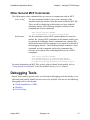
SmartModel Products
Application Notes Manual
To search the entire manual
set, press this toolbar button.
For help, refer to intro.pdf.
August 2001
SmartModel Application Notes
Copyright © 2001 Synopsys, Inc.
All rights reserved.
Printed in USA.
Information in this document is subject to change without notice.
SmartModel, ModelAccess, ModelTools, SourceModel Library, LM-1200, and
Synopsys Eaglei are registered trademarks; MemPro, MemSpec, MemScope,
FlexModel, LM-family, LM-1400, Logic Model, ModelSource, and SourceModel are
trademarks of Synopsys, Inc.
All company and product names are trademarks or registered trademarks of their
respective owners.
2
Synopsys, Inc.
August 2001
SmartModel Application Notes
Contents
Contents
Preface . . . . . . . . . . . . . . . . . . . . . . . . . . . . . . . . . . . . . . . . . . . . . . . . . . . . . . . . . . . . . .
About This Manual . . . . . . . . . . . . . . . . . . . . . . . . . . . . . . . . . . . . . . . . . . . . . . . . . .
Related Documents . . . . . . . . . . . . . . . . . . . . . . . . . . . . . . . . . . . . . . . . . . . . . . . . . .
Manual Overview . . . . . . . . . . . . . . . . . . . . . . . . . . . . . . . . . . . . . . . . . . . . . . . .
Typographical and Symbol Conventions . . . . . . . . . . . . . . . . . . . . . . . . . . . . . . .
Getting Help . . . . . . . . . . . . . . . . . . . . . . . . . . . . . . . . . . . . . . . . . . . . . . . . . . . . . . .
The Synopsys Website . . . . . . . . . . . . . . . . . . . . . . . . . . . . . . . . . . . . . . . . . . . . .
Synopsys Common Licensing (SCL) Document Set . . . . . . . . . . . . . . . . . . . .
Comments? . . . . . . . . . . . . . . . . . . . . . . . . . . . . . . . . . . . . . . . . . . . . . . . . . . . . . . .
7
7
7
7
8
9
9
10
10
Chapter 1
Verifying FPGA Designs . . . . . . . . . . . . . . . . . . . . . . . . . . . . . . . . . . . . . . . . . . . . . . .
Introduction . . . . . . . . . . . . . . . . . . . . . . . . . . . . . . . . . . . . . . . . . . . . . . . . . . . . . . .
What Are SmartCircuit Models? . . . . . . . . . . . . . . . . . . . . . . . . . . . . . . . . . . . . . . .
SmartCircuit Design Flow . . . . . . . . . . . . . . . . . . . . . . . . . . . . . . . . . . . . . . . . . . . .
SmartCircuit Models — Some Basics . . . . . . . . . . . . . . . . . . . . . . . . . . . . . . . . . . .
Load Command Switches . . . . . . . . . . . . . . . . . . . . . . . . . . . . . . . . . . . . . . . . .
Other General MCF Commands . . . . . . . . . . . . . . . . . . . . . . . . . . . . . . . . . . . .
Debugging Tools . . . . . . . . . . . . . . . . . . . . . . . . . . . . . . . . . . . . . . . . . . . . . . . . . . .
Visual SmartBrowser (VSB) . . . . . . . . . . . . . . . . . . . . . . . . . . . . . . . . . . . . . . .
Windows . . . . . . . . . . . . . . . . . . . . . . . . . . . . . . . . . . . . . . . . . . . . . . . . . . . . . .
Event Tracing . . . . . . . . . . . . . . . . . . . . . . . . . . . . . . . . . . . . . . . . . . . . . . . . . . .
Targeting Unsupported Devices . . . . . . . . . . . . . . . . . . . . . . . . . . . . . . . . . . . . . . .
Interactive SmartBrowser Commands . . . . . . . . . . . . . . . . . . . . . . . . . . . . . . . . . . .
11
11
11
12
13
14
15
15
16
23
26
31
31
Chapter 2
Interfacing with Non-FlexModels . . . . . . . . . . . . . . . . . . . . . . . . . . . . . . . . . . . . . . .
Introduction . . . . . . . . . . . . . . . . . . . . . . . . . . . . . . . . . . . . . . . . . . . . . . . . . . . . . . .
Synchronizing with Non-FlexModels . . . . . . . . . . . . . . . . . . . . . . . . . . . . . . . . . . .
Sync8_fx Model Interface . . . . . . . . . . . . . . . . . . . . . . . . . . . . . . . . . . . . . . . . . . . .
Using PCI SourceModels and ppc603_fx FlexModel in Same Design . . . . . . . . .
Sync8 as Non-design Verification Pin . . . . . . . . . . . . . . . . . . . . . . . . . . . . . . . . . . .
33
33
34
35
36
37
Chapter 3
SystemC SmartModel Library . . . . . . . . . . . . . . . . . . . . . . . . . . . . . . . . . . . . . . . . . 41
Supported SmartModel Library Capabilities . . . . . . . . . . . . . . . . . . . . . . . . . . . . . 42
August 2001
Synopsys, Inc.
3
Contents
SmartModel Application Notes
Command Control . . . . . . . . . . . . . . . . . . . . . . . . . . . . . . . . . . . . . . . . . . . . . . .
Attributes . . . . . . . . . . . . . . . . . . . . . . . . . . . . . . . . . . . . . . . . . . . . . . . . . . . . . .
Timing . . . . . . . . . . . . . . . . . . . . . . . . . . . . . . . . . . . . . . . . . . . . . . . . . . . . . . . .
Timing Check Control . . . . . . . . . . . . . . . . . . . . . . . . . . . . . . . . . . . . . . . . . . . .
Command Channel . . . . . . . . . . . . . . . . . . . . . . . . . . . . . . . . . . . . . . . . . . . . . .
Fault Simulation . . . . . . . . . . . . . . . . . . . . . . . . . . . . . . . . . . . . . . . . . . . . . . . . .
Save and Restore . . . . . . . . . . . . . . . . . . . . . . . . . . . . . . . . . . . . . . . . . . . . . . . .
Reset and Reconfigure . . . . . . . . . . . . . . . . . . . . . . . . . . . . . . . . . . . . . . . . . . . .
Model Status Report . . . . . . . . . . . . . . . . . . . . . . . . . . . . . . . . . . . . . . . . . . . . .
Dumping Memory Contents . . . . . . . . . . . . . . . . . . . . . . . . . . . . . . . . . . . . . . .
Model Logging . . . . . . . . . . . . . . . . . . . . . . . . . . . . . . . . . . . . . . . . . . . . . . . . .
Tracing . . . . . . . . . . . . . . . . . . . . . . . . . . . . . . . . . . . . . . . . . . . . . . . . . . . . . . . .
SmartModel Windows . . . . . . . . . . . . . . . . . . . . . . . . . . . . . . . . . . . . . . . . . . . .
Wrapper Generation . . . . . . . . . . . . . . . . . . . . . . . . . . . . . . . . . . . . . . . . . . . . . . . .
Model Header File . . . . . . . . . . . . . . . . . . . . . . . . . . . . . . . . . . . . . . . . . . . . . . .
Model Command Header File . . . . . . . . . . . . . . . . . . . . . . . . . . . . . . . . . . . . . .
Platform Support . . . . . . . . . . . . . . . . . . . . . . . . . . . . . . . . . . . . . . . . . . . . . . . . . . .
Product Usage . . . . . . . . . . . . . . . . . . . . . . . . . . . . . . . . . . . . . . . . . . . . . . . . . . . . .
Installation . . . . . . . . . . . . . . . . . . . . . . . . . . . . . . . . . . . . . . . . . . . . . . . . . . . . .
Using SWIFT Models in SystemC Designs . . . . . . . . . . . . . . . . . . . . . . . . . . . . . .
Wrapper Files . . . . . . . . . . . . . . . . . . . . . . . . . . . . . . . . . . . . . . . . . . . . . . . . . .
Code Examples . . . . . . . . . . . . . . . . . . . . . . . . . . . . . . . . . . . . . . . . . . . . . . . . .
Make Files . . . . . . . . . . . . . . . . . . . . . . . . . . . . . . . . . . . . . . . . . . . . . . . . . . . . .
Simulation . . . . . . . . . . . . . . . . . . . . . . . . . . . . . . . . . . . . . . . . . . . . . . . . . . . . .
42
42
42
42
43
43
43
43
43
43
44
44
44
44
45
46
48
49
49
51
51
51
53
54
Index . . . . . . . . . . . . . . . . . . . . . . . . . . . . . . . . . . . . . . . . . . . . . . . . . . . . . . . . . . . . . . . 55
4
Synopsys, Inc.
August 2001
SmartModel Application Notes
Figures
Figures
Figure 1:
Figure 2:
Figure 3:
Figure 4:
Figure 5:
Figure 6:
Figure 7:
Figure 8:
Figure 9:
Figure 10:
August 2001
SmartCircuit FPGA Design Flow . . . . . . . . . . . . . . . . . . . . . . . . . . . . . . .
Waveform Viewing Through Windows . . . . . . . . . . . . . . . . . . . . . . . . . . .
Event Tracing . . . . . . . . . . . . . . . . . . . . . . . . . . . . . . . . . . . . . . . . . . . . . .
Causal and Event Tracing . . . . . . . . . . . . . . . . . . . . . . . . . . . . . . . . . . . . .
FlexModel Command Core . . . . . . . . . . . . . . . . . . . . . . . . . . . . . . . . . . . .
sync8_fx Model Interface . . . . . . . . . . . . . . . . . . . . . . . . . . . . . . . . . . . . .
PCI SourceModel Coordinated with FlexModel . . . . . . . . . . . . . . . . . . . .
Non-design Verification Pin Example . . . . . . . . . . . . . . . . . . . . . . . . . . . .
Testbench Connectivity . . . . . . . . . . . . . . . . . . . . . . . . . . . . . . . . . . . . . . .
Installing SystemC SmartModel Support . . . . . . . . . . . . . . . . . . . . . . . . .
Synopsys, Inc.
12
23
26
27
34
35
36
38
49
50
5
Figures
6
SmartModel Application Notes
Synopsys, Inc.
August 2001
v
SmartModel Application Notes
Preface
Preface
About This Manual
This manual contains application notes for the SmartModel Library of simulation
models and other compatible products. Topics include different ways to use multiple
Synopsys products or tools in combination to solve verification problems.
Related Documents
For general information about SmartModel Library documentation, or to navigate to a
different online document, refer to the Guide to SmartModel Documentation. For the
latest information on supported platforms and simulators, refer to SmartModel Library
Supported Simulators and Platforms.
For detailed information about specific models in the SmartModel Library, use the
Browser tool ($LMC_HOME/bin/sl_browser) to access the online model datasheets.
Manual Overview
This manual contains the following chapters:
Preface
Describes the manual and lists the typographical
conventions and symbols used in it. Tells how to get
technical assistance.
Chapter 1
Verifying FPGA Designs
Different ways that you can use SmartModel FPGA
models to debug programmable designs.
Chapter 2
Interfacing with Non-FlexModels
How to use the special sync8_fx FlexModel to
interface with non-FlexModels and simplify
complex verification processes.
August 2001
Synopsys, Inc.
7
v
Preface
SmartModel Application Notes
Typographical and Symbol Conventions
●
Default UNIX prompt
Represented by a percent sign (%).
●
User input (text entered by the user)
Shown in bold type, as in the following command line example:
% cd $LMC_HOME/hdl
●
System-generated text (prompts, messages, files, reports)
Shown as in the following system message:
No Mismatches: 66 Vectors processed: 66 Possible”
●
Variables for which you supply a specific value
Shown in italic type, as in the following command line example:
% setenv LMC_HOME prod_dir
In this example, you substitute a specific name for prod_dir when you enter the
command.
●
Command syntax
Choice among alternatives is shown with a vertical bar ( | ) as in the following
syntax example:
-effort_level low | medium | high
In this example, you must choose one of the three possibilities: low, medium, or
high.
Optional parameters are enclosed in square brackets ( [ ] ) as in the following
syntax example:
pin1 [pin2 … pinN]
In this example, you must enter at least one pin name (pin1), but others are optional
([pin2 … pinN]).
8
Synopsys, Inc.
August 2001
SmartModel Application Notes
v
Preface
Getting Help
If you have a question while using Synopsys products, use the following resources:
1. Start with the available product documentation installed on your network or located
at the root level of your Synopsys CD-ROM. Every documentation set contains
overview information in the intro.pdf file.
Additional Synopsys documentation is available at this URL:
http://www.synopsys.com/products/lm/doc
Datasheets for models are available using the Model Directory:
http://www.synopsys.com/products/lm/modelDir.html
2. Visit the online Support Center at this URL:
http://www.synopsys.com/support/lm/support.html
This site gives you access to the following resources:
❍
SOLV-IT!, the Synopsys automated problem resolution system
❍
product-specific FAQs (frequently asked questions)
❍
lists of supported simulators and platforms
❍
the ability to open a support help call
❍
the ability to submit a delivery request for some product lines
3. If you still have questions, you can call the Support Center:
North American customers:
Call the Synopsys Eaglei and Logic Modeling Products Support Center hotline at
1-800-445-1888 (or 1-503-748-6920) from 6:30 AM to 5 PM Pacific Time, Monday
through Friday.
International customers:
Call your local sales office.
The Synopsys Website
General information about Synopsys and its products is available at this URL:
http://www.synopsys.com
August 2001
Synopsys, Inc.
9
Preface
v
SmartModel Application Notes
Synopsys Common Licensing (SCL) Document Set
Synopsys common licensing (SCL) software is delivered on a CD that is separate from
the tools that use this software to authorize their use. The SCL documentation set
includes the following publications, which are located in (root)/docs/scl on the SCL CD
and also available on the Synopsys FTP server (ftp://ftp.synopsys.com):
●
Licensing QuickStart—(142K PDF file)
This booklet provides instructions for obtaining an electronic copy of your license
key file and for installing and configuring SCL on UNIX and Windows NT.
●
Licensing Installation and Administration Guide—(2.08M PDF file)
This guide provides information about installation and configuration, key concepts,
examples of license key files, migration to SCL, maintenance, and troubleshooting.
You can find general SCL information on the Web at:
http://www.synopsys.com/keys
Comments?
To report errors or make suggestions, please send e-mail to:
[email protected]
To report an error that occurs on a specific page, select the entire page (including
headers and footers), and copy to the buffer. Then paste the buffer to the body of your
e-mail message. This will provide us with information to identify the source of the
problem.
10
Synopsys, Inc.
August 2001
SmartModel Application Notes
v
Chapter 1: Verifying FPGA Designs
1
Verifying FPGA Designs
Introduction
Custom logic implemented in an FPGA is often the most critical part of a system and
must be extensively tested. As many designers have discovered, however, there is a
difference between testing the functionality of a stand-alone device and testing a device
installed in a system. While a designer can add flexibility and speed to the early stages
of design using text-based, high-level design methods and synthesis, the device can later
appear as a black box to an engineer. Additionally, designs are now typically too large
and complex to rely on manual debugging methods. This dilemma results in the need for
a different approach to verifying and debugging FPGA designs.
This application note explains how to use the debug features associated with
SmartModel FPGA models—known as SmartCircuit models—to verify designs that
contain FPGA devices.
What Are SmartCircuit Models?
SmartCircuit models are essentially templates of unconfigured devices. These models
provide designers with advanced verification and debugging features that enable them to
verify, in the shortest timeframe, a design incorporating a complex FPGA device.
The models are programmed by a design netlist in a standard format produced by vendor
place-and-route tools. SmartCircuit FPGAs increase productivity by enabling designers
to focus on the design and system verification tasks, rather than on simulation details.
For general information on SmartCircuit models, refer to “SmartCircuit FPGA Models”
in the SmartModel Library User’s Manual. You can navigate to other SmartModel
manuals from the Guide to SmartModel Documentation.
August 2001
Synopsys, Inc.
11
v
Chapter 1: Verifying FPGA Designs
SmartModel Application Notes
SmartCircuit Design Flow
Figure 1 provides a conceptual overview of the FPGA design flow using SmartCircuit
models in system verification.
Design Entry — Synthesize Design
Place and route using vendor tools
Create post-routed netlist
System verification using SmartModel Library
FPGA configured using netlist
Program device
µP
FPGA
Figure 1: SmartCircuit FPGA Design Flow
12
Synopsys, Inc.
August 2001
SmartModel Application Notes
v
Chapter 1: Verifying FPGA Designs
SmartCircuit Models — Some Basics
Before you can start simulating with a SmartCircuit model, you need to configure it
using a netlist generated from your vendor’s tools. Refer to the individual model
datasheet for an explanation of how to generate the netlist in the correct format. The
model extracts all of the design’s function and timing information from this netlist. You
can access datasheets for all Synopsys models through this link:
http://www.synopsys.com/products/lm/modelDir.html
Each SmartCircuit model has a property called “SCFFILE” associated with it.
Depending on which simulator you are using, this may be one of the following:
●
Property on the symbol
●
VHDL generic
●
Verilog defparam
The SCFFILE property must be set to point to a model command file (MCF), which is a
text file that you use to tell the model which netlist to load and to enable/disable the
simulator interactive model debugging features.
SCFFILE => Model Command File (MCF)
The following is an example of a basic MCF:
#########################################
#####
Model Command File (MCF):
#####
#########################################
# Load netlist design file (.ccn):
# --------------------------------load -source /d/projects/flying_ducks/edif/ducks.edo
There are several reasons to configure a SmartCircuit model through an MCF file.
During a simulation, you will typically turn on and off the debugging features you are
using. If you have to change a property on the model to do this, you might have to
recompile the design.
Setting the SCFFILE property once and then changing values in the MCF means
changes won’t require you to recompile your design. Configuring the model in this
fashion also means that you only have to learn how to use the SmartCircuit models once,
irrespective of which simulator you are using. This process enables you to develop a
clean and easy simulation design flow for all your FPGA vendors.
August 2001
Synopsys, Inc.
13
Chapter 1: Verifying FPGA Designs
v
SmartModel Application Notes
Load Command Switches
The load command specifies the netlist to load for the model when you start the
simulator. The following are switches you can use with the load command:
-source
The -source switch tells the model to auto-compile the netlist. The
netlist is compiled into the SmartCircuit internal .ccn format. The
netlist is compiled only if the .ccn file is out of date with respect to
the source netlist, which can happen if you overwrite the vendor
netlist with a new one. Compiling like this saves time at simulation
startup.
To configure the full-functional, full-timing model in your
simulator, you need a minimum of one line in the MCF:
load -source netlist_pathname
-nocheck
The -nocheck switch disables reports of all timing constraint
violations. You should use this switch only if you do not care
about timing violations during the simulation. The following MCF
example incorporates the -nocheck switch:
load -source netlist_pathname -nocheck
-scale
The -scale switch scales all of the timing that is extracted from the
netlist. This switch enables you to experiment with how a change
in the timing characteristics would affect on your design. As an
example, a factor of 0.9 will up-rate the timing, whereas a factor of
1.1 will de-rate the timing. The following MCF example
incorporates the -scale switch:
load -source netlist_pathname -scale 1.1
You can also pass switches from the load command to a compiler called smartccn,
which is called to compile the vendor netlist into the .ccn format of the netlist design
file. For more information on smartccn and smartccn switches, refer to “smartccn
Command Reference” in the SmartModel Library User’s Manual.
14
Synopsys, Inc.
August 2001
SmartModel Application Notes
v
Chapter 1: Verifying FPGA Designs
Other General MCF Commands
The following are other commands that you can use in conjunction with an MCF:
echo “string”
The echo command enables you to print a message to the
simulator transcript window when the model reads the MCF file.
This is useful in identifying which netlist you have loaded at
simulation startup. The following example combines a load
command and an echo command:
load -source netlist_pathname
echo “Loaded Design 1 of Project Flying Ducks”
do filename
The do command executes MCF commands that are stored in
another file. Storing MCF commands in this manner enables you
to partition the debugging feature commands into separate files,
which makes them easier to manage if you intend to enable all of
the debugging features. The following example combines a load
command, an echo command, and two do commands that
reference two separate files containing different sets of MCF
commands:
load -source netlist_pathname
echo “Loaded Design 1 of Project Flying Ducks”
do /d/projects/flying_ducks/mcf_files/windows.do
do /d/projects/flying_ducks/mcf_files/causal_trace.do
For more information on MCF files as they relate to SmartCircuit models, refer to
“Using SmartCircuit Models” in the SmartModel Library User’s Manual.
Debugging Tools
SmartCircuit models operate with a set of advanced debugging tools that enable you to
efficiently and quickly identify the root cause of a problem. You can use the following
debugging tools on your design:
●
●
●
Visual SmartBrowser (VSB)
Windows
Event Tracing
August 2001
Synopsys, Inc.
15
Chapter 1: Verifying FPGA Designs
v
SmartModel Application Notes
Visual SmartBrowser (VSB)
With today's very large and complex FPGA designs, designers typically are interested in
only a small section of a netlist. A good starting point for debugging any project is with
the design schematic.
The Visual SmartBrowser (VSB) tool enables you to visually display an FPGA netlist
(.ccn file) using an on-demand viewing technique, which enables you to concentrate on
only the portions of the design in which you are interested.
VSB comes with a self-paced tutorial that introduces you to all of the VSB features.
Since this discussion cannot address hands-on learning, you might want to refer to
“Learning Visual SmartBrowser” in the UNIX version or NT version of the Visual
SmartBrowser User’s Manual. You can also access the tutorial document from the VSB
help pull-down menu.
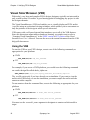
Using the VSB
To start the VSB on your FPGA design, execute one of the following commands, as
appropriate for your platform:
●
UNIX
$LMC_HOME/bin/vsb CCN_file_pathname
●
NT
%LMC_HOME%\bin\vsb CCN_file_pathname
For example, if you are on a UNIX platform, you would issue the following command
on a netlist design file called ducks_alpha.ccn:
$LMC_HOME/bin/vsb /d/projects/flying_ducks/mcf_files/ducks_alpha.ccn
The .ccn file exists only if you have already run a simulation. If you want to view the
netlist with VSB before you run the simulation, you must compile the netlist with the
smartccn netlist compiler.
To run smartccn from the command line, execute the following as appropriate for your
platform:
●
UNIX
$LMC_HOME/bin/smartccn -m model_name netlist_pathname
●
NT
%LMC_HOME%\bin\smartccn -m model_name netlist_pathname
You must use the -m model_name argument to designate to smartccn which model to
target.
16
Synopsys, Inc.
August 2001
SmartModel Application Notes
v
Chapter 1: Verifying FPGA Designs
The smartccn compiler generates a .ccn file in the current working directory, after which
you can invoke the VSB on the new file. The smartccn compiler also generates a .pmp
file, which you can use to see which internal port names have been mapped to the
SmartCircuit model. SmartCircuit pin names are generic for the configurable pins,
whereas all the dedicated FPGA device pins are set by the vendor.
For more information on smartccn and smartccn switches, refer to “smartccn Command
Reference” in the SmartModel Library User’s Manual.
8 Note
For the NT version only: If you exit VSB, but then want to view the last
window you used, you can restart the VSB using the -r log_file argument in
the vsb command.
VSB Tools
There are several tools within the VSB environment, some of which are discussed in this
application note:
●
Main Window
●
Hierarchy View
●
Connection View
●
Examine View
●
Timing Form
●
Windows
August 2001
Synopsys, Inc.
17
Chapter 1: Verifying FPGA Designs
v
SmartModel Application Notes
Main Window
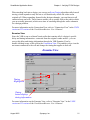
When the VSB invokes, it displays the Main window. The Main window is the starting
point for debugging your design, giving you access to specialized views that contain
different types of information.
Hierarchy View
Connection View
Examine View
Global Select
Windows & Monitors
Net Tags
Causal Trace
From the Main Window, you can:
●
Examine the post-routed netlist at a number of different levels.
●
Look at the design hierarchy using the Hierarchy View.
●
Create an “on-demand” schematic of the design using the Connection View.
●
Examine the timing of any cell using the Examine View.
●
Search through the netlist for a particular cell, net, or port instance using the Global
Select tool.
●
View a causal path using the Causal Trace Tool; causal tracing is discussed in
“Event Tracing” on page 26.
●
Create a windows declaration file; windows are discussed in “Windows” on
page 23.
For more information on the Main Window, refer to “Main Window” in the UNIX
version or NT version of the Visual SmartBrowser User’s Manual.
18
Synopsys, Inc.
August 2001
SmartModel Application Notes
v
Chapter 1: Verifying FPGA Designs
Hierarchy View
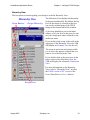
The best place to start navigating your design is with the Hierarchy View.
Hierarchy View
Zoom Buttons
Design Hierarchy
The Hierarchy View displays the hierarchy
of the post-routed netlist. By default, the top
level of the design is selected so that you
can see the external ports of the FPGA
design in the bottom half of the window.
A port icon identifies a port as an input,
output, or I/O pin. Next to the icon you can
see your design port name, followed by the
model pin name.
If you double-click on any of the cells in the
upper part of the Hierarchy View, the VSB
will display an Examine View for the cell.
The zoom in and zoom out buttons enable
you to select the amount of detail that you
want to see in the Hierarchy View.
If you double-click on the port icons in the
lower section of the Hierarchy View, the
VSB will display the schematic Connection
View.
For more information on the Hierarchy
View, refer to “Hierarchy View” in either
the UNIX version or NT version of the
Visual SmartBrowser User’s Manual.
Design Ports
August 2001
Synopsys, Inc.
19
Chapter 1: Verifying FPGA Designs
v
SmartModel Application Notes
Connection View
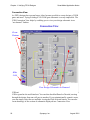
As FPGA designs have grown larger, it has become possible to create designs of 250K
gates and more. Trying to debug a 100–250K gate schematic is nearly impossible. The
VSB Connection View helps by enabling you to view your design schematic in an
“on-demand” fashion.
Connection View
Zoom
Buttons
Hide
Cells
View Design Schematic on Demand
VSB enables you to navigate around a schematic by clicking on a cell port, which causes
VSB to generate the associated net. You can then track backward or forward, moving
through the design from one cell port to another. If you unintentionally expand a route,
you can simply select the net and hide it using the Hide Selected button. You can also
create hardcopy of the section of schematic displayed in a Connection View.
20
Synopsys, Inc.
August 2001
SmartModel Application Notes
v
Chapter 1: Verifying FPGA Designs
When tracking back into a design, you can use an Event Tracing algorithm called causal
tracing, which expands to only the net or cell that directly affects the value on the
original cell. When expanding forward in the design schematic, you can fan out to all
connected nets and cells. These features enable you to quickly look at the path in which
you are actually interested, which saves time in searching through the entire schematic
for a design problem.
For more information on the Connection View, refer to “Connection View” in the UNIX
version or NT version of the Visual SmartBrowser User’s Manual.
Examine View
Since the VSB is run on a SmartCircuit netlist that contains all of a design’s specific
delay and timing information—extracted from the original vendor netlist—you can
access this delay and timing information through the VSB Examine View by
double-clicking on any of the cells in the Connection View. This enables you to view the
net names connected to the cell and change the timing that applies to that cell.
Examine View
Timing
Highlighted
Timing
button displays
timing information
For more information on the Examine View, refer to “Examine View” in the UNIX
version or NT version of the Visual SmartBrowser User’s Manual.
August 2001
Synopsys, Inc.
21
Chapter 1: Verifying FPGA Designs
v
SmartModel Application Notes
Timing Form
Model timing includes timing check values and cell/routing delay values, which contain
all of the functional and timing information extracted from your place-and-route tool.
You can access timing information through the VSB Timing Form, which enables you to
change any timing parameter on the cell and experiment with different scenarios to
identify a fix to a timing problem. These changes do not affect the source netlist, but
enable you to identify exactly where the problem lies so that you can then fix the
problem in the source.
Timing Form
Timing
Values
As an example, suppose you have encountered some sort of timing violation. You can
use VSB Event Tracing (discussed on page 26) to identify the critical path, which
enables you to look at the timing used for the cells on that path. If you identify a large
delay on that path, you can use the timing form to decrease a small amount of time from
the path, re-save the .ccn file, and re-simulate the modified design. If this fixes the
problem, you know that you have to return to the source and constrain that path more
tightly. However, you may find that by reducing the delay on that path, you cause hold
violations. In that case, you can go back to the original .ccn file and try something else
to fix the problem.
As you can see, using SmartCircuit debugging processes to modify a .ccn file in much
quicker than a repetitive, iterative process of going back to the source, re-synthesizing,
and re-doing the place-and-route.
22
Synopsys, Inc.
August 2001
v
SmartModel Application Notes
Chapter 1: Verifying FPGA Designs
For more information on the timing form in the Examine View, refer to “Examine View”
in the UNIX version or NT version of the Visual SmartBrowser User’s Manual.
Windows
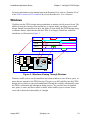
Visibility into the FPGA design during simulation is another critical success factor. The
ability to trace the contents of an internal net or register helps you debug your overall
design. SmartCircuit models also have the ability to look inside the FPGA design using
a windows feature, which means that the FPGA is no longer a black box within the
simulation, as illustrated in Figure 2.
In<1>
/XC/D1
/XC/Q
/XC/L1
Out<2>
A
S
I
C
µP
Logic
block
FPGA
DUT
Figure 2: Waveform Viewing Through Windows
Windows enable you to use the simulation waveform window to trace all nets, ports, or
states that are internal to the FPGA design. This gives you full visibility into the FPGA
design at a level that you can easily understand. Having this visibility substantially eases
the FPGA verification and subsequent debug process. You can also trace designated
nets, ports, or states and force values on them, which enables you to recreate corner
cases and evaluate the functionality of a design.
August 2001
Synopsys, Inc.
23
Chapter 1: Verifying FPGA Designs
v
SmartModel Application Notes
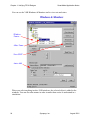
You can use the VSB Windows & Monitors tool to view nets and states.
Windows & Monitors
Window
Names
Alias Name
Save MCF
Auto-Add
When you select anything in other VSB windows, the selected object is added to the
windows. You can also alias names in order to make them easier to understand in a
simulation.
24
Synopsys, Inc.
August 2001
SmartModel Application Notes
v
Chapter 1: Verifying FPGA Designs
Finally, when you have all the windows that you want in a simulation, you can save a
new or partial MCF for use in a later simulation. Here is an example that shows how to
specify windows in an MCF file:
bus SEGS7 /u2/segs1333<7>
window SEGS7
bus SEGS2 /u2/segs1332<2>
window SEGS2
The bus command aliases the internal signal; in this example, the internal net
/u2/segs1333<7> is aliased to SEGS7. The window command makes the signal available
in the simulator.
You can include this new file into your main MCF by using a do command, as shown in
the following example:
load -source /d/projects/flying_ducks/mcf_files/ducks_alpha.ccn
do /d/projects/flying_ducks/mcf_files/windows.do
The windows file tells the SmartCircuit model which extra signals should be available
within the simulation. To access a designated window from a simulator, you should use
the trace and assign commands appropriate for that simulator. For the exact command to
access windows, refer to your simulator documentation.
The VSB tool also has a monitor feature that enables you to create a text printout of the
values on the nets, ports, or states in the selected portions of the FPGA design that are
within the simulator transcript window. For example, to enable the monitors feature for
the OE and DBUS signals, you would add the following line to your MCF file:
monitor OE , DBUS
You can put monitor commands into an MCF “do” file, just as you can the window and
bus commands.
For more information on SmartModel windows, refer to “SmartModel Windows” and
“SmartCircuit Monitor” in the SmartModel Library User’s Manual. For more
information on the VSB Windows & Monitors, refer to “Windows & Monitors Tool” in
the UNIX version or NT version of the Visual SmartBrowser User’s Manual.
August 2001
Synopsys, Inc.
25
Chapter 1: Verifying FPGA Designs
v
SmartModel Application Notes
Event Tracing
A key factor in successfully verifying an FPGA design is the ability to debug functional
and timing errors. If you encounter functional or timing errors during a simulation run, it
is important to quickly trace the event back to the parent event that is the root cause of
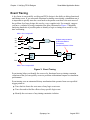
the problem. In a large design, this can be a very complex task. For example, suppose
you have a violation of setup constraints like those illustrated in Figure 3. Manually
analyzing hundreds of possible paths to identify a logic or timing error would be very
time consuming.
242.0 — 0 to 1 on port A1
A1
A2
A3
Violated setup constraint
on D at time 260.0ns.
Tsu was 2ns;
specified minimum is 5.0ns.
A4
D
A5
REG2
REG1
CLK
CLK
258.0 — 0 to 1 on port CLK
Figure 3: Event Tracing
Event tracing helps you identify the source of a functional error or timing constraint
violation so that you can quickly correct a problem with minimal impact on simulation
performance.
Event tracing uses an automated history mechanism that operates from user-specified
trigger points to:
26
●
Trace back to locate the root cause of any logic event error.
●
Trace forward to find the effects of any specific logic event.
●
Identify the root cause of any timing constraint violation.
Synopsys, Inc.
August 2001
SmartModel Application Notes
v
Chapter 1: Verifying FPGA Designs
Event tracing reports identify the root of logic or timing errors by generating a list of
events internal to the FPGA that are causally related to the problem event. You can
control the scope of the report, as well as target multiple events and simulation times, as
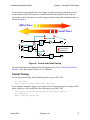
shown in Figure 4.
Effect Trace
Causal Trace
1
Logic Event Flow
Parent Event
Child Event
1
0
Figure 4: Causal and Event Tracing
For more information on SmartCircuit debugging tools, refer to “SmartCircuit FPGA
Models” in the SmartModel Library User’s Manual.
Causal Tracing
To turn on causal tracing, add the following lines to your MCF file:
set cause full
report cause net_name [start_time] [end_time]
For a complete example, suppose you want to turn on causal tracing for a design called
ducks_alpha.ccn. You would place the following in your MCF file:
load -source /d/projects/flying_ducks/mcf_files/ducks_alpha.ccn
set cause full
report cause net_CE 150 300
August 2001
Synopsys, Inc.
27
Chapter 1: Verifying FPGA Designs
v
SmartModel Application Notes
The command “set cause full” enables a full causal report. The full switch generates a
report that lists all the nets and cells in that path. The nofull switch generates a report
that lists only the start and end points. The start_time and end_time specify the window
in which the causal tracing on the selected net is turned on. Typically, you would only
want to turn on causal tracing around a particular problem that you are seeing, such as a
glitch or an X on a pin.
You can also turn on the causal tracing feature around all timing violations. To do this,
add the following line to your MCF file:
set cause constraint
Causal Trace Report Example
The following causal trace report is triggered on a user-specified event and then traces
that event back through time to the parent event. In this case, the parent event occurred
on the CLOCK_EN port. As you can see, causal tracing has tracked the output event all
the way back to the causal event on an input pin. You can see the X traveling through the
design to the output.
SmartModel TRACE:
Instance /TESTBENCH/DUT/SMART(SmartCircuit),at time 586.3 NS.
Beginning cause report from "DBUS<6>":
586.3 ns 1->X on model port DBUS<6>
586.3 ns 1->X on cell port /CELL4/O, net DBUS<6>
586.3 ns 1->X on cell port /CELL4/T, net DBUS_ENABLE<0>
569.4 ns 1->X on cell port /CELL40/O,net DBUS_ENABLE<0>
564.9 ns 0->X on cell port /CELL44/O, net ENABLEBUS_SIG
562.6 ns 1->X on cell port /CELL43/O, net U2;N735
560.6 ns 0->X on cell port /CELL42/O, net YSIG2
558.1 ns 0->X on cell port /U2;MODE<1>/Q,net U2;MODE<1>
555.3 ns 0->X on cell port /U2;MODE<1>/C,net CLOCK_EN
553.9 ns 0->X on cell port /BUFGS_TL/O, net CLOCK_EN
550.0 ns 0->Z on model port CLOCK_EN
Report completed.
MCF Example for Causal Tracing Around Timing Violations
Suppose you want to turn on causal tracing around timing violations in a design called
ducks_alpha.ccn. You would place the following in your MCF file:
load -source /d/projects/flying_ducks/mcf_files/ducks_alpha.ccn
set cause constraint
The set cause command defaults to “noconstraint,” so you must specify “constraint” as
the set cause argument in order to constrain causal tracing around timing violations.
28
Synopsys, Inc.
August 2001
SmartModel Application Notes
v
Chapter 1: Verifying FPGA Designs
Causal Trace/Timing Constraint Violation Example
In the following example, you can see a causal trace that was triggered by a timing
constraint violation, where a pulse on the RESET port was too small.
SmartModel ERROR:
Violated pulsewidth constraint PW_CLR+ on CLR for cell U2;MODE<1> at
time 12.1 ns.
Actual pulsewidth time 3.0ns, specified minimum is 4.0 ns.
Instance /TESTBENCH/DUT/SMART(SmartCircuit),at time 12.1 NS.
SmartModel TRACE:
Constraint causal report for event on "CLR" at 12.1 ns:
12.1 ns 1->0 on cell port /CELL72/O, net YSIG27
10.5 ns 1->0 on cell port /CELL37/O, net U2;N658
5.5 ns 0->1 on cell port /CELL33/O, net N4
3.0 ns 0->1 on model port RESET
Report completed.
For more information on causal tracing, refer to “Visualizing a Cause Report from a
Simulation Run” in the UNIX version or NT version of the Visual SmartBrowser User’s
Manual.
Effect Tracing Example
You can also perform effect tracing that enables you to track forward into an FPGA
design. Effect tracing is a technique that shows you what effect an input change has on
the design.
To turn on effect tracing, add the following line to your MCF file:
Report effect net_name [start_time] [end_time]
For a complete example, suppose you want to turn on effect tracing for a design called
ducks_alpha.ccn. You would place the following in your MCF file:
load -source /d/projects/flying_ducks/mcf_files/ducks_alpha.ccn
set cause full
report effect IN_DATA 4500 6000
August 2001
Synopsys, Inc.
29
v
Chapter 1: Verifying FPGA Designs
SmartModel Application Notes
Effect Trace Report Example
The following report traces the effect that a 0-to-X transition has on the DBUS<6> port.
You can see that the X propagates through the design to the U3/I<6> instance net.
SmartModel TRACE:
Instance /TESTBENCH/DUT/SMART(SMartCircuit),at time 1087.1 NS.
Triggering effect report
1087.1 ns Effect 0->X on
1090.9 ns Effect 0->X on
1090.9 ns Effect 0->X on
Report completed.
from
cell
cell
cell
"DBUS<6>" at 1087.1 ns:
port /CELL3/O,net U3;N163
port /CELL50/O, net YSIG6
port /U3;I<6>/D,net YSIG6
For more information on effect tracing, refer to “Visualizing an Effect Report from a
Simulation Run” in the UNIX version or NT version of the Visual SmartBrowser User’s
Manual.
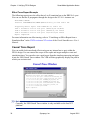
Causal Trace Report
You can enable both causal and effect tracing on any internal net or port within the
FPGA design. You can control the scope of the report and target multiple events and
simulation times. You can also cut a causal report from the simulator transcript and paste
it into the VSB Causal Trace window. The VSB will then graphically display the path in
which you are interested.
Causal Trace Window
LMC Model Trace in 'TB.DUT.CFPGA.SMARTMODEL'at 16100 ps:
Beginning cause report from "JDOE_FSRAMCE":
16.1 ns 0->X on cell port /U1287/$1I20.GTS.TRI/OUT, net
16.1 ns 0->X on cell port /U1287/$1I20/OUT, net /U1287/
5.3 ns 0->X on cell port /FSRAMCE_INT_reg/OUT, net
5.3 ns X->1 on cell port /FSRAMCE_INT_reg/CLK, net
3.9 ns X->1 on cell port /U879;clkbuf/OUT, net n2468
0.0 ns X->1 on cell port /U879;clkio_buf/OUT, net
0.0 ns X->1 on model port FCLOCK
Report completed.
8 Note
Currently, the VSB Causal Trace window is only available on the Intel NT
platform.
30
Synopsys, Inc.
August 2001
SmartModel Application Notes
v
Chapter 1: Verifying FPGA Designs
For more information on causal tracing, refer to “Using Traces from a Simulation Run in
Causal Trace” in the NT version of the Visual SmartBrowser User’s Manual.
Targeting Unsupported Devices
You may come across an FPGA device package type that Synopsys does not support.
This does not mean that you cannot simulate that device. If there is a Synopsys device
model in the same FPGA family that has the same number of pins or more, you can still
simulate the device. For example, you might have a package type called sqt-208,
whereas you might find a model for only the sqt-240 device. The 208/240 nomenclature
specifies the number of device pins. You can use the model for the 240-pin device to
simulate the 208-pin device. To learn how to use unsupported device types in your
design, refer to “Using Unsupported Devices” in the SmartModel Library User’s
Manual.
Interactive SmartBrowser Commands
This application note provides lots of information about how you can use the Visual
SmartBrowser (VSB) to debug your FPGA design. There is also an interactive tool
called SmartBrowser that enables you to debug an internal FPGA from the simulator
command line of a testbench. For more information on the interactive SmartBrowser,
refer to “Browsing Your Design Using SmartBrowser” in the SmartModel Library
User’s Manual.
August 2001
Synopsys, Inc.
31
Chapter 1: Verifying FPGA Designs
32
v
Synopsys, Inc.
SmartModel Application Notes
August 2001
SmartModel Application Notes
v Chapter 2: Interfacing with Non-FlexModels
2
Interfacing with Non-FlexModels
Introduction
One of the most useful FlexModels isn’t a real model at all. The sync8_fx FlexModel
does not represent any physical device or bus protocol. Instead it acts as an interface to
other models in the testbench and simplifies complex verification processes. You can use
the sync8_fx model to:
●
Make SourceModels, user-developed models, and 3rd-party models visible to the
FlexModel Command Core so that you can synchronize those models with the
FlexModels in your design.
●
Serve as a non-design verification pin that makes design under verification (DUV)
signals visible to C testbenches and easier to trace in the simulator waveform
viewer.
This chapter explains how to use the sync8_fx model to solve these and other common
verification problems in the following major sections:
●
“Synchronizing with Non-FlexModels” on page 34
●
“Sync8_fx Model Interface” on page 35
●
“Using PCI SourceModels and ppc603_fx FlexModel in Same Design” on page 36
●
“Sync8 as Non-design Verification Pin” on page 37
August 2001
Synopsys, Inc.
33
Chapter 2: Interfacing with Non-FlexModels
v
SmartModel Application Notes
Synchronizing with Non-FlexModels
The command streams for one or more FlexModels are synchronized by the FlexModel
Command Core. But there is an issue if your design includes SourceModels, userdeveloped models, or 3rd-party models—these models are not visible to the FlexModel
Command Core. This means that you cannot coordinate testbench processes for
FlexModels with non-FlexModels. To solve this problem, instantiate the sync8_fx
model in your design and hook it up to the non-FlexModel that you want to coordinate
with FlexModels. The central role of the Command Core is illustrated in Figure 5.
HDL Simulator
DUV
HDL Testbench
Model Pins
SWIFTInterface
Entente
SWIFT
HDL2C
Pipe
VERA
FlexModel
Command
Core
FlexModel111
FlexModel
FlexModel
C Testbench
FlexModel
FlexModel 22
FlexModel
FlexModel12
FlexModel
sync8_fx
FlexModel22
FlexModel
sync8_fx
FlexModel32
FlexModel
sync8_fx
User Model
3rd-Party Model
SourceModel
Figure 5: FlexModel Command Core
34
Synopsys, Inc.
August 2001
SmartModel Application Notes
v Chapter 2: Interfacing with Non-FlexModels
You can connect the sync8_fx model to pins on your non-FlexModel using the model’s
8-bit I/O bus and four I/O pins. Then you can use sync8_fx FlexModel commands to
sample the values on any of those pins. If you want to use a sync8_fx pin as an output,
just enable the pin using the sync8_output_enable command. You can also use the
flex_synchronize command to synchronize the activity of your non-FlexModel with the
other FlexModels in your design.
For detailed information on the all of the model-specific commands supported by the
sync8_fx model, refer to the model datasheet. Like all FlexModel datasheets, you can
access the latest version of the sync8_fx datasheet using the Model Directory:
http://www.synopsys.com/products/lm/ds/s/sync8_fx.pdf
For information about using global FlexModel commands such as flex_synchronize,
refer to the FlexModel User’s Manual.
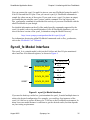
Sync8_fx Model Interface
The sync8_fx is a simple model, with just the 8-bit bus and four I/O pins mentioned
above and four 8-bit internal registers, as shown in Figure 6.
sync8_fx
CLK
SYNC8_R0_REG
IO_BUS [7:0]
IO_0
IO_1
SYNC8_R1_REG
SYNC8_R2_REG
RESET
SYNC8_R3_REG
IO_2
IO_3
Figure 6: sync8_fx Model Interface
If you need to hook up a wider bus, just instantiate the sync8_fx model multiple times to
achieve the desired configuration. For example, you could use four instances of the
sync8_fx 8-bit bus to expose all lanes of a 32-bit bus to the FlexModel environment. In
many cases one model instance is sufficient to get the desired results, but that depends
on your testing requirements.
August 2001
Synopsys, Inc.
35
Chapter 2: Interfacing with Non-FlexModels
v
SmartModel Application Notes
The sync8_fx model also provides four 8-bit registers that you can use to save and
compare data patterns using the FlexModel commands documented in the sync8_fx
FlexModel Datasheet.
Using PCI SourceModels and ppc603_fx
FlexModel in Same Design
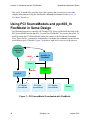
For illustration purposes, consider a PCI bridge DUV being verified with the help of the
PCI SourceModels and the ppc603e_fx processor FlexModel. You can use the sync8_fx
model to bring the PCI SourceModel under the control of the FlexModel Command
Core. Then, use flex_synchronize commands to coordinate the command streams for the
two different types of models. Figure 7 provides a high-level overview of the process.
FlexModel
Command
Core
FlexModel11
FlexModel
ppc603e_fx
FlexModel
read
Memory
write
PCI Bridge
DUV
FlexModel
FlexModel 22
sync8_fx
PCI Master
SourceModel
PCI Slave
SourceModel
PCI Monitor
SourceModel
Memory
Figure 7: PCI SourceModel Coordinated with FlexModel
36
Synopsys, Inc.
August 2001
SmartModel Application Notes
v Chapter 2: Interfacing with Non-FlexModels
For example, a bus cycle can occur when the PCI Master is writing a block of video data
to local memory and the processor is simultaneously trying to read the same block of
video data from memory. Even though the processor has to arbitrate for the bus to read
from memory, what if you want to wait until four packets of video data are available
before reading them all? To solve this problem, use flex_synchronize commands to
coordinate the command streams of the two different model types in your testbench.
You can also use the sync8_fx to coordinate model processes across multiple
testbenches. This works for any combination of HDL and C, but is particularly useful
for multiple C testbenches that have model processes running in parallel. The sync8_fx
model is the tool that make this synchronization possible when you are using nonFlexModels in any of the testbenches.
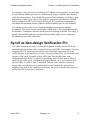
Sync8 as Non-design Verification Pin
One of the drawbacks of using C testbenches is limited visibility into the DUV and
testbench registers that are easily accessed in the top-level HDL. For example, if you are
designing an ASIC and need to decode the state of multiple output pins for event
synchronization in the testbench or to drive a microprocessor reset, you can hook up an
instance of the sync8_fx model to those ASIC pins. You can then write some
combinational logic in the C testbench to decode the states of those pins and drive a
signal on one of the sync8_fx bidirectional pins. Suddenly, an event of interest in the
top-level HDL is visible to your C testbench. You can create complex verification
triggers this way and start or stop testbench processes based on the states of those
triggers at any point in the simulation. In this way, the sync8_fx model helps make up
for the lack of a clock in the C testbench.
August 2001
Synopsys, Inc.
37
Chapter 2: Interfacing with Non-FlexModels
v
SmartModel Application Notes
With the addition of the non-design verification pin provided by the sync8_fx model,
you can also more easily track trigger events in the simulation waveform viewer. There
is now one decoded signal to view, rather than multiple independent signals. One
example for how to use the sync8_fx model as a non-design verification pin is illustrated
in Figure 8.
Testbench Trigger
(cache_read)
HDL Testbench
IO_3
FlexModel2
sync8_fx
FlexModel
C Testbench 1
IO_0
IO_1
IO_2
ASIC
C Testbench 2
Figure 8: Non-design Verification Pin Example
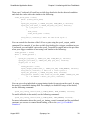
For example, if you wanted to detect when conditions were ready for a cache write, your
C testbench #1 could contain code similar to the following:
if (IO_0 == 1 && IO_1 == 0) || (IO_2 == 0)
{
sync8_set_pin(Inst_1,SYNC8_IO3_PIN,1'b1, &status);
flex_fprintf (stdout, "Condition set for cache write : %b STATUS =
%d\n", pin_rslt, &status);
}
}
38
Synopsys, Inc.
August 2001
SmartModel Application Notes
v Chapter 2: Interfacing with Non-FlexModels
Then your C testbench #2 could use a while loop that looks for the detected condition
and reads the cache with code similar to the following:
cache_write_done = false;
while (!cache_write_done)
{
sync8_pin_req(Inst_1, SYNC8_IO3_PIN, FLEX_WAIT_F, &status);
sync8_pin_rslt(Inst_1, SYNC8_IO3_PIN, pin_rslt, &status);
if ( pin_rslt == 1)
{
read_cache;
cache_write_done = false;
}
flex_wait(1, &status);/* Wait for One Clock Cycle */
}
You can control the direction of the I/O bus or pins using the sync8_output_enable
command. For example, if you have a while loop looking for a trigger condition in your
C testbench, you can enable a pin on the sync8_fx model for output and set the pin value
when your trigger condition is met using code similar to the following:
found_pattern = false;
while ( !found_pattern )
{
sync8_pin_req(Inst_1, SYNC8_IO1_PIN, FLEX_WAIT_F, &status);
sync8_pin_rslt(Inst_1, SYNC8_IO1_PIN, pin_rslt, &status);
if(pin_rslt == "1")
{
found_pattern = true;
sync8_output_enable(Inst_1, SYNC8_IO3_PIN, FLEX_ENABLE, &status);
flex_wait(2, &status); /* Wait for 2 clock cycles */
sync8_set_pin(Inst_1, SYNC8_IO3_PIN, "b0", &status);
flex_fprintf (stdout, "The value of pin PCI_FRAME =SYNC8_IO3_PIN
is : %b STATUS = %d\n", pin_rslt, &status);
}
}
You can set or clear individual or group timing checks for any pin on the sync8_fx using
the model’s controllable timing shell. For example, to disable all setups in the model,
use the following command:
sync8_set_timing_control(Inst_1,SYNC8_SETUP, FLEX_DISABLE, &status);
To enable all holds in the model, use the following command:
sync8_set_timing_control(Inst_1,SYNC8_HOLD, FLEX_ENABLE, &status);
For more information about the sync8_set_timing_control command and the predefined
constants you can use to control model timing, refer to the sync8_fx FlexModel
Datasheet.
August 2001
Synopsys, Inc.
39
Chapter 2: Interfacing with Non-FlexModels
40
v
Synopsys, Inc.
SmartModel Application Notes
August 2001
SmartModel Products Application Notes Manual
Chapter 3: SystemC SmartModel Library
3
SystemC SmartModel Library
SystemC is a C++ class library used for creating cycle-accurate models of software
algorithms, hardware architecture, and interfaces for System-on-Chip (SoC) and
system-level designs. For more information on SystemC, refer to the SystemC User’s
Guide. You can obtain SystemC documentation from http://www.systemc.org.
SystemC provides a cycle simulation environment as part of its class library. The
SmartModel Library is designed to work with event-driven logic simulators and has
extensive support for modeling device timing accurately. For more information on the
SmartModel Library, refer to the SmartModel Library User’s Manual. The SystemC
class library provides a “SWIFT Integration” for SystemC.
8 Note
Because of the mismatch between the cycle simulation capabilities of
SystemC and the event simulation bias of the SmartModel Library, there are
some restrictions for SystemC users of the SmartModel Library.
This chapter contains information about the following topics:
●
●
●
●
●
“Supported SmartModel Library Capabilities” on page 42
“Wrapper Generation” on page 44
“Platform Support” on page 48
“Product Usage” on page 49
“Using SWIFT Models in SystemC Designs” on page 51
August 2001
Synopsys, Inc.
41
Chapter 3: SystemC SmartModel Library
SmartModel Products Application Notes Manual
Supported SmartModel Library Capabilities
Command Control
All FlexModels and MemPro models support command control. FlexModels provide
“HDL” and “C” command control. SystemC users of FlexModels will typically call
commands from SystemC testbenches, thus using HDL control.
Attributes
Note that the model configuration attributes that are supported in the SystemC
framework are provided as parameters to the model class constructor. The following lists
pertinent information for the supported model configuration attributes:
●
●
●
●
All models must have the InstanceName attribute.
The timing attributes TimingVersion and DelayRange are not available since they
are not supported in SystemC.
All file attributes are available for non-FlexModels.
FlexModels automatically set the command stream ID attributes based on the model
instance name.
Timing
SystemC is a cycle simulator. Therefore, timing in the event simulation sense is not
supported. FlexModels run in “no-timing” mode in SystemC. Other SWIFT models use
a settling-out technique to permit them to function adequately in the SystemC cycle
environment.
Timing Check Control
Timing checks are not applicable for the SystemC environment and are disabled.
42
Synopsys, Inc.
August 2001
SmartModel Products Application Notes Manual
Chapter 3: SystemC SmartModel Library
Command Channel
SmartModel Library users send session commands by calling the SessionCommand
static member function in the LSC_SwiftSession class. Model commands are available
through the lsc_SwiftModel static member function ModelCommand. It takes the
model’s InstanceName and the command string as arguments, as shown in the
following example:
LSC_SwiftSession::SessionCommand("trace on");
LSC_SwiftModel::ModelCommand("U3", "ReportStatus");
LSC_SwiftSession::SessionCommand("trace off");
The typical access to the command channel through the LMC_COMMAND environment
variable is available.
Fault Simulation
SystemC/SWIFT does not support fault simulation.
Save and Restore
SystemC does not support Save/Restore (Checkpoint/Restart).
Reset and Reconfigure
SystemC does not support reset or reconfigure.
Model Status Report
The model status report is available through the model command channel and also
through the lsc_SwiftModel static member function Report. It takes the model’s
InstanceName as an argument, as shown in the following report status example:
LSC_SwiftModel::Report("U2");
Dumping Memory Contents
The SystemC/SWIFT integration provides access to the memory dump capability
through the DumpMemory static member function LSC_SwiftModel and through the
model command channel. The following are dump memory examples:
LSC_SwiftModel::DumpMemory("U1", "dump2");
LSC_SwiftModel::ModelCommand("U1", "DumpMemory dump1");
August 2001
Synopsys, Inc.
43
Chapter 3: SystemC SmartModel Library
SmartModel Products Application Notes Manual
Model Logging
The standard model logging support works in SystemC/SWIFT. Most models use the
standard SWIFT model logging triggered from the presence of a mlog.cfg file in the
working directory or by using the SetLogFile and TraceEvents model commands.
Advanced users may wish to use the model command channel to control the mlog file as
well. The following are model logging command examples:
LSC_SwiftModel::ModelCommand("U1", "SetLogFile mlog.log");
LSC_SwiftModel::ModelCommand("U1", "TraceEvents On");
Tracing
Tracing works through the usual settings of the LMC_COMMAND environment
variable and the session command channel, as shown in the following example:
LSC_SwiftSession::SessionCommand("trace on");
SmartModel Windows
SmartModel Windows are not supported at this time.
Wrapper Generation
The wrapper generator scsg resides in $LMC_HOME/bin. To generate a SystemC
wrapper for any installed models, enter the model names as arguments to scsg
separated by white space, as in the following example:
scsg cake_fz usbhost_fz
scsg writes the wrapper files into the working directory.
To generate wrappers for all installed models, use the -a or -all options, as shown in
the following example:
scsg -all
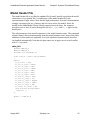
The following sections describe the generated wrappers for the cake_fz model.
44
Synopsys, Inc.
August 2001
SmartModel Products Application Notes Manual
Chapter 3: SystemC SmartModel Library
Model Header File
The model header file is just like the standard for SystemC models except that the model
constructor is in a separate file. A notable part of the model header file is the
representation of logic values. Note that for high performance, SystemC documentation
strongly encourages the use of integer and bit vector values for models. Since the
models in the SmartModel Library already support four-state logic, the wrappers
provide access to four (4) states through the use of sc_logic and sc_lv types for the
model ports.
The only parameter to the model constructor is the model instance name. The command
instance name is derived automatically from the model instance name. None of the other
attributes for this model are applicable in a cycle-simulator framework and, therefore,
are handled automatically. Note that the port names are in upper case to avoid conflict
with C++ keywords.
cake_fz.h
#ifndef CAKE_FZ_H
#define CAKE_FZ_H
#include "lsc_FlexModel.h"
class cake_fz : public LSC_FlexModel
{
public:
sc_in< bool > CLK;
sc_in< sc_logic > HOLD;
sc_in< sc_logic > INT;
sc_in< sc_lv<3> > INTB;
sc_in< sc_logic > NMI;
sc_in< sc_logic > RDY;
sc_in< sc_logic > RST;
sc_out< sc_logic > ADS;
sc_out< sc_logic > DC;
sc_out< sc_logic > HOLDA;
sc_out< sc_logic > PEND;
sc_out< sc_logic > RW;
sc_inout< sc_lv<32> > AD;
cake_fz(const string& Name);
~cake_fz() {}
};
#endif // CAKE_FZ_H
August 2001
Synopsys, Inc.
45
Chapter 3: SystemC SmartModel Library
SmartModel Products Application Notes Manual
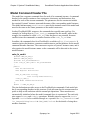
Model Command Header File
The model has a separate command class for each of its command streams. A command
header for the model contains a class constructor, destructor, and declarations for a
method for each of the stream commands. The parameters for the constructor include
the required SystemC instance name and the name of the corresponding model instance.
The model instance name, ModelInstance, must be the instance name of the model and
must be the same as the Name parameter to the model constructor.
In other FlexModel HDL wrappers, the commands have model name prefixes. For
example, in Verilog there is a cake_read_req command for this model, while in this
wrapper, the command is called read_req. Note that there is no potential for name
conflicts since the command is a member function of the cake_fz_cmd class.
In outline, the command class for a FlexModel is a subclass of LSC_FlexCommands. It
contains register declarations, constructor and destructor, and declarations for the model
command member functions. The constructor requires a SystemC instance name, and it
also requires the model instance name so the commands will be directed to the correct
model instance.
cake_fz_cmd.h
#ifndef CAKE_FZ_CMD_H
#define CAKE_FZ_CMD_H
#include "lsc_FlexCommands.h"
class cake_fz_cmd: public LSC_FlexCommands
{
public:
Cake Pin Declarations
Cake Register Declarations
cake_fz_cmd(const string&,
const string& ModelInstance);
~cake_fz_cmd();
Cake Model Command Declarations
};
#endif // CAKE_FZ_CMD_H
The pin declarations provide access to the FlexModel pin commands. Each model pin
has a corresponding member in this structure. Each pin name has the stream name as a
prefix to help avoid confusion with the normal pin operations. These members are
automatically initialized when the model command class is constructed. The read-only
pins support PinReq and PinRslt operations. Writable pins also support the SetPin
operation. SetPin is also available through an = operator. See lsc_CommandPin.h and
lsc_CommandPinTemplates.h in $LMC_HOME/include for the details of using these
member functions.
46
Synopsys, Inc.
August 2001
SmartModel Products Application Notes Manual
Chapter 3: SystemC SmartModel Library
Cake Pin Declarations
LSC_CommandBus<32> cmdAD;
LSC_CommandPin cmdADS;
LSC_CommandPin cmdCLK;
LSC_CommandPin cmdDC;
LSC_CommandPin cmdHOLD;
LSC_CommandPin cmdHOLDA;
LSC_CommandPin cmdINT;
LSC_CommandBus<3> cmdINTB;
LSC_CommandPin cmdNMI;
LSC_CommandPin cmdPEND;
LSC_CommandPin cmdRDY;
LSC_CommandPin cmdRST;
LSC_CommandPin cmdRW;
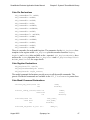
There is a member for each model register. The parameter for the LSC_Register class
template is the register width. LSC_Register provides member functions RegReq,
RegRslt, and SetReg (also available as the = operator). LSC_RegisterReadOnly does
not have the SetReg operation. See lsc_Register.h and lsc_RegisterTemplates.h
in $LMC_HOME/include for usage details.
Cake Register Declarations
LSC_Register<16> cntclk;
LSC_RegisterReadOnly<4> state;
LSC_Register<4> eagle_trattr;
The model command declarations provide access to all the model commands. The
generic FlexModel commands are available in the LSC_FlexCommands parent class.
Cake Model Command Declarations
void set_msg_level(const int
int
mode,
&status);
void set_timing_control(const int
const bool
int
void idle(const int
const bool
int
index,
state,
&status);
idle_count,
wait_mode,
&status);
void read_req(const sc_int< 32 >
August 2001
Synopsys, Inc.
addr_bv,
47
Chapter 3: SystemC SmartModel Library
SmartModel Products Application Notes Manual
const int
const bool
int
void write(const
const
const
const
xfer_attr,
wait_mode,
&status);
sc_int< 32 >
int
sc_int< 32 >
bool
int
addr_bv,
xfer_attr,
data,
wait_mode,
&status);
void burst_read_req(const sc_int< 32 >
const int
const bool
int
void burst_write(const
const
const
const
const
const
const
sc_int<
int
sc_int<
sc_int<
sc_int<
sc_int<
bool
int
32 >
32
32
32
32
>
>
>
>
addr_bv,
xfer_attr,
wait_mode,
&status);
addr_vu,
xfer_attr,
data0,
data1,
data2,
data3,
wait_mode,
&status);
void read_rslt(const int
const int
sc_int< 32 >
int
Tag,
cmd_tag,
&data,
&status);
void print_msg(const char*
int
tesxt,
&status);
Platform Support
Currently, SystemC is available for Linux (x86), Solaris, HPUX, and Microsoft
Windows NT. SystemC on Solaris works best with gcc, but also works, with limitations,
with the SUN SC5.0 compiler.
48
Synopsys, Inc.
August 2001
SmartModel Products Application Notes Manual
Chapter 3: SystemC SmartModel Library
Product Usage
The overall flow of a testbench for a CFlex model in SystemC is shown in Figure 9.
Each box in the figure represents a separate SystemC module. The solid arrows in the
diagram represent global signals in the testbench to which all the ports of the model are
connected. The dotted arrows indicate command activity. In more realistic designs, the
SWIFT models will be nested inside other SystemC processes. Since the command
interactions do not depend on SystemC scheduling, they are not required to be in
separate modules but can be interleaved with port activity.
Port Driver
Stream 1
Command
Driver
Model
Results
Checker
Stream N
Command
Driver
Figure 9: Testbench Connectivity
SystemC enforces a one-cycle delay on the propagation of signals between
SC_THREAD modules, so if the port driver sets a value at time T, the model will not see
it until time T+1. There is a corresponding delay between the model and the results
checker. There are no delays associated with the command interactions that do not use
SystemC for scheduling, but instead go directly to the model. If you place input
commands with port inputs and result commands with port outputs, these effects can be
avoided.
Installation
SystemC/SWIFT is a standard part of the SmartModel Library delivery. Its components
are installed by way of the conventional installation process. For more information about
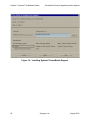
the installation process, refer to the SmartModel Library Installation Guide. The check
box to install the SystemC support is outlined in Figure 10 from the SmartModel
Administration tool, sl_admin.
August 2001
Synopsys, Inc.
49
Chapter 3: SystemC SmartModel Library
SmartModel Products Application Notes Manual
Figure 10: Installing SystemC SmartModel Support
50
Synopsys, Inc.
August 2001
SmartModel Products Application Notes Manual
Chapter 3: SystemC SmartModel Library
Using SWIFT Models in SystemC Designs
Wrapper Files
After the SmartModel Library is installed, you must generate wrapper files for the
desired models, as shown in the following wrapper generation example:
$LMC_HOME/bin/scsg cake_fz
For most models there are two wrapper files with .h and .cpp suffixes. For FlexModels,
there are also .h and .cpp files for the command interface. Note that the wrapper
generator puts the wrapper files in the working directory.
Code Examples
A SystemC design is a set of SystemC (C ++) files that you construct. Note that the set of
files includes an associated Makefile. To use the SWIFT models, you must include the
model header file in the files that refer to it, as shown in the following include example:
#include "cake_fz.h"
Here are fragments from a testbench that uses the cake_fz model illustrating how it is
set up. Since the model instance name must agree between the model and its command
class, it is worth defining a global constant for it, as shown in the following example:
const char* const ModelInstanceName = "instance";
Modules that use the testbench commands must include the command header, as shown
in the following example:
#include "cake_fz_cmd.h"
Command Stimulus
The following example shows the clock and signal declarations and how they connect to
a SWIFT model.
int
sc_main(int ac, char* av[])
{
sc_clock CLK("CLK");
sc_signal< sc_lv<32> > AD;
sc_signal< sc_logic > ADS;
sc_signal< sc_logic > DC;
sc_signal< sc_logic > HOLD;
sc_signal< sc_logic > HOLDA;
sc_signal< sc_logic > INT;
sc_signal< sc_lv<3> > INTB;
sc_signal< sc_logic > NMI;
sc_signal< sc_logic > PEND;
August 2001
Synopsys, Inc.
51
Chapter 3: SystemC SmartModel Library
SmartModel Products Application Notes Manual
sc_signal< sc_logic > RDY;
sc_signal< sc_logic > RST;
sc_signal< sc_logic > RW;
cake_fz Cake("Wrapper", ModelInstanceName);
Cake.CLK(CLK.signal());
Cake.ADS(ADS);
Cake.DC(DC);
Cake.HOLD(HOLD);
Cake.HOLDA(HOLDA);
Cake.INT(INT);
Cake.INTB(INTB);
Cake.NMI(NMI);
Cake.PEND(PEND);
Cake.RDY(RDY);
Cake.RST(RST);
Cake.RW(RW);
Cake.AD(AD);
// Other initializations here.
sc_start(-1);
return 0;
}
Note that preceding sc_main, there is usually a module containing command (and
possibly port) stimulus. The following shows an example of command stimulus:
cake_fz_cmd CakeCmd("CakeCmd", ModelInstanceName);
CakeCmd.set_msg_level(0x4fffffff, status);
CakeCmd.idle(0x1, false, status);
CakeCmd.flex_print_msg("Hello World", status);
CakeCmd.read_req(0xf00, 0x3, false, status);
CakeCmd.read_req(0xf04, 0x3, false, status);
CakeCmd.write(0xf08, 0x3, 0x76543210, false, status);
CakeCmd.write(0xf0c, 0x3, 0xf0f0, false, status);
Cake Register Operations
The following fragment illustrates how to set and get values from a cake_fz register. It
first sets the value of the cntclk model register to, waits two cycles, then gets the value
back.
Cake Register Operations
int status;
CakeCmd.cntclk = 5;
wait();
wait();
CakeCmd.cntclk.RegReq(true, status);
sc_lv<16> CntClk = CakeCmd.cntclk.RegRslt(status);
The following is an example of a complete thread process performing pin commands.
Cake Pin Command example
SC_MODULE(CAKEPins) {
52
Synopsys, Inc.
August 2001
SmartModel Products Application Notes Manual
Chapter 3: SystemC SmartModel Library
sc_in< bool > CLK;
sc_inout< sc_lv<32> > CmdAD;
sc_out< sc_logic > CmdHOLD;
void eval();
SC_CTOR(CAKEPins)
{
SC_THREAD(eval);
sensitive « CLK;
}
}; // CAKEPins
void CAKEPins::eval()
{
int status;
cake_fz_cmd CakeCmd("CakeCmd", ModelInstanceName);
for (int i = 0; i < 12; i++) {
wait();
}
CakeCmd.cmdAD.SetPin("X0X0X0X0X0X0X0X0X0X0X0X0X0X0X0X0");
while (true) {
CakeCmd.cmdAD.PinReq(false, status);
CakeCmd.cmdHOLD.PinReq(true, status);
CmdAD = CakeCmd.cmdAD.PinRslt(status);
sc_logic HOLDValue = CakeCmd.cmdHOLD.PinRslt(status);
CmdHOLD = HOLDValue;
}
}
Make Files
The Makefile must be arranged to compile and link the models and link the associated
runtime support files. You would add the model .cpp files to the SRCS variable, add the
SWIFTINC variable to INCDIR, and define EXTRA_LIBS, as shown in the Makefile
example. EXTRA_LIBS arranges for libscswift.a to be available in case SWIFT
models are used in the design. It also adds the -ldl library so libswift will be loaded
dynamically. LMC_HOME would typically come from the corresponding shell
environment variable. Makefile.defs is from the examples directory in the
SystemC distribution.
TARGET_ARCH = linux
MODULE = cake_tb
SRCS = cake_tb.cpp cake_fz.cpp cake_fz_cmd.cpp
OBJS = $(SRCS:.cpp=.o)
include ../Makefile.defs
SWIFTINC = -I$(LMC_HOME)/sim/systemc/src
INCDIR += $(SWIFTINC)
August 2001
Synopsys, Inc.
53
Chapter 3: SystemC SmartModel Library
SmartModel Products Application Notes Manual
EXTRA_LIBS += -L $(LMC_HOME)/lib/x86_linux.lib -lscswift -ldl
Simulation
With the above in place, you can proceed as described in the SystemC documentation
and release notes. For more information on SystemC, you can obtain documentation
from http://www.systemc.org.
54
Synopsys, Inc.
August 2001
SmartModel Application Notes
Index
Index
A
attributes 42
command stream ID 42
configuration 42
cycle-simulator framework 45
DelayRange 42
files 42
InstanceName 42
model configuration 42
TimingVersion 42
C
C++
class library 41
keywords 45
cake model command declarations 47
cake pin declarations 47
cake register declarations 47
cake_fz_cmd class 46
Causal Trace VSB window 30
causal tracing
enabling 27
MCF example 28
report example 28
CFlex model 49
class
command 46, 51
constructor 42, 46
template 47
class library, C++ 41
command channel 43
command channel session 44
Command Core
FlexModel 34
commands
channel 43
class 46
do 15
echo 15
Flex model pins 46
August 2001
general, for MCF 15
header 46, 51
instance name 45
interactive for Visual SmartBrowser 31
load 14
member functions 46
model 44
model name prefixes 46
session 43
smartccn 14
stream ID 42
streams 46
testbench 51
Verilog 46
comments, submitting 10
configuration attributes 42
constructor class 46
conventions, typographical and symbol 8
cycle simulation environment 41
cycle simulator 42
D
datasheets, accessing 13
debugging tools for SmartCircuit models
15
declarations
constructor 46
register 46
design flow for SmartCircuits 12
destructor class 46
devices, simulating unsupported 31
do command 15
do file for MCF 25
E
echo command 15
effect tracing
MCF example 29
report example 30
Synopsys, Inc.
55
Index
SmartModel Application Notes
L
environment variables
$LMC_COMMAND 43, 44
$LMC_HOME 44, 53
event simulation 41, 42
event tracing 15
event tracing for VSB 22
examples
model logging command 44
session command channel 44
Linux (x86) 48
load command switches 14
M
F
fault simulation 43
file attributes 42
Flex models 42, 46, 51
HDL wrapper 46
FlexModel
Command Core 34
four-state logic 45
FPGA
design flow 12
SmartModels 11
verifying designs 11
G
global signals 49
H
HDL 42
help about Synopsys products 9
HPUX 48
I
instance name 46
command 45
model 45
interactive SmartBrowser commands 31
K
keywords, C++ 45
56
MCF commands 15
MCF do file 25
MCF. See also model command file.
memory contents 43
MemPro models 42
Microsoft Windows NT 48
model
cake_fz.h 45
cake_fz_cmd.h 46
CFlex 49
class constructor 42
command channel 43
command class 46
command declarations 47
commands 43
SetLogFile 44
TraceEvents 44
configuration attributes 42
constructor 45, 46
Flex 42, 46
header file 51
instance 46
instance name 42, 45, 46, 51
logging 44
MemPro 42
non-Flex 42
pin 46
ports 45, 49
status report 43
model command channel 43
model command file (MCF) for
SmartCircuit model 13
model command header file 46
model directory 9
model status report 43
monitor feature for VSB 25
Synopsys, Inc.
August 2001
SmartModel Application Notes
Index
N
static member function, LSC_SwiftModel
43
Non-design verification pin
using sync8_fx as 37
no-timing mode 42
P
pins
commands 46
declarations 46
name 46
read-only 46
writable 46
ports
connected 49
driver 49
naming convention 45
R
reset 43
runtime support files 53
S
SCFFILE property for SmartCircuit models
status report 43
stream name 46
SUN SC5.0 compiler 48
Support Center 9
SWIFT integration 41
SWIFT models 51, 53
sync8_fx
as non-design verification pin 37
as user pin 37
model interface 35
synchronizing non-FlexModels 34
Synchronizing
with non-FlexModels 34
Synopsys website 9
SystemC 41
class library 41
design 51
distribution 53
module 49
scheduling 49
SystemC/SWIFT 43
System-on-Chip (SoC) 41
13
session commands 43
settling-out technique 42
smartccn command 14
SmartCircuit model
basic information 13
debugging tools 15
definition 11
design flow 12
model command file (MCF) 13
SCFFILE property 13
SmartModel library 41
SmartModel Library documentation 7
SmartModel windows 44
Solaris 48
SOLV-IT! 9
SourceModels
symchronizing with FlexModels 36
August 2001
T
testbenches 42, 49
Timing 42
timing check control 42
typographical and symbol conventions 8
U
unsupported devices, simulating 31
User pin
sync8_fx as 37
V
Verilog command 46
Visual SmartBrowser (VSB) 15
Visual SmartBrowser, interactive
commands 31
VSB
Synopsys, Inc.
57
Index
SmartModel Application Notes
Causal Trace window 30
causal tracing example 28
causal tracing report 28
Connection View 18
effect trace report example 30
effect tracing example 29
enabling causal tracing 27
event tracing 22
Examine View 18
global select tool 18
Hierarchy View 18
monitor feature 25
timing form. timing form for VSB 22
using. Visual SmartBrowser 15
W
Windows 15
windows
including in model command file 25
wrapper generation 44, 51
58
Synopsys, Inc.
August 2001