1
WDR-3124A
Web Console Configuration
Service Forwarding
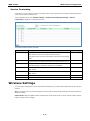
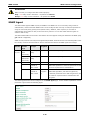
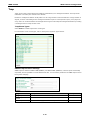
In AP mode, you can configure service forwarding to allow up to eight devices connected to the WDR-3124A to
connect to the OnCell Central server.
In the navigation panel, click Cellular Settings > OnCell Central Manager Settings > Service
Forwarding to display the configuration screen.
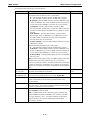
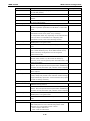
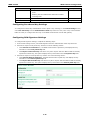
The following table describes the fields.
Field
Description
Service forwarding
Select Enable to allow up to eight Ethernet devices connected to the Disable
Default setting
WDR-3124A to connect to the OnCell Central server.
The system stores the device information in the Service Forwarding
Table.
Service forwarding
Enter the port number the WDR-3124A uses to establish a
port
connection from the Ethernet interface to the OnCell Central server.
Act.
Select this check box to enable the selected service forwarding rule.
Eth. Device Name
Enter a descriptive name for the Ethernet device connected to the
63204
To enable all entries, select the check box in the header.
WDR-3124A.
Eth. Device IP
Enter the IP address of the Ethernet device connected to the
WDR-3124A.
Port
Enter the service port number.
Description
Enter a description for the service forwarding entry.
Wireless Settings
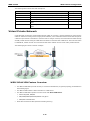
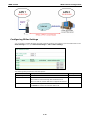
You can use the configuration screens under Wireless Settings to set wireless LAN settings and set up a wireless
network.
AP: In a wireless local area network (WLAN), an access point is a station that transmits and receives data from
WLAN-to-Cellular.
Client-Router: When the WDR-3124A is configured for Client-Router mode, it can be used as a LAN-to-LAN or
LAN-to-Cellular network adapter.
3-12