1
WDR-3124A
Web Console Configuration
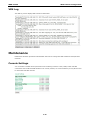
VPN System log
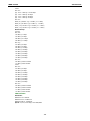
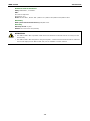
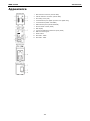
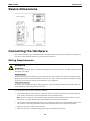
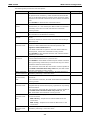
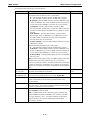
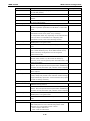
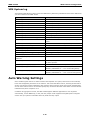
The following table lists the system logs for the VPN feature. [VPN name] indicates the name of the VPN tunnel
you have created on the WDR-3124A.
System log
Description
[VPN name] mismatch of PSK
Pre-shared key mismatch.
[VPN name] Phase 1 start
VPN tunnel phase 1 start.
[VPN name] Phase 1 pass
VPN tunnel phase 1 pass.
[VPN name] Phase 2 start
VPN tunnel phase 2 start.
[VPN name] Phase 2 pass
VPN tunnel phase 2 pass.
[VPN name] received Delete ISAKMP SA
Remote VPN tunnel request to delete ISAKMP SA.
[VPN name] no Preshared Key Found
No pre-shared key is found.
[VPN name] policy doesn't allow PRESHARED KEY The encryption algorithm does not allow pre-shared key.
[VPN name] policy doesn't allow RSASIG
VPN encrypt algorithm does not allow RSA or X.509.
[VPN name] DPD timeout - declaring peer dead
No response from a peer. PDP timeout.
[VPN name] DPD: Hold connection
Clear the remote VPN SA and keep the peer routing table
status.
[VPN name] DPD: Clearing Connection
Clear the remote VPN SA and peer routing table status.
[VPN name] DPD: Restarting Connection
Renegotiate VPN SA immediately.
[VPN name] encrypt alg is different
VPN encryption mismatch.
[VPN name] hash alg is different
VPN hash mismatch.
[VPN name] DH group is different
VPN Diffie-Hellman group mismatch.
[VPN name] Ignore initial Aggr message
Ignore aggressive requests from a remote VPN gateway.
[VPN name] Maybe ID format error
Invalid local or remote VPN ID format.
[VPN name] we require peer ID differ from peer
Remote ID mismatch.
declares ID
[VPN name] no suitable connection for peer
No corresponding VPN connection for a remote peer from
the VPN responder.
[VPN name] connect_fail_log:ip_port
Fail to route VPN connection to [IP address].
[VPN name] send payload name
Send “VPN INVALID_KEY_INFORMATION,
[VPN name] receive payload name
Receive “VPN INVALID_KEY_INFORMATION ,
INVALID_CERTIFICATE or….” to a remote VPN gateway.
INVALID_CERTIFICATE or …” from a remote VPN gateway.
Auto Warning Settings
Since industrial-grade devices are often located at the endpoints of a system, these devices will not always
know what is happening elsewhere on the network. This means that these devices, including wireless APs or
clients, must provide system maintainers with real-time alarm messages. Even when system administrators
are out of the control room for an extended period, they can still be informed of the status of devices almost
instantaneously when exceptions occur.
In addition to logging these events, the WDR-3124A supports different approaches to warn engineers
automatically, such as SNMP trap, e-mail, and relay output. It also supports two digital inputs to integrate
sensors into your system to automate alarms by email and relay output.
3-40