1
DR-500 Series PC Software “Reflect”
Reflect.exe is a Windows based application and is compatible with a Windows ™
operating system. The software is capable of displaying, storing, reading, printing
and analyzing several traces at the same time. Reflect.exe is capable of
controlling the operation of the DR-500 series OTDR via a USB cable and windows
mobile device interface AcitveSyn if desired by the OTDR operator.
Software Installation
1. Insert CD in PC
2. In CD drive open SetupAFS_eng
3. Allow PC to run installation
Functional Description
Trace Screen
Table 1.0
Trace Title
Menu Drop
Downs
Active Trace
Information
Panel
Menu Icons
Active Trace
Panel
Displayed
Section
Trace
Parameters
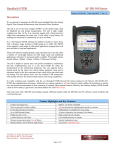
A Trace screen on the Reflect software is illustrated above
© 2010 Advanced Fiber Solutions, Inc. All rights reserved.
19 Norfolk Ave * Easton * MA * USA * 02375 - Phone: 508.238.7100 * Fax: 617.507.0784
4