1
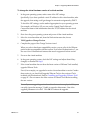
Chapter 12 Configuring Teams To remove a virtual machine from a team 1 Make sure that any virtual machines that you want to remove are powered off. 2 Open the team or select the team in the Favorites list. 3 From the Workstation menu bar, choose Team>Remove><virtual machine name>. The selected virtual machine is removed from the team. You can now use it independently. NOTE When you remove a virtual machine from a team, you also remove it from team LAN segments. Virtual network adapters associated with LAN segments become disconnected. Bridged, host‐only, NAT, and custom configurations remain unchanged. To completely delete a virtual machine and erase its files from the host file system, see “Deleting a Virtual Machine” on page 154. When you add a virtual machine to a team, it is removed from the Favorites list. A virtual machine is not automatically added to the Favorites list when you remove it from a team. You must manually add it, as described in “To add a virtual machine or team entry to the Favorites list” on page 75. Setting the Startup Sequence for a Team In the startup sequence, you can specify: The order in which virtual machines start and stop – Team virtual machines start one at a time, in the order you set in the startup sequence. Setting the startup sequence is useful, for example, if you have a virtual machine that runs an application to be tested and you want it to start before the virtual machines running an automated testing script. The delay between team members in the sequence – Set the time that Workstation delays after starting or stopping a virtual machine, before starting or stopping the next virtual machine in the sequence. This delay avoids overloading the CPU when multiple virtual machines start and allows applications on a virtual machine to launch before another team virtual machine attempts to connect. You might also use this delay to ensure that a virtual machine functioning as a server completes its startup before client virtual machines start. If your virtual machine team depends on precise startup timing, experiment to determine how much time your host and guest operating environments and applications need to launch. VMware, Inc. 261