1
Installation and Configuration Guide
21
Debugging AutoVue
Logging for AutoVue
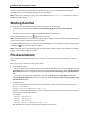
AutoVue uses the log4j package to generate debug information. The configuration file log4j.xml (located in the
<AutoVue Install Root>\bin directory) makes it possible to display debugging information for AutoVue. Log files are
created in the <AutoVue Install Directory>\bin\logs folder by default. In situations where trouble-shooting
information is necessary, an Oracle Global Customer Support representative will ask you to update the log4j.xml and
enable logging for AutoVue.
Note: By default, logging is enabled at the WARN level. Any warning messages generated while you use AutoVue
are written to the log4j output file.
For additional information regarding log4j, go to Apache’s log4j documentation.
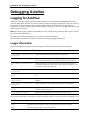
The following section describes the classes for which you can enable debugging information.
Logger Information
The following descriptions explain what kind of logger information will be seen for each class specified:
Class
Description
com.cimmetry.jvueserver.con
figuration
Displays reports on loading errors of AutoVue’s configuration.
com.cimmetry.jvueserver.eve
nt
Displays information concerning posting and handling of different AutoVue
events (opened and closed sessions, opened and closed documents, and so on).
com.cimmetry.jvueserver.cac
he
Displays information concerning the AutoVue cache. Reports messages and
errors related to loading the cache, locking, saving, deleting cached files as well
as searching for archive and XRef files.
log4j.category.com.cimmetry
.connection
Displays information concerning downloading files from the network.
com.cimmetry.jvueserver.doc
ument
Displays document-related information (open, information, properties, and so
on).
com.cimmetry.jvueserver.doc
ument.native
Displays messages and error reporting for document related native code
execution.
com.cimmetry.jvueserver.str
eamingfile
Displays information concerning generation and usage of streaming files.
com.cimmetry.jvueserver.sym
bols
Displays mapping between the stamp library name in the UI and the actual SMB
file name on the AutoVue server.
com.cimmetry.frontend
Displays all messages and errors reported from the AutoVue client.
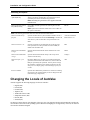
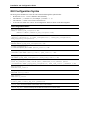
You can specify what kind of information to output by setting the classes to one of the following information levels:
Information Level
Description
INFO
Displays informative messages such as session information, document open requests.
WARN
Displays warning messages. This is the default value.