1
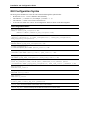
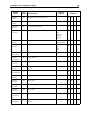
Installation and Configuration Guide 25 GUI Configuration Blocks permissions: All action names need “PERM_READ”. These are the exceptions to this rule: VueActionFilePrint needs: PERM_READ|PERM_HEADERS|PERM_WATERMARK VueActionOptionsBars needs: PERM_NONE VueActionHelp needs: PERM_NONE Example: To define a very basic user interface that only allows users, through menu items, to open or print a file and get the file information without changing watermark/headers/footers: BEGIN UI VIEW MENUBAR BEGIN POPUP IDS_FILE BEGIN MENUITEM VueActionFileOpen, , PERM_READ MENUITEM VueActionFileProperties, , PERM_READ MENUITEM VueActionFilePrint, , PERM_READ END END END Control Names The following table lists available Control Names and their functionality. Control Key List VueAction FileOpen VC When INI option EnableUniversalFileChooser is set to 0, invokes open URL dialog. When option is set to 1, the universal file chooser dialog (that supports URLs, local files, server:// protocol and DMS files) appears. Default for EnableUniversalFileChooser is 1. VueAction FileMarkup V Switch to Markup mode VueAction FileCompare V Switch to compare mode VueAction FileOverlays V Select and modify overlays VueAction FileProperties VCM (M: status bar only) Show file properties RMB Contexts Status Bar Functionality Toolbar UI* Modes Popup Menu Control Name