1
Recommended P3Dv1 Settings
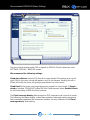
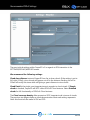
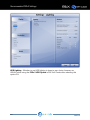
The most critical settings within Prepar3D v.1 in regards to REX interaction is the
SETTINGS/DISPLAY/WEATHER screen.
We recommend the following settings:
Cloud draw distance instructs Prepar3D how far to draw clouds. If the setting is set to
full-right (110mi), cirrus clouds will appear cut-off in the distance. Backing this off to
100mi will rectify this issue while still giving a great distance to view clouds.
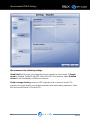
Cloud Detail is the single most important area in regards to cloud visuals. If Simple
clouds is checked, Prepar3D will NOT utilize REX Soft Cloud textures. Select Detailed
clouds for full functionality of REX Soft Cloud textures.
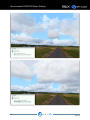
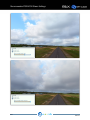
The Cloud coverage density slider presents a VERY important role in terms of visuals.
The previous two pages display a visual demonstration what each setting represents.
Note: this functions the same in FSX and P3D.
REX SOFT CLOUDS
PAGE 8