1
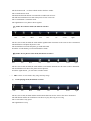
(2) Under the show mode,the button is below:
One
two
three
four
five
six
seven
eight
The first and the second buttons'functions are the same as the above mentioned
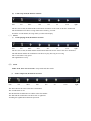
The third button can choose which kind show for clock
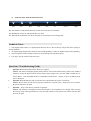
The fifth and the sixth button can choose last phto or next photo to be it's background
Technical Notes:
1. Your digital picture frame is a sophisticated electronic device. Do not drop or subject the unit to jarring or
strong vibrations.
2. Avoid placing the digital photo frame in areas of high humidity or where it might be subjected to splashing.
4. The LCD panel is made of plastic and can be easily damaged. Avoid sharp objects.
5. Use only a soft dry cloth to clean the screen
Questions / Troubleshooting Guide
1.
2.
3.
Question: What kind of photos does this device support?
Answer: The frame will display digital photos that are stored in the JPEG format, which is the standard
format for nearly all digital cameras. Some cameras allow images to be stored as TIFF or RAW files as
well as JPEG. Only the JPEG format is compatible with the frame. Photos of up to 10 million pixels
can be displayed.
Question: What should I do if the system does not respond when the power is turned on?
Answer: Please make sure the unit is properly connected to a power source. Then turn it off, re-connect
the power and turn it on again.
Question: Why is the memory card not recognized?
Answer: The memory card might be inserted backwards or is not pushed in far enough. After inserting
the memory card in the right direction, if the card still cannot be read, please turn off the unit and then
power it on again.