1
Tools
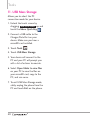
11. USB Mass Storage
Allows you to select the PC
connection mode for your device.
1. Unlock the touch screen by
dragging Slide up to unlock up and
touch the Menu Quick Key .
2. Connect a USB cable to the
Charger/Data Port on your
device. Make sure you have a
microSD card installed.
3. Touch Tools
.
4. Touch USB Mass Storage.
5. Your device will connect to the
PC and your PC will prompt you
with a list of actions to execute.
6. Select Open folder to view files
on your PC to view the files on
your microSD card, copy to the
PC, and vice versa.
7. To exit USB Mass Storage mode,
safely unplug the phone from the
PC and touch Exit on the phone.
48