1
Low Bobbin Alarm
Bobbin Thread Capacity
0.0 Yards
Remaining Bobbin Thread
New Bobbin
0.0 Yards
Bobbin Thread Capacity Presets
100.0
130.0
Back
200.0
Main
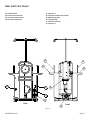
Figure 30
Low Bobbin Alarm
Bobbin Thread Capacity
0.0 Yards
Remaining Bobbin Thread
New Bobbin
0.0 Yards
Bobbin Thread Capacity Presets
100.0
130.0
Back
200.0
Main
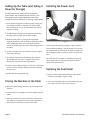
Figure 31
Low Bobbin Alarm
Bobbin Thread Capacity
0.0 Yards
Remaining Bobbin Thread
New Bobbin
0.0 Yards
Bobbin Thread Capacity Presets
100.0
130.0
Back
Main
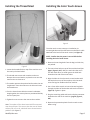
Figure 32
HandiQuilter.com
200.0
Low Bobbin
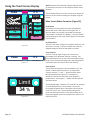
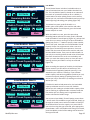
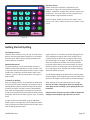
The HQ Sweet Sixteen includes a low bobbin alarm so
you can estimate how soon your bobbin thread will run
out. This Low Bobbin Capacity is based on an estimate of
how much of a particular thread can fit on a bobbin, in
combination with other quilting factors such as tension,
stitches per inch, and how much bobbin thread you pull up
when beginning and ending your quilting (Figure 30).
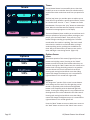
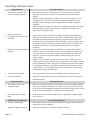
To estimate how many yards of thread is on a
bobbin, place a full bobbin in the machine and under
the heading Bobbin Thread Capacity, press the Record
button and quilt as usual.
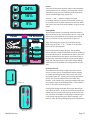
When the bobbin runs out, press the square Stop
Recording button and note how many yards is indicated
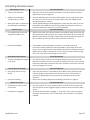
under the Bobbin Thread Capacity (Figure 31), perhaps 210
yards. Since you want a warning as to when the bobbin is
getting low, use the “–” button to specify a lower number,
such as 195 yards. Save that as one of the Bobbin Thread
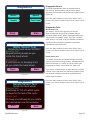
Capacity Presets. You might want to make a note as to
which type of thread the preset represents. Put a new
bobbin with the same thread into the machine and press
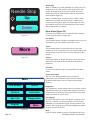
the New Bobbin button. Then press the Alarm button. As
you quilt, the remaining bobbin thread value will estimate
how much thread remains on the current bobbin, and
when you reach the capacity value, an alarm will sound
warning you that your bobbin is nearly out of thread
(Figure 32).
When recording the capacity of a bobbin, the HQ Sweet
Sixteen assumes you will stitch at 10 stitches per inch
if TruStitch stitch regulation (optional accessory) is not
attached to your machine. Therefore, if you estimate
bobbin capacity and stitch using different stitches per inch,
increase the capacity setting (if stitching fewer than 10
stitches per inch) or decrease it (if stitching more than 10
stitches per inch).
If TruStitch is attached and powered on, the low-bobbin
capacity calculation uses the current last TruStitch
stitches-per-inch setting to calculate bobbin capacity when
you are stitching in regulated mode. In Manual mode the
last stitches-per-inch setting used in regulated mode is
used to calculate the bobbin usage.
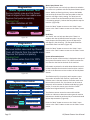
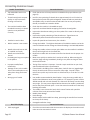
You can store three Bobbin Thread Capacity preset values
– one for each of three different types of thread. Simply go
through the record process with a full bobbin of that type
of thread and then store the capacity as a preset. When
you switch to using that type of thread, press appropriate
preset button. Insert a full bobbin with that type of thread,
press New Bobbin, and all of the settings will be based on
that type of thread.
Page 19