Download InSideControl Builder System Overview EN
Transcript
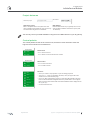
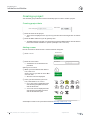
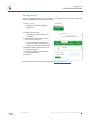
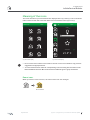
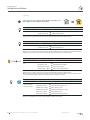
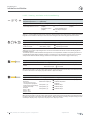
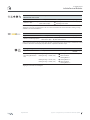
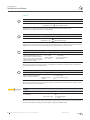
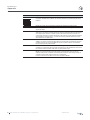
InSideControl InSideControl Builder HVAC - Heating , ventilation and air-conditioning Setpoint temperature +/- 0.5 °C (DPt9.001) Setpoint temperature +/- 1 °C (DPt9.001) Application Builder objects ETS objects Status query receiver Change the setpoint tempera ture in steps of 0.5 °C or 1 °C. Temperature value (2 Byte) Setpoint adjustment Temperature value (2 Byte) Temperature status (2 Byte) Status feedback of cur rent setpoint tempera ture Behaviour in the App: Tapping +/- sends a 2 Byte telegram and the setpoint is changed stepwise. The status object is updated with a status telegram on each actuation. The setpoint cannot be further changed until a status telegram has been received. HVAC mode control Application Builder objects ETS objects Status query receiver Toggling between operating modes via 1 Byte. Mode selection (1 Byte) Operating mode Mode selection (1 Byte) Mode status (1 Byte) Operating mode status Behaviour in the App: Tapping an icon sends a 1 Byte telegram. The user can choose between the modes Comfort, Standby, Night and Frost/Heat protection. The element expects a status feedback message from the room temperature controller. The operating mode icon is not highlighted until the status feedback message is received. If the room temperature controller does not indepen dently send the status feedback message, then the user must tap the device name to trigger a status query. 3 step vent control, 4 step vent control, 5 step vent control Application Builder objects ETS objects Status query receiver Control of a ventilator or fan in 3, 4 or 5 steps Value 1 Byte Fan value Value 1 Byte Status value 1 Byte Fan status Behaviour in the App: When moving the slider control the 1 Byte value telegram corresponding to the selected step is sent after the control is released. The slider control display is updated with the 1 Byte status object. Fan Coil Vent control (DPt5.001) Application Builder objects ETS objects Status query receiver Control of the ventilator or fan speed. You use the Vent speed 1/2/3 objects to specify the desired speed in percentage terms for each step. Example: Step 1 = 34%, Step 2 = 67%, Step 3 = 100% Value 1 Byte (%) Setting value for ventilator Value 1 Byte (%) Status value 1 Byte (%) Ventilator step status feedback Vent speed 1 (%) Ventilator step 1 Vent speed 2 (%) Ventilator step 2 Vent speed 3 (%) Ventilator step 3 Behaviour in the App: When moving the slider control the 1 Byte value telegram corresponding to the selected step is sent after the control is released. The slider control display is updated with the 1 Byte status object according to the speed steps you have set. Example: display of step 1 up to 34%, step 2 up to 67%, step 3 up to 100%. 26 KNX | InSideControl Builder | System configuration 03/2013-00