Download InSideControl Builder System Overview EN

Transcript
InSideControl
Appendix
Appendix
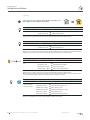
Trademarks
• Apple®, iTunes®, App StoreSM, iPhone®, iPod®, iPad® and MAC OS® are brand names or
registered trademarks of Apple Inc.
• Google PlayTM, Google Play StoreTM and AndroidTM are brand names or registered trade­
marks of Google Inc.
• Wi-Fi® is a registered trademark of the Wi-Fi Alliance.
• Microsoft Windows®, Windows XP® and Windows 7® are brand names or registered
trademarks of the Microsoft Corporation in the USA and/or other countries.
Other brands and registered trademarks are the property of the relevant owner.
Licensing rights
The InSideControl App and InSideControl HD App can be downloaded from the App Store or
Google Play Store and run in demo mode free of charge.
The licence and full range of functions can be purchased with the specially developed KNX
InSideControl IP gateway from Schneider Electric. Only with this IP gateway can you control
your house and visualise the functions on your portable device.
To make the configuration available on the portable device, you need the software InSideControl Builder, which is available to download free of charge from www.schneider-electric.
com.
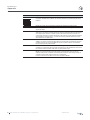
Glossary
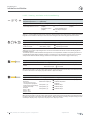
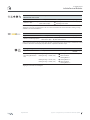
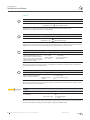
Use
App
HD App
Builder
DDNS
Demo mode
Functions
Devices
IP gateway
Configuration file
Portable devices
03/2013-00
Explanation
Abbreviation for InSideControl App.
Application (App) for a Smartphone based on iOS or Android
Abbreviation for InSideControl HD App.
Application (App) for a tablet based on iOS or Android
Abbreviation for InSideControl Builder.
Software in which the control for the App is configured.
Abbreviation for Dynamic Domain Name System
In demo mode, you can navigate in the InSideControl App/HD App and try out the differ­
ent functions, but not control your house.
Devices have functions which you can call up with the portable device.You can switch a
lamp on or off or even show the results of a function, such as warning notifications or the
status of a device.
Devices are installations or machines with specific functions.
Example: the heating has the function of heating the room.
Abbreviation for KNX InSideControl IP gateway.
The portable device accesses the KNX system via the IP gateway, enabling it to control
the individual functions and also receive feedback (e.g. warning notifications).
The configuration file is created by the system integrator in the software InSideControl
Builder and is then transferred to the portable device. This file contains all information for
the functions you wish to control in your house.
Portable devices that receive additional functions with an App. Examples of portable
devices include Smartphones or tablets, but not laptops.
System configuration | InSideControl Builder | KNX 41