1
Getting Started
Getting Started
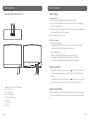
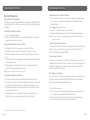
Location of Main Unit Controls
Power Supply
1
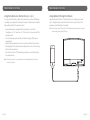
Charging Upbeat
1. Connect the supplied AC adapter to the back of Upbeat.
2. Plug the supplied AC adapter into a wall power outlet to begin charging
Upbeat’s internal battery.
3. The battery LED indicator light will turn orange while charging and will turn
green when the battery is fully charged.
2 3
Note: Full charge time is approx 4 hours.
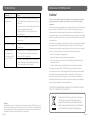
LED Status Indicator
-- Bluetooth LED Indicator
- Blinking Blue LED: Bluetooth on with no connection. (Ready to pair)
- Solid Blue LED: Bluetooth paired and connected
-- Battery LED Indicator
- Orange LED: Charging (When plugged into a wall outlet)
- Green LED: Fully charged (When plugged into a wall outlet)
- Red LED: Low battery (When running on the built-in battery)
USB
5V 500 mA
AUX IN
DC IN 16V
Powering ON/OFF
4 5
1.
2.
3.
4.
5.
6.
7.
8.
POWER ON/OFF/PLAY/PAUSE Button
VOLUME - Button
VOLUME + Button
Battery LED Indicator
Bluetooth LED Indicator
USB Port
AUX IN Jack
DC IN Jack
Page 8
6 7 8
-- To power the speaker on, press and hold the button for 3 seconds until
you hear an ascending audible tone and the Bluetooth LED light starts
blinking.
-- To power the speaker off, press and hold the button for 3 seconds until
you hear a descending audible tone. The Bluetooth LED will shut off.
Power Saving Mode
The Upbeat will automatically enter power saving mode if no audio is played
for 30 minutes. Press and hold power button 3 seconds to wake the speaker
up.
Page 9