1
ntop 2.3 User’s Guide
[-W|--https-server <port>]
These are the command line options (specified on the command line) accepted by ntop:
@filename
The text of filename is copied ignoring line breaks and comment lines (anything following a
#) into the command line. ntop behaves as if all of the text had simply been typed directly
on the command line. For example, if the command line is "-t 3 @d -u ntop" and file d
contains just the line '-d', then the effective command line is -t 3 -d -u ntop. Multiple @s are
permitted. Nested @s (an @ inside the file) are not permitted.
Remember, most ntop options are "sticky", that is they just set an internal flag. Invoking
them multiple times doesn't change ntop's behavior. However, options that set a value,
such as --trace-level, will use the LAST value given: --trace-level 2 --trace-level 3 will run as -trace-level 3.
-a | --access-log-path
By default ntop does not maintain a log of HTTP requests to the internal web server. Use this
parameter to request logging and to specify the location of the file where these HTTP
requests are logged.
Each log entry is in Apache-like style. The only difference between Apache and ntop logs is
that an additional column has been added which has the time (in milliseconds) that ntop
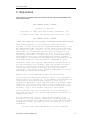
needed to serve the request. Log entries look like this:
192.168.1.1 [04/Sep/2003:20:38:55 -0500] "GET / HTTP/1.1" 200 1489 4
192.168.1.1 [04/Sep/2003:20:38:55 -0500] "GET /index_top.html HTTP/1.1" 200 1854 4
192.168.1.1 [04/Sep/2003:20:38:55 -0500] "GET /index_inner.html HTTP/1.1" 200 1441 7
192.168.1.1 [04/Sep/2003:20:38:56 -0500] "GET /index_left.html HTTP/1.1" 200 1356 4
192.168.1.1 [04/Sep/2003:20:38:56 -0500] "GET /home_.html HTTP/1.1" 200 154/617 9
192.168.1.1 [04/Sep/2003:20:38:56 -0500] "GET /home.html HTTP/1.1" 200 1100/3195 10
192.168.1.1 [04/Sep/2003:20:38:56 -0500] "GET /About.html HTTP/1.1" 200 2010 10
Although this parameter is called a 'path', it is actually the complete file name of the access
log.
-b | --disable-decoders
This parameter disables protocol decoders.
Protocol decoders examine and collect information about layer 2 protocols such as NetBIOS
or Netware SAP, as well as about specific tcp/ip (layer 3) protocols, such as DNS, http and
ftp.
This support is specifically coded for each protocol and is different from the capability to
count raw information (packets and bytes) by protocol specified by the -p | --protocols
parameter, below.
Decoding protocols is a significant consumer of resources. If the ntop host is underpowered
or monitoring a very busy network, you may wish to disable protocol decoding via this
parameter. It may also be appropriate to use this parameter if you believe that ntop has
problems handling some protocols that occur on your network.
Even if decoding is disabled, ftp-data traffic is still decoded to look for passive ftp port
commands.
-c | --sticky-hosts
© 1998-2003 - Luca Deri <[email protected]>
5