1
iSense Level Controller – User’s
Manual
CO2Meter.com
1. Expose the meter to ambient air (model CM-0045 will draw
ambient air)(assumed to be at 400ppm) or connect it to a
calibration gas bottle/cylinder (100% nitrogen or argon)
with the appropriate demand regulator.
2. Wait 25 seconds to collect a sample. Write down this value as
the “before” value.
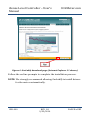
3. Click the “Calibrate” button after selecting your calibration
gas.
4. Wait 25 seconds again. This time, the meter will take a
sample and use this data to adjust zero values. The displayed
measurement will show the new calibration value (0 or
400ppm, depending on method used).
5. Disconnect the Calibration gas and wait 25 seconds.
Manual Calibration
In order to calibrate the 1% level controller, expose the meter to
outdoor/fresh air or 400 ppm CO2 calibration gas for at least 2
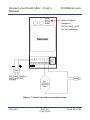
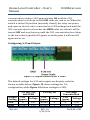
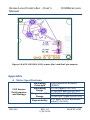
minutes and connect Din1 to G0 (see Figure 16 below) for at least 2
seconds in order to affect the calibration cycle for 400 ppm.
If using Nitrogen (0 ppm CO2) calibration gas, expose meter to 100%
Nitrogen for at least 2 minutes and connect Din2 to G0 (see Figure
16 below) for at least 2 seconds in order to affect the calibration
cycle for 0 ppm.
USR-009
REV. 1.8
9/23/2014
PAGE 25 of 35