1
USER GUIDES
E-Vision 8000 Series
INSTALLATION AND QUICK-START GUIDE
CONNECTION GUIDE
OPERATING GUIDE
REMOTE COMMUNICATIONS GUIDE
High Brightness Digital Video Projector
s
Rev A
April 2012
112-796A
Digital Projection E-Vision
series
About these Guides
Please read this guide carefully before using the projector, and keep it handy for future reference.
A serial number is located on the back of the projector. Record it here:
Symbols used in these guides
Warnings
ELECTRICAL WARNING: this symbol indicates that there is a danger of electrical shock unless the instructions are closely
followed.
WARNING: this symbol indicates that there is a danger of physical injury to yourself and/or damage to the equipment unless
the instructions are closely followed.
Notes
NOTE: this symbol indicates that there is some important information that you should read.
Product revision
Because we at Digital Projection continually strive to improve our products, we may change specifications and designs, and add new features
without prior notice. Projectors built prior to this revision of the Operating Guide may therefore not include all the features described.
Rev A
April 2012
INSTALLATION AND QUICK-START GUIDE
E-Vision 8000 Series
High Brightness Digital Video Projector
Rev A
April 2012
Digital Projection E-Vision
8000 series CONTENTS
Installation and Quick-Start Guide
CONTENTS
What’s in the Box?................................................................................Inst_1
Operating the Projector....................................................................Inst_8
Getting to Know the Projector....................................................Inst_2
Switching the Projector On...................................................................Inst_8
Front and rear views..............................................................................Inst_2
Remote control.......................................................................................Inst_2
Control panel..........................................................................................Inst_3
Indicators................................................................................................Inst_3
Changing the lens, lamps, filters and colour wheel.....Inst_4
Removing the lens.................................................................................Inst_4
Fitting the lens........................................................................................Inst_4
Changing a lamp....................................................................................Inst_5
Changing the filters................................................................................Inst_5
Changing the colour wheel...................................................................Inst_6
Positioning the Screen and Projector.....................................Inst_7
Rev A
April 2012
Selecting an Input Signal or Test Pattern............................................Inst_8
Input signal.....................................................................................Inst_8
Test pattern....................................................................................Inst_8
Adjusting the Lens.................................................................................Inst_9
Zoom..............................................................................................Inst_9
Focus.............................................................................................Inst_9
Shift................................................................................................Inst_9
Adjusting the Image...............................................................................Inst_9
Orientation.....................................................................................Inst_9
Aspect Ratio...................................................................................Inst_9
Picture............................................................................................Inst_9
Switching the Projector Off.................................................................Inst_10
Digital Projection E-Vision
WHAT'S IN THE BOX?
8000 series Installation and Quick-Start Guide
What’s in the Box?
Notes
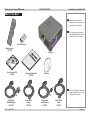
Make sure your box contains
everything listed. If any pieces are
missing, contact your dealer.
You should save the original box
and packing materials, in case you
ever need to ship your Projector.
2x AAA batteries
Remote control
(112-532)
User Guides on CD
(112-456)
Projector
Important Information
(112-797)
Lens cap
Only one power cable - dependent
on the destination territory - will be
supplied with the projector.
Power cable,
United Kingdom
(112-814)
Rev A
April 2012
Power cable,
Europe
(112-816)
Power cable,
North America
(112-815)
Power cable,
China
(112-817)
Page Inst_1
Digital Projection E-Vision
GETTING TO KNOW THE PROJECTOR
8000 series Installation and Quick-Start Guide
Getting to Know the Projector
Notes
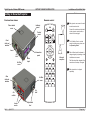
Front and rear views
Remote control
Indicator
panel
Colour wheel
cover
The projector can use an infra-red or
a wired remote control.
40°
Control
panel
Front
infra-red
window
Some of the controls are duplicated
on the projector control panel, as
shown on the next page.
For full details of how to use the
controls and the menu system, see
the Operating Guide.
Lens
Air
inlet
Air filter
cover
Connection
panel
Mains
input
40°
Infra-red
reception
The air filters should be cleaned or
changed regularly, depending on the
installation environment.
The filters should be changed at the
same time as the lamp is changed.
The projector lens is shipped
separately.
Rear
infra-red
window
Air filter
cover
Air
inlet
Air
outlets
Lamp
covers
Rev A
April 2012
Adjustable
feet
Page Inst_2
Digital Projection E-Vision
GETTING TO KNOW THE PROJECTOR
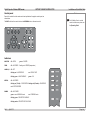
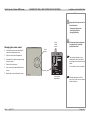
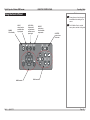
8000 series Control panel
Some of the controls from the remote control are duplicated on the projector control panel, as
shown below.
The EXIT button has the same function as the RETURN button on the remote control.
Installation and Quick-Start Guide
Notes
For full details of how to use the
controls and the menu system, see
the Operating Guide.
Indicators
SHUTTER
off = OPEN
green = CLOSED
TEMP
off = NO ERROR
flashing red = ERROR (temperature)
LAMPS 1,2
off = OFF
flashing red = LAMP ERROR
red = END OF LIFE
flashing green = LAMP WARM-UP
green = ON
STATUS
off = NO ERROR
flashing red (1 flash) = COVER OPEN flashing red (4 flashes) = FAN ERROR
red = SYSTEM ERROR
POWER
off = NO POWER
green = normal RUNNING mode
flashing green = PROJECTOR WARM UP
flashing amber = PROJECTOR COOL DOWN
Rev A
April 2012
red = STANDBY mode
Page Inst_3
Digital Projection E-Vision
8000 series CHANGING THE LENS, LAMPS, FILTERS AND COLOUR WHEEL
Installation and Quick-Start Guide
Changing the lens, lamps, filters and colour wheel
Notes
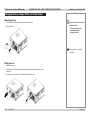
Removing the lens
•
•
Push in the lens release lever, and turn the lens anti-clockwise.
Remove the lens.
Always allow the lamp to cool for
5 minutes before:
- disconnecting the power
- moving the projector
- changing the lamp
The projector lens is shipped
separately.
Fitting the lens
•
•
Remove the lens cap.
•
Push the lens in firmly, and turn it clockwise until it clicks into place.
Position the lens so that the labels are at the top, and gently insert it all the way into the
lens mount.
Rev A
April 2012
Page Inst_4
Digital Projection E-Vision
CHANGING THE LENS, LAMPS, FILTERS AND COLOUR WHEEL
8000 series Installation and Quick-Start Guide
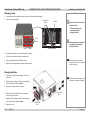
Changing a lamp
•
•
Notes
Unscrew the two captive screws securing the cover for the lamp that needs changing.
Open the lamp compartment.
Lamp module
screws
Handle
Always allow the lamp to cool for
5 minutes before:
Cover
screws
Lamp 1
Lamp 1
•
•
•
•
Lamp 2
Lamp compartment
Lamp 2
- disconnecting the power
- moving the projector
- changing the lamp
The lamp and colour wheel must
be changed only by suitably
qualified personnel.
Unscrew the three captive screws securing the lamp module.
Pull firmly on the handle to remove the lamp module.
Insert a new lamp module and fasten the screws.
Note that the projector will shut
down if any of the covers is opened
whilst in operation.
Replace the lamp compartment cover and fasten the screws.
Changing the filters
•
Unscrew the captive screws securing the cover for the
side air inlet.
•
Replace the filter, making sure that the arrow showing
the air flow direction is pointed inwards.
•
Replace the cover and fasten the screws.
•
Remove the cover for the side air inlet by pushing it
firmly to the right, as shown.
•
Replace the filter, making sure that the arrow showing
the air flow direction is pointed inwards.
•
Replace the cover.
Rev A
April 2012
The filters should be changed at the
same time as the lamp is changed.
Front air inlet
filter
Side air inlet
filter
Page Inst_5
Digital Projection E-Vision
8000 series CHANGING THE LENS, LAMPS, FILTERS AND COLOUR WHEEL
Installation and Quick-Start Guide
Notes
Always allow the lamp to cool for
5 minutes before:
Changing the colour wheel
•
Unscrew the captive screw securing the
colour wheel compartment cover.
•
•
Open the colour wheel compartment.
•
•
Remove the colour wheel.
•
Replace the cover and fasten the screw.
Cover
screw
The lamp and colour wheel must
be changed only by suitably
qualified personnel.
Colour
wheel
screws
The projector firmware is colour
wheel specific, and so will need to
be changed at the same time as the
wheel.
Unscrew the four captive screws securing
the colour wheel.
Insert a new colour wheel and fasten the
screws.
Colour wheel
compartment
Rev A
April 2012
- disconnecting the power
- moving the projector
- changing the lamp
For assistance, contact your dealer.
Note that the projector will shut
down if any of the covers is opened
whilst in operation.
Page Inst_6
Digital Projection E-Vision
8000 series POSITIONING THE SCREEN AND PROJECTOR
Installation and Quick-Start Guide
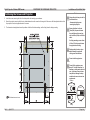
Positioning the Screen and Projector
•
•
Install the screen, ensuring that it is in the best position for viewing by your audience.
•
The dimension drawing below shows the positions of the feet for table mounting, and the fixing holes for ceiling mounting.
Mount the projector, ensuring that it is at a suitable distance from the screen for the image to fill the screen. Set the adjustable feet so that
the projector is level, and perpendicular to the screen.
Notes
Always allow the lamp to cool for
5 minutes before:
- disconnecting the power
- moving the projector
Ensure that there is at least
70cm (28in) of space between
the ventilation outlets and any
wall, and 50cm (20in) on all other
sides.
If ceiling mounting, ensure there
is 30cm (12in) of space between
the projector and ceiling.
Backup safety chains or wires
should always be used with
ceiling mount installations.
Do not stack the projectors.
Do not tilt the projector more
than ±12° in either direction, in
desktop or ceiling mode, when in
use, as this may cause serious
lamp failure, damage the lamp
module and cause extra cost on
replacement.
Desktop
±10°
±360°
All dimensions are in mm.
±10°
Ceiling
Rev A
April 2012
Page Inst_7
Digital Projection E-Vision
8000 series OPERATING THE PROJECTOR
Installation and Quick-Start Guide
Operating the Projector
Notes
Switching the Projector On
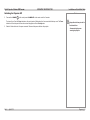
•
•
Connect the power cable between the mains supply and the projector. Switch on at the switch next to the power connector.
•
Press POWER
Wait until the self-test has completed and the Power indicator on the projector control panel shows red. The lamp will be off and the
projector will be in STANDBY mode.
on the control panel or POWER ON on the remote control.
Always allow the lamp to cool for
5 minutes before:
- disconnecting the power
- moving the projector
The Power indicator on the control panel will flash green for a few seconds whilst the lamp comes up to full brightness. When the
projector is ready for use, the Power indicator will show steady green.
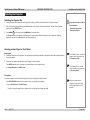
Selecting an Input Signal or Test Pattern
Input signal
•
Connect an image source to the projector. The signal should be automatically detected by the projector, and should be displayed within a
two or three seconds.
•
If more than one signal is connected, then select the image you want to display:
Press INPUT repeatedly on the control panel or remote control to cycle through the inputs.
or use Input Selection in the INPUT menu.
For full details of how to connect an
image source to the projector, see
the Connection Guide.
For full details of how to use the
controls and the menu system, see
the Operating Guide.
Test pattern
If you have an image source connected to the projector, then you can display a test pattern instead:
Press TEST PATTERN repeatedly on the remote control to cycle through the test patterns,
or select a Test Pattern from the INPUT menu.
Rev A
To return to viewing the image from your image source, scroll through the test pattern list to Off.
April 2012
If there is no image source
connected to the projector, then
the Test Pattern feature is NOT
available.
Page Inst_8
Digital Projection E-Vision
OPERATING THE PROJECTOR
8000 series Adjusting the Lens
Installation and Quick-Start Guide
Notes
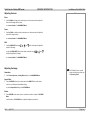
Zoom
•
Use the ZOOM +/− buttons on the control panel or on the remote control to adjust the
lens so that the image fills the screen.
or use Lens Control in the ALIGNMENT Menu.
Focus
•
Use the FOCUS +/− buttons on the control panel or on the remote control to adjust the
lens until the image is sharp.
or use Lens Control in the ALIGNMENT Menu.
Shift
•
Use the LENS SHIFT buttons
position of the image,
,
,
and
on the control panel to adjust the
or press the LENS SHIFT button on the remote control then use
to adjust the position of the image.
,
,
and
or use Lens Control in the ALIGNMENT Menu.
Adjusting the Image
Orientation
•
Use the Rear Projection or Ceiling Mode settings, in the ALIGNMENT Menu.
For full details of how to use the
controls and the menu system, see
the Operating Guide.
Aspect Ratio
•
Press the RESIZE button on the control panel or the ASPECT button on the remote
control to cycle through all the available settings.
or use the Aspect Ratio setting in the PICTURE Menu.
Picture
•
Press PICTURE on the remote control or use the menu controls, to open the PICTURE
Menu.
Use the sliders in the PICTURE menu to adjust the brightness, contrast etc.
Rev A
April 2012
Page Inst_9
Digital Projection E-Vision
8000 series OPERATING THE PROJECTOR
Installation and Quick-Start Guide
Switching the Projector Off
•
Press and hold POWER
Notes
on the control panel or POWER OFF on the remote control for 5 seconds.
The lamp will go off, and the Power indicator on the control panel will flash amber for a few seconds whilst the lamp cools. The Power
indicator on the control panel will then show red and the projector will be in Standby mode.
•
Switch off at the switch next to the power connector. Disconnect the power cable from the projector.
Rev A
April 2012
Always allow the lamp to cool for
5 minutes before:
- disconnecting the power
- moving the projector
Page Inst_10
CONNECTION GUIDE
E-Vision 8000 Series
High Brightness Digital Video Projector
Rev A
April 2012
Digital Projection E-Vision
8000 series CONTENTS
Connection Guide
CONTENTS
Signal Inputs and Outputs........................................................... Conn_1
3G-SDI IN.............................................................................................. Conn_1
3G-SDI OUT.......................................................................................... Conn_1
HDMI..................................................................................................... Conn_1
DVI-D.................................................................................................... Conn_1
VGA....................................................................................................... Conn_1
COMPONENT....................................................................................... Conn_1
S-Video................................................................................................. Conn_1
Video..................................................................................................... Conn_1
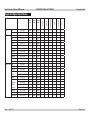
Supported Signal Input Modes................................................. Conn_2
Control Connections........................................................................ Conn_3
LAN....................................................................................................... Conn_3
RS232................................................................................................... Conn_3
Wired Remote Control........................................................................ Conn_3
Screen Trigger..................................................................................... Conn_3
Rev A
April 2012
Wiring Details....................................................................................... Conn_4
Signal inputs and outputs.................................................................. Conn_4
3G-SDI........................................................................................ Conn_4
HDMI input.................................................................................. Conn_4
DVI-D.......................................................................................... Conn_5
VGA............................................................................................. Conn_6
COMPONENT............................................................................. Conn_6
S-Video input............................................................................... Conn_7
Video input.................................................................................. Conn_7
Control connections........................................................................... Conn_8
LAN connection........................................................................... Conn_8
RS232 Serial control input.......................................................... Conn_9
Wired Remote control connection............................................... Conn_9
Screen Trigger output................................................................. Conn_9
Digital Projection E-Vision
8000 series SIGNAL INPUTS AND OUTPUTS
Connection Guide
Signal Inputs and Outputs
Notes
3G-SDI IN
•
For a complete listing of pin
configurations for all signal and
control connectors, see Wiring
Details later in this Guide.
Connect a 3G-SDI cable to the left hand SDI BNC.
3G-SDI OUT
•
Connect a 3G-SDI cable to the right hand SDI BNC, to distribute the signal to another
projector.
HDMI
•
Connect a HDMI cable to the HDMI connector.
DVI-D
•
Connect a DVI-D cable to the DVI connector.
3G-SDI
IN OUT
VGA
•
If necessary, use the VGA Setup controls in the PICTURE menu. For more information,
see the Operating Guide.
•
Set Color Space in the INPUT menu to Auto or RGB-PC.
HDMI
DVI-D
VGA
COMPONENT
S-VIDEO
VIDEO
COMPONENT
RGBHV, RGsB or RGBS
•
Set Color Space in the INPUT menu to Auto or RGB-Video.
OPTION
BOARD
YPbPr or YCbCr
•
Set Color Space in the INPUT menu to YPbPr or YCbCr.
S-Video
•
Connect an S-Video cable to the 4-pin mini-DIN.
Video
•
•
Connect a composite video cable to the single RCA phono connector.
Set Video Standard in the INPUT menu to Auto, PAL, SECAM, or NTSC
Rev A
April 2012
Page Conn_1
Digital Projection E-Vision
SUPPORTED SIGNAL INPUT MODES
8000 series Connection Guide
480i
576i
HDTV
480p
576p
720p50
720p60
1080p24
1080i50
1080p25
1080i60
1080p30
1080p50
1080p60
COMPUTER 480p
VGA75
SVGA60
XGA60
XGA70
XGA85
WXGA60
WXGA+60
SXGA60
SXGA+60
UXGA60
VESA 1080p
WUXGA60
720 x 480
720 x 576
720 x 480
720 x 576
1280 x 720
1280 x 720
1920 x 1080
1920 x 1080
1920 x 1080
1920 x 1080
1920 x 1080
1920 x 1080
1920 x 1080
640 x 480
640 x 480
800 x 600
1024 x 768
1024 x 768
1024 x 768
1280 x 768
1440 x 900
1280 x 1024
1400 x 1050
1600 x 1200
1920 x 1080
1920 x 1200
59.94
50
59.94
50
50
60
24
50
25
60
30
50
60
60
75
60
60
70
85
60
60
60
60
60
60
60
525
625
525
625
750
750
1125
1125
1125
1125
1125
1125
1125
525
500
628
806
806
808
798
934
1066
1089
1245
1120
1235
15.73
15.63
31.47
31.25
37.50
45.00
27.00
28.13
28.13
33.75
33.75
56.24
67.48
31.47
37.50
37.88
48.36
56.48
68.68
47.78
55.94
63.98
65.32
75.00
67.5
74.038
SDTV
Rev A
April 2012
ü
ü
ü
ü
ü
ü
ü
ü
ü
ü
ü
ü
ü
ü
ü
ü
ü
ü
ü
ü
SDI
Horizontal
Frequency
(kHz)
DVI/HDMI
Total
number
of lines
VGA
Refresh
Rate
( Hz )
COMPONENT
Resolution
S-VIDEO
Signal
VIDEO
Supported Signal Input Modes
ü
ü
ü
ü
ü
ü
ü
ü
ü
ü
ü
ü
ü
ü
ü
ü
ü
ü
ü
ü
ü
ü
ü
ü
ü
ü
ü
ü
ü
ü
ü
ü
ü
ü
ü
ü
ü
ü
ü
ü
ü
ü
Page Conn_2
Digital Projection E-Vision
8000 series CONTROL CONNECTIONS
Connection Guide
Control Connections
Notes
For a complete listing of pin
configurations for all signal and
control connectors, see Wiring
Details later in this Guide.
LAN
•
All of the projector’s features can be controlled via a LAN connection, using the control
strings described in the Remote Communications Guide..
•
The LAN IP Address of the projector can be set by using the LAN IP Configuration
Utility. To see what the Address is set to, you can view the current Network settings in
the CONTROL Menu.
Eco Network Power must be set to
Standard, if you wish to control the
projector via the LAN connection.
Only one remote connection can be
used at any one time as determined
by the Projector Control setting in
the CONTROL menu.
For more information about these settings, see the Operating Guide.
RS232
•
The RS232 port can be used to download firmware updates, issued from time to time by
Digital Projection.
•
All of the projector’s features can be controlled via a serial connection, using the control
strings described in the Remote Communications Guide.
For full details of how to use the
menu system, see the Operating
Guide.
LAN
RS232
WIRED
REMOTE
SCREEN
TRIGGER
Wired Remote Control
•
If infrared signals from the remote control cannot reach the projector due to excessive
distance or obstructions such as walls or cabinet doors, you can connect an external
IR repeater to the Remote control input, and position its IR sensor within range of the
operator.
Note that plugging in the remote control cable will disable the infra-red.
Screen Trigger
•
The Trigger output can be connected to an electrically operated screen, automatically
deploying the screen when the projector is switched on, or activating curtains when the
aspect ratio is changed.
MAINS
Rev A
April 2012
Page Conn_3
Digital Projection E-Vision
WIRING DETAILS
8000 series Wiring Details
Connection Guide
Notes
Signal inputs and outputs
For full details of all input settings,
see the INPUT menu in the
Operating Guide.
3G-SDI
75 ohm BNC
SMPTE 292 / HD-SDI signals are very high speed digital signals which require better quality
coaxial cable than conventional analogue video. The data rate is 1.5 Gigabits per second.
In choosing cable length and connectors for any installation the frequency response loss
in decibels should be proportional to √f, from 1MHz, to 1.5GHz. The following or similar
cable specification should be used to ensure fault free communication between source and
projector:
Belden 8281 cable or equivalent
HDMI input
19 way type A connector
1
TMDS Data 2+
2
TMDS Data 2 Shield
3
TMDS Data 2-
4
TMDS Data 1+
5
TMDS Data 1 Shield
6
TMDS Data 1-
7
TMDS Data 0+
8
TMDS Data 0 Shield
9
TMDS Data 0-
10
TMDS Clock+
11
TMDS Clock Shield
12
TMDS Clock-
13CEC
14
Rev A
not connected
April 2012
pin view of panel connector
15
SCL (DDC Clock)
16
SCA (DDC Data)
17
DDC/CEC Ground
18
+5 V Power
19
Hot Plug Detect
Page Conn_4
Digital Projection E-Vision
8000 series WIRING DETAILS
DVI-D
Notes
24 way D-type connector
1
TMDS Data 2-
2
TMDS Data 2+
3
TMDS Data 2 Shield
4unused
Connection Guide
pin view of female connector
For full details of all input settings,
see the INPUT menu in the
Operating Guide.
5unused
6
DDC Clock
7
DDC Data
8unused
9
TMDS Data 1-
10
TMDS Data 1+
11
TMDS Data 1 Shield
12unused
13unused
14
+5 V Power
15Ground
16
Hot Plug Detect*
17
TMDS Data 0-
18
TMDS Data 0+
19
TMDS Data 0 Shield
20unused
21unused
22
TMDS Clock Shield
23
TMDS Clock+
24
TMDS Clock-
* Hot plug detect (HPD) is fully DVI compliant. DVI sources detect the presence of a display
device by providing +5V on pin 14 and looking for +5V on pin 16. Whenever the projector is
operational, and 5V is present on pin 14, pin 16 will be held at +5V.
EDID is available even when the projector is switched off.
Operational means that the projector is powered up. Non operational states are powered
down and some self test and reprogramming modes.
High Definition Content Protection (HDCP) is supported on this input.
Rev A
April 2012
Page Conn_5
Digital Projection E-Vision
WIRING DETAILS
8000 series Connection Guide
VGA
Notes
15 way D-type connector
1R
2G
pin view of female connector
3B
For full details of all input settings,
see the INPUT menu in the
Operating Guide.
4unused
5
Digital Ground (H Sync)
6
R Ground
7
B Ground
8
G Ground
9+5v
10
Digital Ground (V Sync/DDC)
11unused
12SDA
13
H Sync
14
V Sync
15SCL
COMPONENT
Pb/Cb
Y
Pr/Cr
5 x 75 ohm BNC
Blue
Green
Red
V
H
RGBHVRGsBYPbPrYCbCr
Green Green + Sync Y
Y
Blue BluePbCb
Red RedPrCr
Hsync
Vsync
Rev A
April 2012
Page Conn_6
Digital Projection E-Vision
8000 series WIRING DETAILS
S-Video input
Notes
4 pin mini-DIN
1
Y Ground
2
C Ground
3
Luminance (Y)
4
Chrominance (C)
Connection Guide
pin view of female connector
For full details of all input settings,
see the INPUT menu in the
Operating Guide.
Video input
1 x RCA Phono
Composite Video
Rev A
April 2012
Page Conn_7
Digital Projection E-Vision
WIRING DETAILS
8000 series Connection Guide
Control connections
Notes
LAN connection
For full details of all control settings,
see the CONTROL menu in the
Operating Guide.
TCP Port number
7000
10BaseT Unshielded Twisted Pair cable
top view of cable
connector
(clip is underneath)
The standard wire colours are as follows:
1
White / Orange stripe
2Orange
3
White / Green stripe
Use:
4Blue
5
White / Blue stripe
6Green
7
White / Brown stripe
8Brown
Crossed cable
a straight cable to connect to a hub
or network, or
a crossed cable as shown here
to connect ONLY to a computer
directly.
(used to connect directly to a computer with no hub or network.)
(Note that only the green and orange pairs are crossed)
1
White / Orange stripe
White / Green stripe
1
2
OrangeGreen2
3
White / Green stripe
White / Orange stripe
3
4
BlueBlue4
5
White / Blue stripe
White / Blue stripe
5
6
GreenOrange6
7
White / Brown stripe
White / Brown stripe
7
8
BrownBrown8
Rev A
April 2012
Page Conn_8
Digital Projection E-Vision
8000 series WIRING DETAILS
Connection Guide
RS232 Serial control input
Notes
1unused
2
Received Data (RX)
3
Transmitted Data (TX)
4unused
5
For full details of all control settings,
see the CONTROL menu in the
Operating Guide.
pin view of female connector
Signal Ground
6unused
7unused
8unused
9unused
Null-modem cable
(used to connect the projector to a computer)
RX
2---3TX
The projector is a DTE, so use:
TX
3---2RX
GND
5---5GND
Serial port settings
Baud rate
38,400 bps
Data length
8 bits
Stop bits
one
Parity
none
Flow control
none
Wired Remote control connection
Tip
a straight cable to connect to a
modem, or
a null-modem cable as shown here
to connect to another DTE such as a
computer.
Sleeve
3.5mm mini jack
Note that plugging in the remote
control cable will disable the infrared.
TipPower
RingSignal
Ring
SleeveGround
Screen Trigger output
3.5mm mini jack
TipSignal
Tip
Sleeve
SleeveGround
Rev A
April 2012
Page Conn_9
OPERATING GUIDE
E-Vision 8000 Series
High Brightness Digital Video Projector
Rev A
April 2012
Digital Projection E-Vision
8000 series CONTENTS
Operating Guide
CONTENTS
Using the Remote Control................................................................ Op_1
Test Pattern..................................................................................... Op_1
Using the Control Panel..................................................................... Op_2
Using the Menus..................................................................................... Op_3
Navigating the menus............................................................................. Op_3
Sub Menus............................................................................................... Op_4
Selecting parameters.............................................................................. Op_5
Sliders...................................................................................................... Op_6
Commands............................................................................................... Op_6
A Tour of the Menus............................................................................. Op_7
INPUT Menu............................................................................................. Op_7
Input Selection................................................................................ Op_7
PIP (Picture in Picture) sub menu................................................... Op_7
Test Pattern..................................................................................... Op_8
Color Space.................................................................................... Op_8
Input Lock....................................................................................... Op_8
Background..................................................................................... Op_8
Video Standard............................................................................... Op_8
Auto Sync Adjust............................................................................. Op_8
PICTURE Menu........................................................................................ Op_9
Display Mode.................................................................................. Op_9
Contrast, Brightness, Saturation, Hue............................................ Op_9
Dynamic Contrast........................................................................... Op_9
Gamma........................................................................................... Op_9
Color sub menu............................................................................. Op_10
Sharpness, Noise Reduction........................................................ Op_10
Aspect Ratio.................................................................................. Op_10
Overscan....................................................................................... Op_11
VGA Setup sub menu................................................................... Op_11
Auto Sync...................................................................................... Op_11
LAMPS Menu......................................................................................... Op_12
Mode............................................................................................. Op_12
Power............................................................................................ Op_12
High Altitude Mode........................................................................ Op_12
Custom Power.............................................................................. Op_12
Lamp Status and Time.................................................................. Op_12
ALIGNMENT Menu................................................................................. Op_13
Rear Projection............................................................................. Op_13
Ceiling Mode................................................................................. Op_13
Lens Control.................................................................................. Op_13
Center Lens.................................................................................. Op_14
Lens Memory sub menu............................................................... Op_14
Warp sub menu............................................................................. Op_15
Blanking sub menu....................................................................... Op_16
Edge Blend sub menu................................................................... Op_17
continued
Rev A
April 2012
Digital Projection E-Vision
8000 series CONTENTS
CONTROL menu.................................................................................... Op_18
IR Address.................................................................................... Op_18
Eco Network Power...................................................................... Op_18
Auto Power Off.............................................................................. Op_18
Auto Power On.............................................................................. Op_18
Projector Control........................................................................... Op_19
Network sub menu........................................................................ Op_19
Startup Logo................................................................................. Op_20
Trigger........................................................................................... Op_20
Auto Search.................................................................................. Op_20
Dynamic Black.............................................................................. Op_20
Language...................................................................................... Op_20
SERVICE menu...................................................................................... Op_21
Information.................................................................................... Op_21
Blue Only...................................................................................... Op_21
Factory Reset................................................................................ Op_21
Menu Map.................................................................................................. Op_22
INPUT..................................................................................................... Op_22
PICTURE................................................................................................ Op_22
LAMPS.................................................................................................... Op_23
ALIGNMENT.......................................................................................... Op_23
CONTROL............................................................................................... Op_24
SERVICE................................................................................................. Op_24
LAN IP Configuration Utility......................................................... Op_25
Rev A
April 2012
Operating Guide
Digital Projection E-Vision
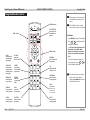
8000 series USING THE REMOTE CONTROL
Operating Guide
Using the Remote Control
Notes
Some options and controls may not
be available due to settings in the
menus.
POWER controls
LENS controls
TEST PATTERN:
select from a list
of available test
patterns
For full details of how to use the
menu system, see later in this guide.
Test Pattern
•
Press ENTER to display a Test Pattern.
•
Use
or
to scroll through the
following Test Patterns:
... Off, Colour Bars, Alignment Grid,
Burst, Red, Green, Blue, White,
Black, Corrected Red, Corrected
Green, Corrected Blue, Greyscale,
Off ...
MENU controls
INPUT:
select from the
available video
input signals
PICTURE:
opens the
Picture menu
AUTO SYNC:
Projector will
re-synchronise
with the current
input signal
ASPECT:
select from a
list of available
aspect ratios
OVERSCAN:
select from Off
Crop or Zoom
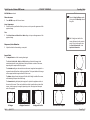
FREEZE:
freeze the
current image
frame
3D MODE:
has no function
on this projector
INFO:
opens the
Service menu
LIGHT:
illuminates the
buttons on the
remote control
for 10 seconds
CLEAR:
has no function
on this projector
SHUTTER:
opens or closes
the shutter
ID SET:
has no function
on this projector
Rev A
April 2012
NETWORK:
has no function on
this projector
PIP:
switches the PIP
image on or off
LAMP MODE:
has no function
on this projectorl
•
To return to viewing the image from
your image source, use
or
to
scroll through the list to Off.
To protect the lamps from thermal
shock, it will not be possible to
change the Lamp Mode more than
once within five minutes.
Page Op_1
Digital Projection E-Vision
USING THE CONTROL PANEL
8000 series Operating Guide
Using the Control Panel
Notes
Some options and controls may not
be available due to settings in the
menus.
POWER:
Off or Standby
INPUT:
select from the
available video
input signals
MENU controls
Rev A
April 2012
AUTO SYNC:
Projector will
re-synchronise
with the current
input signal
ASPECT:
select from a
list of available
aspect ratios
For full details of how to use the
menu system, see later in this guide.
SHUTTER:
open or close
the shutter
LENS controls
Page Op_2
Digital Projection E-Vision
8000 series USING THE MENUS
Operating Guide
Using the Menus
Notes
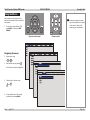
Use the buttons on the projector control
panel or on the remote control, to access the
menu system.
•
Some menu options and controls
may not be available due to settings
in other menus. These will be
shaded grey on the actual menu.
To open the on-screen display (OSD),
press MENU. To close, press EXIT/
RETURN.
Projector control panel
Remote control
Navigating the menus
•
Select a menu using
and
•
,
then open the menu by pressing
.
The first item in the menu is highlighted.
•
Select an item in the menu using
and
•
.
To open another menu, first close the
current menu by pressing MENU.
Rev A
April 2012
Page Op_3
Digital Projection E-Vision
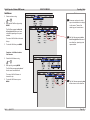
8000 series Sub Menus
•
Select a sub menu using
and
•
.
then open the Sub Menu by pressing
ENTER.
The Sub Menu appears to either the
left or right side of the menu it was
called from, depending on the space
available.
The name of the Sub Menu is shown at
the top.
•
To close the Sub Menu, press MENU.
USING THE MENUS
Operating Guide
Notes
Some menu options and controls
may not be available due to settings
in other menus. These will be
shaded grey on the actual menu.
The Sub Menu appears to either
the left or right side of the menu it
was called from, depending on the
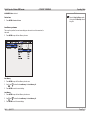
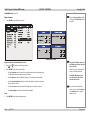
space available.
Sometimes, a Sub Menu leads to a
Sub Submenu:
•
Select the Sub Submenu using
and
•
.
then open it by pressing ENTER.
The Sub Submenu appears in place of
the sub menu it was called from.
The name of the Sub Submenu is
shown at the top.
•
To close the Sub Submenu, press
MENU.
Rev A
April 2012
The Sub Submenu appears in place
of the sub menu it was called from.
Page Op_4
Digital Projection E-Vision
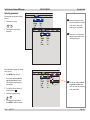
8000 series Selecting parameters
Most parameters are changed by selecting
from a list:
•
Select from the list using
and
•
.
The change will usually be made
immediately.
USING THE MENUS
Operating Guide
Notes
Some menu options and controls
may not be available due to settings
in other menus. These will be
shaded grey on the actual menu.
There may be a short delay when
changing some parameters, due to
internal processing time.
Some parameters are changed by selecting
from a sub menu.
•
Press ENTER to open the menu.
The sub menu appears to the left or
right side, or in place of the menu
it was called from, depending on the
space available.
•
The item that is currently selected is
marked with a block: .
•
Select from the sub menu using
and
•
The sub menu appears to the left
or right side, or in place of the
menu it was called from, depending
on the space available.
.
The change will be made when you
press ENTER to confirm the selection.
Rev A
April 2012
Page Op_5
Digital Projection E-Vision
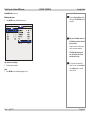
8000 series Sliders
•
Use
Operating Guide
Notes
or
to adjust the value.
The menu will disappear, to be replaced
by a slider bar.
•
USING THE MENUS
To return to the menu, press MENU.
Some menu options and controls
may not be available due to settings
in other menus. These will be
shaded grey on the actual menu.
Commands
•
To execute the command, press
ENTER.
In this example,
•
use
or
to move the blue
highlight to OK or Cancel,
•
then press ENTER to confirm your
selection.
Rev A
April 2012
Page Op_6
Digital Projection E-Vision
8000 series A TOUR OF THE MENUS
Operating Guide
A Tour of the Menus
Notes
See also Using the Menus, earlier
in this guide and Menu Map, later in
this guide.
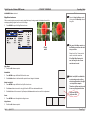
INPUT Menu
PIP (split L-R)
In this example, the flower is the
main image, and the window is the
sub-image.
The two images MUST be from
different Input groups.
Input Selection
•
Press ENTER to open the Input Selection menu, then select an input from the list.
PIP (Picture in Picture) sub menu
•
PIP (top left)
Press ENTER to open the PIP sub menu.
PIP Option
•
Set PIP Option to On or Off.
Main and PIP Inputs
•
•
Select a Main Input from the drop-down list. The inputs are divided into
two groups – the main image must be from one group, and the subimage must be from the other group.
•
•
Group A: VGA, Component/BNC, Composite, S-Video
Input Menu
PIP Submenu
Group B: HDMI, DVI, 3G-SDI
Select a PIP Input from the drop-down list.
Position
•
Select a Position or Split L-R for the PIP image.
Rev A
April 2012
Page Op_7
Digital Projection E-Vision
A TOUR OF THE MENUS
8000 series INPUT Menu continued
Notes
Test Pattern
•
Press ENTER to display a Test Pattern.
•
Use
or
Operating Guide
See also Using the Menus, earlier
in this guide and Menu Map, later in
this guide.
to scroll through the following Test Patterns:
... Off, Colour Bars, Alignment Grid, Burst, Red, Green, Blue, White, Black, Corrected Red,
Corrected Green, Corrected Blue, Greyscale, Off ...
•
To return to viewing the image from your image source, use
Off.
or
to scroll through the list to
Color Space
•
Set this to Auto, except when the projector has problems selecting between YCrCb, YPrPb, RGB-PC
and RGB-Video.
Input Lock
•
Set this to Auto, except when the projector has problems locking on to 48Hz, 50Hz and 60Hz signals.
Background
•
Set this to determine what appears on screen when the projector is searching for a valid input source.
Video Standard
•
Set this to Auto, unless the projector has problems selecting between PAL, SECAM and NTSC.
Auto Sync Adjust
•
Select from
•
•
Off: Auto Sync Adjustment is never performed.
•
Always - Projector will perform auto setup every time a new signal source is connected, ignoring
Rev A
Auto – Projector will compare with the previous five signals stored in memory, and then recall
those settings if possible.
any settings in memory.
April 2012
Page Op_8
Digital Projection E-Vision
8000 series PICTURE Menu
A TOUR OF THE MENUS
Operating Guide
Notes
See also Using the Menus, earlier
in this guide and Menu Map, later in
this guide.
Display Mode
•
Select one of the Display modes as required.
Contrast, Brightness, Saturation, Hue
•
Adjust the sliders for these settings, as required.
Dynamic Contrast
•
Set this to On or Off as required.
Gamma
•
Select one of the Gamma settings as required.
Rev A
April 2012
Page Op_9
Digital Projection E-Vision
8000 series A TOUR OF THE MENUS
Operating Guide
PICTURE Menu continued
Notes
Color sub menu
•
See also Using the Menus, earlier
in this guide and Menu Map, later in
this guide.
Press ENTER to open the Color sub menu.
Colour Temperature
•
Set this to suit the specification of the input source, or to improve the appearance of the
projected image.
Trim
•
Set the Red, Green and Blue Lift and Gain settings, to improve the appearance of the
projected image.
The full height and width of the
screen will depend on the projector
model. For more information, see
the Specification leaflet, or the
Important Information.
Sharpness, Noise Reduction
•
Adjust the sliders for these settings, as required.
Aspect Ratio
•
Set Aspect Ratio to suit the incoming video signal.
The 5:4, 4:3, 16:10, 16:9, 1.88:1 and 2.35:1 settings will stretch the image to the
selected aspect ratio, leaving black bars at the top and bottom or sides of the screen,
depending on the aspect ratio of the projector.
The Letterbox setting can be used where a wide screen image has been supplied in a
narrower format with black bars at the top and bottom. The top and bottom of the image
will be cropped,and the image stretched to fill the screen.
16:10 image
The Native setting will scale the image to fit either the full height or width of the screen,
whilst retaining the aspect ratio of the image.
The Unscaled setting will display the image pixel for pixel at its supplied resolution, in
the centre of the screen. There may be black bars at the top and bottom or sides of the
screen, or the image may be cropped, depending on the video signal and the aspect
ratio of the projector.
5:4 image
Rev A
April 2012
displayed unscaled
displayed at native
letterbox image
displayed at 5:4
stretched and cropped
displayed at 2.35:1
Page Op_10
Digital Projection E-Vision
8000 series PICTURE Menu continued
Overscan
•
Set this to Off On or Zoom as required.
VGA Setup sub menu
•
Press ENTER to open the VGA Setup sub menu.
Horizontal Total, Start and Phase, Vertical Start
•
Adjust the sliders for these settings, as required to suit the incoming image.
A TOUR OF THE MENUS
Operating Guide
Notes
See also Using the Menus, earlier
in this guide and Menu Map, later in
this guide.
Overscan is used to compensate
for noisy or badly defined image
edges, by cropping the image, or
increasing the size of the image to
force the edges off-screen.
Auto Sync
•
Press ENTER to force the projector to re-synchronise with the input signal.
Rev A
April 2012
Page Op_11
Digital Projection E-Vision
8000 series A TOUR OF THE MENUS
LAMPS Menu
Operating Guide
Notes
See also Using the Menus, earlier
in this guide and Menu Map, later in
this guide.
Mode
•
Set this to Single or Dual as required.
When the mode is changed, it will not be possible to change it again within five minutes.
Power
•
Set this to Normal for 100% power, Eco for 80% power or Custom to enable the
Custom Power slider.
When Lamp Mode is set to Single,
the projector will turn on using the
lamp with the least hours of use.
To protect the lamps from thermal
shock, it will not be possible to
change the Lamp Mode more than
once within five minutes.
High Altitude Mode
•
Set this to On if it is necessary to have the cooling fans running at high speed.
Custom Power
•
Set the slider as required.
The Power setting should be set
to Custom, if you want to use the
Custom Power slider.
Lamp Status and Time
•
For information only.
Rev A
April 2012
Page Op_12
Digital Projection E-Vision
A TOUR OF THE MENUS
8000 series ALIGNMENT Menu
Operating Guide
Notes
See also Using the Menus, earlier
in this guide and Menu Map, later in
this guide.
Rear Projection
•
Set this to Off or On as required.
Ceiling Mode
•
Set this to Off or On as required.
Lens Control
•
•
Press ENTER to display the Lens Control box.
Press ENTER again to scroll through the following combinations of lens control and background pattern:
Shift with
no pattern
•
Use
Rev A
,
Zoom/Focus with
grid and crosses
,
April 2012
and
Shift with
grid
Zoom/Focus with
crosses
to Shift the lens or to adjust the Zoom and Focus, as applicable
Page Op_13
Digital Projection E-Vision
8000 series A TOUR OF THE MENUS
ALIGNMENT Menu continued
Center Lens
•
Press ENTER to Center the Lens.
Operating Guide
Notes
See also Using the Menus, earlier
in this guide and Menu Map, later in
this guide.
Lens Memory sub menu
The current lens position, focus and zoom settings can be saved in one of ten memories, for
later recall.
•
Press ENTER to open the Lens Memory sub menu.
Save Memory
•
Press ENTER to open the Save Memory sub sub menu.
•
•
Use
and
to select from Lens Memory 1 to Lens Memory 10.
Press ENTER to save the current settings.
Load Memory
•
Press ENTER to open the Load Memory sub sub menu.
•
•
Use
and
to select from Lens Memory 1 to Lens Memory 10.
Press ENTER to recall the saved settings.
Rev A
April 2012
Page Op_14
Digital Projection E-Vision
8000 series A TOUR OF THE MENUS
Operating Guide
ALIGNMENT Menu continued
Notes
Warp sub menu
•
See also Using the Menus, earlier
in this guide and Menu Map, later in
this guide.
Press ENTER to open the Warp sub menu.
Warp control boxes
Only one of the Warp controls, or
the Blanking control can be used
at any one time.
Keystone, Rotation, Pincushion/Barrel, Corner
•
•
Use
and
to select one of the warp controls.
Press ENTER to open the warp control box:
•
Use the Keystone control to correct for any distortion caused by the projector being
in a different horizontal or vertical plane to the screen..
•
•
Use the Rotation control to rotate the image up to 5° clockwise or anti-clockwise.
•
•
Use the four Corner controls to stretch the image from each of the four corners..
Use the Pincushion/Barrel control to correct for any distortion caused by the screen
being concave or convex.
Use Custom Warp to activate a user-defined warp pattern.
Reset
•
Exception: all four Corner controls
can be used at the same time.
If the Edge Blend feature is in
use, then only the four Corner
controls can be used.
If you are not sure which Warp
control is in use, then select Reset,
from the Warp menu to reset all
controls to zero.
Press ENTER to reset all warp settings to zero.
Rev A
April 2012
Page Op_15
Digital Projection E-Vision
8000 series A TOUR OF THE MENUS
Operating Guide
ALIGNMENT Menu continued
Notes
Blanking sub menu
•
See also Using the Menus, earlier
in this guide and Menu Map, later in
this guide.
Press ENTER to open the Blanking sub menu.
Only one of the Warp controls, or
the Blanking control can be used
at any one time.
Top, Bottom, Left and Right
•
Set each slider as required.
Reset
•
Press ENTER to reset all blanking settings to zero.
Rev A
April 2012
Exception: all four Corner controls
can be used at the same time.
If the Edge Blend feature is in
use, then only the four Corner
controls can be used.
If you are not sure which Warp
control is in use, then select Reset,
from the Warp menu to reset all
controls to zero.
Page Op_16
Digital Projection E-Vision
8000 series A TOUR OF THE MENUS
Operating Guide
ALIGNMENT Menu continued
Notes
Edge Blend sub menu
See also Using the Menus, earlier
in this guide and Menu Map, later in
this guide.
When several projectors are used to create a large tiled image, the edges need to be blended to avoid the
overlaps appearing brighter than the rest of the image..
•
Press ENTER to open the Edge Blend sub menu.
Only one of the Warp controls, or
the Blanking control can be used
at any one time.
Blend
width
Exception: all four Corner controls
can be used at the same time.
If the Edge Blend feature is in
use, then only the four Corner
controls can be used.
Edge Blend
•
Set this to Off or On as required.
Blend Width
•
•
Press ENTER to open the Blend Width sub sub menu.
Black Level Uplift is available for
up to two edges only, and they
must be top+bottom, or left+right
– not top+left for example.
Set the Width sliders to the blend width required for each edge to be blended.
Black Level Uplift
•
•
•
Press ENTER to open the Black Level Uplift sub sub menu.
Set the Area sliders to correct for stray light from the DMD’s non-addressable border.
Set the All sliders for the amount of uplift required; the Colour sliders can be used for fine adjustment.
Reset
•
Therefore, uplift can only be used
for an array of projectors either:
1 projector high or
1 projector wide
Press ENTER to reset all edge blend settings to zero.
Align Pattern
•
Set this to Off or On as required.
Rev A
April 2012
Page Op_17
Digital Projection E-Vision
8000 series A TOUR OF THE MENUS
CONTROL menu
Operating Guide
Notes
See also Using the Menus, earlier
in this guide and Menu Map, later in
this guide.
IR Address
•
Set this to 1 or 2 as required.
Eco Network Power
•
Set this to Standard or Eco as required. In Eco mode, the LAN power supply is switched
off.
Eco Network Power must be set to
Standard, if you wish to control the
projector via the LAN connection.
Auto Power Off
•
Set this to On, if you want the projector to go into Standby mode when no input source
is detected for 20 minutes.
Auto Power On
•
•
Set this to On, if you want the projector to start up immediately when the mains is
connected.
Set this to Off, if you want the projector to go into Standby mode when the mains is
connected. In this case, the projector will not start up until the POWER button is pressed
on the control panel or the remote control.
Rev A
April 2012
Page Op_18
Digital Projection E-Vision
8000 series CONTROL Menu continued
Projector Control
•
Set this to Network or RS232 as required.
A TOUR OF THE MENUS
Operating Guide
Notes
See also Using the Menus, earlier
in this guide and Menu Map, later in
this guide.
Network sub menu
Eco Network Power must be set to
Standard, if you wish to control the
projector via the LAN connection.
To change any of the network
settings, use the embedded LAN IP
Configuration Utility (see later in
this guide).
•
Press ENTER to open the Network sub sub menu.
The settings here are for information only.
Rev A
April 2012
Page Op_19
Digital Projection E-Vision
8000 series A TOUR OF THE MENUS
CONTROL Menu continued
Startup Logo
•
Set this to On if you want the DP logo to show when the projector is first switched on.
Operating Guide
Notes
See also Using the Menus, earlier
in this guide and Menu Map, later in
this guide.
Trigger
•
Set this to Auto if you want the Trigger output to be activated when the projector is first
switched on.
•
Set this to one of the Aspect Ratio settings, if you want the Trigger output to be
activated when the projector is switched to that aspect ratio.
Auto Search
•
•
When this is set to On, the projector will search for an alternative input source when the
current input source is disconnected
When this is set to Off, the projector will show the DP logo when the current input source
is disconnected.
Dynamic Black
•
Set this to On or Off as required.
Dynamic Black reduces the overall
light output for images that contain
a lot of black. This improves the
perceived contrast ratio.
Language
•
Press ENTER to open the Language Selection menu, then select an language from the
list.
Rev A
April 2012
Page Op_20
Digital Projection E-Vision
8000 series A TOUR OF THE MENUS
SERVICE menu
Operating Guide
Notes
See also Using the Menus, earlier
in this guide and Menu Map, later in
this guide.
Information
•
The first part of the menu is for information only.
Blue Only
•
Set this to On or Off as required.
Factory Reset
•
Projector will ask for confirmation before restoring all settings to factory defaults.
•
When the confirmation box appears, use
or
to move the blue highlight to OK
or Cancel, then press ENTER to confirm your selection.
Rev A
April 2012
Do NOT do this unless you are
sure that you want to restore ALL
settings to their factory defaults.
Page Op_21
Digital Projection E-Vision
8000 series MENU MAP
Menu Map
Menu
Input Selection HDMI, DVI, VGA, Component/BNC, Composite, S-Video, 3G-SDI, Option Board
PIP
PIP Option Off, On
Main Input Select from group A or group B
PIP Input Select from group B or group A
Position Top Left, Top Right, Bottom Left, Bottom Right, Split L-R
Test Pattern Off, Colour Bars, Alignment Grid, Vertical Lines, R, G, B, White, Black, Corrected R, G, B, Greyscale
Color Space Auto, YCbCr, YPbPr, RGB-PC, RGB-Video
Input Lock Auto, 48Hz, 50Hz, 60Hz
Background Logo, Blue, Black, White
Video Standard Auto, PAL, SECAM, NTSC
Auto Sync Adjust Always, Off, Auto
PICTURE
Rev A
Notes
Sub Menus and Controls
INPUT
April 2012
Operating Guide
Some of the information in this menu
map is summarised. See the actual
menu on the projector for full detail.
Some menu options and controls
may not be available due to settings
in other menus. These will be
shaded grey on the actual menu.
Where it would be helpful, some
menu options are described in more
detail earlier in this operating guide.
Display Mode Video, High Bright, Presentation
Contrast
Dynamic Contrast Off, On
Brightness
Saturation
Hue
Gamma Video, Linear, Film, Graphics
Color
Color Temperature Native, 5000K-9300K
Trim RGB Lift and Gain
Sharpness
Noise Reduction
Aspect Ratio 5:4, 4:3, 16:10, 16:9, 1.88, 2.35, Letterbox, Native, Unscaled
Overscan Off, Crop, Zoom
VGA Setup H Total, H Start, H Phase, V Start
Auto Sync Press ENTER to execute
Page Op_22
Digital Projection E-Vision
Menu
8000 series MENU MAP
Sub Menus and Controls
Operating Guide
Notes
LAMPS
Mode Dual, Single
Power Normal, Custom Power, Eco
High Altitude Off, On
Custom Power 80-100%
Lamp Status Information Only: Lamp 1 On, Off Lamp 2 On, Off
Lamp Time Information Only: Lamp 1 Hrs Lamp 2 Hrs
ALIGNMENT
Rear Projection Off, On
Ceiling Mode Off, On
Lens Control Shift, Zoom/Focus
Lens Memory
Load Memory Memory 1-10
Save Memory Memory 1-10
Center Lens Press ENTER to execute
Warp
Keystone Horizontal, Vertical
Rotation
Pincushion/Barrel
Top Left Corner, Top Right, Bottom Left, Bottom Right
Custom Warp
Reset (all warp settings) Press ENTER to execute
Blanking Top, Bottom, Left, Right, Reset (all blanking settings)
Edge Blend
Edge Blend Off, On
Blend Width Top, Bottom, Left, Right
Black Level Uplift
Select Area Top, Bottom, Left, Right
Adjust Width All, Red, Green, Blue
Reset (all edge blend settings) Press ENTER to execute
Align Pattern Off, On
Rev A
April 2012
Some of the information in this menu
map is summarised. See the actual
menu on the projector for full detail.
Some menu options and controls
may not be available due to settings
in other menus. These will be
shaded grey on the actual menu.
Where it would be helpful, some
menu options are described in more
detail earlier in this operating guide.
Page Op_23
Digital Projection E-Vision
Menu
8000 series MENU MAP
Sub Menus and Controls
Operating Guide
Notes
CONTROL
IR Address 1,2
Eco Network Power Standard, Eco
Auto Power Off On, Off
Auto Power On On, Off
Projector Control RS232, Network
Network Information only: IP Address, Subnet Mask, Gateway, DHCP
Startup Logo On, Off
Trigger Auto, 5:4, 4:3, 16:10, 16:9, 1.88, 2.35, Letterbox, Native, Unscaled
Auto Search On, Off
Dynamic Black On, Off
Language Select from list
Some of the information in this menu
map is summarised. See the actual
menu on the projector for full detail.
Some menu options and controls
may not be available due to settings
in other menus. These will be
shaded grey on the actual menu.
Where it would be helpful, some
menu options are described in more
detail earlier in this operating guide.
SERVICE
Information only: Model, Serial Number, Software Version, Active/PIP Source, Pixel Clock, Signal Format, H/V
Refresh Rate, Lamp Time, Power On Time,
Blue Only Off, On
Factory Reset Press ENTER to execute.
Rev A
April 2012
Page Op_24
Digital Projection E-Vision
8000 series LAN IP CONFIGURATION UTILITY
Operating Guide
LAN IP Configuration Utility
Notes
LAN IP configuration can be carried out using a web browser:
•
Point your browser at the projector by typing the LAN IP Address into the address bar,
then press the Enter key.
•
•
The embedded IP Configuration webpage should appear.
Eco Network Power must be set to
Standard, if you wish to control the
projector via the LAN connection.
Make the settings as required, then click on Save.
The default LAN IP address is
192.168.0.100
Rev A
April 2012
If you suspect this has been
changed, then you can view the
current Network settings in the
Control Menu.
Page Op_25
REMOTE COMMUNICATIONS GUIDE
E-Vision 8000 Series
High Brightness Digital Video Projector
Rev A
April 2012
Digital Projection E-Vision
8000 series CONTENTS
CONTENTS
Introduction............................................................................................ Rem_1
Examples.............................................................................................. Rem_1
The Operation Commands............................................................ Rem_2
INPUT menu.......................................................................................... Rem_2
PICTURE menu..................................................................................... Rem_4
LAMPS menu........................................................................................ Rem_5
ALIGNMENT menu............................................................................... Rem_6
CONTROL menu................................................................................... Rem_7
SERVICE menu..................................................................................... Rem_9
Miscellaneous commands................................................................. Rem_10
Rev A
April 2012
Remote Communications Guide
Digital Projection E-Vision
INTRODUCTION
8000 series Remote Communications Guide
Introduction
Notes
The projector can be controlled by using an external control system or a PC via a LAN or RS232 serial interface, using a terminal-emulation
program, such as HyperTerminal.
Details of how to connect to the
projector, using the serial control
or LAN inputs, can be found in the
Connections Guide.
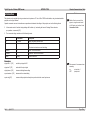
Operation commands are used to simulate menu operations and determine the settings of the projector, and use the following format:
•
All commands consist of ascii text strings starting with the letters ‘op’, and ending with an ascii Carriage Return character:
op <operation> <command> [CR]
•
The <command> string can take one of the following formats:
<command>
Description
Set
= <value>
Makes the setting take that value.
Get
?
Asks what the current value is.
The value is returned as an ascii text string.
Increment
+
Adds 1 to the current value.
Decrement
–
Subtracts 1 from the current value.
Execute
(none)
Performs an action.
Examples
op input.sel = 1 [CR]
sets the input signal to DVI
op input.sel ? [CR]
asks what is the input signal
op brightness + [CR]
increments the brightness setting
op contrastness – [CR]
decrements the contrast setting
op auto.img [CR]
commands the projector to attempt to re-synchronise to the current input source
Rev A
April 2012
Note: spaces in the commands are
necessary.
eg
op input.sel = 1
NOTopinput.sel=1
Page Rem_1
Digital Projection E-Vision
THE OPERATION COMMANDS
8000 series Remote Communications Guide
The Operation Commands
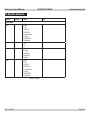
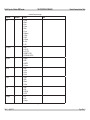
<operation>
<command>
<values>
Notes
input.sel
=?
0 = HDMI
1 = DVI
2 = RGB D-15
3 = RGBHV/YUV
4 = Composite Video
5 = S-Video
6 = SDI/HDSDI/3G
7 = Option Board
pip
=?
0 = Off
1 = On
pip.pos
=?
0 = Top left
1 = Top right
2 = Bottom left
3 = Bottom right
4 = Split L-R
pip.pos
=?
1 = HDMI
2 = DVI
3 = RGB D-15
4 = RGBHV/YUV
5 = Composite Video
6 = S-Video
7 = SDI/HDSDI/3G
8 = Option Board
INPUT menu
continued on next page...
Rev A
April 2012
Page Rem_2
Digital Projection E-Vision
THE OPERATION COMMANDS
8000 series Remote Communications Guide
...continued from previous page
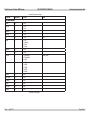
<operation>
<command>
<values>
Notes
pattern
=?
0 = White
1 = Black
2 = Red
3 = Green
4 = Blue
5 = Cyan
6 = Magenta
7 = Yellow
8 = ANSI
9 = H-Ramp
10 = Grid
11 = Off
Color.space2
=?
0 = Auto
1 = YUV HD
2 = YUV STD
3 = RGB-PC (0-255)
4 = RGB-Video (16-235)
color.space
=?
0 = Native
1 = EBU
2 = SMPTE
3 = Custom
input.lock
=?
0 = Auto
1 = 48 Hz
2 = 50 Hz
3 = 60 Hz
no.signal
=?
0 = Logo
1 = Blue
2 = Black
3 = White
vid.std
=?
0 = Auto
1 = PAL
2 = SECAM
3 = NTSC
auto.imgadj
=?
0 = Off
1 = Auto
2 = Always
continued on next page...
Rev A
April 2012
Page Rem_3
Digital Projection E-Vision
THE OPERATION COMMANDS
8000 series Remote Communications Guide
...continued from previous page
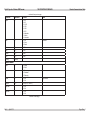
<operation>
<command>
<values>
Notes
PICTURE menu
contrast
=?+-
0 - 200
dyna.cont
=?
0 = Off
1 = On
brightness
=?+-
0 - 200
saturation
=?+-
0 - 200
tint
=?+-
0 - 200
gamma
=?
0 = Film
1 = Graphics
2 = Video
3 = Linear
sharpness
=?+-
0 - 200
nr
=?+-
0 - 200
pic.mode
=?
0 = High Bright
1 = Presentation
2 = Video
color.temp
=?
0 = 5000K
1 = 6500K
2 = 7800K
3 = 9300K
4 = Native
red.offset
=?+-
0-200
green.offset
=?+-
0-200
blue.offset
=?+-
0-200
red.gain
=?+-
0-200
green.gain
=?+-
0-200
blue.gain
=?+-
0-200
Hue
Display Mode
continued on next page...
Rev A
April 2012
Page Rem_4
Digital Projection E-Vision
THE OPERATION COMMANDS
8000 series Remote Communications Guide
...continued from previous page
<operation>
<command>
<values>
aspect
=?
0 = 5:4
1 = 4:3
2 = 16:10
3 = 16:9
4 = 1.88
5 = 2.35
6 = Letterbox
7 = Native
8 = Unscaled
zoom
=?
0 = Off
1 = Crop
2 = Zoom
h.total
=?+-
0-200
h.pos
=?+-
0-200
h.phase
=?+-
0-200
v.pos
=?+-
0-200
auto.img
(execute)
Notes
Overscan
LAMPS menu
lamps
=?
0 = Single
1 = Dual
lamp.mode
=?
0 = Economy
1 = Standard
2 = Dimming
altitude
=?
0 = Off
1 = On
lamp.pwr
=?+-
0-25 ( 80 % ~100.0 % )
lamp1.stat
?
0 = Off
1 = On
lamp2.stat
?
0 = Off
1 = On
High Altitude
continued on next page...
Rev A
April 2012
Page Rem_5
Digital Projection E-Vision
THE OPERATION COMMANDS
8000 series Remote Communications Guide
...continued from previous page
<operation>
<command>
<values>
Notes
ALIGNMENT menu
rear.proj
=?
0 = front
1 = rear
ceil.mode
=?
0 = floor
1 = ceiling
zoomio
+-
+ = Zoom out
- = Zoom in
focus
+-
+ = Focus Near
- = Focus Far
vert.offset
+-
+ = Up
- = Down
horiz.offset
+-
+ = Right
- = Left
Lens.center
(execute)
h.keystone
=?+-
-350~+350
v.keystone
=?+-
-200~+200
warp.rotat
=?+-
-20 ~ +20 (in ¼° unit)
warp.pinbrl
=?+-
-100 ~ +100
warp.tlc.x
warp.tlc.y
=?+-
x: -192 ~ +192
y: -120 ~ +120
warp.trc.x
warp.trc.y
=?+-
x: -192 ~ +192
y: -120 ~ +120
warp.blc.x
warp.blc.y
=?+-
x: -192 ~ +192
y: -120 ~ +120
warp.trc.x
warp.trc.y
=?+-
x: -192 ~ +192
y: -120 ~ +120
warp.reset
(execute)
w2.recover
(execute)
blank.top
=?+-
0 ~ 360
blank.btm
=?+-
0 ~ 360
blank.left
=?+-
0 ~ 534
continued on next page...
Rev A
April 2012
Page Rem_6
Digital Projection E-Vision
THE OPERATION COMMANDS
8000 series Remote Communications Guide
...continued from previous page
<operation>
<command>
<values>
Notes
blank.right
=?+-
0 ~ 534
blank.rst
(execute)
eb.stat
=?
0 = Off
1 = On
eb.wht.top
=?+-
0, 200 ~ 500
1-199 not allowed
eb.wht.btm
=?+-
0, 200 ~ 500
1-199 not allowed
eb.wht.left
=?+-
0, 200 ~ 800
1-199 not allowed
eb.wht.right
=?+-
0, 200 ~ 800
1-199 not allowed
eb.blk.top
=?+-
0, 8, 16, 24, 32
eb.blk.btm
=?+-
0, 8, 16, 24, 32
eb.blk.left
=?+-
0, 4, 8, 12, 16, 20, 24, 28, 32
eb.blk.right
=?+-
0, 4, 8, 12, 16, 20, 24, 28, 32
eb.all
=?+-
0 ~ 32
eb.red
=?+-
0 ~ 32
eb.green
=?+-
0 ~ 32
eb.blue
=?+-
0 ~ 32
eb.reset
(execute)
eb.adl
=?
0 = Off
1 = On
Align Pattern
CONTROL menu
ir.addr
=?
0 = remote code 1
1 = remote code 2
eco.net.pow
=?
0 = Off (RJ45 Power On)
1 = On (RJ45 Power Off)
auto.powoff
=?
0 = Off
1 = On
auto.powon
=?
0 = Off
1 = On
proj.ctrl
=?
0 = RS232
1 = network
Standard
Eco
continued on next page...
Rev A
April 2012
Page Rem_7
Digital Projection E-Vision
THE OPERATION COMMANDS
8000 series Remote Communications Guide
...continued from previous page
<operation>
<command>
<values>
Notes
net.ipaddr
=?
<string>
net.subnet
=?
<string>
net.gateway
=?
<string>
net.dhcp
=?
0 = Off
1 = On
startup.logo
=?
0 = Off
1 = On
trig.1
=?
0 = 5:4
1 = 4:3
2 = 16:10
3 = 16:9
4 = 1.88
5 = 2.35
6 = Letterbox
7 = Native
8 = Unscaled
9 = Auto
auto.src
=?
0 = Off
1 = On
lang
=?
0 = English
1 = French
2 = Spanish
3 = German
4 = Portuese
5 = Chinese Simplified
6 = Chinese Traditional
7 = Japanese
8 = Korean
continued on next page...
Rev A
April 2012
Page Rem_8
Digital Projection E-Vision
THE OPERATION COMMANDS
8000 series Remote Communications Guide
...continued from previous page
<operation>
<command>
<values>
Notes
SERVICE menu
model
?
<string>
ser.no
?
<string>
sw.ver
?
<string>
act.src
?
0 = HDMI
1 = DVI
2 = RGB D-15
3 = RGBHV/YUV
4 = Composite Video
5 = S-Video
6 = SDI/HDSDI/3G
7 = Option Board
pip.src
?
0 = HDMI
1 = DVI
2 = RGB D-15
3 = RGBHV/YUV
4 = Composite Video
5 = S-Video
6 = SDI/HDSDI/3G
7 = Option Board
pixel.clock
?
<number>
signal
?
<string>
h.refresh
?
<string>
KHz
v.refresh
?
<string>
Hz
lamp1.hours
?
<string>
lamp2.hours
?
<string>
lamp1.reset
(execute)
lamp2.reset
(execute)
proj.runtime
?
<string>
blue.only
=?
0 = Off
1 = On
fact.reset
(execute)
Active Source
MHz
Factory reset
continued on next page...
Rev A
April 2012
Page Rem_9
Digital Projection E-Vision
THE OPERATION COMMANDS
8000 series Remote Communications Guide
...continued from previous page
<operation>
<command>
<values>
Notes
Miscellaneous commands
picture.mute
=?
power.on
(execute)
power.off
(execute)
text.mode
=?
0 = Off
1 = On
status.check
?
0 = standby
1 = warm up
2 = imaging
3 = cooling
4 = warning
Rev A
April 2012
0 = Off
1 = On
Power on
Power off (puts projector into Standby mode)
Not available when test pattern is showing
Page Rem_10