1
GVS
K-BUS
KNX/EIB
RS232/KNX Controller
3. Parameter setting description for the ETS
3.1. Parameter window “General”
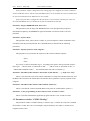
The parameter window “General” is shown in fig. 3.1. Here can be set whether to enable the
serial ports of the RS232/KNX Controller and define the format of the control command. When the
serial ports are enabled, but the control command is not activated or configured, the telegram that the
serial port object receives is invalid. At the meantime, the command that is configured in the
parameters must be the same as the command that the control device requires. Here also gives the
notes of the format of control command and the download times.
Fig.3.1 parameter window ―General‖
Parameter “COM1/2 enable”
This parameter is used to enable the serial port COM1/2. Options:
Disable
Enable
If selecting the “enable” option,the parameter window “COM1/2 Setting” will be visible (as
shown in fig3.2) , and the object “Telegram send via COM1/2” will be also visible.
Note: When the serial ports are enabled, but the control command is not activated or
configured in the parameter window “Telegram setting page”, any values that the serial port object
“Telegram send via COM1/2” receives are invalid.
6