1
Chapter 2: Installing the SolarEdge Gateway
Mounting and Connecting the SolarEdge Gateway
The SolarEdge gateway can be installed on a wall or on a DIN rail.
►
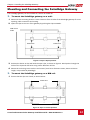
To mount the SolarEdge gateway on a wall:
1 Determine the mounting location. Leave clearance from all sides of the SolarEdge gateway for cover
opening, cable connection and routing.
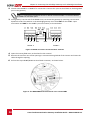
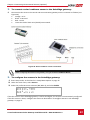
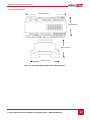
2 Open the clips at the rear of the gateway by pushing the clips outwards.
Wall mount
holes
Press here
Press here
Figure 4: Clips in Open position
3 Position the device on the wall with the open clips, as shown in Figure 4. Mark points through the
holes of the clips and drill holes using a 4mm diameter drill bit.
4 Mount the unit using screw anchors and screws (use 3.5mm diameter screws, 20mm minimum
length, not provided by SolarEdge).
►
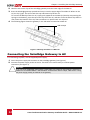
To mount the SolarEdge gateway on a DIN rail:
1 Ensure that the clips are closed, as shown below:
Press here
Press here
Figure 5: Clips in Closed position
Control and Communication Gateway Installation Guide - MAN-01-00132-1.2
13