1
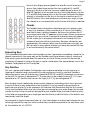
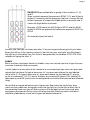
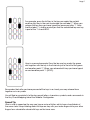
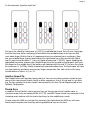
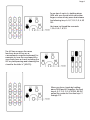
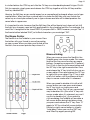
Page 8 Try this example. Type the word “pin”. First press the chord for lowercase “p” (LOLO)--a red-labeled chord. Then lift your ring finger from the third row while continuing to hold down the red-dotted key in the top row with your index finger. (Notice that a “p” appeared when you released your ring finger.) Now use your middle finger to press and release the right-hand key in the second row. (Note that it is next to the red label “I”.) You just typed a lowercase “I” (LROO). Again, keeping the red-dotted key down, release your middle finger from the second row and reach with your little finger for the middle key in the bottom row (labeled with the red “N”) to form the chord for lowercase “n” (LOOM). Finally, release both top and bottom keys. This technique will help you type faster by avoiding unnecessary finger movements. You can use this with many combinations of letters: st, ry, in, 10... Another Speed Tip The Twiddler offers you another typing shortcut. You can use factory-preset chords to type some of the commonest English words or letter sequences: the, of, to, ed, and, in, ion, and ing. The key notation for these chords can be found in the Key Chord Mapping tab of the Twiddler Configurator. Thumb Keys In addition to the NavStick, there are four keys on the top rear of the Twiddler case. In clockwise order they are labeled NUM, ALT, CTRL, and Shift. These thumb keys take part in the chording and combine with the twelve front keys to form additional chords. Chords using the NUM key include the numerals. You hold down the NUM key with your thumb and complete the chord by pressing additional keys on the front.