1
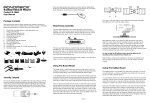
Detection Method B: Priority Mode The second detection method is much simpler. Starting with the first output port, the splitter polls each port for an active display. It will then send the EDID information from the first display discovered to the source device. In the CONNECTION DIAGRAM sample above, if all four displays are powered on the splitter will tell the source device to output video at 1080p with 8-bit Deep Color. This would result in the second display being blank because it is incapable of displaying video at 1080p resolution. This detection method is best for situations in which you will only have one of the four connected displays/sink devices powered on at the same time. An example would be a home video distribution system where you may choose to watch TV in the living, in the den, on the back porch, or in the bedroom, but not at the same time. Note: If you want to use detection method B and have more than one display powered on at the same time, we recommend that you connect the displays in order, from lowest capabilities to highest. In the CONNECTION DIAGRAM sample above, the first two displays should be swapped so that the lowest capable display would be the first one discovered by the splitter. INSTALLATION For installation you will need a High Speed HDMI cable for each connected display and another for the source. If all outputs are going to be used, you will need a total of five High Speed HDMI cables, which are not included with this splitter. 1. Using a High Speed HDMI cable (not included), plug one end into the output of your Blu-ray player (or other video source device). Plug the other end into the INPUT port on the back of the splitter. 2. Using a High Speed HDMI cable (not included), plug one end into the input on your first display. Plug the other end into the 1 port on the back of the splitter. 3. Using a High Speed HDMI cable (not included), plug one end into the input on your second display. Plug the other end into the 2 port on the back of the splitter. 4. Using a High Speed HDMI cable (not included), plug one end into the input on your third display. Plug the other end into the 3 port on the back of the splitter. 5. Using a High Speed HDMI cable (not included), plug one end into the input on your fourth display. Plug the other end into the 4 port on the back of the splitter. 6. Decide which method of display detection you wish to use in your system. Set the A/B switch on the back of the splitter to A or B, depending on which method you want to use. If in doubt about the best method, use method A (default). 7. Plug the DC connector on the power adapter into the DC 5V input port on the back of the splitter. Plug the power adapter into a nearby power outlet. 8. Power on your source device and the four displays. Content played on the source device should be seen on all the displays. NOTICE Specifications, hardware, software, packaging, and manuals are subject to change without notice. HDMI, the HDMI Logo, and High-Definition Multimedia Interface are trademarks or registered trademarks of HDMI Licensing LLC in the United States and other countries. Dolby is a registered trademark of Dolby Laboratories. DTS is a registered trademark & the DTS logos and Symbol are trademarks of DTS, Inc. 3