1
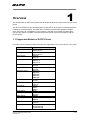
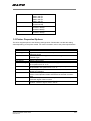
S84ex/S86ex
S84ex 203 dpi
S84ex 305 dpi
S84ex 609 dpi
S86ex 203 dpi
S86ex 305 dpi
CL4NX 203 dpi
CL4NX 305 dpi
CL4NX-J 203 dpi
CL4NX-J 305 dpi
CL4NX-J 609 dpi
CL4NX-J 203 dpi
CL4NX-J 305 dpi
CL6NX Series
CL4NX-J Series
CL6NX-J Series
1.2 Printer Properties/Options
The driver supports printer’s the following settings below. Please take note that the setting
varies depending on the printer model. For more information, refer to the printer specifications.
Property
Media Size
Sensor Type
Print Method
Resolution
Print Speed
Darkness Range
Darkness Level
Print Mode
Cutter
Vertical Offset
Horizontal Offset
Description
Sets the media size. Units in inches.
Specifies the selection of the transparent sensor or the
reflection sensor
Sets the Print method/type such as Thermal Type and Direct
Thermal Type
Sets the print density
Sets the print speed
Sets the print darkness. The print density parameter can be specified
in six options from “A” to “F”.
Sets the print darkness level. The print density level parameter can
be specified in five options from “1” to “5”
Sets the operation mode such as Continuous, Tear Off, Cutter and
Dispenser Operation
Sets the cutter options. This is only applicable for printer units with
cutter. Cutter Operation Mode should also be selected to make it
work
Sets the start position coordinate. Specifies the vertical start position
correction signal. Units in inches
Sets the start position coordinate. Specifies the horizontal start
position correction signal. Units in inches
SATO CUPS Driver for Mac OS X
User Manual
6-29