1
20
P2PP version 3 User Manual
Doc. No. VLT-MAN-ESO-19200-5167
– CS - constraint set name can be changed by editing the appropriate field in the Constraint
set OB view window (see below)
– Acquisition - lists the name of the Acquisition template; this template is attached to the
OB in the OB view window
– Finding charts - lists the number of the attached finding charts and their names
– Ephemeris file - lists the attached ephemeris file names
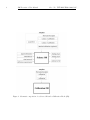
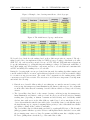
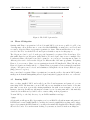
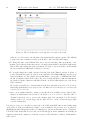
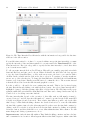
By clicking on the Schedule tab above the list of observing runs, the schedule view is displayed
(Fig. 11). The schedule view lists names of all OBs and Containers and indicates in the same way
as in the ”Obs/Calib Blocks” view, whether the OB is complete or if there are basic parameters
missing.
The function of the Schedule view is to get an overview of the User Priorities for all the OBs and
scheduling containers, and to set-up the observing strategy for the run by adjusting the relative
execution priority between different OBs and scheduling containers.
The User Priority value can be edited by clicking on the number in the ”Priority” column. The default
value is 1, but it should be changed by the user. The lower the User Priority value, the higher the
priority for the execution of the given OB and/or container. The lowest priority is assigned to OBs
and containers with the User Priority value of 10, and the highest priority is marked by assigning
User Priority equal to 1.
The OBs belonging to Groups have the ”Contribution to Group” score. This is an integer number
with values from [1 .... MaxGrpContrib] and it is used to compute the dynamical group score and
therefore assign relatively higher priority to groups of OBs whose observations have already started.
For the details about the group score see Section 2.5.
The OBs belonging to the Time Link containers, that are not the first in the series, have the relative
time constraints ”Earliest After Previous” and ”Latest After Previous”, which can be edited in the
Schedule view. The time delay is expressed in days and hh:mm format. These time constraints are
relative in the sense that they refer to the time with zero point being the start time of the successful
execution of the previous OB in the series. For the rules regarding the execution of OBs within the
time link containers see Section 2.4.
When you first log into P2PP using a new installation, the Summaries area is empty since no OBs
exist yet in your Local Cache. Please note that this does not necessarily mean that no OBs for your
previous programmes exist in the ESO Database if you submitted them in the past! OBs that had
been previously submitted to the ESO Database under your username will not be downloaded to
your Local Cache, since for a number of reasons this would not be desired. The process for copying
OBs from the ESO Database to your Local Cache needs to be carried out explicitly and is described
in Section 6.3.1.
4.5
Exiting P2PP
To exit P2PP, select the Exit option under the File menu, and then click on yes in the dialog box
that appears asking you to confirm your decision.