1
Do you want to control your computer’s mouse from the projector’s
remote or keypad?
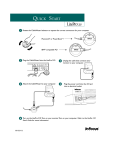
If your computer has a PS/2 connector, use the PS/2 mouse cable
1 Unplug the mouse cable from your computer.
end of the CableWizard mouse cable into the
2 Plug the
mouse connector on your computer.
end of the CableWizard mouse cable into the
3 Plug the
connector on the CableWizard.
NOTE: A USB mouse is hot-pluggable, meaning you do not need to
re-boot your computer after connecting the mouse to use it. A PS-2
mouse is not hot-pluggable.
audio cable
mouse cable
monitor cable
FIGURE 9
Connecting the CableWizard monitor, audio and mouse cables to a desktop computer
If your computer has a USB connector and is running Windows 98,
use the USB mouse cable
end of the CableWizard mouse cable into
1 Plug the
the mouse connector on your computer.
end of the CableWizard mouse cable into the
2 Plug the
connector on the CableWizard.
NOTE: The USB mouse is supported for use with Windows 98
only.
You must have the appropriate USB drivers installed on you
computer to use the USB feature. Windows 98 ships with the
appropriate drivers.
Now you’re ready to power up the projector and your computer.
Skip to “Powering up the Projector and Adjusting the Image” on
page 15.
11