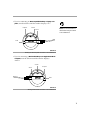
1
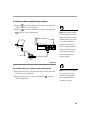
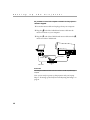
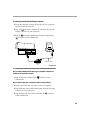
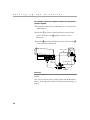
009-0214-01
Don’t Look Into The Lens!
SAFETY SUMMARY: Please
read these instructions before
using your LitePro 210. Failure to
comply could result in fire,
electrical shock, personal injury or
equipment damage.
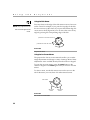
Be extremely careful not to look directly into the lens when the 210 is on. The
bright light can harm your eyes. Be especially careful to keep children from looking into the lens.
Don’t Disassemble
Do not open the 210 case! Doing so exposes you to an electric shock hazard.
Except for the projection lamp, there are no user-serviceable parts. All service
must be performed by an In Focus Systems Authorized Service Provider.
Avoid Hot Surfaces
The inside of the 210 lamp housing can be very hot. Allow the 210 to cool for at
least 45 minutes before opening the lamp door to replace the lamp. Use extreme
care. Avoid touching the hot surfaces inside.
Use Only The 210 Power Cord
Definition of Safety Icons
on Product Labels
Always use the power cord that came with the 210. Although other cords might
look the same, they have not been safety-tested with the 210. Never use the power
cord if it’s damaged or frayed. When you disconnect the 210, always remove the
power cord from the electrical outlet first, then from the 210.
Don’t Defeat The Purpose Of The Grounding Plug
Refer to the User’s
Guide for more
information.
The 210 is grounded through the grounding conductor on the power cord. To
avoid electric shock, plug the power cord into a properly wired receptacle.
Use The Correct Fuse
To avoid the risk of fire, use only a T6.3AH 250V 5x20mm fuse.
Avoid Liquid Spills
Avoid hot surfaces.
Don’t set drinks on top of the 210. Spilled liquids can flow inside causing damage.
Don’t Block Ventilation
Bulb explosion
hazard.
Openings in the case provide ventilation to protect the 210 from overheating.
Keep loose papers and other objects away from the bottom, top and side grills.
Don’t place the 210 on top of or close to a computer or other heat-producing
equipment.
TABLE OF CONTENTS
Safety Summary
Introduction
Image Resolution
Compatibility
Unpacking the Projector
Usage Guidelines
If You Need Assistance
Warranty
iii
1
1
2
2
4
4
4
Setting up the Projector
Connecting the CableWizard to the Projector
Selecting Connectors on the CableWizard
Preparing to Connect Your Equipment to the Projector
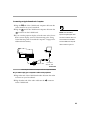
Connecting an IBM-Compatible Desktop Computer
Connecting an IBM-Compatible Laptop Computer
Connecting a Macintosh Desktop Computer
Connecting an Apple PowerBook Computer
Connecting a Video Player
Connecting an External Speaker and a Subwoofer
Connecting a Microphone
Connecting a PS/2-Compatible Mouse.
Connecting the Remote Control Cable
Powering up the Projector and Adjusting the Image
Turning Off the Projector
5
6
6
8
9
11
13
15
17
19
20
20
21
21
23
Using the Projector
Basic Image Adjustment
Using the Remote Control
Adjusting the Projector
Using the Remote and Keypad Buttons
Using the Disk Mouse
Using the On-Screen Menus
Display Menu Functions
Audio Menu Functions
Image Menu Functions
Controls Menu Functions
25
25
25
26
28
32
32
33
35
37
39
i
T
ii
a
b
l
e
o
f
C
o
n
t
e
n
t
s
Maintenance
Cleaning the Lens
Removing and Replacing a Lens
Using the Zoom Lens
Replacing the Projection Lamp
Resetting the Lamp Monitor Light
Replacing the Batteries in the Remote Control
Replacing the Fuse
Using the Kensington Lock
41
41
41
42
43
44
45
45
47
Troubleshooting
Solutions to Common Problems
49
50
Appendix
Specifications
Accessories
Portable and Laptop Activation Chart
Using Video Mirroring with a PowerBook Computer
Projected Image Size
55
55
57
59
63
64
Index
67
SAFETY SUMMARY
Please read these instructions carefully before using your LitePro
210 or 220. Failure to comply with them could result in fire, electrical shock, personal injury or damage to equipment.
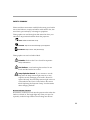
These graphics are used throughout this manual to draw your
attention to important information about the projectors.
NOTE: Additional useful details or tips.
CAUTION: Steps to take to avoid damage to your equipment.
WARNING: Steps to take to avoid personal injury.
These graphics are used on LitePro labels.
Attention - Refer to this User’s Guide for important
safety information.
Hot Surfaces - Avoid touching hot surfaces. Do not
touch until the LitePro has cooled.
Lamp Explosion Hazard - If you continue to use the
lamp after the lamp monitor light comes on, it may
explode, severely damaging your LitePro. Be sure to
replace the lamp when the lamp monitor light comes on
as described in this User’s Guide. Refer to the section
titled “Replacing the Projection Lamp” for information
about changing the bulb.
Do Not Look Into The Lens!
Be extremely careful not to look into the projection lens when the
LitePro is turned on. The bright light may harm your eyes. Be
especially careful to keep children from looking into the lens.
iii
S
a
f
e
t
y
S
u
m
m
a
r
y
Power Source
Use only a three-wire grounding type power source. The power
source should not exceed 250 volts rms between the supply conductors or between either conductor and the ground.
Power Cord
Use only the power cord that was shipped with the LitePro.
Although other power cords might be similar in appearance, they
have not been safety-tested with the 210 or 220. Do not use a
power cord if it has become damaged or frayed. Contact your In
Focus dealer or call In Focus if you need to replace your power
cord.
Grounding
The projector is grounded through the grounding conductor on
the power cord. To avoid electric shock, plug the power cord into
a properly wired receptacle. Do not defeat the purpose of the
grounding-type plug.
Fuse
CAUTION: Be sure to replace
the projection bulb when the lamp
monitor light comes on as
described on page 43. If the lamp
remains in use too long, there is a
danger of bulb explosion. If this
For continued protection against the risk of fire, use only the
specified fuse. It must be a time delay, high breaking capacity
5x20mm fuse with the following amperages: for 6.3amp use
T6.3AH, for 8amp use T8AH. Refer to page 55 for more information about fuse specifications and to page 45 for instructions on
replacing the fuse.
Lamp
To avoid overheating and unacceptable image quality, replace
the projection lamp with a lamp of the specified type. Refer to
page 56 for lamp specifications and to page 43 for instructions on
replacing the lamp.
happens, your LitePro will be
severely damaged.
iv
Lamp Compartment
To avoid burns or an explosion hazard, do not open the lamp
module door until the projector is turned off and the lamp has
cooled. The hot lamp contains high pressure and can explode if
damaged or old. Follow the instructions in this manual for lamp
replacement carefully.
Hot Surfaces
Allow the projector to cool at least 45 minutes before replacing a
lamp. When you open the lamp housing, be very careful not to
touch the hot surfaces inside.
Ventilation and Overheating
Openings in the projector case provide ventilation to protect it
from overheating. Keep loose papers and other objects well away
from the bottom, top and side grills. Do not place the projector on
top of or close to a computer or other heat-producing equipment.
Liquid Spills
Do not set drinks on top of the projector. Spilled liquids can flow
inside and cause damage.
Do Not Disassemble
All LitePro service must be performed by an authorized In Focus
service center. The only user-serviceable part in the LitePro is the
projection lamp, which you can replace by opening the lamp
cover on the bottom of the projector (see page 43). Do not open
any other part of the LitePro. If your LitePro needs repair, call In
Focus Technical Support as described on page 4. Before you call
Technical Support, you may want to refer to “Troubleshooting”
starting on page 49 to see if you can resolve the problem yourself.
NOTE: If you open the LitePro
case, you will void the warranty.
Don’t Set the LitePro on its Lens
To protect the lens when you are transporting the LitePro, adjust
the lens so it is fully retracted (turn it clockwise) before you pack
it.
Place the LitePro in its carrying case with the lens facing
upwards. You may damage the LitePro if you set it on its lens.
v
INTRODUCTION
The In Focus Systems LitePro® 210 and 220 multimedia projectors combine powerful and sophisticated features with easy-touse, intuitive controls. Built-in multimedia features include audio
by JBL™, a palette of 16.7 million colors and active matrix liquid
crystal display (LCD) technology. The 200 series projectors are
ideal for high-performance business, training and imaging applications that demand exceptional color quality. The 210 has VGA
graphics, the 220 has SVGA graphics. The user interfaces of the
two products are identical; information in this User’s Guide
applies to both products.
Image Resolution
LitePro 210
The VGA resolution of the 210’s projected image is 640x480. It
displays computer images just as they appear on your computer’s monitor. Screen resolutions between 640x480 and 800x600
are compressed to 640x480. The 210 cannot compress screen resolutions above 800x600. If your computer’s screen resolution is
higher than 800x600, reset it to a lower resolution before you connect the 210.
LitePro 220
The SVGA resolution of the 220’s projected image is 800x600. It
displays computer images just as they appear on your computer’s monitor. Screen resolutions between 800x600 and
1024x768 are compressed to 800x600. The 220 cannot compress
screen resolutions above 1024x768. If your computer’s screen resolution is higher than 1024x768, reset it to a lower resolution
before you connect the 220.
NOTE: The 220 automatically
expands 640x480 images to
800x600. You can display these
images at 640x480 by turning off
the Auto Resize feature. See “Auto
Resize” on page 37 for more
information.
1
I
n
t
r
o
d
u
c
t
i
o
n
Compatibility
The projector is compatible with a wide variety of computers and
video devices, including:
• IBM-compatible computers, including laptops, up to 800x600
resolution (LitePro 210) or 1024x768 resolution (LitePro 220) at
75Hz.
• IBM PS/2 in VGA and MCGA modes.
• Apple Macintosh and PowerBook computers up to 800x600
resolution (LitePro 210) or 1024x768 resolution (LitePro 220).
• Various VCRs, camcorders and laser disc players.
The projector is not compatible with these systems:
• IBM-compatible computers in CGA or EGA graphics mode.
• Macintosh 128, 512, Plus, SE, SE/30 or Classic.
Unpacking the Projector
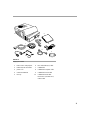
The projector comes with the items shown in Figure 1. Check to
make sure all are included. Contact your In Focus dealer immediately if anything is missing.
If you are experienced in setting up presentation systems, use the
LitePro 210/220 Quick Start card that was included in the shipping
box. For complete details on connecting and operating the projector, refer to this User’s Guide.
NOTE: The contents of your
shipping box may vary depending
on the LitePro configuration you’ve
ordered.
2
2
1
3
7
4
9
6
8
5
10
FIGURE 1
Shipping box contents
1.
LitePro 210 or 220 projector
6.
RCA audio/video (A/V) cable
2.
LitePro 210/220 User’s Guide
7.
CableWizard
3.
power cord
8.
CableWizard computer cable
4.
remote and batteries
9.
CableWizard mouse cable
5.
lens cap
10.
CableWizard audio cable
Not shown: Quick Start card,
remote cable
3
I
n
t
r
o
d
u
c
t
i
o
n
Usage Guidelines
• Do not look directly into the projection lens when the projector
is turned on. The bright light may harm your eyes.
• The top and bottom of the projector can be very hot to the
touch after use. Use extreme care or let it cool before lifting it.
• Do not block the grills at the front or top of the projector.
NOTE: If the LitePro overheats
and turns off, you must wait about
45 seconds before you attempt to
turn it back on.
Restricting the air flow can cause it to overheat and turn off.
• Handle the projector as you would any product with glass
components. Be especially careful not to drop it.
• Avoid leaving the projector in direct sunlight or extreme cold
for extended periods of time. If this happens, allow it to reach
room temperature before use.
• Transport the projector in a vendor-approved hard or soft case.
Part numbers for these cases are listed on page 57. Call your In
Focus dealer to order.
If You Need Assistance
The first place to look for help is in this manual. Be sure to check
the guidelines in “Troubleshooting” on page 49.
If this manual doesn’t answer your question, call your In Focus
dealer. You can also call In Focus Customer Service directly at
1-800-799-9911. Call between 6 a.m. and 5 p.m. PST, Monday
through Friday. In Europe, call In Focus in The Netherlands at
(31) 23-5623200. In Singapore, call (65) 334-9005. Or, send us an
e-mail at [email protected].
The In Focus World Wide Web address is http://www.infs.com.
Warranty
These products are backed by a limited one-year warranty. The
details of the warranty are printed at the back of this manual.
Longer term warranties can be purchased from your In Focus
dealer. Refer to page 58 for part numbers.
4
SETTING UP THE PROJECTOR
1 Place the projector on a flat surface.
• The projector must be within 10 feet of your power source
and within 10 feet of your computer.
• If you want to project from behind a translucent screen, set
up the projector behind your screen. See “Rear Projection”
on page 40 to reverse the image.
• If you are installing the projector on the ceiling, refer to the
LitePro 200 Series Ceiling Mount Installation Guide for more
information. To turn the image upside down, see “Ceiling”
on page 39. The Ceiling Mount Kit is sold separately; see
page 58.
NOTE: An optional extension
cable, sold separately, lets you
increase the distance between the
projector and your computer to 50
feet. See “Accessories” on
page 57.
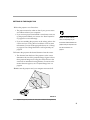
2 Position the projector the desired distance from the screen.
• The distance from the lens of the projector to the screen
determines the size of the projected image. Figure 2 shows
three projected image sizes using the varifocal lens or the
zoom lens at minimum focusing distance. For more information about image size, see “Projected Image Size” on
page 64.
3 Make sure the projector and your computer are turned off.
4 ft.
10 ft.
25 ft.
FIGURE 2
Projected image size (varifocal lens, zoom lens at minimum focusing distance)
5
S
e
t
t
i
n
g
u
p
t
h
e
P
r
o
j
e
c
t
o
r
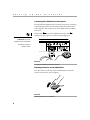
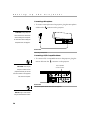
Connecting the CableWizard to the Projector
The CableWizard simplifies the connection process by providing
a central hub for all the connections between the projector and
your computer. The connectors on the CableWizard are labeled
with icons.
Connect the
end of the CableWizard cord to the
connector on the projector’s connector panel (Figure 3).
CAUTION: Turn off the
computer, monitor and projector
whenever you connect or
disconnect cables.
FIGURE 3
Connecting the CableWizard cable to the projector
Selecting Connectors on the CableWizard
Turn the selector on the top of the CableWizard to reveal the
correct connectors for your computer.
FIGURE 4
Selecting connectors on the CableWizard
6
• If you’re connecting an IBM-compatible desktop or laptop computer, turn the selector until the window displays “PC.”
computer
monitor
NOTE: You must disconnect all
mouse
cables before turning the selector
on the CableWizard.
audio
FIGURE 5
Selecting the IBM-compatible connectors on the CableWizard
• If you’re connecting a Macintosh desktop or an Apple PowerBook
computer, turn the selector until the window displays
“Mac™.”
monitor
mouse
computer
audio
FIGURE 6
Selecting the Macintosh connectors on the CableWizard
7
S
e
t
t
i
n
g
u
p
t
h
e
P
r
o
j
e
c
t
o
r
Preparing to Connect Your Equipment to the Projector
Now you’re ready to connect your equipment. Computers are
connected to the Cable Wizard. Video players and other equipment, such as external speakers, are connected directly to the
projector.
NOTE: Before you continue,
Steps for connecting the different types of equipment are given
on the pages listed below.
make sure the projector and your
equipment are turned off. If you’re
Equipment you want to connect
Page
connecting a computer, make sure
IBM-compatible desktop computer
page 9
IBM-compatible laptop computer
page 11
projector is 10 feet or less and
Macintosh desktop computer
page 13
you’ve selected the appropriate
Apple PowerBook
page 15
Video player
page 17
External speakers or subwoofer
page 19
Microphone
page 20
PS/2-compatible mouse
page 20
Remote control cable
page 20
the distance between it and the
connectors on the CableWizard.
8
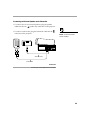
Connecting an IBM-Compatible Desktop Computer
1 Locate the cable that connects your monitor to your computer.
Unplug it from the computer.
2 Plug the
end of the CableWizard computer cable into the
monitor connector on your computer.
3 Plug the
end of the computer cable into the
on the CableWizard.
connector
computer cable
FIGURE 7
Connecting the CableWizard computer cable to an IBM-compatible desktop computer
Do you want to display the image on your computer’s monitor as
well as on the projection screen?
1 Plug your monitor’s cable into the
CableWizard.
connector on the
Do you want to play your computer’s audio on the projector?
1 Unplug the audio cable, if present, from your computer.
2 Plug either end of the CableWizard audio cable into the audio
connector on your computer.
3 Plug the other end of the audio cable into the
on the CableWizard.
connector
9
S
e
t
t
i
n
g
u
p
t
h
e
P
r
o
j
e
c
t
o
r
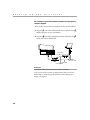
Do you want to control your computer’s mouse from the projector’s
remote or keypad?
1 Unplug the mouse cable from your computer.
2 Plug the
end of the CableWizard mouse cable into the
mouse connector on your computer.
3 Plug the
end of the CableWizard mouse cable into the
connector on the CableWizard.
monitor cable
mouse cable
computer cable
audio cable
FIGURE 8
Connecting the CableWizard monitor, audio and mouse cables to an IBM-compatible
desktop computer
Now you’re ready to power up the projector and your computer.
Skip to “Powering up the Projector and Adjusting the Image” on
page 21.
10
Connecting an IBM-Compatible Laptop Computer
1 Plug the
end of the CableWizard computer cable into the
video connector on your computer.
2 Plug the
end of the CableWizard computer cable into the
connector on the CableWizard.
NOTE: Many laptop computers
do not automatically turn on their
external video port when a secondary display device such as a projector is connected. Refer to your
computer manual for the command that activates the external
video port. Activation commands
for some laptop computers are
listed in the Appendix of this
computer cable
manual on page 59.
FIGURE 9
Connecting the CableWizard computer cable to an IBM-compatible laptop computer
Do you want to play your computer’s audio on the projector?
1 Plug either end of the CableWizard audio cable into the audio
connector on your computer.
2 Plug the other end of the audio cable into the
on the CableWizard.
connector
NOTE: If you don’t want audio or
mouse control, you can use the
CableWizard Lite. CableWizard
Lite is ordered separately. See
“Accessories” on page 57.
11
S
e
t
t
i
n
g
u
p
t
h
e
P
r
o
j
e
c
t
o
r
Do you want to control the computer’s mouse from the projector’s
remote or keypad?
1 Locate the mouse cable and unplug it from your computer.
2 Plug the
end of the CableWizard mouse cable into the
mouse connector on your computer.
3 Plug the
end of the CableWizard mouse cable into the
connector on the CableWizard.
mouse cable
computer cable
audio cable
FIGURE 10
Connecting the CableWizard audio and mouse cables to an IBM-compatible laptop
computer
Now you’re ready to power up the projector and your laptop.
Skip to “Powering up the Projector and Adjusting the Image” on
page 21.
12
Connecting a Macintosh Desktop Computer
1 Locate the cable that connects the monitor to your computer.
Unplug it from the computer.
2 Plug the
end of the CableWizard computer cable into the
monitor connector on your computer.
3 Plug the
end of the CableWizard computer cable into the
connector on the CableWizard.
computer cable
FIGURE 11
Connecting the CableWizard computer cable to a Macintosh desktop computer
Do you want to display the image on your computer’s monitor as
well as on the projection screen?
1 Plug the monitor’s cable into the
CableWizard.
connector on the
Do you want to play your computer’s audio on the projector?
1 Unplug the audio cable, if present, from your computer.
2 Plug either end of the CableWizard audio cable into the audio
connector on your Macintosh.
3 Plug the other end of the audio cable into the
on the CableWizard.
connector
13
S
e
t
t
i
n
g
u
p
t
h
e
P
r
o
j
e
c
t
o
r
Do you want to control the computer’s mouse from the projector’s
remote or keypad?
1 Unplug the mouse from your Macintosh or locate an unused
ADB connector.
2 Plug the
end of the CableWizard mouse cable into the
mouse connector or the
Macintosh.
(ADB) connector on your
3 Plug the
end of the CableWizard mouse cable into the
connector on the CableWizard.
monitor cable
mouse
cable
computer cable
audio cable
FIGURE 12
Connecting the CableWizard monitor, audio and mouse cables to a Macintosh desktop
computer
Now you’re ready to power up the projector and the Macintosh.
Skip to “Powering up the Projector and Adjusting the Image” on
page 21.
14
Connecting an Apple PowerBook Computer
1 Plug the
end of the CableWizard computer cable into the
video connector on your PowerBook.
2 Plug the
end of the CableWizard computer cable into the
NOTE: Some PowerBooks
connector on the CableWizard.
3 If you want the projector display to be the same as the PowerBook’s screen display, turn on video mirroring. (See “Using
Video Mirroring with a PowerBook Computer” on page 63 for
additional information.)
require the Apple-supplied videoout cable for external video. Connect it between the PowerBook
and the CableWizard computer
cable as shown in Figure 13.
computer cable
PowerBook
video-out cable
FIGURE 13
Connecting the CableWizard computer cable to an Apple PowerBook
Do you want to play your computer’s audio on the projector?
1 Plug either end of the CableWizard audio cable into the audio
connector on your PowerBook.
2 Plug the other end of the audio cable into the
on the CableWizard.
connector
15
S
e
t
t
i
n
g
u
p
t
h
e
P
r
o
j
e
c
t
o
r
Do you want to control the computer’s mouse from the projector’s
remote or keypad?
1 Locate the mouse cable and unplug it from your PowerBook.
2 Plug the
end of the CableWizard mouse cable into the
(ADB) connector on your PowerBook.
3 Plug the
end of the CableWizard mouse cable into the
connector on the CableWizard.
mouse cable
PowerBook
video-out cable
audio cable
computer cable
FIGURE 14
Connecting the CableWizard audio and mouse cables to a PowerBook
Now you’re ready to power up the projector and your PowerBook. Skip to “Powering up the Projector and Adjusting the
Image” on page 21.
16
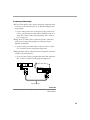
Connecting a Video Player
1 If your video player uses a round, one-prong composite video
connector, you’ll need only the A/V cable that shipped with
the projector.
• If your video player uses a round, four-prong S-video con-
nector, you’ll need an S-video cable in addition to the A/V
cable. The S-video cable is sold separately. (See “Accessories” on page 57.)
2 Plug the A/V cable’s yellow connector into the “video-out”
port on your video player (Figure 15). This port may be
labeled “To Monitor.”
• If you’re using an S-video cable, connect it to the “s-video
out” connector on the video player (Figure 16).
3 Plug the other yellow connector into the composite connector
on the back of the projector.
• If you’re using S-video, plug the other end of the cable into
the “s-video” connector on the projector (Figure 16).
audio/video cable
FIGURE 15
Connecting the projector to a video player using the standard A/V cable (with composite
video connector)
17
S
e
t
t
i
n
g
u
p
t
h
e
P
r
o
A/V cable
j
e
c
t
o
r
S-video cable
FIGURE 16
Connecting the projector to a video player using an S-video cable and the audio connectors on the standard A/V cable
4 Plug the A/V cable’s white connector into the left “audio out”
port on your video player. Plug the cable’s red connector into
the right “audio out” port on the video player (Figure 15 and
Figure 16).
• If you’re using an S-video cable, the yellow connectors on
CAUTION: Your video player
may also have a “Video Out” port
for a coaxial cable connection.
DO NOT use this to connect to the
projector.
18
the A/V cable remain unused (Figure 16).
5 Plug the A/V cable’s other white and red connectors to the
left and right “audio in” ports on the projector.
The projector is compatible with the three major broadcast video
standards: NTSC, PAL and SECAM. It automatically adjusts to
optimize its performance for the incoming video. You can also set
the video standard manually from the projector’s Controls menu;
see “Video Standard” on page 39.
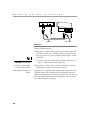
Connecting an External Speaker and a Subwoofer
• To connect one or two external speakers, plug the speaker
cables into the two
(audio out) connectors on the projector.
• To connect a subwoofer, plug the subwoofer cable into the
connector on the projector.
NOTE: The external speakers
must be amplified.
subwoofer cable
speaker cable
FIGURE 17
Connecting an external speaker and a subwoofer
19
S
e
t
t
i
n
g
u
p
t
h
e
P
r
o
j
e
c
t
o
r
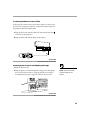
Connecting a Microphone
• To connect a microphone to the projector, plug the microphone
cable into the
connector on the projector.
CAUTION: Always keep the
source volume at its lowest level
when installing the microphone.
For information about setting the
microphone level, see page 35.
FIGURE 18
Connecting a microphone
Connecting a PS/2-Compatible Mouse
• To connect a PS/2-compatible mouse to the projector, plug the
mouse cable into the
connector on the projector.
PS/2-compatible
mouse connector
CAUTION: Turn off your
computer, monitor and the
projector whenever you connect
the mouse. Power on the projector
first, then the computer.
FIGURE 19
The PS/2-compatible mouse connector on the projector
NOTE: Using a mouse makes
using the Scribble feature easier.
20
Connecting the Remote Control Cable
If the projector cannot receive the remote’s signal, as may be the
case if you’re using rear projection, connect the remote directly to
the projector with the remote cable.
1 Plug the end of the remote cable with the cylinder into the
connector on the projector.
2 Plug the other end into the plug on the remote.
cylinder
FIGURE 20
Connecting the remote control cable
Powering up the Projector and Adjusting the Image
1 Remove the lens cap.
2 Plug the power cord into the projector (Figure 21), then plug it
into your electrical outlet. A surge-protected power strip is
recommended if power surges are common in your area.
NOTE: Always use the power
cord that shipped with the
projector.
FIGURE 21
Connecting the power cord to the projector
21
S
e
t
t
i
n
g
u
p
t
h
e
P
r
o
j
e
c
t
o
r
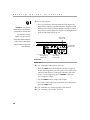
3 Turn on the projector.
• The power indicator and lamp module LEDs (Figure 22)
CAUTION: If the lamp LED
remains solidly lit after the LitePro
has powered on, the lamp needs
light solidly while the projector initializes. The power LED
blinks green when the projector begins to power up. When
the projector reaches full power, the power LED lights solid
green and the lamp LED goes out.
to be replaced. If the lamp
remains in use too long, it may
lamp module
indicator LED
explode and severely damage the
LitePro. Refer to “Replacing the
Projection Lamp” on page 43 for
power/standby
indicator LED
more information.
computer source
indicator LED
video source
indicator LED
FIGURE 22
Indicator LEDs
4 If you connected a video player, turn it on.
• Press the video button on the remote control or keypad to
display the image from your video player. The video source
indicator LED displays a solid green indicating the video
source is active (Figure 22). Press computer to return to
your computer’s image.
• Use the volume buttons to adjust the volume.
• If you don’t want to hear the sound from your video player,
press the mute button.
5 If you connected any external speakers, turn them on.
6 If you connected your monitor, turn it on.
22
7 Turn on your computer.
• The computer image should display on the projection
screen.
• The computer source indicator LED displays a solid green
indicating the computer source is active (Figure 22).
• If necessary, use the brightness buttons on the remote con-
trol or keypad to adjust the brightness. You can make further adjustments to the image from the projector’s onscreen menus. To open the menus, press the menu button
on the remote control or keypad. Then select the Display
menu or the Image menu. For more information about the
menus, see page 32.
• If you don’t want to hear the sound from your computer or
video player, press the mute button. (Pressing mute does
not mute the microphone.)
Turning Off the Projector
NOTE: With some computers,
the order in which you power up
the equipment is very important.
We recommend that you always
turn on the computer LAST. Turn
on all other pieces of equipment
(including the computer’s monitor) before you turn on the computer.
If you want to turn off the projector for a short period of time,
press the standby button on the remote control or keypad. This
turns off the lamp but keeps the projector running. The power/
standby indicator LED (Figure 22) blinks green while the projector is in standby. To exit standby mode, press the standby button
once. (It takes several seconds for the projection lamp to reach
full power and project the image again.)
To completely power off the projector, press the “O” side of the
power switch. If you want to turn the projector back on immediately, you must allow about 45 seconds for the lamp to cool. The
lamp won’t light if it’s too hot.
NOTE: When you disconnect the
projector after you have switched
it off, always remove the power
cord from the electrical outlet first,
then remove it from the projector.
23
USING THE PROJECTOR
This section describes how to use and make adjustments to the
projector. It also provides a reference to the remote control buttons and the options available from the on-screen menus.
Basic Image Adjustment
1 Make sure you have powered up your equipment in the right
order (page 21).
2 If the image doesn’t display completely, adjust the height of
the projector (page 26) or center the image by adjusting its
horizontal or vertical position (page 38).
3 If the image is out of focus, rotate the lens to focus it (page 26).
4 If the image appears to shimmer or if it has blurry vertical
bars after you have adjusted the focus, turn Auto Image
(page 37) off and then back on to reset the automatic sync and
tracking. If that doesn’t clear up the image, adjust the sync
(page 37) and/or the tracking (page 38) manually.
5 If the colors don’t look right, adjust the brightness (page 29).
Using the Remote Control
Point the remote control at the projection screen or at the front or
rear of the projector. The range for optimum operation is about
40 feet. If you point the remote at the projection screen, the distance to the screen and back to the projector must be less than or
equal to 40 feet. For best results, point the remote directly at the
front or the rear of the projector.
NOTE: If you can’t aim the
remote control at the projector so
that its signal is received — for
example, when using rear projection — connect the remote
directly to the projector with the
remote control cable (page 21).
25
U
s
i
n
g
t
h
e
P
r
o
j
e
c
t
o
r
Adjusting the Projector
To focus the image, rotate the projection lens until the image is
clear. Rotate the lens clockwise for a longer focusing distance;
counterclockwise for a shorter focusing distance.
If the projected image seems wider at the bottom or at the top,
rotate the keystone adjustment dial on the back of the projector
until the image is correct (Figure 23).
FIGURE 23
Keystone adjustment knob
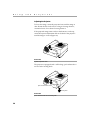
The projector is equipped with a self-locking, quick-release elevator foot and a leveling knob.
quick-release elevator button
leveling knob
FIGURE 24
Quick-release elevator foot and leveling knob
26
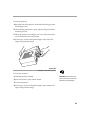
To raise the projector:
1 Raise the front of the projector off the table by lifting up on the
handle (Figure 25).
2 While holding the projector, press and hold the quick-release
button (Figure 25).
3 When the projector is the height you want, release the button
to lock the elevator foot into position.
4 If necessary, use the leveling knob (Figure 24) to adjust the
angle of the projected image.
FIGURE 25
Adjusting the height of the projector
To lower the projector:
1 Hold the projector’s handle.
2 Press the elevator’s quick release button.
3 Lower the projector.
CAUTION: Always hold the projector’s handle when you press the
elevator’s quick release button.
4 If necessary, use the leveling knob (Figure 24) to readjust the
angle of the projected image.
27
U
s
i
n
g
t
h
e
P
r
o
j
e
c
t
o
r
Using the Remote and Keypad Buttons
This section provides an alphabetical reference to the remote and
keypad buttons.
FIGURE 26
Remote control
FIGURE 27
Keypad
28
Brightness
Adjusting the brightness lightens or darkens the image.
• To darken the image, press
• To lighten the image, press
The brightness buttons are auto-repeating; they repeat their function as long as you hold down the button.
Computer
When you have more than one source (computer or video) connected to the projector, select between them by pressing the button for the source you want.
Press computer to display the computer image.
Freeze
The freeze button halts, or “freezes” the projected image. Use this
button to freeze a frame of video (the video continues to run but
the projected image is frozen). You can also freeze an image from
a computer source on the screen, allowing you to perform other
operations on the computer without the audience seeing them.
Press freeze again when you want the image to return to normal.
Help
Press help to display the online help information.
Light
Press light to illuminate the buttons on the remote control. The
light goes off automatically 10 seconds after you press any
button.
LiteShow
The liteshow button will be used to display a LiteShow presenta-
tion from disk. Call your In Focus dealer for availability.
29
U
s
i
n
g
t
h
e
P
r
o
j
e
c
t
o
r
Menu
Press menu to open the on-screen menus. Press menu again to
close the menus. When you close the menus, the projector saves
any changes you made. For more information about the onscreen menus, see page 32.
Mute
NOTE: Pressing mute has no
effect on microphone volume.
Pressing the mute button silences the internal speakers. It also
silences any external speakers that are connected. It does not
mute the microphone.
To return the volume to its previous setting, press mute again or
press either volume button.
Scribble
The scribble button activates on-screen annotation.
1 Press the scribble button. The cursor changes to a pencil.
NOTE: Scribble functionality is
enhanced by using a PS/2 mouse.
See “Connecting a PS/2Compatible Mouse” on page 20.
2 Press the right disk mouse button (Figure 29) to display the
color selector. Use the disk mouse to position the cursor on
the desired color, then press the left mouse button. Press the
right button again to close the color selector.
3 Move the pencil to where you want to start the annotation.
4 Press the left mouse button. The cursor changes to an upright
pencil.
5 Use the disk mouse (or PS/2 mouse, if connected) to draw
your annotation. Press the left mouse button to complete the
annotation.
6 To exit Scribble, press the scribble button. The annotation is
automatically deleted (it cannot be saved).
30
Standby
When you press standby, the display and audio turn off and the
screen becomes black. After 30 seconds the lamp goes out if you
haven’t pressed any other buttons.
• If you press any button again within 30 seconds, the projector
returns to normal operations immediately.
• If you press standby again after 30 seconds, there is about a 30-
second delay before the lamp turns back on.
Video
When you have more than one source (computer or video) connected to the projector, select between them by pressing the button for the source you want.
Press video to display the image from your video player.
Volume
• To increase the volume, press
• To decrease the volume, press
The volume buttons are auto-repeating; they continue to adjust
the volume as long as you hold them down. Volume adjustments
are saved for each source you have connected.
31
U
s
i
n
g
t
h
e
P
r
o
j
e
c
t
o
r
Using the Disk Mouse
NOTE: Using a light touch on the
disk mouse often gets the best
results.
Press anywhere on the edge of the disk mouse to move the cursor
on the screen. For example, if you press the top edge of the disk,
the cursor moves up the screen; if you press the bottom edge, the
cursor moves down (Figure 28). You can move the cursor at any
angle by pressing the corresponding edge of the disk.
press here to move the cursor up
press here to move the cursor down
FIGURE 28
Using the disk mouse
Using the On-Screen Menus
The projector has four on-screen menus that allow you to make
image adjustments and change a variety of settings. Most of these
adjustments aren’t available directly from the remote or keypad.
To open the on-screen menus, press the menu button on the
remote or keypad. Press menu again when you want to close the
menus.
To select a menu, use the disk mouse to move the cursor to the
tab for the menu you want, then click either mouse button.
disk mouse
left mouse
button
FIGURE 29
Disk mouse and mouse buttons
32
right mouse
button
To change a menu setting, move the cursor to the setting you
want to change, then use one of the two mouse buttons below the
disk to make changes.
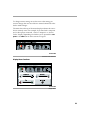
The status bar at the top of the menu display indicates the source
that is currently active. For example, if you have both a computer
and a video player connected, “Source: Computer” or “Source:
Video” displays depending on whether you’ve pressed the computer or the video button on the remote or keypad.
FIGURE 30
On-screen menu status bar
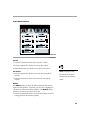
Display Menu Functions
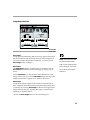
FIGURE 31
Display menu
33
U
s
i
n
g
t
h
e
P
r
o
j
e
c
t
o
r
Brightness
Adjusting the brightness changes the intensity of the image.
• Press the left mouse button to darken the image.
• Press the right mouse button to lighten the image.
NOTE: Changing the brightness
using the menu is the same as
changing it using the remote or
keypad.
Contrast
The contrast controls the degree of difference between the lightest and darkest parts of the picture. Adjusting the contrast
changes the amount of black and white in the image.
• Press the left mouse button to decrease the contrast.
• Press the right mouse button to increase the contrast, making
the blacks appear blacker and the whites appear whiter.
Tint
The Tint setting adjusts the red-green color balance in the projected image. Changing the Tint setting has no effect on PAL or
SECAM video sources.
• Press the left mouse button to increase the amount of green in
the image.
• Press the right mouse button to increase the amount of red in
the image.
Reset All
Click either mouse button to reset all the options (except Language and Video Standard) in all the menus to their original settings. This also returns Freeze and Mute to their default (off)
settings.
34
Audio Menu Functions
FIGURE 32
Audio menu
Volume
• Press the left mouse button to decrease the volume.
• Press the right mouse button to increase the volume.
Volume adjustments you make are saved for each source.
Mic Volume
• Press the right mouse button to increase the microphone
volume.
• Press the left mouse button to decrease the microphone
volume.
NOTE: Changing the volume
from the menu is the same as
changing it using the remote or
keypad.
Balance
The Balance setting controls the balance between the left and
right external speakers. It appears gray and won’t highlight if
you haven’t connected external speakers. The Balance setting
applies to all sources you have connected.
• Press the left mouse button to increase the amount of sound
coming from the left external speaker.
35
U
s
i
n
g
t
h
e
P
r
o
j
e
c
t
o
r
• Press the right mouse button to increase the amount of sound
coming from the right external speaker.
Fade
The Fade setting controls the balance between the internal and
external speakers. The setting appears gray and won’t highlight if
external speakers aren’t connected.
• Press the left mouse button to increase the amount of sound
coming from the internal speakers.
• Press the right mouse button to increase the amount of sound
coming from the external speakers.
Treble
The Treble setting controls the higher frequencies of your audio
source.
• Press the left mouse button to decrease the treble.
NOTE: The Treble and Bass
settings apply only to the
projector’s internal speakers.
External speakers typically have
their own tone controls.
• Press the right mouse button to increase the treble.
Bass
The Bass setting controls the lower frequencies of your audio
source.
• Press the left mouse button to decrease the bass.
• Press the right mouse button to increase the bass.
Ambiance
The Ambiance setting controls the spaciousness of the sound
quality from the projector’s internal speakers.
• Press the left mouse button to increase the amount of sound
coming from the rear internal speaker.
• Press the right mouse button to decrease the amount of sound
coming from the top internal speaker.
36
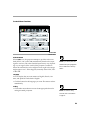
Image Menu Functions
FIGURE 33
Image menu
Auto Image
The projector automatically adjusts tracking, signal synchronization and vertical and horizontal position for most computers. If
you want to adjust these features manually, you must turn off
Auto Image first by clicking it.
NOTE: Some screen savers interfere withthe operation of Auto
Image. If you’re experiencing prob-
Auto Resize
The Auto Resize setting is available only for computer sources.
Auto Resize automatically resizes the image by scaling it up or
down.
lems, try turning your screen saver
off, then turning Auto Image off
and back on.
When Auto Resize is on, the projector makes the best fit of the
image to the screen. If you turn Auto Resize off (by clicking it), the
image may be either cropped or too small for the screen.
Manual Sync
The projector adjusts signal synchronization automatically for
most computers. But if the projected computer image looks fuzzy
or streaked, try turning Auto Image off then back on again. If the
image still looks bad, try adjusting the signal synchronization
manually as described below.
1 Click the Auto Image button to turn Auto Image off.
37
U
s
i
n
g
t
h
e
P
r
o
j
e
c
t
o
r
2 Press the left or right mouse buttons repeatedly until the
image is sharp and free of streaks.
Manual Tracking
NOTE: The Manual Sync,
Manual Tracking, Horiz.
Position and Vert. Position
buttons are available only for
computer sources. The projector
sets these options automatically
for a video source so they appear
gray.
The tracking function adjusts the projector to match the video
signal from your computer. The projector usually adjusts the
tracking automatically when you connect your computer. However, if the display shows evenly spaced, fuzzy, vertical lines or if
the projected image is too wide or too narrow for the screen, try
turning Auto Image off then back on again. If the image is still
bad, try adjusting the tracking manually as described below.
1 Click the Auto Image button to turn Auto Image off.
2 Press the left or right mouse buttons repeatedly until the
fuzzy vertical bars are gone.
Horiz. Position
Follow these steps to manually adjust the horizontal position.
1 Click the Auto Image button to turn Auto Image off.
2 Press the left mouse button to move the image right; press the
right mouse button to move the image left.
Positioning adjustments are saved when you power off the projector.
Vert. Position
Follow these steps to manually adjust the vertical position.
1 Click the Auto Image button to turn Auto Image off.
2 Press the left mouse button to move the image down; press
the right mouse button to move the image up.
Positioning adjustments are saved when you power off the projector.
38
Controls Menu Functions
FIGURE 34
Controls menu
Video Standard
When Auto is on, the projector attempts to pick the video stan-
dard (NTSC, PAL or SECAM) automatically based on the input
signal it receives. (The video standard options may vary depending on your region of the world.) If the projector is unable to
detect the standard, the colors might not look right or the image
might appear “torn.” If this happens, manually select NTSC, PAL
or SECAM.
NOTE: If you already know the
standard used in your geographical
area, it’s often best to manually
select it.
Language
You can display the on-screen menus in English, French, German, and Spanish. The default is English.
• Click the button for the language you want. The menus redraw
immediately.
Ceiling
• Click either mouse button to turn the image upside down for
ceiling-mounted projection.
NOTE: To order the ceiling
mount kit, refer to “Accessories”
on page 57.
39
U
s
i
n
g
t
h
e
P
r
o
j
e
c
t
o
r
Rear Projection
When you select Rear Projection, the projector reverses the image
so you can project from behind a translucent screen.
• Click either mouse button to reverse the image.
Monitor Connect
When Auto is selected, the projector attempts to pick the correct
monitor connection based on the input signal it receives. This setting produces the best results in most situations. Select “On” or
“Off” only if the image is very dim or not projected.
NOTE: Do not select “Off” if
• Select “On” if your monitor is connected directly to the
CableWizard and the images are excessively dim.
your monitor is connected directly
to the CableWizard.
40
• Select “Off” if your monitor is not connected directly to the
CableWizard and the image is not projected. (Some IBM
ThinkPad computers exhibit this problem, especially the
ThinkPad 760.)
MAINTENANCE
This section describes how to:
• clean and replace a lens
• install and use the zoom lens
• replace the projection lamp and reset the lamp monitor light
• replace the batteries in the remote control
• replace the fuse
• use the Kensington lock feature
Cleaning the Lens
Follow these steps to clean the projection lens:
1 Apply a non-abrasive camera lens cleaner to a soft, dry cleaning cloth.
• Avoid using an excessive amount of cleaner.
• Abrasive cleaners, solvents or other harsh chemicals might
scratch the lens.
2 Lightly wipe the cleaning cloth over the lens.
3 If you don’t intend to use the projector immediately, replace
the lens cap.
Removing and Replacing a Lens
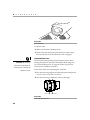
1 Turn the focus ring counterclockwise until it reaches a stop.
2 While holding the lens, squeeze the latch below the lens
(Figure 35) and turn the lens counterclockwise again.
3 Gently pull the lens out of the lens bracket.
41
M
a
i
n
t
e
n
a
n
c
e
FIGURE 35
Removing the lens
To replace a lens:
1 Make sure the latch is pointing down.
2 Squeeze the latch and gently push the lens in until it stops,
then turn the lens clockwise until the catch is engaged.
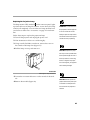
Using the Zoom Lens
CAUTION: Be sure to fully
retract the zoom lens before you
The zoom lens enlarges the projected image by 40% without
moving the projector. (For more information about image size,
see “Projected Image Size” on page 64.) Follow the previous
instructions to install the zoom lens.
put the lens cap on and pack the
projector in its case.
Follow these steps when operating the zoom lens:
1 Turn the zoom ring (Figure 36) until the projected image is the
size you want, even if it is out of focus.
2 Turn the focus ring as needed to clear up the image.
focus ring
FIGURE 36
LitePro 200 Series zoom lens
42
zoom ring
Replacing the Projection Lamp
The lamp monitor LED, marked
on the connector panel, lights
up when 150 hours of lamp life remains. At zero hours, the lamp
switches off completely. You can order new lamp modules from
your In Focus dealer. See “Accessories” on page 57 for information.
WARNING: To avoid burns and
lamp explosion, allow the projector
to cool for at least 45 minutes
before you open the lamp module
Follow these steps to replace the projection lamp:
door. Never extract the lamp mod-
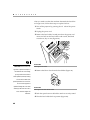
1 Turn off the projector and unplug the power cord.
ule while the lamp is operating.
2 Wait 45 minutes to allow it to cool thoroughly.
3 Using a small, flat-blade screwdriver, remove the screw on
the outside of the lamp door (Figure 37).
4 Pull the lamp cover up and remove it.
CAUTION: Replace the projection lamp as soon as possible after
the lamp monitor light comes on. If
the lamp remains in use too long,
there is a danger of lamp explosion. If this happens, your projector
will be severely damaged.
FIGURE 37
Removing the lamp module door
5 Loosen the non-removable screw on the outside of the module.
CAUTION: Never operate the
6 Remove the module (Figure 38).
projector with the lamp cover open
or removed. This disrupts the air
flow and causes the projector to
overheat.
43
M
a
i
n
t
e
n
a
n
c
e
FIGURE 38
Removing the lamp module
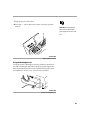
7 Align the module in the correct direction.
8 Gently push the module in as far as it goes (Figure 39).
9 Tighten the screw on the outside of the module.
WARNING: Do not drop the
lamp module or touch the glass
bulb! The glass may shatter and
cause injury.
FIGURE 39
Installing a new lamp module
10 Reposition the lamp cover.
11 Replace the screw and tighten it.
12 Turn the projector back on.
44
Resetting the Lamp Monitor Light
After replacing the lamp, you must reset the lamp monitor light.
1 Press and hold the two brightness buttons on the keypad for at
least 5 seconds.
2 Release the buttons. The lamp monitor light goes out after it is
reset.
Replacing the Batteries in the Remote Control
NOTE: You must reset the lamp
monitor light so the projector can
keep track of the usable life of the
new lamp.
The life of the batteries depends on how often and how long you
use the remote. Symptoms of low battery charge include erratic
responses when using the remote and a reduced range of operation.
Follow these steps to replace the batteries:
1 Turn the remote face down in your hand.
2 Slide the battery cover off the end of the remote by pressing
on it with the heel of your hand.
3 Remove the old batteries.
4 Install two new AA alkaline batteries. Make sure you install
each in the correct direction.
5 Slide the battery cover back on the remote.
Replacing the Fuse
A power line surge or spike can blow the power supply fuse,
causing the projector to stop working. If this happens, you’ll need
to replace the fuse.
The projector ships with a 6.3 amp fuse. The correct replacement
fuse depends on the power line voltage in the country where you
are operating the projector.
CAUTION: Use only the speci-
• If your line voltage is 115V to 240V, use a T6.3AH, 250V,
ferent fuse may damage the
5x20mm fuse.
fied power supply fuse. Using a dif-
projector.
• If your line voltage is 100V to 115V (as in Japan), use a T8AH,
250V, 5x20mm fuse. You can order the fuse from your In Focus
dealer; the part number is listed on page 58.
45
M
a
i
n
t
e
n
a
n
c
e
After you make sure that the condition that made the fuse blow
no longer exists, follow these steps to replace the fuse:
1 Turn off the projector by pressing the “O” side of the power
switch.
2 Unplug the power cord.
3 Remove the fuse holder, located just above the power cord
connector. Pull out the fuse holder with a small, flat-blade
screwdriver, key or coin (Figure 40).
FIGURE 40
CAUTION: The 6.3A IEC 127
type fuse is required in Europe. In
Removing the fuse holder
4 Remove the blown fuse from the fuse holder (Figure 41).
countries with low main voltage,
you may need the 8.0A fuse to
avoid repeated (nuisance) blowing
of the 6.3A fuse. Both fuses
provide protection from risk of fire.
Do not use the projector if
repeated blowing still occurs after
switching to the 8.0A fuse. Call In
FIGURE 41
Removing the fuse from the fuse holder
Focus Technical Support for
assistance.
5 Push the spare fuse into the holder until it is securely seated.
6 Place the fuse holder back in position (Figure 42).
46
7 Plug the power cord back in.
8 Press the “|” side of the power switch to turn the projector
back on.
CAUTION: A surge-protected
power strip is recommended if
power surges are common in your
area.
FIGURE 42
Replacing the fuse holder
Using the Kensington Lock
The projector has a Kensington Security Standard connector for
use with a Kensington MicroSaver Security System (Figure 43).
Refer to the information that came with the Kensington System
for instructions on how to use it to secure the projector.
FIGURE 43
Installing the Kensington lock
47
TROUBLESHOOTING
If you’re experiencing trouble with the projector, follow these
steps to make sure everything is properly connected before you
call Technical Support for assistance.
1 Check cable connections. Verify that all computer, CableWizard and power cables are properly connected.
2 Verify that all power is switched on.
3 Verify that the projector has not been switched off with the
standby button on the remote or keypad.
4 If the projector still doesn’t display an image, restart the computer.
5 If the problem still exists, unplug the projector from the computer and check the computer monitor’s display. The maximum resolution that the 210 can display is 800x600 pixels,
preferably 640x480; the maximum resolution that the 220 can
display is 1024x768 pixels, preferably 800x600. The problem
might be with the graphics controller in your computer rather
than with the projector. When you reconnect the projector,
remember to turn the computer and monitor off before you
power up the projector. Power the equipment back up in this
order: projector, monitor, computer.
NOTE: Macintosh computers
require a specific power-up
sequence: the projector must be
turned on before you turn on the
computer.
6 If you’re using a laptop computer and its monitor is not displaying your presentation, make sure you have re-activated
the computer’s monitor. Most laptop computers de-activate
their own monitor when a second display device, such as the
projector, is connected. Refer to page 59 for more information.
7 If the problem still exists, read through the problems and
solutions in this chapter.
If you call Technical Support for assistance:
• Find out what kind of graphics controller card is installed in
your computer. This is the circuit board in the computer to
which the projector is connected. Most PCs use a VGA graphics
controller.
49
T
r
o
u
b
l
e
s
h
o
o
t
i
n
g
Solutions to Common Problems
Problem: Nothing on projection screen
• Make sure that the power cord is properly connected to a func-
tional AC electrical outlet. Make sure that the power cord is
also properly connected to the projector.
• If the projector is plugged into a power strip, make sure the
power strip is turned on.
• Make sure you have removed the lens cap on the projection
lens at the front of the projector.
• Make sure the projector is switched on.
• Check the projector’s lamp to ensure that it is securely con-
nected in the lamp module. See “Replacing the Projection
Lamp” on page 43.
• Check the fuse. If it has blown, replace it. See “Replacing the
Fuse” on page 45.
• Make sure that the CableWizard and the cables do not have
any bent pins. Check the power cord for bent pins also.
Problem: Color or VGA text not being projected
• You might need to adjust the brightness up or down until the
text is visible. Refer to “Brightness” on page 29 for more information.
• Verify that the appropriate input source is selected. See “Com-
puter” on page 29 or “Video” on page 31.
Problem: The screen resolution is not right
• Make sure the computer’s graphics card is set for a resolution
of no greater than 800x600 for the 210, 1024x768 for the 220.
Problem: Image isn’t centered on the screen
• Reposition the image. Refer to “Horiz. Position” on page 38
and “Vert. Position” on page 38.
• If you’re using an extension cable between the CableWizard
and the projector, make sure it’s In Focus-approved.
50
Problem: Only the start-up screen displays
• Verify that the cables are connected correctly. Check to see that
the CableWizard computer cable is correctly connected to the
monitor connector on the computer (this is the connector
where your monitor cable usually goes.) See page 6 through
page 15 for connection procedures.
• Verify that the proper input source is connected. See “Com-
puter” on page 29 or “Video” on page 31.
• You might need to turn everything off and power up the
equipment again. Make sure you power up in this order: projector, computer monitor, computer. It is especially important
that you follow this sequence for Macintosh computers.
• Make sure your computer’s graphics board is installed and
configured correctly.
If you’re using Windows 3.x:
1 In the Windows Program Manager, double-click the Windows Setup icon in the Main program group.
2 Verify that the Display setting is 800x600 or less for the
210, 1024x768 or less for the 220.
If you’re using Windows 95:
1 Open “My Computer” icon, the Control Panel folder and
then the Display icon.
2 Click the Settings tab.
3 Verify that the Desktop area is set to 800x600 or less for the
210, 1024x768 or less for the 220.
Also check the following:
• Does your computer have a compatible graphics board? The
projector isn’t CGA or EGA compatible.
• Is your computer’s graphics board turned on? This is especially
true for laptop computers. See “Portable and Laptop Activation Chart” on page 59.
51
T
r
o
u
b
l
e
s
h
o
o
t
i
n
g
Problem: Image is too wide or narrow for screen
• You might need to manually adjust the tracking to reduce or
enlarge the projected image. Refer to “Manual Tracking” on
page 38.
• Adjust the resolution of your monitor if it’s greater than
800x600 pixels for the 210 or 1024x768 for the 220. Only these
resolutions at 75 Hz or less will display on the projector.
• Make sure that your computer has a compatible graphics
board. The projector is not compatible with CGA, EGA, or
1280x1024 graphics modes.
Problem: Image is out of focus
• Make sure the lens is locked in place.
• Turn the projection lens to focus the image.
• Make sure the projection screen is at least 4 feet (1.2m) from the
projector.
• Check the projection lens to see if it needs cleaning.
Problem: Image and menus are reversed left to right
• Rear projection mode is probably turned on. Switch back to
forward projection from the Controls menu. The image should
immediately return to forward projection. See “Rear Projection” on page 40.
Problem: Image and menus are upside down
• Ceiling mode is probably turned on. Turn off the mode from
the Controls menu. The image should immediately return to
forward projection. See “Ceiling” on page 39.
Problem: the projector displays vertical lines, “bleeding” or spots
• Adjust the brightness. See “Brightness” on page 29.
• Check the projection lens to see if it needs cleaning.
52
Problem: Image is “noisy” or streaked
Try these steps in this order.
1 Deactivate the screen saver on your computer.
2 Turn Auto Image off and then back on again. See “Auto
Image” on page 37.
3 Adjust the synchronization and tracking manually to find an
optimal setting. See “Manual Sync” on page 37 and “Manual
Tracking” on page 38.
• If you’re using an extension cable between the CableWizard
and the projector, make sure it’s In Focus-approved.
• The problem could be with your computer’s graphics board. If
possible, connect another computer with a different graphics
board.
Problem: Projected colors don’t match the computer or video
player’s colors
• Adjust the brightness, tint and/or contrast from the Display
menu. Just as there are differences in the displays of different
monitors, there are often differences between the computer
image and the projected image. See “Brightness” on page 29,
“Tint” on page 34 and “Contrast” on page 34.
Problem: Lamp seems to be getting dimmer
• The lamp begins to lose brightness when it has been in use for a
long time. Replace the lamp as described in “Replacing the Projection Lamp” on page 43.
Problem: Lamp shuts off
• A minor power surge may cause the lamp to shut off. Turn the
projector off, wait at least 45 seconds, then turn it back on.
Problem: Remote not operating correctly
• You might need to replace the batteries. See “Replacing the
Batteries in the Remote Control” on page 45.
• Make sure you’re pointing the remote either at the back or
front of the projector, or at the projection screen.
• Make sure the remote is within its operating range of 40 feet.
53
APPENDIX
Specifications
The LitePro 210 and 220 must be operated and stored within the
temperature and humidity ranges specified.
Temperature
Operating
10 C to 40° C
Non-operating
-20 to 60° C
Humidity
Operating and non-oper.
10% to 95% relative humidity, non-condensing
Dimensions
6.6 x 16.25 x 13.25 inches (16.8 x 41.3 x 33.7 cm)
Weight
16 lbs. (7.3 kg) unpacked
Altitude
Operating
Non-operating
0 to 10,000 feet (3048 meters)
20,000 feet (6096 meters)
Left and Right Audio Outputs
Frequency Response
10 Hz - 20 KHz
Output Impedance
1.2 K ohm nominal
Output Voltage
2 Vrms maximum (open circuit)
Connector Type
red and white RCA jacks
Subwoofer Outputs
Frequency Response
Output Impedance
Output Voltage
Connector Type
10 Hz - 10 KHz
200 ohms nominal
2 Vrms maximum (open circuit)
black RCA jack
Optics
Focus Range
4 to 25 feet
55
A
p
p
e
n
d
i
x
Microphone Input
Input Impedance
Maximum Input Voltage
Sensitivity
Microphone Impedance
Connector Type
3.5 K ohm nominal
60 mVrms for THD ≤0.3%, main inputs off
800 Vrms at 1 KHz for 88 dB SPL at 1 meter
< 8K ohms
6.3 mm (1/4 inch) monaural phone jack
(unbalanced)
Lamp
Type
270-watt metal halide
Remote Control
Battery
Two (2) AA alkaline cells
Input Power Requirements
100-240VAC, 7.0A-3.6A, 50 to 60 Hz.
Video Module Input
Input Impedance
Maximum Input Voltage
Sensitivity
Connector Type
5K ohm DC coupled
(LIN + RIN)PEAK < 4.5 V for THD ≤ 0.3%, microphone off
LIN or RIN < 2.0 Vrms for THD ≤ 0.3%, microphone off
100 mV at 1 KHz for 88 dB SPL at 1 meter
RCA jack
CableWizard Audio Input
Input Impedance
10K ohm nominal, AC coupled
Maximum Input Voltage
(LIN + RIN)PEAK < 4.5 V for THD ≤ 0.3%, microphone off
LIN or RIN < 2.0 Vrms for THD ≤ 0.3%, microphone off
Sensitivity
100 mV at 1 KHz for 88 dB SPL at 1 meter
Connector Type
3.5 mm (1/8 inch) stereo phone jack
Fuse
115 to 240V nominal line
100 to 115V nominal line
56
T6.3AH, 250V, 5x20mm
T8AH, 250V, 5x20mm
Accessories
Standard Accessories
(ship with the projector)
Part Number
LitePro 210/220 Quick Start card
009-0214-xx
LitePro 210/220 User’s Guide
010-0102-xx
Shipping Box
110-0098-xx
CableWizard and Cables
591-0182-xx
CableWizard Audio Cable
210-0079-xx
CableWizard Computer Cable
210-0076-xx
CableWizard Mouse Cable
210-0078-xx
Varifocal Lens
505-0148-00
Projection Lamp Module
505-0144-xx
Lens Cap
340-0220-xx
Audio/Video Cable
210-0062-xx
Fuse — 6.3 amp
749-0010-xx
Remote Control with Cable and 2 Batteries
590-0198-xx
Remote Cable (50 ft)
210-0088-xx
Power Cords (one ships with projector, type depends on country)
North American Power Cord
210-0023-xx
Australian Power Cord
210-0027-xx
UK Power Cord
210-0028-xx
European Power Cord
210-0029-xx
Danish Power Cord
210-0030-xx
Swiss Power Cord
210-0031-xx
57
A
p
p
e
n
d
i
x
Optional Accessories
Soft Carry Case
CA-C077
ATA Shipping Case
CA-C119
CableWizard Lite
SP-CWLITE
Mac Adapter for CableWizard Lite
*
516-0003-xx
CableWizard Extension Cable, 50 ft
210-0077-xx
Zoom Lens
HW-LP210-ZM
Kensington MicroSaver Security System
SP-KENLOC
JBL Satellite Speakers
591-0203-xx
JBL Subwoofer
591-0204-xx
S-Video Cable
515-0027-xx
Microphone
591-0201-xx
Fuse — 8.0 amp
call for part no.
*
LitePro 200 Series Ceiling Mount Kit
591-0208-xx
1 Year Extended Warranty
592-0320-xx
2 Year Extended Warranty
592-0319-xx
*Using the extension cable or ceiling mount reduces FCC
and EMC compliance to Class A.
58
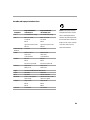
Portable and Laptop Activation Chart
NOTE: Most laptop computers
Computer
Key command to
activate port
Key command to
de-activate port
Acer
Ctrl-Alt-Esc (for setup)
Ctrl-Alt-Esc (for setup)
when a second display device is
AST* **
FN-D or Ctrl-D
FN-D or Ctrl-D
connected. The following chart lists
Ctrl-FN-D
Ctrl-FN-D
the commands that re-activate the
FN-F5
FN-F5
laptop’s monitor. If your computer
type from A:/IVGA/CRT
type from A:/IVGA/CRT
FN-F12
FN-F12
Advanced Logic
Research
Ctrl-Alt-V
Ctrl-Alt-V
Altima
Shift-Ctrl-Alt-C
Shift-Ctrl-Alt-L
setup VGA/
Conf.Simulscan
setup VGA/
Conf.Simulscan
FN-F12
FN-F12
FN-F5
FN-F5
Ambra**
Amrel* **
F2/Choose Option/F5
F2/Choose Option/F5
setup menu
setup menu
Shift-Ctrl-D
Shift-Ctrl-D
Apple
see Mac Portable and Mac PowerBook
Aspen
automatic
automatic
BCC*
automatic
reboot computer
Bondwell
LCD or CRT options
after bootup
reboot for LCD or CRT
options to appear
Chaplet**
setup screen
setup screen
FN-F6
FN-F6
FN-F4
FN-F4
Ctrl-Alt-#6
Ctrl-Alt-#5
Commax
de-activate their built-in monitors
is not listed, refer to the computer’s documentation.
59
A
p
p
e
n
d
i
x
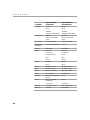
Computer
Key command to
activate port
Key command to
de-activate port
Compaq* **
Ctrl-Alt-<
Ctrl-Alt->
FN-F4
FN-F4
automatic
automatic
mode/? (for setup option)
mode/? (for setup option)
automatic
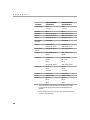
automatic
Alt-F for screen setup
option
Alt-F for screen setup
option
Data General
Ctrl-Alt-Command
Ctrl-Alt-Command
Data General
Walkabout
2 CRT/X at DOS prompt
reboot
Compuadd* **
Datavue
Ctrl-Shift-M
Ctrl-Shift-M
Dell**
Ctrl-Alt-<
Ctrl-Alt->
Ctrl-Alt-F10
Ctrl-Alt-F10
FN-F8 (CRT/LCD)
FN-F8
FN-D
FN-D
FN-F12
FN-F12
automatic
reboot
FN-F2
FN-F2
Dolch
dip switch to CRT
dip switch to LCD
Epson
dip switch to CRT
dip switch to LCD
Everex*
setup screen option
setup screen option
For-A
Ctrl-Alt-Shift-C
Ctrl-Shift-Alt-L
Gateway
FN-F1/FN-F1 again simultaneous
FN-F1
Grid* **
FN-F2, choose auto or
simultaneous
FN-F2
Digital*
60
Ctrl-Alt-Tab
Ctrl-Alt-Tab
Hyundai
setup screen option
setup screen option
IBM 970*
automatic
warm reboot
Computer
Key command to
activate port
Key command to
de-activate port
IBM ThinkPad**
reboot, enter setup menu
FN-F2
FN-F7, select choice
from setup menu
FN-F1, select choice
FN-F5, select choice
PS/2 SC select choice
(CRT, LCD, etc.)
Kaypro
boot up, monitor plugged
in
unplug monitor
Kris Tech
FN-F8
FN-F8
Mac Portable
100
no video port: not compatible
Mac PowerBook
140, 145, 150,
170
no video port: requires a 3rd-party interface
160, 165, 180,
520, 540, 5300
Control Panel folder,
PowerBook Display
folder; Activate Video
Mirroring
210, 230, 250,
270, 280, 2300
requires Apple Docking Station or Mini Dock
Magitronic
FN-F4
Mastersport
FN-F2
FN-F1
Micro Express*
automatic
warm reboot
Microslate*
automatic
warm reboot
Mitsubishi
SW2 On-Off-Off-Off
SW2 Off-On-On-On
NCR
setup screen option
setup screen option
NEC* **
setup screen option
setup screen option
CRT at the DOS prompt
LCD at the DOS prompt
FN-F31
FN-F3
automatic
automatic
FN-O/*
FN-O/*
FN- | |
FN- | |
Olivetti*
warm reboot
FN-F4
61
A
p
p
e
n
d
i
x
Computer
Key command to
activate port
Key command to
de-activate port
Packard Bell**
FN-F2
FN-F2
Ctrl-Alt-<
Ctrl-Alt->
Panasonic
FN-F2
FN-F2
Samsung*
setup screen option
setup screen option
Sanyo
setup screen option
setup screen option
Sharp
dip switch to CRT
dip switch to LCD
Sun SPARCDataview
Ctrl-Shift-M
Ctrl-Shift-M
Tandy**
Ctrl-Alt-Insert
Ctrl-Alt-Insert
setup screen option
setup screen option
Texas Instruments*
setup screen option
setup screen option
Top-Link* **
setup screen option
setup screen option
FN-F6
FN-F6
Toshiba* **
Ctrl-Alt-End
Ctrl-Alt-Home
FN-End
FN-Home
FN-F5
FN-F5
setup screen option
setup screen option
FN-F7
FN-F7
FN-F5
FN-F5
Automatic
Automatic
Ctrl-Alt-F10
Ctrl-Alt-F10
Wyse
software driven
software driven
Zenith**
FN-F10
FN-F10
FN-F2
FN-F2
FN-F1
FN-F1
Twinhead*
WinBook
* These manufacturers have models that automatically send video
to the external CRT port when some type of display device is
attached.
** These manufacturers offer more than one key command depending on the computer model.
62
Using Video Mirroring with a PowerBook Computer
When you turn video mirroring on, the projector displays the
same information that appears on your PowerBook’s built-in
screen. When video mirroring is off, the projector acts like a separate display.
To turn on video mirroring for the first time:
1 Open the Monitors control panel; click on Monitor 2.
2 Set the number of colors you want.
3 Open the Control Strip; click on the monitor icon.
4 Select “Turn Video Mirroring On.”
Now you can turn video mirroring on and off from the Control
Strip without having to open the Monitors control panel again.
When using video mirroring and high color graphics such as
slide shows, the projected image occasionally might turn black
and white. If this happens, perform the following steps:
1 Turn off video mirroring.
2 Open the Monitors control panel.
3 Move the white menu bar to Monitor 2 to set the projector as
the primary monitor.
4 Restart the PowerBook.
63
A
p
p
e
n
d
i
x
Projected Image Size
Use the chart below and the tables on the next page to help you
determine projected image sizes for the varifocal and zoom
lenses.
FIGURE 44
Projected image size for LitePro 200 series zoom and varifocal lenses
64
Table 1:
Image Size, Width and Height for Varifocal Lens
and Zoom Lens at Minimum Focusing Distance
Distance to
Screen (feet)
4
10
15
20
25
30
35
40
Diagonal
(inches)
34
84
126
168
210
252
294
336
Width
(inches)
27
67
101
134
168
202
235
269
Height
(inches)
20.4
50.4
75.6
100.8
126.
151.2
176.4
201.6
Table 2:
Image Size, Width and Height for Zoom Lens at
Maximum Focusing* Distance
Distance to
Screen (feet)
4
10
15
20
25
30
35
40
Maximum
Diagonal
(inches)
48
120
180
240
300
360
420
480
Maximum
Width
(inches)
38
96
144
192
240
288
336
384
Maximum
Height
(inches)
28.8
72
108
144
180
216
252
288
* The focusing distance of the zoom lens is from 4 feet to infinity.
65