1
E9768
Revised Edition V2
October 2014
Copyright© 2014 ASUSTeK COMPUTER INC. All Rights Reserved.
No part of this manual, including the products and software described in it, may be reproduced,
transmitted, transcribed, stored in a retrieval system, or translated into any language in any form or by any
means, except documentation kept by the purchaser for backup purposes, without the express written
permission of ASUSTeK COMPUTER INC. (“ASUS”).
Product warranty or service will not be extended if: (1) the product is repaired, modified or altered, unless
such repair, modification of alteration is authorized in writing by ASUS; or (2) the serial number of the
product is defaced or missing.
ASUS PROVIDES THIS MANUAL “AS IS” WITHOUT WARRANTY OF ANY KIND, EITHER EXPRESS
OR IMPLIED, INCLUDING BUT NOT LIMITED TO THE IMPLIED WARRANTIES OR CONDITIONS OF
MERCHANTABILITY OR FITNESS FOR A PARTICULAR PURPOSE. IN NO EVENT SHALL ASUS, ITS
DIRECTORS, OFFICERS, EMPLOYEES OR AGENTS BE LIABLE FOR ANY INDIRECT, SPECIAL,
INCIDENTAL, OR CONSEQUENTIAL DAMAGES (INCLUDING DAMAGES FOR LOSS OF PROFITS,
LOSS OF BUSINESS, LOSS OF USE OR DATA, INTERRUPTION OF BUSINESS AND THE LIKE),
EVEN IF ASUS HAS BEEN ADVISED OF THE POSSIBILITY OF SUCH DAMAGES ARISING FROM ANY
DEFECT OR ERROR IN THIS MANUAL OR PRODUCT.
SPECIFICATIONS AND INFORMATION CONTAINED IN THIS MANUAL ARE FURNISHED FOR
INFORMATIONAL USE ONLY, AND ARE SUBJECT TO CHANGE AT ANY TIME WITHOUT NOTICE,
AND SHOULD NOT BE CONSTRUED AS A COMMITMENT BY ASUS. ASUS ASSUMES NO
RESPONSIBILITY OR LIABILITY FOR ANY ERRORS OR INACCURACIES THAT MAY APPEAR IN THIS
MANUAL, INCLUDING THE PRODUCTS AND SOFTWARE DESCRIBED IN IT.
Products and corporate names appearing in this manual may or may not be registered trademarks or
copyrights of their respective companies, and are used only for identification or explanation and to the
owners’ benefit, without intent to infringe.
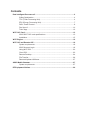
Contents
Dual Intelligent Processors 5...................................................................................... 4
5-Way Optimization.......................................................................................... 4
TPU (Turbo Processing Unit)........................................................................... 4
EPU (Energy Processing Unit)......................................................................... 7
DIGI+ Power Control........................................................................................ 8
Fan Xpert 3.................................................................................................... 10
Turbo App...................................................................................................... 12
Wi-Fi GO! Card........................................................................................................... 13
ASUS Wi-Fi GO! card specifications.............................................................. 13
Installation...................................................................................................... 15
Wi-Fi Engine............................................................................................................... 16
Wi-Fi GO! and Remote GO!....................................................................................... 18
System requirements..................................................................................... 18
ASUS Account Login..................................................................................... 18
Using Wi-Fi GO!............................................................................................. 20
Cloud GO!...................................................................................................... 23
Remote Desktop............................................................................................ 24
File Transfer................................................................................................... 26
Remote Keyboard & Mouse........................................................................... 27
ASUS Media Streamer............................................................................................... 27
System requirements..................................................................................... 27
RF Equipment Notices............................................................................................... 29
Conventions used in this guide
To ensure that you perform certain tasks properly, take note of the following symbols used
throughout this manual.
DANGER/WARNING: Information to prevent injury to yourself when trying to
complete a task.
CAUTION: Information to prevent damage to the components when trying to
complete a task
IMPORTANT: Instructions that you MUST follow to complete a task.
NOTE: Tips and additional information to help you complete a task.
Dual Intelligent Processors 5
ASUS Dual Intelligent Processors 5 combines TPU, EPU, DIGI+ Power Control, Fan Xpert
3, and Turbo App functions to push the system’s performance to its optimal potential. It
automatically balances the system’s performance, power saving, levels, and fan settings via
the user-friendly AI Suite 3 utility.
5-Way Optimization
The 5-Way Optimization function dynamically optimizes your PC based on real-time usage
to provide the best system status. It covers the essential areas such as CPU performance,
energy saving, stable digital power, cool and quiet fan control, and includes tailored settings
for your apps to ensure your PC is ready for gaming, entertainment, productivity, or just about
anything.
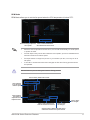
5-Way Optimization screen
Click or tap this 5-Way Optimization button to auto-detect and tune the best settings
for your system
DO NOT remove your fan during the tuning process.
TPU (Turbo Processing Unit)
TPU allows you to manually adjust the CPU frequency, core ratio, DRAM frequency, and
related voltages for enhanced system stability and performance boost.
Refer to the CPU documentation before adjusting CPU voltage settings. Setting a high
voltage may damage the CPU permanently and setting a low voltage may lead to an
unstable system.
For system stability, the TPU settings are not saved in the BIOS and are not loaded during
system bootup. Save your overclocking settings as a TPU profile and manually load this
profile after system bootup.
4
Using TPU
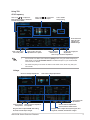
CPU Frequency
Click or tap or to adjust the
Base Clock Frequency, CPU Ratio,
and CPU Cache Ratio
Click or tap or to select the
number of cores to adjust
Tick to enable
Group Tuning
Scroll down then
adjust the CPU
voltages and
DRAM voltages
Click or tap to load
the saved profile
Click or tap to save the
adjustment into a profile
Click to load the
Click or tap to apply the
default values
adjustments
Click or tap to undo the adjustments
•
Set the CPU Core Ratio item in BIOS to [Auto] before using the CPU Frequency in
TPU. Refer to section Ai Tweaker menu in the BIOS chapter of your motherboard
user manual for details.
•
The CPU Frequency bars show the status of the CPU cores, which vary with your
CPU model.
Voltage
CPU Core Voltage adjustments
CPU Cache Voltage adjustments
Click to apply the
adjustments
Click to load the
saved profile
Click to save the adjustment
into a profile
Drag the slider to adjust DRAM, CPU Analog
I/O, PCH, and CPU Input voltages
ASUS X99 Series Exclusive Features
Click to undo the adjustments
Click to load the default values
Drag the slider to adjust CPU System Agent, CPU
Digital I/O, VTTDDR, and PCHVLX voltages
5
GPU Boost
CPU Graphics Voltage adjustmets
Click to load the
saved profile
Click to
apply the
adjustments
Click to
undo the
adjustments
Click to enable the
Click to save the
adjustment into a profile default settings
CPU Strap
Click to load the
saved profile
Click to save the
adjustment into a profile
Click to enable the
default settings
Click or tap or to adjust the
CPU Strap’s BCLK frequency
6
Click to apply
the adjustments
Click to undo the
adjustments
•
The overclocking result varies with the CPU model and the system configuration.
•
We recommend that you set up a better thermal environment to prevent overheating
from damaging the motherboard.
EPU (Energy Processing Unit)
EPU is a real-time system power-saving chip that automatically detects the current
system load and intelligently moderates power usage. It offers a total system-wide energy
optimization, reduces fan noise, and extends the lifespan of your hardware components.
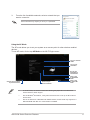
Using EPU
Click to configure the settings
in Max Power Saving mode
Click to configure the
settings in Auto mode
Click to configure the settings
in High Performance mode
Click to configure the
settings in Away mode
Click to configure the
Global settings
Click or
to adjust the
configured Max
CPU Power
Click to
select a fan
profile
Tick to select
a setting for
Add-on USB
ports power
Tick to select a setting for
Voltage Decrement
Click to enable the
default settings
Click to undo the
adjustments
Click to apply the
adjustments
•
When you enable Configured Max CPU Power for advanced energy saving
condition, the CPU frequency may display 800 MHz in the Windows® OS information
of your computer. However, the true CPU frequency varies depending on the
wattage that you manually set. You can adjust the CPU wattage from the lowest
base on your preferred default value.
•
Configured Max CPU Power may decrease the total power delivery to the CPU and
affects the CPU performance under system heavy load. To restore your system to its
default settings, reboot your computer.
ASUS X99 Series Exclusive Features
7
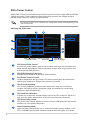
DIGI+ Power Control
ASUS DIGI+ Power Control features the revolutionary and innovative digital VRM and DRAM
Voltage controllers. These controllers offers ultra-precise memory and voltage tuning for
optimal system efficiency, stability and performance.
The following screens are for reference only. Configuration options varies depending on the
motherboard model.
Adjusting the CPU Power
Click or tap to switch Click or tap to undo
between screens
the changes
Click or tap to
apply the changes
CPU Power Phase Control
Increase the phase number under a heavy system load to get more transient and
better thermal performance. Reduce the phase number under a light system load
to increase the VRM efficiency.
CPU VRM Switching Frequency
Enables spread spectrum to enhance system stability.
CPU Power Thermal Control
A higher temperature brings a wider CPU power thermal range and extends the
overclocking tolerance to enlarge the overclocking potential.
CPU Current Capability
CPU Current Capability provides a wider total power range for overclocking.
A higher value brings a wider total power range and extends the overclocking
frequence range simultaneously.
CPU Load-line Calibration
It allows you to adjust the voltage range to control the CPU Load-line. Adjust to a
high value for system performance or to a low value for power efficiezncy.
CPU Power Duty Control
CPU Power Duty Control adjusts the current of every VRM phase and the thermal
conditions of every phase component.
Active Frequency Mode
Active Frequency Mode allows you to enhance the power saving condition of the
CPU. Click ON to get a quicker transient response while saving the CPU power.
8
Adjusting the DRAM Power
Click or tap to undo
the changes
Click or tap to
apply the changes
DRAM Voltage Frequency
Allows you to adjust the DRAM switching frequency to stabilize the system or to
increase the overclocking range.
DRAM Current Capability
A higher value brings a wider total power range and extends the overclocking
frequency range simultaneously.
DRAM Power Phase Control
Select Extreme for full phase mode to increase system performance or select
Optimized for ASUS optimized phase tuning profile to increase the DRAM power
efficiency.
•
The actual performance boost may vary depending on your CPU specification.
•
Ensure that the cooling modules are properly installed in your motherboard to
monitor the thermal conditions.
ASUS X99 Series Exclusive Features
9
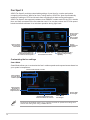
Fan Xpert 3
ASUS Fan Xpert 3 provides customizable settings of your fans for a cooler and quieter
computing environment. With its fan Auto Tuning feature, ASUS Fan Xpert 3 automatically
tweaks the settings of CPU and chassis fans to achieve their best cooling performance.
ASUS Fan Xpert 3 also supports hardware level PWM/DC combo mode for the CPU, chassis
fans, and fans connected to the fan extension card. You can also reduce the CPU fan speed
below the default minimum for a noiseless operation during light loads.
Click a screen
to select the
type of fan
that you want
to customize
Click to
maximize the
fan speed
Click to set the
fan’s speed to
silent mode
Click to set the balanced
configuration between the
fan’s noise level and speed
Click to switch between CPU
and chassis fan screens
Click to increase the fan’s
speed for a high cooling
capability
Customizing the fan settings
Smart Mode
Smart Mode allows you to customize the fans’ rotation speeds and responsiveness based on
your system’s temperature.
Tick to set the CPU fan’s mode
Click and drag
to set the fan’s
rotation speed
Click and drag
the sliders to
adjust the fan’s
responsiveness
Click to apply
the changes
Click to switch between the
CPU and chassis fan screens
Click to undo
the changes
The Extreme Quiet Mode allows you to configure the CPU fan speed control range to its
extreme low setting when using a PWM CPU fan.
10
RPM Mode
RPM Mode allows you to set the fan speed when the CPU temperature is below 75oC.
Click and drag to adjust the Click to switch between the
CPU and chassis fan screens
fan’s speed
•
When the CPU temperature reaches 75o C, the fan will automatically run at full speed
to protect the CPU.
•
The Fan Xpert 3 may not be able to detect the fan speed if your fan is installed with an
external control kit for rotation speed.
•
Fan Xpert 3 does not support 2-pin fans. If you install a 2-pin fan, it can only run at its
full speed.
•
If the CPU or chassis fans have been changed, the Fan Auto Tuning process should
be repeated.
DO NOT remove your fan during the Fan Auto Tuning process.
Tick to set the Chassis fan’s mode
Click and drag
to set the fan’s
rotation speed
Click and drag
the sliders to
adjust the fan’s
responsiveness
Click to apply
the changes
Click to switch between the
CPU and chassis fan screens
Click to undo
the changes
Click to select a different thermal sensor
onboard for chassis fan’s speed control
ASUS X99 Series Exclusive Features
11
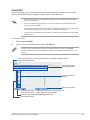
Turbo App
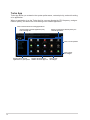
Turbo App allows you customize the system performance, network priority, and audio setting
of an application.
When an application is on the Turbo App List, you can allocate the CPU frequency, assign a
network priority, and define the audio setting of the seleted application.
Click to refresh the list of running applications
Click to assign a specific application(.exe)
into Turbo App list
Allows you assign the network priority to a
selected application.
Click to scroll up/down
Click to apply
the changes
Displays all the running
applications on your system
12
Displays the applications
added to the Turbo App List
Click to undo
the changes
Wi-Fi GO! Card
The Wi-Fi GO! card is an easy-to-use wireless LAN adapter that allows you to connect to a
wireless LAN in a single network. With the Wi-Fi GO! card, you can also use your system as
an access point for other Wi-Fi supported devices.
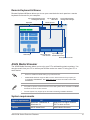
By default, the Wi-Fi GO! card is already installed on your motherboard. To locate the Wi-Fi
GO! card, refer to section Motherboard rear and audio connections of your motherboard’s
user guide.
The Wi-Fi standard of 802.11ac will be restricted by countries’ regulations. Wi-Fi 802.11ac
feature will be supported under the complete 11ac eco-system environment.
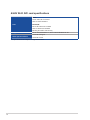
ASUS Wi-Fi GO! card specifications
Bluetooth v4.0 Wi-Fi 802.11 a/b/g/n/ac version
Wi-Fi Standard
IEEE 802.11 a/b/g/n/ac
Bluetooth standard
Bluetooth v4.0
3T3R
802.11ac(HT80*) up to 1300 Mbps, 802.11n(HT40*) up to 450 Mbps
802.11n(HT20) up to 225 Mbps, 802.11a up to 54 Mbps
802.11b up to 11 Mbps, 802.11g up to 54 Mbps
Data rate
* When using Wi-Fi Engine in AP mode, the channel bandwidth is limited
to HT20, with a maximum data rate of 216.5 Mbps due to Windows®
limitation.
2T2R
802.11ac(HT80*) up to 867 Mbps, 802.11n(HT40*) up to 300 Mbps
802.11n(HT20) up to 150 Mbps, 802.11a up to 54 Mbps
802.11b up to 11 Mbps, 802.11g up to 54 Mbps
* When using Wi-Fi Engine in AP mode, the channel bandwidth is limited to
HT20 with a maximum data rate of 150 Mbps due to Windows® limitation.
Security
WEP, WPA & WPA2*
* Use WPA2 or open system to reach 65Mbps and above.
Network architecture
types
AP Mode
Frequency band
2.4GHz & 5GHz ISM radio band
Client mode
Wi-Fi*: Outdoor up to 300 meters, Indoor up to 100 meters
Operating range
* The transmission speed may vary according to the environment
Bluetooth: 10 - 20 meters (depends on the environment)
Antenna 1: Wi-Fi Tx/Rx
Antenna 2: Wi-Fi Tx/Rx + Bluetooth
Antenna
1 x ASUS 2T2R dual band Wi-Fi moving antenna (with SMA
connector)
Antenna3: Wi-Fi- Tx/Rx
1 x ASUS 3T3R dual band Wi-Fi moving antenna (with MMCX
connector)
(continued on the next page)
ASUS X99 Series Exclusive Features
13
ASUS Wi-Fi GO! card specifications
Wi-Fi:
Green LED: Wi-Fi enabled
LED off: Wi-Fi disabled
LED
Bluetooth:
Blue LED: Bluetooth enabled
LED off: Bluetooth disabled
Blinking blue LED: Data activity
Support OS
ASUS special features
32-bit / 64-bit Windows® 7, 32-bit / 64-bit Windows® 8 / 8.1
ASUS Wi-Fi Engine
ASUS Wi-Fi GO!
* The specifications are subject to change without notice.
14
Installation
System requirements
To use the Wi-Fi GO! card, ensure that your system meets the following requirements:
1.
32-bit / 64-bit Windows® 7, 32-bit / 64-bit Windows® 8 / 8.1
2.
DVD Optical drive
3.
ASUS support DVD containing the Wi-Fi GO! card driver
4.
ASUS AI Suite 3 utility
•
Ensure to install the bundled Wi-Fi antenna connector to the Wi-Fi GO! card ports.
•
To install ASUS AI Suite 3 utility, refer to the section AI Suite 3 of your motherboard’s
user guide for more details.
Installing Wi-Fi GO! card driver
The contents of the support DVD are subject to change without notice. Visit the ASUS
support site at http://support.asus.com for driver or utilities updates.
To install Wi-Fi GO! card driver:
1.
Place the support DVD on the optical drive. If Autorun is enabled in your computer, the
DVD automatically displays the installation wizard.
2.Click Drivers tab then click ASUS
Bluetooth 4.0 Wi-Fi Driver.
3.
Follow the onscreen instructions to complete
the installation.
4.
After the installation is completed, restart
your computer.
ASUS X99 Series Exclusive Features
15
Wi-Fi Engine
Wi-Fi Engine allows you to connect to a wireless network and set up your computer as an
access point for Internet connection sharing among Wi-Fi enabled devices.
To use Wi-Fi Engine, click or tap
select Wi-Fi Engine.
on the right edge of the AI Suite 3 main menu, then
Wi-Fi Engine is available only in selected motherboard models.
Using Wi-Fi Engine
Click or tap to set up your computer as
a wireless access point
Click or tap to connect to a wireless access point
Using the Client Mode
The Client mode allows you to connect your system to a wireless network.
To use the client mode:
16
1.
Click or tap Client Mode to launch Network Connections.
2.
From the Network Connections window, select a network adapter.
3.
From the list of available networks, select a network that you
want to connect to.
Some networks may require you to key in a password.
Using the AP Mode
The AP mode allows you to set your system as an access point for other wireless-enabled
devices.
To use AP mode, click or tap AP Mode on the Wi-Fi Engine menu.
Key in a network
name
Key in your
password
Key in your
password for
confirmation
Click or tap to go back
to previous screen
Click or tap to
select a network
Click or tap
to disable AP
mode
Click or tap
to enable AP
mode
•
In the AP mode, the Internet Connection Sharing may depend on the Bluetooth/
Internet device's driver support.
•
Due to Windows® 8 limitation, it may take several minutes to set up the AP mode for
the first time.
•
Due to the restriction of Windows OS SoftAP feature, the AP mode only supports 2.4
GHz bandwidth with 802.11n communication standard.
ASUS X99 Series Exclusive Features
17
Wi-Fi GO! and Remote GO!
Wi-Fi GO! and Remote GO! are ASUS exclusive utilities that gives you complete control of
your PC anytime and anywhere with your smart devices. You can manage all your public
clouds or sync and backup files among your PC and devices.
The user interface of your smart device may vary with the operating system and the screen
resolution.
System requirements
System requirements
PC
Smart device
OS
Windows 7/Windows 8/
Windows® 8.1
Android 4.0 or higher versions
iOS7 or later versions
Utilities
ASUS HomeCloud
ASUS Wi-Fi GO! & NFC Remote
®
®
•
For Android devices, download the ASUS Wi-Fi GO! & NFC Remote from Google
Play. For iOS devices, download it from App Store.
•
Install the Wi-Fi GO! card driver and ASUS HomeCloud utility from the support DVD
bundled with your ASUS motherboard or visit www.asus.com.
•
If you upgrade from Windows® 8 to Windows® 8.1, ensure to reinstall the Wi-Fi GO!
card driver to fully utilize the Wi-Fi GO! functions.
Smart device supported screen resolutions
Wi-Fi GO! & NFC Remote supports the following screen resolutions of smart devices:
Screen
type
Low density
(120 ldpi)
Screen
Resolution
1024 x 600
Medium density
(160 mdpi)
High density
(240 hdpi)
Extra high density
(320 xhdpi)
WXGA
(1280 x 800)
1536 x 1152
2048 x 1536
1024 x 768
1920 x 1152
2560 x 1536
1280 x 768
1920 x 1200
2560 x 1600
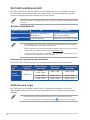
ASUS Account Login
Wi-Fi GO! gives you complete control of your PC anytime and anywhere. Create and
login the same ASUS Account on your PC and smart devices for public-to-private network
functions.
18
•
Remote Desktop and File Transfer support public-to-private networks feature.
•
You can access the ASUS Account tab by clicking
from Wi-Fi GO! main page.
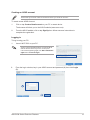
Creating an ASUS account
Ensure that you have an internet connection before you create an account.
To create a new ASUS Account:
1. Click or tap Create a New Account on your PC or smart device.
The browser will direct you to the ASUS website (www.asus.com).
2. From the ASUS website, click or tap Sign Up then follow onscreen instructions to
complete the registration.
Logging in
To log-in using your PC:
1.
Launch Wi-Fi GO! on your PC.
A login notice is displayed when you launch Wi-Fi
GO! for the first time on your PC. To stop this
notice from appearing again, tick Don’t remind me
again then click Go to Login.
2.
From the log-in window, key in your ASUS account and password (A) then click Login
(B).
ASUS X99 Series Exclusive Features
19
To log-in using your smart device:
1. Launch Wi-Fi GO! & NFC
Remote on you smart device.
2. Tap ASUS Account (A), key
in your ASUS Account and
password, then click or tap
Login (C).
•
PCs with the same ASUS account logged in will show up in the device list.
•
The public-to-private network functions for the iOS system will be available from
Wi-Fi GO! & NFC Remote V2.00.00 or later versions.
Using Wi-Fi GO!
To launch Wi-Fi GO!, click the ASUS HomeCloud shortcut on your desktop, then select WiFi GO! from the mini bar.
Click to set a password or log in using your ASUS Account
Wi-Fi GO! menu
Use your smart device to scan QR
Codes for more information
To protect your Wi-Fi utility from unauthorized remote access, click
password.
then set a
Launch Wi-Fi GO! & NFC Remote on your smart device to use the Wi-Fi GO! & NFC
remote control functions. For more details, refer to section Wi-Fi GO! & NFC Remote of
this user manual for more details.
20
Wi-Fi GO! & NFC Remote (App for smart devices)
Using Wi-Fi GO! & NFC Remote
To use the Wi-Fi GO! & NFC Remote:
1.
Connect your smart device to the same Wi-Fi network as your computer or log in on
your computer and smart devices using the same ASUS account to fully utilize the WiFi GO! functions across different networks.
2.
On your smart device, tap
3.
From the list of scanned PCs, tap the computer that you want to connect with your smart
device.
Wi-Fi GO!
& NFC Remote
then tap Enter.
Wi-Fi GO! & NFC Remote interface main page
Cloud GO!
File Transfer
Remote Desktop
Remote Keyboard & Mouse
The screenshots are for reference only and vary with the type of smart device.
ASUS X99 Series Exclusive Features
21
Using the Wake-on-LAN
If you want to wake up your computer using the smart device, ensure that you enable the
computer’s Wake-on-LAN settings.
To configure your computer’s Wake-on-LAN settings:
1.
From BIOS Setup, go to Advanced > APM Configuration then set Power On By
PCI-E/PCI to [Enabled].
2.
From Windows® OS, do the following:
a.
On your desktop, click Start, right-click Computer > Manage to launch the
Computer Management screen.
b.Click Device Manager to view all the installed devices.
c.Click Network Adapters, right-click the installed module card (Broadcom or
Atheros) then click Properties > Power Management tab.
d.
Tick these items Allow this device to wake up the computer and Only allow a
magic packet to wake the computer.
For 802.11ac standard Wi-Fi GO! Card, the Wake-on-LAN function will be supported in the
later version for Windows® 8 operating system.
22
Cloud GO!
Cloud GO! allows you to control and synchronize your files across multiple cloud services
such as ASUS WebStorage, Dropbox®, Google Drive™, and SkyDrive®.
•
Ensure to set the correct system date and time of your computer and smart device
when using Cloud GO!
•
Due to the cloud storage limitation, you can only upload or synchronize files with a
maximum size of 100 MB.
•
The synchronized files will be saved under the Wi-Fi GO! folder of each cloud storage.
For the backed up files, you can find them in C://MyFavorites folder.
•
Log into the cloud storages accounts first in your PC and stay signed in to allow smart
device control.
To use Cloud GO!:
1.
Click or tap Cloud GO!.
2.
Log in to your cloud account then click or tap Sign In.
To log in to your Google Drive, Dropbox, or SkyDrive accounts, click or tap Sign in.
Cloud GO! directs you to the Google Drive, Dropbox, or SkyDrive website to log in to your
account.
Click or tap a specific icon to move, upload, rename, create folder, download, delete or
refresh your cloud contents
Click or tap to open a
cloud storage account
Click to open the file
directly
Click or tap to sign out
Click or tap to go back
to the previous screen
Click or tap to synchronize cloud contents or to
create a back up to your local drive
Click or tap to go back to Wi-Fi GO!/Remote GO! screen
Tick to select contents
ASUS X99 Series Exclusive Features
23
Remote Desktop
Remote Desktop allows you to remotely control your desktop in real-time using your smart
device.
The System User Account Control (UAC) will be set to Never Notify when using Remote
Desktop function. The UAC level will return to your previous settings after you exit Remote
Desktop.
To use Remote Desktop:
On your smart device, tap Remote Desktop.
Remote Desktop interface for Windows® 8
Tap to view the cursor
Tap to launch the
Charms bar
Tap to launch the
smart device’s
keypad. Long press
to switch between
multitouch and
mouse mode.
Remote Desktop
function keys
24
•
Select multitouch mode to support Microsoft multitouch functions on Windows® 8 / 8.1.
•
Select mouse mode to support zoom-in and normal mouse functions.
•
The Extended Mode support varies with the VGA driver installed in your computer.
Remote Desktop Control Notification
This function allows you to send the control authorization to a smart device and directly start
using Remote Desktop in your device.
To use Remote Desktop Control Notification:
1. Click Select Device.
2. Select a device from the drop list.
3. Click Send to send the Remote Desktop control authorization to the selected device.
This function requires the Push Notice feature to be installed. You can get the PUSH
Notice installer from the bundled support DVD or download the latest installer from
www.asus.com.
ASUS X99 Series Exclusive Features
25
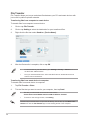
File Transfer
File Transfer allows you to sync and share files between your PCs and smart devices with
just a click in public-to-private networks.
Transferring files from computer to smart device
To transfer files from computer to smart device:
1.
Click or tap File Transfer .
2.
Click or tap Setting to select the destination for your transferred files.
3.
Right-click the file then select Send to > [Device Name].
4.
After the file transfer is complete, click or tap OK.
•
To receive files on your iOS device, go to Settings > Privacy > Photos then turn on
the Wi-Fi GO! & NFC Remote.
•
Find your transferred files from <SD Card>\Wi-Fi GO! for Android devices and
Camera roll for iOS devices.
Transferring files from smart device to computer
To transfer files from smart device to computer:
1.Tap File Transfer > Enter.
2.
Tick the files that you want to send to your computer, then tap Send.
•
The files you transferred can be found on the location
X:\Users\Documents\ASUS HomeCloud\Wi-Fi GO!\File Transfer\
•
To select a new storage location, click Setting.
Another way to transfer files is to open the file directly, tick the file, tap the Share icon/
button then click the File Transfer app to start sending the file to the computer.
26
Remote Keyboard & Mouse
Remote Keyboard & Mouse allows you to use your smart device’s touch panel as a remote
keyboard and mouse for your computer.
Tap to switch between zoom
and magnifier function
Input field
Tap to display the
Start menu
Tap to switch between
running tasks and apps
Mouse tap area
Control keys
Tap to mimic leftclick function
Tap to mimic rightclick mouse function
Slide up/down to scroll
ASUS Media Streamer
The ASUS Media Streamer allows you to enjoy your PC’s multimedia content anywhere. You
can pipe music from your PC or stream your favorite movie to a smart TV using your PC or
smart device.
•
Ensure to enable the DLNA setting of your devices first.
•
ASUS Media Streamer supports NFC function. Some functions may require you
to install NFC EXPRESS 2. Visit www.asus.com for more information about NFC
EXPRESS 2.
•
The public-to-private network functions for the iOS system will be available from Media
Streamer V2.00.00 or later versions.
•
The iOS system only support photo and video streaming for Media Streamer.
System requirements
System requirements
PC
Smart device
OS
Windows 7/Windows 8/
Windows® 8.1
Android 4.0 or higher versions
iOS7 or later versions
Utilities
ASUS HomeCloud
ASUS Media Streamer
®
ASUS X99 Series Exclusive Features
®
27
To use ASUS Media Streamer:
On your computer, click ASUS HomeCloud then select Media Streamer from the mini bar.
On your device, click or tap Media Streamer.
You can use Push Notice to receive a media link. The link can be clicked and allows you
to play the file driectly.
Click or tap to edit media files
Log in ASUS account to stream
play in different networks
Click or tap to select media type
Click or tap a media file to play
Select the device you
want to stream to
Adding and deleting media files
Drag and drop or tick files to add or delete.
Click to add or create a new folder
Click to add the selected files
Click to delete selected files
Click to proceed with the deletion or
addition of files
Click to cancel changes
The following media formats are supported by Android and iOS devices:
28
•
Android: .3gp, .mp4, .m4a, .aac, .ts, .flac, .mp3, .mid, .xmf, .mxmf, .rtttl, .rtx, .ota,
.imy, .ogg, .mkv, .wav, .jpg, .gif, .png, .bmp, .webp, .webm
•
iOS Supports the following media formats: .mov, .mp4, .mpv, .3gp.
RF Equipment Notices
CE: European Community Compliance Statement
The equipment complies with the RF Exposure Requirement 1999/519/EC, Council
Recommendation of 12 July 1999 on the limitation of exposure of the general public to
electromagnetic fields (0–300 GHz). This wireless device complies with the R&TTE Directive.
Wireless Radio Use
This device is restricted to indoor use when operating in the 5.15 to 5.25 GHz frequency
band.
Exposure to Radio Frequency Energy
The radiated output power of the Wi-Fi technology is below the FCC radio frequency
exposure limits. Nevertheless, it is advised to use the wireless equipment in such a manner
that the potential for human contact during normal operation is minimized.
FCC Bluetooth Wireless Compliance
The antenna used with this transmitter must not be colocated or operated in conjunction with
any other antenna or transmitter subject to the conditions of the FCC Grant.
Bluetooth Industry Canada Statement
This Class B device meets all requirements of the Canadian interference-causing equipment
regulations.
Cet appareil numérique de la Class B respecte toutes les exigences du Règlement sur le
matériel brouilleur du Canada.
NCC: Taiwan Wireless Statement
Japan RF Equipment Statement
KC (RF Equipment)
ASUS X99 Series Exclusive Features
29
30