1
LOR1602MP3
Computerized Light Controller
with MP3 Player
[A Complete Musical Light Show in a Box]
User Manual
October 2, 2007
V1.05
Copyright © Light O Rama, Inc. 2006, 2007, 2008
LOR1602MP3
Table of Contents
Introduction
Introduction ............................................................ 4
What’s in the Box................................................... 5
Creating a Show (Simple) ...................................... 6
Creating a Show (Full Functionality) ...................... 7
Power Considerations............................................ 7
3-Phase Power................................................... 9
Operating the LOR1602MP3 ................................. 9
LOR1602W Light Controller................................. 10
Safety Considerations ...................................... 10
Hardware Description .......................................... 11
Status LED ................................................... 11
Assigning a Unit ID ....................................... 11
Stand Alone Speed Control .......................... 12
J0 Header ..................................................... 13
Testing with the Hardware Utility...................... 14
Installing LOR Software ................................ 14
Connecting Controller-to-PC Data Cable...... 14
Configuring the Communications Port .......... 15
Creating A Sequence ....................................... 18
Triggering (Starting) a Sequence ..................... 23
Power On Mode............................................ 23
Input Control Mode ....................................... 23
Stand Alone Operation ..................................... 23
Troubleshooting ................................................... 25
Autoconfigure does not find COM Port............. 25
Refresh does not find the controller.................. 26
LOR1602MP3 Plugged in No Status LEDs Lit . 27
Channel 9-16 OK, Channels 1-8 No Good ....... 27
Specifications and Features................................. 28
Warnings and Liability.......................................... 29
Appendix A Hexadecimal to Decimal................... 30
57H
19H
58H
20H
59H
21H
60H
2H
61H
23H
The LOR1602MP3 is a LOR1602W 16 channel, 30
amp lighting controller with a DC-MP3 Show
Director inside. The DC-MP3 is a powerful show
director. It can control a network of Light-O-Rama
(LOR) controllers while simultaneously playing MP3
music files. It has a real time clock so shows can be
scheduled and six trigger inputs to allow interactive
shows using switches and motion detectors.
The unit is simple to operate. Connect your lights to
it, insert an SD memory card containing your
scheduled show and power it up, no PC is required
to play the show and its music.
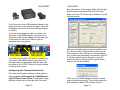
The DC-MP3 is the smaller circuit board mounted
on the metal plate containing the on/off switch. It is
covered by a small metal plate labeled “ShowTime
MP3 Director.” See Figure 1 on the next page.
The LOR1602W lighting controller circuit board is
under the metal plate containing the on/off switch.
The lighting controller circuit board is the same one
sold in the Components line of products as the
CTB16D 16 Channel Controlled Triac Board
(Deluxe) with heavy duty heat sink.
62H
24H
63H
25H
64H
26H
65H
27H
6H
28H
67H
29H
68H
30H
69H
For use with incandescent and line
voltage LED strings
Powder coated metal enclosure for
indoor/outdoor use
Page 4
LOR1602MP3
What’s in the Box
In addition to your LOR1602MP3 “Light Show in a
Box” you will also receive the following:
• USB SD card reader/writer
• 128 MB (or larger) SD card
• This LOR1602MP3 user manual
• DC-MP3 user manual
The latest copies of the manuals are available at
www.lightorama.com ► Support ► Using the
Hardware – Documentation and Firmware section.
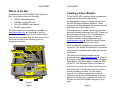
Remove the two screws from the front cover, lift off
the cover and refer to the following figure for
component locations.
LOR1602MP3
Creating a Show (Simple)
To use the DC-MP3 you must either purchase premade musical sequences (light shows
choreographed to music) or create your own with
the LOR Showtime Windows Software. These
sequences are then arranged into a show or shows
and placed on an SD memory card.
The simplest way to create a show is to purchase
pre-made musical sequences from LOR. These can
be purchased in sets on a CD, or individually via
download from the LOR website. To see the
currently available musical sequences, go to
www.lightorama.com ► Web Store button (upper
right) ► Musical Sequences button (left.)
Once you have the sequences you want installed
on your PC, the Simple Show Builder is the easiest
way to arrange, schedule and transfer your show to
an SD card.
The Simple Show Builder installer can be
downloaded from www.lightorama.com ► Support
► (bottom of the page) download button for Simple
Show Builder. Run this installer to install the SSB
on you PC. Use Windows Explorer to browse to
C:\Program Files\Light-O-Rama\LORSimpleShowBuilder.exe
Figure 1
Page 5
and double click it. Follow the instructions on the
screen to create your show. In a few simple
screens, you will have arranged your musical
sequences into a show, scheduled this show and
copied it to the SD card. You need only insert the
SD card into the LOR1602MP3 and plug in your
lights.
Page 6
LOR1602MP3
Creating a Show (Full Functionality)
To utilize the full functionality of your
LOR1602MP3, you will need to use the LOR
Hardware Utility to create and manage your shows.
Using the Hardware Utility allows you to access the
following features not available with Simple Show
Builder:
•
Up to nine different shows on the SD card
•
More flexible scheduling
•
Interactive shows using one or more of the
six input triggers
The DC-MP3 User Manual contains a complete
description of how to use these advanced features.
Power Considerations
This section attempts a relatively simple answer to
the question “How many lights can I use?”
The LOR1602MP3 has two power input cords, one
for channels 1-8 (left channels) and one for
channels 9-16 (right channels.) The right cord also
powers the controller’s microcomputers.
If you plug both power cords into one circuit, then
the controller would have at most 20 amps
available, but more likely, the circuit is a 15 amp
circuit, so that’s all you’ll have available.
If you can plug the two power cords into separate
circuits, then the full 30 amp capacity of the
controller will be available.
We will talk about only the right channels for now.
The same discussion applies to the left channels.
Page 7
LOR1602MP3
The maximum current on a single channel is 8
amps. The maximum current for all right channels is
15 amps. So you have to divide up your lights on
the 8 channels so you don’t exceed these two
limits. You could put 1 amp on 7 channels and 8
amps on the last one and that would be 15 amps.
Or, you could put 2 amps on 6 channels, 1 amp on
another channel and 2 amps on the last channel
and that would be 15 amps.
The following table gives the approximate current
consumption for various types of Christmas lights.
Description
Lights/string
Amps/string
Mini-lights
50
0.17
Mini-lights
100
0.33
C7 bulbs
25
1.04
C9 bulbs
25
1.5
100 watt bulb
1
0.75
150 floodlight
1
1.25
LED mini-lights
70
0.03
LED C6 or C7
25
0.02
If you put six sets of 100 mini-lights on one channel,
that would be 6 * 0.33 = about 2 amps. If you put
six sets of 70 LED mini-lights on one channel, that
would be 6 * 0.03 = about 0.18 amps. You can see
that you can get a lot of LEDs with very little power.
Make a chart of all the lights you want to connect to
the controller’s channels and then work out the
numbers to see if you hit any limits. You don’t want
more than 8 amps on any one channel, and all
Page 8
LOR1602MP3
LOR1602MP3
eight channel in the bank must not add up to more
than 15 amps.
Fourth, push the SD card into the ShowTime MP3
Director.
The same computation applies to the left bank of
channels. Remember, if the controller is plugged
into only one circuit in your house, then both the left
and right banks’ total current must not exceed what
that circuit can supply.
Finally, turn on the LOR1602MP3 power switch.
Your show will start in about 5 seconds or when it is
scheduled.
3-Phase Power
Both power cords must be plugged into the same
phase in 3-phase environments. If they are not,
channels 1-8 will not be flashing in sync with the
Show Director or PC.
Your LOR1602MP3 is an LOR1602W lighting
controller with an internal DC-MP3 Show Director.
This section of the manual describes the lighting
controller portion of your LOR1602MP3. How to
configure it, how to control it from a PC and its
specifications.
Operating the LOR1602MP3
Safety Considerations
This section assumes you have created an SD card
with your show(s) and schedule(s) on it. You will
have to open the LOR1602MP3 by removing the
two big screws from the cover plate, see Figure 1.
The metal enclosure is water resistant provided that
the LOR1602W is mounted with the wires pointing
downward. The pigtail outlets must be at least one
foot off the ground. Keep the unit away from heavy
water splashing and forced water flows such as
from irrigation sprinklers.
First, attach your lights to the 16 pig tails. There is a
video available on the LOR Musical Sequences
page that explains how to lay out the 16 channels’
lights so that your display will look good with our
pre-made musical sequences. You can view the
video at www.lightorama.com ► Web Store button
(upper right) ► Musical Sequences button (left.)
►16 Channel Setup Instructions button.
Second, plug your amplified speakers and/or FM
transmitter into the “Audio Output” mini-jack on the
ShowTime MP3 Director. Use the small hole at the
bottom of the LOR1602MP3 for the audio cable.
Third, plug in both of your controller’s power plugs.
Page 9
LOR1602W Light Controller
Anchor communication cables using wire ties to a
stable point such as the top mounting tab. Place a
small piece of duct tap over the hole in the bottom
of the unit once communication cables have been
installed. Do not seal entire unit with tape. It needs
to breath.
To connect the communications link and to set the
Unit ID, you must remove the cover. Make sure that
the unit is not plugged in or be very careful when
removing the cover, replacing the cover or when
reaching into the unit.
Page 10
LOR1602MP3
Hardware Description
Status LED
LOR1602MP3
For example, in a sequence that you construct,
channel 32 may be assigned to Unit ID 03 circuit
10. Because the controllers are daisy chained
together, every controller sees every command
sent but Unit 03 will only react to commands that
are marked “for Unit 03.”
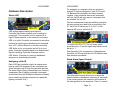
The two hexadecimal rotary dip switches (shown in
the next picture) are used to set a controller’s Unit
ID. Valid Unit ID values are 01 to F0 (1 to 240
decimal) 00 is not a valid Unit ID.
LED blinking approximately twice/second:
Controller has booted correctly and is waiting for
commands. The controller is not connected to a
Light O Rama network or the network is not active.
LED is on solid: Controller is connected to an active
network (is receiving the heartbeat and commands
from a PC, a Show Director or another controller)
LED blinks on for a long pulse and off for a short
pulse: Controller firmware needs to be downloaded.
See the Updating Controller Firmware section.
LED flutters: Controller is running a standalone
sequence or downloading firmware.
Assigning a Unit ID
Each LOR light controller used in a network must
have a unique ID assigned. [If two controllers are
given the same unit ID, then they will both perform
the same effects.] Every channel that you control in
a sequence (Set of lighting controller commands
constructed using the Showtime Windows software)
has to identify a particular channel on a particular
lighting controller (Unit.)
Page 11
To set the Unit ID to ’01,’ the left rotary switch
would be set to ‘0’ and the right rotary switch would
be set to ‘1.’
See Appendix A for a conversion of Hexadecimal
controller unit IDs set with the Unit ID Switches and
their decimal equivalents.
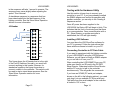
Stand Alone Speed Control
This little potentiometer allows you to adjust the
speed at which a standalone sequence is executed.
In the center position the sequence will execute at
the rate specified in the sequence. That is 1 second
Page 12
LOR1602MP3
in the sequence will take 1 second to execute. The
sequence may pause slightly when adjusting the
speed. This is normal.
A standalone sequence is a sequence that has
been downloaded into the flash memory of the
lighting controller. See the Stand Alone Operation
section for more information.
LOR1602MP3
Testing with the Hardware Utility
Use this section to learn how to connect your
controller to your PC. If you have already installed
the RS485 adapter and verified its operation with
another controller, you can skip to the Creating A
Sequence section.
Once AC power has been supplied to the
LOR1602W the Status LED will begin to blink. This
indicates that the Unit is functioning and that there
is no communication. Once communication with a
PC, Show Director or another controller is
established, the LED will light steadily.
J0 Header
Installing LOR Software
You must have the LOR ShowTime software for
you PC to proceed. Follow the instructions that
came with the software to install it on your PC.
Connecting Controller-to-PC Data Cable
This figure shows the J0 header that is to the right
of the Unit ID Switches. Normally, you would not
connect anything to this header, however, for
standalone operation the figure shows how to
connect a switch to the controller. This switch could
be used to start a stand alone sequence. See the
Stand Alone Operation section for more
information.
Page 13
If you want to experiment with the lighting controller
in your LOR1602MP3 using the LOR Windows
Software, you will have to install an RS485 adapter
so you can talk to it from your PC.
When controlling the LOR1602MP3 from your PC,
make sure there is no SD card in the DC-MP3
Show Director. Otherwise both the Show Director
and the PC may try to talk to the controller
simultaneously. This will garble the commands.
If you have an SC485 (PC serial port adapter,
shown on the left in the following picture), you need
only plug it into an available PC 9-pin serial port.
The cable from this serial adapter to the controller
is limited to 100’ or less.
Page 14
LOR1602MP3
LOR1602MP3
bar at the bottom of the screen. Right-click the light
bulb and select Hardware Utility from the menu.
Make sure the LOR Control tab is selected. You will
see this window:
If you have one of the USB adapters (shown in the
previous picture on the center and right), follow the
installation instructions that came with the adapter
to install it.
If you are using telephone cable to connect your
controller to the RS485 adapter, plug one end of
the phone cable into the adapter and the other end
of the cable into the Phone Cable In jack as
indicated in the next picture.
If you are using CAT5E LAN cable to connect your
controller to the RS485 adapter, plug one end of
the data cable into the adapter and the other end
into either of the CAT5E Cable In/Out jacks shown
in the previous picture.
With your controller powered up and cabled to your
PC, click the Auto Configure button on the top left.
The Hardware Utility will pop up a window asking
you to make sure everything is connected, click OK.
It will then search through all ports on your PC
looking for the port being used by Light O Rama
and you will see this window:
Configuring the Communications Port
First start the Showtime software control panel by
clicking start ► All Programs ► LightORama ►
Light-O-Rama Control Panel. There will be a light
bulb with a blue halo on the right side of the task
Page 15
Click Yes, your RS485 adapter has been located
and is functioning properly. This will also make this
port available to other LOR software, like the
Page 16
LOR1602MP3
Sequence Editor which is used to create your light
shows. See the Troubleshooting section if you have
problems.
TIP: The REFRESH command can take a long time
scanning for all possibly Unit IDs. To speed things
up, set the Max Units (upper right of window) to a
number slightly larger than the maximum Unit ID
you plan on using. See Appendix A if you have Unit
IDs above 09 to convert hexadecimal to decimal.
Click the Refresh button (center top of window) to
have the Hardware Utility search for all controllers
attached to the PC. When it finishes, the drop down
menu to the right of the Refresh button will list all
controllers found. Use this menu to select your
controller. See the Troubleshooting section if you
have problems.
LOR1602MP3
Creating A Sequence
This section assumes that you have used previous
sections to configure your controller and attach it to
your PC. If you haven’t done this, see the Assigning
a Unit ID and Testing with the Hardware Utility
sections.
The following screen shot is for later reference, it
shows the Sequence Editor with the completed test
sequence and labels for the functions used.
You can use the “Test Unit’s Operation” portion of
the window to test the controller. Make sure you
have some lights plugged into the controller and
then click the radio buttons under “Select Effect.”
This is a good time to experiment with different
intensities, fade rates and chase speeds. This
information will be useful if you want to create your
own light shows.
Figure 2
First start the Showtime software control panel if it
is not already running by clicking start ► All
Programs ► LightORama ► Light-O-Rama
Control Panel. There will be a light bulb with a blue
halo on the right side of the task bar at the bottom
of the screen. Stop the Hardware Utility if it is
running because only one LOR program may use
Page 17
Page 18
LOR1602MP3
the communications port at a time. Right-click the
light bulb and select Sequence Editor from the
menu and you will see this window:
Click File ► New ► Animation Sequence and
you will see this window:
LOR1602MP3
Set the number of channels to 16, the rest of the
options can be left as is and click OK. You will see
this window:
Click the Channel 1 button ( on the left of the
window.) In the Channel Settings window that pops
up use the “Device Type” drop down menu to select
“Light-O-Rama” controller. Set the Unit to ‘01’ (or
the Unit ID of your controller if different) and set the
Circuit to 1. Circuit number 1 corresponds to Output
Circuit 1 on the controller. When you click OK, the
Autopopulate box will appear, use the drop down
menu in the box to select “Sixteen Channels” and
click OK.
You can also configure each channel individually by
clicking its channel button and setting its device
type, unit ID and circuit number.
You now have a blank sequence grid with the
channels configured. Click the sequence grid
maximize button to expand the grid and it will look
like this:
Page 19
Page 20
LOR1602MP3
The rows in this grid represent the circuits on the
lighting controller. The “Channel 1” row is circuit 1,
“Unit 01.2” is circuit 2, … If you look at the output
pigtails on the controller, you will see small number
bands on each socket – these correspond to the
grid rows now.
The columns in the grid represent time increasing
to the right.
Click the ‘on’ tool. It is in the effects tool bar which
is just above the row labeled “Time Scale.” (Refer
back to Figure 2) The ‘on’ tool is the square green
button. If you click it and then click in the grid, it will
turn ‘on’ the lights for those circuits at the times you
click. In the following example, I have clicked to turn
each light on in sequence for a 10th of a second
during the first 1.6 seconds of the sequence.
LOR1602MP3
In the top tool bar, make sure Control Lights in the
Play menu is checked. (Refer back to Figure 2)
Clicking the green play arrow (button) in the second
tool bar will run your sequence. The red box to the
right of the arrow is the stop button. If you have
lights plugged into the controller, this simple
sequence will light them in circuit order. You have
created you first sequence.
There are Quick Start Guides for creating animation
(non-musical) and musical sequences, Flash
Tutorials on this subject and much more at:
www.lightorama.com ► Support
The following Wiki is also an excellent source of
information on all things Light-O-Rama:
www.lorwiki.com
There is a very active and helpful group of people
on the Light O Rama bulletin board:
http://lightorama.mywowbb.com
Page 21
Page 22
LOR1602MP3
LOR1602MP3
There is also a very active and helpful user
community on the Planet Christmas bulletin board::
lighting controller’s microprocessor, not stored on
an SD card read by the DC-MP3’s microprocessor.
www.planetchristmas.com
This sequence can contain approximately 5,000
commands. These commands can also be for
controllers other than this controller, so this
controller can direct a network of controllers. There
is no restriction on the types of LOR controllers in
this network.
Triggering (Starting) a Sequence
In the Hardware Utility, when you download a stand
alone sequence, you can specify what trigger
condition will be used to start that sequence. A
stand alone sequence can be triggered one of two
ways: Power on and Input Control.
Power On Mode
The means that the sequence will run anytime that
power is supplied to the controller. You plug it in
and it plays until you unplug it.
Input Control Mode
This uses the input pin on the controller to
determine when the sequence will run. When the
input pin is connected to the ground pin the
sequence will run one time and then check to see if
the pin is connected to ground. For more
information on trigger conditions see the help for
the Hardware Utility.
For information on how to connect the switch to the
controller, see the J0 Header section.
Stand Alone Operation
The sequence is designed and tested using the
Showtime Software Sequence Editor. When you
are happy with the sequence, save it and stop the
Sequence Editor.
Start the Hardware Utility and click the Refresh
button to find the LOR1602W. Use the drop down
menu next to the Refresh button to select the
controller.
Click the Standalone button at the bottom of the
window. Select one of “Run when power is on,”
“Input (norm open switch)” or “Input (norm closed
switch.)” Click the Send Trigger info to Unit button.
Finally, Use the Open button to browse to your
sequence and click the Download button.
You also use this screen to remove downloaded
standalone sequences. You can also remove a
standalone sequence by turning the controller off,
setting the Unit ID switches to ‘00’ and turning it on
for 10 seconds. Then turn it off and reset the Unit
ID switches to the original value.
An animation sequence (sequence with no
accompanying audio) can be downloaded in the
LOR1602W. This is different from sequences run
by the LOR1602MP3’s DC-MP3. A stand alone
sequence is loaded into the flash memory of the
Page 23
Page 24
LOR1602MP3
Troubleshooting
Autoconfigure does not find COM Port
LOR1602MP3
Click the Hardware tab and then the Device
Manager button. You should see a Device Manager
window like this one:
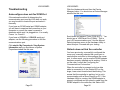
If the automatic method of determining the
communication port used by LOR does not work,
you may be able to locate the port and select it
manually.
If you have an SC485 serial port RS485 adapter,
you will have to examine the connection on your
computer or consult the owner’s manual to
determine which port it is plugged into. It is usually
Comm 1 or Comm 2.
If you have a USB485 or USB485B serial port
adapter, use the following procedure to find the
communications port.
Click start ► My Computer ► View System
Information and you should see a System
Properties window like this one:
Scroll down and expand “Ports (COM & LPT).” You
should see a “USB Serial Port (COMn).” This is
your LOR communications port. Use the Manual
Select drop down menu in the Hardware Utility to
select this port. Proceed with your testing.
Refresh does not find the controller
You have previously: successfully configured the
comm port, manually selected the comm port or
used another controller to Autoconfigure the comm
port. In other words, you’re sure the RS485 adapter
has been properly installed and is working. If this is
not the case, consult the Configuring the
Communications Port section.
When the controller is powered up but no data
cable is connected to it, the Status LED on the
larger, lower circuit board should be blinking. This
means that the controller is working, but is not in
communication with a Show Director or PC. If the
Hardware Utility is running, the RS485 adapter is
properly configured and you attach a cable from the
RS485 adapter to the controller, this Status LED
Page 25
Page 26
LOR1602MP3
should be steady on. If this is not the case, then
either the RS485 adapter is not properly installed,
the Hardware Utility is not running or some
component is broken.
If the light does go steady on, then manually type
the controller Unit ID in hex into the box to the right
of the Refresh button in the Hardware Utility.
Connect some lights to the controller and try
clicking the ‘On’ radio button in the “Test Unit’s
Operation’ section. If the lights come on, your
controller is working. If no good at this point,
contact LOR support.
LOR1602MP3 Plugged in No Status LEDs
Lit
If you take your LOR1602MP3, remove the top
cover, plug in both power cords and turn on the
power switch, there should be a red LED blinking
on the upper and lower circuit boards. There should
also be a green LED lit on the upper board. If this is
not the case, check the outlet for power with a lamp
that is known to be working. Check the right fuse
(refer to Figure 1) and replace if bad.
Channel 9-16 OK, Channels 1-8 No Good
Channels 1-8 don’t work: Make sure the left power
cord is plugged into a working outlet – test it with a
known good lamp. Check the left fuse (refer to
Figure 1) and replace if bad.
Page 27
LOR1602MP3
Specifications and Features
Specifications
•
•
•
•
•
•
•
Features
Channel Capacity:
8 amps per channel
(16 amp triacs are
used.)
Controller
Capacity:
LOR1602W is 30
amps
Isolation: Opto
isolators are used
to isolate high and
low voltage sides.
Triacs are isolated.
Parts are UL listed.
Supply Voltage:
120VAC 50/60Hz
Power
Connections:
NEMA 5-15P
NEMA 5-15R
Control Input:
RS485 via RJ45 or
RJ11 jacks
Dimensions:
10¾”w x 12”h x
4¾”d
Page 28
•
•
•
•
•
•
•
•
Director: Unit can
control other units
as well as its own
16 channels.
Input: Unit can
monitor inputs to
start a sequence
Unit IDs: Up to
240 controllers. Up
to 3,840 channels.
Fading: 256 levels
used for smooth
fading effects.
Fades from 0.1 to
25 seconds.
Dimming: 100
levels (0%...100%)
Effects: Ramp,
Fade, Intensity,
Flicker, Shimmer
Sequences:
Multiple internal
sequences
Presets: High-burn
and low-burn
settings.
LOR1602MP3
Warnings and Liability
WARNING: The LOR1602MP3 can pose a
dangerous electrical hazard if not used
properly. Care should be taken to keep
the inside of the LOR1602MP3 dry. When
the LOR1602MP3 is directly connected to
a PC via one of the RS485 adaptors,
there is a direct electrical connection
between the low voltage logic side of the
LOR1602MP3 and the PC. If the
LOR1602MP3 is physically damaged
causing traces to short or the device is
allowed to get wet either through direct
contact with water or condensation, the
logic side of the LOR1602MP3 can
receive direct 120VAC. In that case
damage to any connected hardware such
as a PC can occur.
IN NO EVENT SHALL BUYER BE
ENTITLED TO INCIDENTAL,
CONSEQUENTIAL, OR SPECIAL
DAMAGES, NOR SHALL LIGHT-ORAMA’s LIABILITY EXCEED THE
PURCHASE PRICE OF THE GOODS.
Page 29
LOR1602MP3
Appendix A Hexadecimal to Decimal
Hex
Dec
Hex
Dec
Hex
Dec
Hex
Dec
01
01
3D
61
79
121
B5
181
02
02
3E
62
7A
122
B6
182
03
03
3F
63
7B
123
B7
183
04
04
40
64
7C
124
B8
184
05
05
41
65
7D
125
B9
185
06
06
42
66
7E
126
BA
186
07
07
43
67
7F
127
BB
187
08
08
44
68
80
128
BC
188
09
09
45
69
81
129
BD
189
0A
10
46
70
82
130
BE
190
0B
11
47
72
83
131
BF
191
0C
12
48
72
84
132
C0
192
0D
13
49
73
85
133
C1
193
0E
14
4A
74
86
134
C2
194
0F
15
4B
75
87
135
C3
195
10
16
4C
76
88
136
C4
196
11
17
4D
77
89
137
C5
197
12
18
4E
78
8A
138
C6
198
13
19
4F
79
8B
139
C7
199
14
20
50
80
8C
140
C8
200
15
21
51
81
8D
141
C9
201
16
22
52
82
8E
142
CA
202
17
23
53
83
9F
143
CB
203
18
24
54
84
90
144
CC
204
19
25
55
85
91
145
CD
205
1A
26
56
86
92
146
CE
206
1B
27
57
87
93
147
CF
207
1C
28
58
88
94
147
D0
208
1D
29
59
89
95
147
D1
209
Page 30
LOR1602MP3
1E
30
5A
90
96
150
D2
210
1F
31
5B
91
97
151
D3
211
20
32
5C
92
98
152
D4
212
21
33
5D
93
99
153
D5
213
22
34
5E
94
9A
154
D6
214
23
35
5F
95
9B
155
D7
215
24
36
60
96
9C
156
D8
216
25
37
61
97
9D
157
D9
217
26
38
62
98
9E
158
DA
218
27
39
63
99
9F
159
DB
219
28
40
64
100
A0
160
DC
220
29
41
65
101
A1
161
DD
221
2A
42
66
102
A2
162
DE
222
2B
43
67
103
A3
163
DF
223
2C
44
68
104
A4
164
E0
224
2D
45
69
105
A5
165
E1
225
2E
46
6A
106
A6
166
E2
226
2F
47
6B
107
A7
167
E3
227
30
48
6C
108
A8
168
E4
228
31
49
6D
109
A9
168
E5
229
32
50
6E
110
AA
170
E6
230
33
51
6F
111
AB
171
E7
231
34
52
70
112
AC
172
E8
232
35
53
71
113
AD
173
E9
233
36
54
72
114
AE
174
EA
234
37
55
73
115
AF
175
EB
235
38
56
74
116
B0
176
EC
236
39
57
75
117
B1
177
ED
237
3A
58
76
118
B2
178
EE
238
3B
59
77
119
B3
179
EF
239
3C
60
78
120
B4
180
F0
240
Page 31
Light-O-Rama, Inc.
Tel: (518) 539-9000
Fax: (518) 538-0067
[email protected]