1
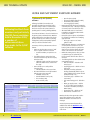
BRE TECHNICAL UPDATE ISSUE 012 - MARCH 2010 HI/DEA AND SAP ENERGY ASSESSOR GUIDANCE 1. Enhanced Q-SAP (RdSAP) software Following feed back from members and particularly the DEA forum workshop held in November 2009, a number of enhancements have been made to the Q-SAP software Following feed back from members and particularly the DEA forum workshop held in November 2009, a number of enhancements have been made to the Q-SAP software for producing EPCs for existing dwellings (RdSAP). The enhanced software is due to be loaded onto the Quest system in mid March 2010. Members will be notified of the exact date of the release by email at least 24 hours earlier. Any existing unlodged EPCs will be automatically updated when you click the ‘Calculate’ button. • • • • A summary of the key enhancements and new features: • Option to view data input screens in ‘Tabs’ view or original continuous scroll view −− System remembers your preference on exit • The Sheltered Factors sections has been inserted towards the top after the Property Overview section −− Validation checks now link property type with both Shelter Factors and ‘Ground floor type’ • New calendar icon to easily add the ‘Inspection date’ −− Calendar defaults to the current date • All numerical fields are now fully formatted with the upper range extended: −− Habitable rooms (1-99) −− Heated habitable rooms (1-99) −− Floor number (0-98) −− Stories in block (1-99) • • −− Open fire places (0-99) −− Percentage multiple glazed (0-100%), −− Photovoltaic cells (0-100%) −− Low energy lights (0-100%) Measurement fields have been formatted to 2 decimal places only – although a high level of accuracy can be recorded in site notes Alternative Wall section is now located towards the end within the Other Details section above ‘Utilities’ Revised drop-down options and validation for the ‘Basis of Certificate’ and ‘Sampling approach’ fields −− No longer a option to use ‘Data gatherer’s data’ Within the Main, Extension 1 and Extension 2 measurements sections there are new buttons (‘Same as above’) to quickly enter data for floors that have exactly the same values as the entries for the floor below Within the Heating section, when you clear or update the type of system field, the fuel and controls fields are also cleared or refreshed The following fields now have default values automatically entered: −− Basis of Certificate – defaults to ‘Full Survey by you’ −− Sampling approach – defaults to ‘None (full survey)’ −− Fuel (Main, Secondary and Water heating) automatically filled if only one option available for the system selected (usually electricity or oil) −− Conservatory type – defaults to ‘No conservatory’ −− Solar water heating panel – defaults to ‘No’ −− Mains gas supply present – defaults to ‘Yes’ if a mains gas fuel appliance is entered for the Main, Secondary or Water heating −− Photovoltaic cells – defaults to ‘0%’ −− Wind turbines - defaults to ‘No’ BRE has also taken this opportunity to make some further refinements to Q-SAP with additional validation and enhanced error messages. A revised Quest User Manual (PDF) will be available from within the Members’ Area, together with updated fieldsheets and Heating code sheets. 2 Back to top Certification/Accreditation Schemes for HIs & EAs | MAR 10