1
Gas system software manual
Gas system control program
The main control process contains two threads. The first one
provides graphical user interface (GUI) and events log, while the second
thread does data acquisition, device control and alarms handling. The
priority of the second thread is set to highest value for reliable work in
crowded system.
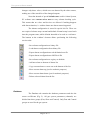
The main window contains several tabs:
1. Main control provides basic gas system control.
2. System parameters tab is used for control electronics
specific parameters like communication properties,
reading interval.
3. Alarms tab contains alarm handlers list.
4. Database tab is used for the database control and also for
changing the sensor coefficients.
5. DAQ32 tab can be used for fine tuning the DAQ32
module and is not necessary for gas system operation.
Main control
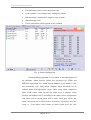
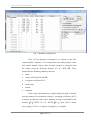
The Main control tab of the gas system software gives user a
possibility to control gas system manually (Fig. 1). It has simplified gas
scheme in the main window [3]. The buttons on the gas scheme represent
every solenoid valve and device controlled by software. Red button state
means either closed valve or switched off device, while green one stays
for open valve or switched on device. Note that some solenoid valves and
devices are controlled by the pressure switch PIS1 and therefore may be
blocked for software control.
Page 3 of 12