1
*MEC*
MEC Software
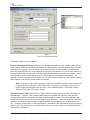
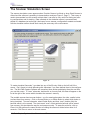
Field Name: This is the name given to each field definition. When saving data to a text file, field
names are not recorded. In Excel, the first row should contain matching field names. When using
Access, the field names should match the fields in the database; if a field with a matching name
does not already exist in the raw scanner data table or in the history table, it will be created automatically. However, the Mini Data Capture Software will not create new fields in a main inventory
table. For example, if you want to update an existing field named CurrentLocation in your main
inventory table, be sure to use the name CurrentLocation for one of the Mini Data Capture Software
field definitions.
Barcode Prefix: This setting defines a fixed prefix that will be found at the beginning of each
barcode for this field. A prefix can be one or more letters or digits, but should be short to avoid long
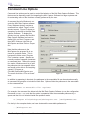
barcodes. For example, the following barcode includes a LO prefix to indicate that it contains
location data; the prefix is followed by the location (RM107):
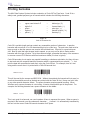
*LORM107*
A prefix is a very reliable method for differentiating types of barcodes. Even when the Mini Data
Capture Software recognizes a prefix, to be certain it checks the length of the barcode and whether
letters or numbers are not allowed. You may leave the prefix setting blank, in which case the Mini
Data Capture Software will not expect any fixed prefix and will use other methods (MinLen, MaxLen,
Allow A-Z, Allow 0-9) to identify the barcode.
Strip Prefix: Checking the Strip Prefix box removes the prefix from the data once a barcode has
been classified. While the prefix may be useful to the Mini Data Capture Software for organizing
the data, it may not be recognized by other software that will use the database.
MinLen and MaxLen: The Mini Data Capture Software checks the overall length of the barcode
against MinLen and MaxLen; barcodes which are too short or too long are disqualified, and the
software moves on to the next definition in the Field List. If a prefix is defined, it is not included in
the length calculation. For example, if a barcode contains LORM107 and “LO” is a defined prefix,
the Mini Data Capture Software considers the length to be 5 characters (RM107).
If no prefix is defined, length may be a good way to identify a barcode; serial numbers might always
be exactly 8 digits long, for instance. Even if a barcode contains a prefix, the length check provides
insurance that it will be identified correctly. This is especially true for short prefixes. For example, if
inventory tag barcodes begin with the letter T, there is the risk that some other type of barcode (a
manufacturer’s model number, perhaps) might also begin with a T and be mis-identified. With a
length check, the Mini Data Capture Software can tell the difference between T338478 (an inventory tag) and TBB-449858-AR (manufacturer’s model number). If the length of the barcode is not a
good indicator, set MinLen to 0 and MaxLen to 30 or some other large number.
Allow 0-9 and Allow A-Z: If the Allow 0-9 box is not checked, barcodes that contain any digits will
be disqualified; if the Allow A-Z box is not checked, barcodes that contain any letters will be disqualified. The Mini Data Capture Software will not let you uncheck both boxes, which would disqualify barcodes with any letters or numbers. The prefix, if one exists, is not included in the 0-9 or
A-Z check. For example, an inventory tag field could be defined with a Prefix of TAG and Allow A-Z
unchecked (no letters allowed); the fact that “TAG” includes letters would not disqualify the barcode
because the only letters are part of the prefix.
Mini Data Capture System - User Manual
11