1
User Manual / Operating Instructions
BELTCLIP
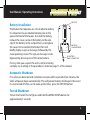
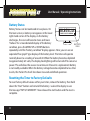
Battery Installation
The Pocket Pro II operates on a 9 volt alkaline battery.
It is important to use alkaline batteries due to the
power demand of the buzzer. To install the battery,
remove the cover, connect the battery to the wire
clip, fit the battery in the compartment, and replace
the cover. Once installed, the Pocket Pro II will
briefly display a sign-on message, followed by the
main operating screen. The sign on message can be
bypassed by pressing one of the menu buttons.
BATTERY
COMPARTMENT
9V BATTERY
SNAP CONNECTOR
If at any time you suspect the unit is not functioning
normally, try resetting it. The procedure is listed on page 11 of this manual.
Automatic Shutdown
If no shots are detected and no buttons are pressed for a period of ten minutes, the
timer will power down automatically. This will prevent battery discharge in the event
it is not turned off after use. To wake up the timer, press the SET/ON button.
Forced Shutdown
To turn the Pocket Pro II off, press and hold the MENU DOWN button for
approximately 3 seconds.
2