1
User Manual / Operating Instructions
Shot Detection
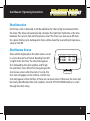
Each time a shot is detected, it will be added to the “shot string” maintained within
the timer. The timer will automatically calculate the “split time.” Split time is the time
between the current shot and the previous shot. The timer can store up to 99 shots
for a given timing cycle. Subsequent shots will be stored by overwriting the previous
value of shot 99.
Shot Review Screen
Shots will be displayed on the shot review screen
SPL
2.1 6
17 .07 # 5
SPL
1 .58
18 .65 # 6
in a “one shot per line” format. Reading from left
SPL
3.4 1
17 .41 # 1
17 .34 # 2
SPL
2.93
to right in the shot line, the shot time appears
first, followed by the shot number, and finally
the split time, if any. When first navigating to the
shot review screen after the start of a cycle, the
first shot will appear on the 3rd line, and the last
shot will appear on the 2nd line, if there are 4 or more shots. Otherwise, the shots will
be clearly identified by their shot numbers. Use the SET UP/DOWN buttons to scroll
through the shot string.
4