1
3. Creating climate change weather files from ‘present-day’ weather data
3.1. Decimal and digit grouping symbols in Microsoft
®
Windows
IMPORTANT - PLEASE NOTE:
The standard decimal symbol needs to be set to dots (.) and the digit grouping symbol
to commas (,). To change these settings, open the Microsoft® Windows ‘Control Panel’.
Click ‘Regional and Language Options’ and in the following window ‘Customize...’.
Change the decimal symbol and the digit grouping symbol if required. (To avoid issues
with other software you should change them back after finishing using this tool.)
3.2. Permitting macros and setting the auto-recover time in Microsoft
®
CCWorldWeatherGen will not
work if steps 3.1 and 3.2 have not
been addressed appropriately.
Excel
Macros need to be permitted for CCWorldWeatherGen to work. In Microsoft® Excel
2003 this needs to be done prior to opening CCWorldWeatherGen. Please select
‘Macro’ from the ‘Tools’ menu. Select ‘Security…’ and choose ‘Low’ from the ‘Security
Level’ tab inside the message box. (You may wish to change the security level back after
you have finished using the CCWorldWeatherGen tool in order to prevent potentially
unsafe macros from being executed on your system.) Now open CCWorldWeatherGen.
If you are using Microsoft® Excel 2007 please open CCWorldWeatherGen and select
‘Options...’ at the end of the ‘Security Warning’ message in the task bar. Inside the
following message box select ‘Enable this content’ and click ‘OK’.
The auto-recover time needs to be set to at least 20 minutes. In Microsoft® Excel
2003 select ‘Options’ from the ‘Tools’ menu. Then select the ‘Save’ tab and
change ‘Save AutoRecover info’ to 20 minutes. In Microsoft® Excel 2007 click the
‘Office Button’ and then ‘Excel Options’. Select the ‘Save’ tab and change ‘Save
AutoRecover info’ to 20 minutes.
3.3. Getting started
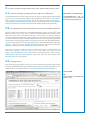
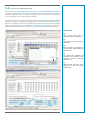
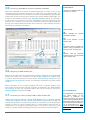
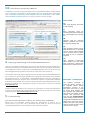
After closing the entry splash-screen your screen should look as shown below. Make
sure that the HadCM3 data file path (A) corresponds to the download location of the
HadCM3 data. (The default path is ‘C:\CCWorldWeatherGen\HadCM3data’.)
QUICK GUIDE:
(A)
Check whether the HadCM3 data
path is correct
(A)
Climate change world weather file generator
4