1
3.6Set Up Your Voicemail
D. TracFone Frequent Numbers Service
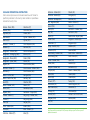
With TracFone, making international calls is really easy! Our Frequent
Numbers Service offers you up to ten U.S. 800 numbers, which you
can link to your most frequently dialed international numbers in any
of our available international destinations (with this service, you do
not need to follow steps A, B and C from section 3.5).
Just dial any of the ten U.S. 800 numbers that you can program through
our website or by calling TracFone, and you will be quickly connected
with the international destination you want at no additional cost.
Visit our International Long Distance website at TracFone.com or call our
Customer Care Center at 1-800-867-7183 to set up this service for free.
E. TracFone International Neighbors Service (Available only for Mexico)
With our International Neighbors Service, your family and friends
living in Mexico can call your TracFone directly without paying for
an international long distance call, and your TracFone will deduct
the same number of Minutes as if it were a local call. No international
long distance charges for anyone!
With Active service, TracFone will assign you a Mexican phone number
that will be linked to your TracFone for free. Your family and friends
can dial this local phone number and you will receive the call on your
TracFone here in the U.S. To register for International Neighbors Service,
and to assign specific phone numbers, register at TracFone.com.
TIP: To enjoy this unique service, make sure you keep your service Active.
If your Service Days Remaining end and your phone is deactivated, you
will lose your Mexican phone number. Should this happen, you can get
a new Mexican phone number when you re-activate your TracFone.
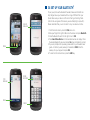
1. Press and hold the 1 key for several seconds.
2. Your phone will automatically call Voicemail.
3. Once the call is connected, follow the instructions.
3.7Send text messages
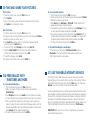
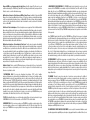
1. From the Home screen, press the Messaging icon at the bottom of your screen.
2.Press Create New Message.
3. Press the Type Message field and enter the message you wish to send. Press OK.
4.Press Send To and then press the Enter Number field. Using the keypad, enter the phone number of the recipient and press Add.
5.Press Send.
6.To return to the Home screen, press the END key.