1
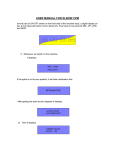
below that splint. Tighten that bolt after length adjustment. Apply straps on leg
tightly, it displays: -
Press UP/ LOW keys to set desired flexion angle and press NEXT key.
UP key will increase flexion angle by 5 degrees, LOW key will decrease flexion angle
by 5 degrees
3) It then displays: -
Press UP/ LOW keys to set timer and press NEXT key.
4) It will display: -
HOLD TIME 04 SEC
ADJ & PRESS NEXT
Press UP/ LOW keys to set desired Hold time and press NEXT key.
When you will press NEXT key on this screen, the treatment will be started.
USING CAMRY FOR FIX FLECTION DEFORMITY
1) On the very first screen of “FLEXION ANGLE 000”, press and hold DEL key for 3
sec. It will display: -
.
2) Then it displays: -
Use UP/LOW keys to bring empty splint up /down to adjust splint as per the
Patient’s comfort / deformity angle and press NEXT key.
3) Then it displays: -