1
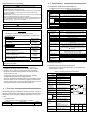
Table 2.2 General-purpose output specifications
No.
Transistor output (sink type)
AJ65BT-R2
External connection
Surge killer
Common method
External connection
method
Applicable wire size
Applicable crimp
terminal
2 points
Photo coupler insulation
12/24VDC
10.2 to 28.8VDC
(ripple rate within 5%)
0.1A/point 0.2A/common
0.4A 10ms or less
0.1mA or less
switch
5 YC
L
(3) Data link transmission
12/24VDC
6 COM2
Internal
circuit
No. of output points
Insulation method
Rated load voltage
Working load voltage
range
Max. load current
Max. rush current
Leakage current at
OFF
Max. voltage drop at
ON
Output type
Response OFF ON
time
ON OFF
Output
Voltage
section
externally
Current
supplied
power
Name
(2) Station No. setting
speed setting switch
7 YD
L
1.5VDC or less (MAX) 0.1A
Sink type
2ms or less
(4) Mode setting switch
2ms or less (resistance load)
10.2 to 28.8VDC
(ripple rate within 5%)
50mA or less (TYP. 24VDC,
per common)
Not including external load
current.
Zener diode
2 points/common (COM2)
9-pin connector (I/O section)
7-point terminal block (M3.5
screw)
Including transmission circuit
and module power terminal
2
0.75 to 2mm
RAV1.25-3.5, RAV2-3.5 (JIS C
2805 compliant)
Terminal Signal Terminal Signal
No.
name
No.
name
TB5
YC
TB7
YD
TB6
COM2
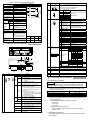
3. Part Names and Settings
(5) RS-232C
transmission
specifications setting
switch
(10)
(1)
(4) (3) (2)
(9)
(5)
(6) Data link terminal
block
(7) RS-232C interface
(8) General-purpose
(6)
No.
(7)
Name
(1) Operation display
LEDs
(8)
Details
LED name
Details
ON : Power is ON.
OFF : Power is OFF.
ON : Operating normally
Default RUN
OFF : Power (24VDC) is OFF or WDT error is
state
occurring.
ON : Communicating normally
L RUN OFF : Communication stopped (Time over
error)
ON : Any transmission speed or station
number out of range is set.
Flickering at constant intervals :
The transmission speed or station number
has been changed after the power is
State L ERR.
turned on.
Flickering not constant intervals :
The terminating resistor is not connected.
The module or CC-Link dedicated cable is
being affected by noise.
OFF: Communicating normally
ON : Data link Sending data
SD
OFF : Data link Not sending data
Others
ON : Data link Receiving data
RD
OFF : Data link Not receiving data
ON : General-purpose input (XC, XD) is ON.
XC, XD
OFF : General-purpose input (XC, XD) is OFF.
ON : General-purpose output (YC, YD) is ON.
YC, YD
OFF : General-purpose output (YC, YD) is OFF.
ON : Sending RS-232C data
RS-232-C SD
OFF : Not sending RS-232C data
ON : Receiving RS-232C data
RS-232-C RD
OFF : Not receiving RS-232C data
ON : RS-232C transmission error
RS-232-C ERR.
OFF : No error
PW
input/output terminal
block
(9) Reset switch
(10) Connector
Details
Set the module's station No. (Default setting: 0)
Setting range: 1 to 64 (0: Master module)
" 10" sets the 10th place of the station No..
" 1" sets the 1st place of the station No..
Transmission
speed
0
156kbps
Set the module's transmission speed
1
625kbps
(for data link)
2
2.5Mbps
(Default setting: 0)
3
5Mbps
4
10Mbps
5 to 9
Setting error
Set the module's operation state. (Default setting: 0)
No.
Name
Setting details
On-line mode
Mode for on-line communication.
0 (using transmission/ Set when using the
reception buffer)
transmission/reception buffer.
On-line mode
Mode for on-line communication.
(using buffer
1
Set when using the buffer memory
memory automatic
automatic update function.
update function)
2 Not used
Setting error ("RUN" LED turns OFF.)
3 Not used
Setting error ("RUN" LED turns OFF.)
4 Use not possible
–
5 Not used
Setting error ("RUN" LED turns OFF.)
6 Not used
Setting error ("RUN" LED turns OFF.)
7 Not used
Setting error ("RUN" LED turns OFF.)
8 Not used
Setting error ("RUN" LED turns OFF.)
9 Not used
Setting error ("RUN" LED turns OFF.)
A Not used
Setting error ("RUN" LED turns OFF.)
B Not used
Setting error ("RUN" LED turns OFF.)
C Not used
Setting error ("RUN" LED turns OFF.)
Hardware test
Mode for confirming that module runs
D
mode
independently.
E Not used
Setting error ("RUN" LED turns OFF.)
F Not used
Setting error ("RUN" LED turns OFF.)
Set the RS-232C transmission specifications.
Default
Setting switch state
No. Setting details
setting
ON
OFF
SW 1
2
3
0
0
0
300bps
1
0
0
600bps
0
1
0 1200bps
SW1 Transmission
1
1
0 2400bps
to 3 speed
OFF
0
0
1 4800bps
1
0
1 9600bps
0
1
1 19200bps
0:OFF
1:ON
SW4
Not used
SW5 Data bit length
8
7
ON
SW6
Yes
No
Parity bit
OFF
SW7
Even
Odd
SW8 Stop bit length
2
1
Connect a CC-Link dedicated cable for power supply and data
link. (2-piece terminal block)
Connect an RS-232C cable for connection with external device.
Connect the input/output wire.
Setting
Returns to the power ON status.
Use prohibited.
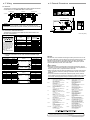
4. Mounting and Installation
4.1 Precautions for handling
POINT
For handling instructions such as module installation/removal, read
SAFETY PRECAUTIONS given at the beginning of this manual.
(1) Tighten the module installation screws and terminal block screws
within the following range.
Screw place
Module installation screw (M4 screw)
Terminal block terminal screw (M3.5 screw)
Terminal block installation screw (M4 screw)
Tightening torque range
0.78 to 1.18Nym
0.59 to 0.88Nym
0.98 to 1.37Nym
(2) When using the DIN rail adaptor, install the DIN rail while observing
the following points.
(a) Applicable DIN rail type (JIS C 2812 compliant)
TH35-7.5Fe
TH35-7.5Al
TH35-15Fe
(b) DIN rail installation screw pitch
When installing the DIN rail, tighten the screws at a pitch of
200mm or less.
4.2 Installation environment
When installing the PLC, refer to the CC-Link system master module's
User's Manual.