1
Connections
Before connection to the projector
Read and follow the operating and connecting instructions of each peripheral device.
The peripheral devices must be turned off.
Use cables that match each peripheral device to be connected.
If the input signal is affected by signal jitter, the projected image may have poor image quality and timebase
correction is effective.
Confirm the type of video signals. See “List of compatible signals” on page 44.
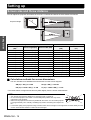
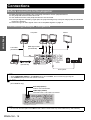
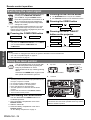
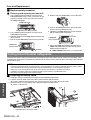
Connecting example: Computers
Computers
Monitor
Getting Started
RGB signal cable
(Commercial)
LAN cable
(Commercial)
Serial cable
(Commercial)
Audio system
NOTE:
• When COMPUTER2 SELECT in the OPTION menu is set to OUTPUT, do not connect any input signals.
• See CD-ROM contents for the LAN network connection.
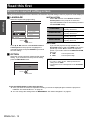
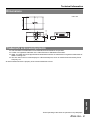
J LAN terminal
(PT-F200NTU only)
ACT lamp (Green)
Flashes when transmit data.
LINK lamp (Yellow)
Illuminates when a LAN cable is connected.
NOTE:
• Do not touch the metal parts of the LAN terminal. Failure to observe this may cause malfunction by static electricity.
ENGLISH - 18