1
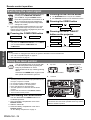
SECURITY menu
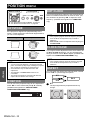
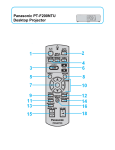
Remote control
Control panel
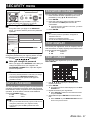
See “Navigating through the MENU” on page 27.
See “Main menu and Sub-menu” on page 28.
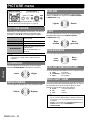
J Entering the SECURITY menu
Every time when you apply to the SECURITY
menu, you will be asked to perform the password
operation.
PICTURE
INPUT PASSWORD
POSITION
OFF
PASSWORD CHANGE
LANGUAGE
OPTION
TEXT DISPLAY
OFF
TEXT CHANGE
PASSWORD CHANGE
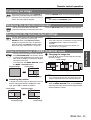
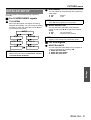
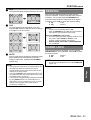
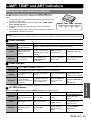
You can change the password operation to your original.
1. Press a series of button operation up to 8 as a
password by using F G I and H buttons.
2. Press ENTER.
3. Press the exact same series of button operation
you entered in the NEW password box for
confirmation.
If a series of button operation is incorrect, you will be
asked to perform again.
4. Press ENTER.
NOTE:
• The entered password operations will appear as
asterisks in the box.
• Change your password regularly.
• Do not use too simple password to guess.
SECURITY
TEXT DISPLAY
PASSWORD
RETURN
SELECT
ENTER
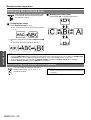
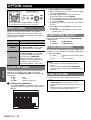
When you apply to the SECURITY menu before you
change the password to your original, perform to input
the following factory default password operation.
Press F H G I F H G I and ENTER.
Q After you change the password
When you apply to the SECURITY menu after you
change the password to your original in the
PASSWORD CHANGE menu, input the original
password operation.
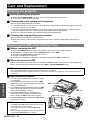
You can set your original text, such as company name or
URL information, to display regularly at the bottom of the
projected image while projecting.
OFF
ON
Deactive
Active
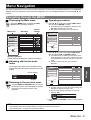
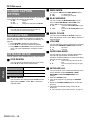
TEXT CHANGE
You can enter your original text up to 22 characters for
TEXT DISPLAY.
TEXT CHANGE
DELETE
Settings
NETWORK
NOTE:
• The factory default password is valid until you change
the password in PASSWORD CHANGE menu.
• The entered password operations will appear as
asterisks in the box.
INPUT PASSWORD
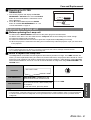
You can activate the security system and the password
operation will be asked to perform when the projecting
mode started. Unless you perform the correct password
operation, all of the button controls will be disabled
except the POWER button.
OFF
ON
Deactive
Active
NOTE:
OK
CANCEL
1. Use F G I H to specify the location of the
required character.
2. Press ENTER.
The selected character will be displayed in the TEXT
CHANGE box.
3. Repeat until finish your original text.
Select DELETE to delete the last entered character
and press ENTER.
4. Select OK and press ENTER to set the entered
text.
Select CANCEL or press MENU/RETURN buttons to
return to the previous menu.
• When you activated the security system, make sure to
change the password to your original for safety.
• The security system is OFF by default and when
initialized.
ENGLISH - 37