1
For the best listing of all questions and answers related to a particular jurisdiction and
subject, use “Search By Chapter”.
c. Question (depends on the module)
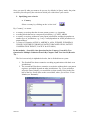
Select a question by clicking on the “select icon”
There is a question hyperlink in three of the four modules:
•
•
•
Search By One Question In One Country
Search By Two Questions In Multiple Countries
Full Text Search
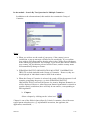
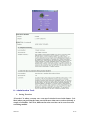
Purpose of the Question hyperlink
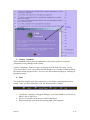
If you are unsure of where the question you wish to ask is located, you can perform a
key word search using one or two words (the 'First Word' and the 'Second Word'), on
the entire database of Short Questions, Long Questions and Chapters. This search
will help you quickly identify the question you want answered.
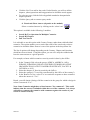
Using the Question hyperlink
•
•
•
•
•
•
2007/01
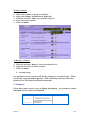
Select one of the aforementioned modules.
Select a country and a chapter (if applicable).
Click the blue "Question" link. This will open the “Find What” (search)
window.
Enter the first word (or the first few letters of the word) in the First Word
field. You must enter at least 3 characters.
(Optional) Enter the second word (or the first few letters of the word) in the
Second Word field. Again, you must enter at least 3 characters.
(Optional) If you wish your first and/or second words to be highlighted in the
result, check 'Highlight Words in Text'.
6/13