1
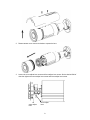
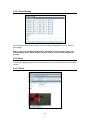
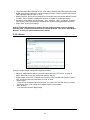
Note: Two desiccant packs are already placed near the lens. The desiccant pack prevents fogging on the inside of the lens due to any moisture. Make adjustments within 30 minutes or the desiccant pack may absorb too much moisture and become ineffective. Desiccant packs that have absorbed too much moisture need to be replaced or reactivated. When lens adjustments are complete, reattach the camera cover and sunshield. 3.1.5 Using “SmartFocus” to Adjust Focus Smartly This network box camera provides “SmartFocus” to obtain correct focus on a subject, instead of requiring users to adjust focus manually. 9 view zones are provided. When you obtain correct focus on each view zone, the green light will be turned on. 1. Directly connect the video output cable to your monitor. 2. Press the reset button until the power is on. 3. The nine zones will appear in your monitor. Adjust the lens focus and symbols will be displayed on the top left corner of each zone. The green light: it means each view zone’s best focus position. The red arrow: it means it is near the best focus position. You just need to fine-tune it. 3.2 Network Camera Diagram Connection type:1 Connection type 2: 9